

Alternatives to TinyFast
Shrink files instantly on your Mac with TinyFast, ensuring privacy and speed without uploads or waiting in queues.
Explore 20 alternatives to TinyFast. Compare features, pricing, and find the best fit for your needs.

ZombieTrend AI
Two photos become an emotional cinematic zombie love story with a free first-scene preview.

SightRadar
Face recognition API, a drop-in replacement for AWS Rekognition. Index, search, compare and detect faces, billed per photo with no subscription.

My Tools Suite Pro
MyToolsSuitePro is a curated directory of free online tools for productivity, writing, marketing, SEO, 3D, email marketing, and everyday digital tas

Panzoe
Panzoe is an all-in-one AI platform for personal productivity, business automation, AI assistants, content creation, and custom AI solutions.

AIPetGen
AIPetGen turns a photo of your dog, cat, or other pet, or a written description, into a new picture or a short animation.



ideogram-45
AI image generation and editing with sharp typography, native 2K output, and localized edits that preserve the rest of your image.




Qwen Image 2.1
Qwen Image 2.1 is a powerful AI model for text-to-image creation and image editing.

JevModel
Run Choice, Score and Noul decisions on text or JSON. Build visual flows, process batches and integrate results through an API.

Tally Counter
Online tally counter for tracking attendance, workouts, inventory, visitors, sports scores, habits, and everyday counting tasks.

AI Email Filter
AI Email Filter sorts incoming mail into folders using plain-language prompts you write. Works with any IMAP mailbox; bring your own LLM if you want.

Kody Tools
Free collection of online developer utilities, code formatters, and digital converters designed to streamline your daily workflow.

Sprite Sheet Maker
A free browser-based toolkit for creating, cutting, converting, and previewing sprite sheet animations.

Forms Plugin
The #1 Native Form Builder Plugin for Framer - No Code, No Embeds, No External Platforms.
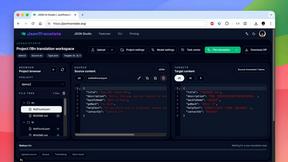
JsonTranslate
Translate JSON, Markdown, and TXT files while preserving keys, nested paths, and project structure.
About TinyFast Alternatives
TinyFast is a powerful native macOS application specifically designed for file compression, aimed at helping users reclaim time, space, and privacy on their Macs. By instantly shrinking a variety of file types—from images and videos to documents—TinyFast revolutionizes the way individuals manage their digital assets. Users often seek alternatives for various reasons, including pricing, feature sets, and compatibility with different platforms. It's essential to consider factors such as speed, privacy, and ease of use when exploring alternative solutions, ensuring they align with your specific needs and workflow. When choosing an alternative, prioritize tools that offer local processing capabilities to maintain your data's security while ensuring efficient performance. Look for applications that support a wide range of file formats, enabling you to handle all your compression needs seamlessly. Additionally, a user-friendly interface can significantly enhance your experience, allowing you to focus on your creative projects rather than getting bogged down by complicated software.
FAQs about TinyFast Alternatives
What is TinyFast?
TinyFast is a native macOS application designed to compress various file types quickly and securely on your computer.
Who is TinyFast for?
TinyFast is tailored for developers, designers, creators, and professionals who prioritize speed, security, and efficiency in their workflows.
Is TinyFast free?
The provided content does not specify pricing details for TinyFast.
What are the main features of TinyFast?
TinyFast offers blazing-fast local compression, 100% privacy and security, and supports a wide range of file formats, making it a comprehensive solution for file management.