

Subclip
Subclip transforms your raw footage into polished, global-ready videos with AI editing, captions, and voice cloning in one platform.
AI tool Details
Explore More
Alternatives
About Subclip
You didn't become a creator to stare at timelines. Subclip is the AI-powered video editor that transforms how you create, edit, and distribute video content. Built for creators, marketers, educators, coaches, and content teams, Subclip lets you edit videos like a document simply by dragging in a transcript and making changes. No more scrubbing through hours of footage or wrestling with complex editing software. Subclip reclaims 80% of your time by automating the most tedious parts of video production. With features like AI-powered clipping that identifies viral moments, one-click silence and filler word removal, auto-generated subtitles in 48+ languages, and AI dubbing with voice cloning that preserves your original tone and emotion, Subclip replaces the manual grind with intuitive, AI-driven efficiency. Whether you are a YouTuber, podcaster, course creator, agency, or freelancer, Subclip streamlines your entire workflow from raw footage to finished video scheduled across every platform. Export directly to DaVinci Resolve, Final Cut Pro, and Adobe Premiere Pro for advanced editing, or publish instantly to social media. Subclip is built for speed and simplicity, removing the complexity of traditional tools and replacing them with features that save hours of work. Freemium pricing with a free tier and affordable paid plans means anyone can start transforming their video creation process today.
Features
Rough Cut Using Text Transcript
Edit transcripts like a Google Doc. Simply upload your video, and Subclip generates a full transcript that you can edit, trim, and rearrange just like a text document. Delete mistakes, reorder sections, and update your timeline instantly without any manual rework. When you are ready, export your NLE timeline directly to DaVinci Resolve, Final Cut Pro, and Adobe Premiere Pro for further refinement. This feature eliminates hours of scrubbing through raw footage and makes video editing as intuitive as writing.
AI Clipping for Viral Moments
Stop guessing which parts of your video will perform best. Subclip's AI engine automatically scans your footage for high-energy segments, punchlines, and key emotional shifts to identify your most engaging clips. Each clip receives a Viral Score, Engagement Score, and Retention Score so you know exactly which moments to highlight. Turn long-form videos into short, high-retention clips in minutes and export them to your favorite editing software as .fcpxml files. No more manual searching for the best content.
One-Click Unlimited Captions and Subtitles
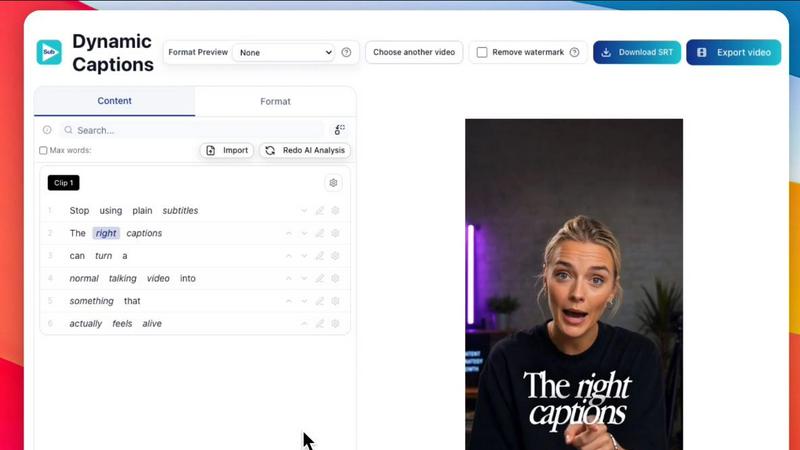
Generate stunning, accurate subtitles for your videos with a single click. Subclip supports local transcription in 48+ languages, and you can generate unlimited subtitles and export unlimited video minutes without any caps. Customize the text formatting, font, and style to match your brand, and make quick edits before publishing. Whether you need captions for accessibility, social media engagement, or multilingual audiences, Subclip delivers professional results instantly without the manual captioning grind.
AI Dubbing with Voice Clone
Translate your video into 21+ languages while preserving your original voice, tone, and emotion. Subclip's AI dubbing technology clones your voice so that your content sounds natural and authentic in every language. No more hiring voice actors or recording yourself speaking languages you do not know. Simply select your target languages, and Subclip generates fully dubbed versions of your video that maintain your personality and delivery. This feature opens up global audiences and multiplies your content's reach without additional production time or cost.
Use Cases
Creators and Podcasters
Clip long-form videos and 10x your viewership with zero effort. Podcasters and content creators can upload hours of raw footage and let Subclip automatically identify the best moments, remove silences and filler words, and generate engaging short clips ready for social media. Add stunning captions, dub into multiple languages to reach global audiences, and schedule posts directly to YouTube and X. Subclip transforms a single recording session into a library of high-retention content that drives engagement and growth.
Coaches and Course Creators
Dub your recorded videos or courses into 20+ languages using your own cloned voice. Coaches and educators can create a single course and instantly make it accessible to students worldwide without re-recording or hiring translators. Subclip preserves your natural teaching tone and emotion so your students get the same experience regardless of language. Remove background noise, enhance vocal clarity, and add professional subtitles to make your content studio-ready. Expand your reach and impact without multiplying your production hours.
Vloggers and Social Media Creators
Add captions, B-roll, audio, remove noise, and export in one click without limits. Vloggers can streamline their entire editing workflow from recording to publishing. Subclip handles the tedious tasks like silence removal, background noise reduction, and caption generation so you can focus on storytelling. Export your final video in any aspect ratio for different platforms, schedule posts directly, and maintain a consistent publishing cadence. Spend less time editing and more time creating content your audience loves.
Agencies and Freelancers
Increase output at a fraction of the cost with unlimited transcription, export, and team collaboration. Agencies and freelance video editors can manage multiple client projects in one workspace, share projects for feedback, and collaborate seamlessly with team members. Subclip's AI-powered features let you deliver polished, multilingual videos faster than ever before. Export finished clips directly to DaVinci Resolve, Final Cut Pro, and Adobe Premiere Pro for advanced editing, and schedule content across client calendars. Scale your video production without scaling your team or budget.
Frequently Asked Questions
How does Subclip's transcript-based editing work?
Subclip generates a full transcript of your video automatically after upload. You can then edit the transcript like a Google Doc by deleting words, rearranging sentences, or adding new text. Each edit instantly updates your video timeline, removing the need to manually scrub through footage and cut clips. This makes video editing as intuitive as writing and saves hours of manual work on every project.
Can I keep my original voice when dubbing into other languages?
Yes. Subclip's AI voice cloning technology analyzes your original voice, tone, and emotion, then generates natural-sounding speech in 21+ languages that matches your unique vocal characteristics. The result sounds like you speaking the language fluently, not like a robotic translation. Your personality and delivery style are preserved so your audience gets an authentic experience in every language.
What editing software can I export to from Subclip?
Subclip supports direct export to DaVinci Resolve, Final Cut Pro, and Adobe Premiere Pro as .fcpxml files. This means you can do your rough cut and AI-powered editing in Subclip, then seamlessly move your project into your preferred advanced editor for final polish. No more exporting and re-importing video files or losing your edit decisions.
Is there a free tier available and what are the limitations?
Yes, Subclip offers a freemium pricing model with a free tier that lets you try the core features. The free plan includes access to transcript-based editing, AI clipping, caption generation, and basic audio enhancement. Paid plans unlock unlimited transcription, unlimited export minutes, AI dubbing with voice cloning, team collaboration, and priority support. Specific pricing details are available on the Subclip pricing page.
Similar to Subclip

Oravaa
Turn every missed form fill and silent lead into a resolved ticket or booked call with Oravaa’s human-like Voice AI, working 24/7.

Hush Touch | Voice-to-Text for MacOS
Transform your dictation experience with Hush Touch, the smart offline voice-to-text solution for Mac that learns as.

Glossa
Glossa empowers your church to break language barriers with fast, accurate AI translation in over 100 languages.

Bantr: Offline & Unlimited TTS for Mac
Unlock unlimited, private voiceovers on your Mac with a single purchase, no subscriptions ever.

KaiCalls
KaiCalls is your 24/7 AI phone agent that captures leads and books appointments while you focus on growing your.

Vowen
Transform your voice into text and action effortlessly with Vowen, your private and powerful voice interface.
VoiceCloner
Unlock your voice's potential to create limitless speech and transform your content.