Gleem.AI Studio vs Image3D AI
Side-by-side comparison to help you choose the right AI tool.

Gleem.AI Studio
Gleem.AI Studio empowers you to effortlessly create, edit, and personalize stunning visuals in one seamless workspace.
Last updated: February 26, 2026

Image3D AI
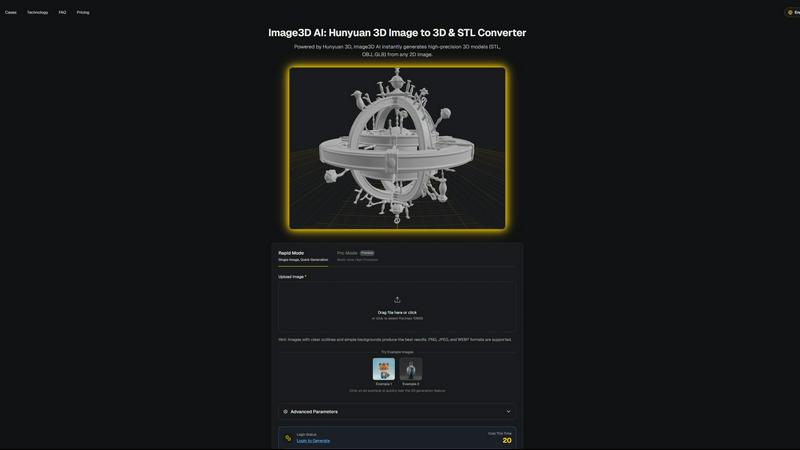
Transform any 2D image into stunning 3D models in minutes, effortlessly unlocking creativity for printing and gaming.
Last updated: March 1, 2026
Visual Comparison
Gleem.AI Studio

Image3D AI
Feature Comparison
Gleem.AI Studio
Text-to-Image Generator
Transform your ideas into breathtaking visuals with Gleem.AI Studio's text-to-image generator. Simply input your concept, choose your desired size, and let the platform's advanced AI refine your words into stunning images that capture your vision perfectly.
AI Image Editing
Edit images effortlessly within Gleem.AI Studio's intuitive AI editor. Add or remove objects, adjust poses, apply filters, and even restore old images, all with simple, natural prompts that make the editing process both creative and enjoyable.
AI Avatars
Generate and personalize your own AI avatars to enhance your visual storytelling. Place your avatar into any scene, adjust its pose, or try on different outfits without the need for another photoshoot, expanding your creative capabilities with ease.
Seamless Workflow Management
Gleem.AI Studio is designed to keep your creative process organized. Each project has its dedicated space, allowing you to save prompts, edits, and versions in one location. This ensures that you can easily access and build upon your previous work without losing context.
Image3D AI
Instant 3D Model Generation
Image3D AI swiftly generates high-precision 3D models in formats such as STL, OBJ, and GLB from any 2D image, saving you valuable time and effort. With just a few clicks, you can elevate your designs from flat images to stunning 3D assets.
Rapid and Pro Modes
Choose between Rapid Mode for quick single-image generation and Pro Mode for premium multi-view, high-precision outputs. This flexibility allows you to select the best approach based on your project's specific requirements, whether it’s a quick mockup or a detailed model.
User-Friendly Interface
The intuitive interface of Image3D AI simplifies the 3D modeling process, making it accessible even if you have no prior experience in 3D design. Just upload your image, and let the AI handle the rest, significantly reducing the learning curve.
Multi-View Capability
Enhance the accuracy of your 3D models with the Multi-view mode. By providing additional angles of your subject, the AI can create a more detailed and physically accurate reconstruction, perfect for more complex objects.
Use Cases
Gleem.AI Studio
Marketing Assets Creation
Marketers can leverage Gleem.AI Studio to swiftly create visually appealing marketing materials. From social media posts to promotional banners, the platform allows for rapid iteration and adaptation, ensuring your visuals stay fresh and engaging.
Social Media Visuals
Social media managers can use Gleem.AI Studio to generate and edit eye-catching images tailored to their audience. With built-in tools for image enhancement and avatar creation, you can maintain a cohesive visual style that resonates with followers.
Product Images Generation
E-commerce businesses can benefit from Gleem.AI Studio by generating high-quality product images that stand out. The ability to edit and customize visuals on the fly streamlines the process of updating and showcasing products effectively.
Creative Variations Testing
Artists and designers can utilize Gleem.AI Studio for testing creative variations of their work. The platform's seamless workflow allows for quick iterations and modifications, enabling you to explore different styles and concepts without hassle.
Image3D AI
Game Development
Game developers can rapidly generate 3D assets from concept art or sketches, streamlining the creation of characters, environments, and props. With PBR material support, these assets can be imported directly into popular game engines like Unity and Unreal Engine.
E-commerce
Transform standard product images into interactive 3D models that enhance online shopping experiences. This feature not only captivates customers but also allows for AR previews, helping e-commerce professionals showcase their products more effectively.
3D Printing
With Image3D AI's advanced STL conversion capabilities, 3D printing enthusiasts can quickly turn their designs into print-ready files. The high-precision output ensures that your models are optimized for successful printing every time.
Architectural Visualization
Architects can generate detailed 3D models from 2D plans or sketches, significantly improving workflow efficiency. This capability allows them to present their designs more dynamically and interactively to clients and stakeholders.
Overview
About Gleem.AI Studio
Gleem.AI Studio is a transformative AI image workspace designed for creators who prioritize creativity over configuration. In a world where visual content is paramount, Gleem.AI Studio simplifies the creative process by integrating image generation, editing, and iteration into a single, streamlined environment. Whether you are a marketer, content creator, or part of a small team, this platform empowers you to produce consistent, high-quality visuals quickly and intuitively. With Gleem.AI Studio, you can effortlessly generate stunning images from text prompts, edit them seamlessly, and even create personalized AI avatars, all without the burden of technical complexity. By removing unnecessary distractions and fostering a fast, fluid creative flow, Gleem.AI Studio enables you to focus on what truly matters: your vision and the artistry behind it.
About Image3D AI
Unlock your creative potential with Image3D AI, a groundbreaking tool that turns your static 2D images into breathtaking 3D models in mere seconds. Leveraging Tencent's advanced Hunyuan 3D engine, this innovative AI tool eliminates the intricate, time-consuming processes typically associated with traditional 3D modeling. Whether you have a simple photograph, a hand-drawn sketch, or a company logo, Image3D AI transforms these into high-fidelity 3D assets complete with realistic textures and geometry. Designed for a diverse array of users—from game developers racing against tight deadlines to e-commerce professionals crafting immersive product experiences—Image3D AI democratizes 3D creation. It removes the steep learning curve associated with complex software like Blender, enabling you to concentrate on your creative vision rather than technical challenges. This tool is not just a converter; it is your gateway to transforming imagination into interactive reality, streamlining your workflow and accelerating your projects from concept to completion.
Frequently Asked Questions
Gleem.AI Studio FAQ
What makes Gleem.AI Studio different from other design tools?
Gleem.AI Studio stands out by offering a unified workspace where image generation, editing, and avatar creation happen in one place. This eliminates the need for multiple tools, allowing for a more fluid and intuitive creative process.
Is there a learning curve to using Gleem.AI Studio?
Gleem.AI Studio is designed with simplicity in mind, making it accessible even for users without technical expertise. The intuitive interface and natural language prompts simplify the creative process, enabling users to focus on their ideas.
Can I collaborate with my team using Gleem.AI Studio?
Yes! Gleem.AI Studio is perfect for small teams and collaborations. The platform allows users to share projects, ensuring that everyone can contribute to the creative process without losing track of edits and versions.
How does the AI image editing feature work?
The AI image editing feature uses advanced algorithms to understand your natural prompts, allowing you to make changes like adding or removing elements with ease. This smart approach ensures high-quality edits without needing complex commands.
Image3D AI FAQ
How does Image3D AI transform 2D images into 3D models?
Image3D AI utilizes advanced algorithms powered by the Hunyuan 3D engine to analyze and interpret the details within your 2D images, producing highly accurate 3D models in various formats.
What types of images work best for conversion?
For optimal results, use high-contrast images with clear outlines and simple backgrounds. Avoid blurry or low-light images, as these can hinder the quality of the generated 3D model.
Can I use Image3D AI for free?
Yes! Image3D AI offers free example images that you can test without the need for login or credit card information, allowing you to experience the power of the tool before committing.
What file formats can I export my 3D models to?
You can export your generated 3D models in several formats including STL for 3D printing, OBJ for traditional 3D editing, and GLB for web and AR applications, ensuring compatibility with a wide range of uses.
Alternatives
Gleem.AI Studio Alternatives
Gleem.AI Studio is an innovative AI image workspace that empowers creators to generate and edit visuals effortlessly. As a tool that falls under the marketing category, it brings together image generation and editing in a single, user-friendly environment. This streamlined approach is particularly appealing to marketers, creators, and small teams who prioritize speed and consistency in their visual assets. Users often seek alternatives to Gleem.AI Studio for various reasons, including pricing, specific feature sets, or compatibility with their existing workflows. When exploring alternatives, it's essential to consider factors such as ease of use, the range of features offered, and the overall cost-effectiveness. A great alternative should enhance your creative process, allowing you to focus on what truly matters: bringing your visions to life.
Image3D AI Alternatives
Image3D AI is an innovative tool designed to convert 2D images into high-quality 3D models, catering primarily to creators in the fields of gaming, 3D printing, and design. As this technology becomes more popular, users often seek alternatives due to various reasons, including pricing, specific feature sets, or platform compatibility. Finding the right alternative involves assessing your unique needs—whether you require advanced customization options, a user-friendly interface, or specific export formats that align with your projects. When searching for alternatives, it’s essential to consider factors such as the quality of 3D model output, the range of export formats available, ease of use, and the level of support provided. Additionally, evaluating the software's integration capabilities with tools you already use can streamline your workflow and enhance your creative process. Ultimately, the right choice will empower you to bring your 2D visions to life in 3D without unnecessary obstacles.