DocuExtractor vs Dokta
Side-by-side comparison to help you choose the right AI tool.

DocuExtractor
Transform messy receipts into clean, structured data instantly, eliminating manual entry.
Last updated: February 28, 2026

Dokta empowers freelancers and SMBs by automating document management, transforming invoices and contracts into effortless tasks.
Last updated: April 4, 2026
Visual Comparison
DocuExtractor
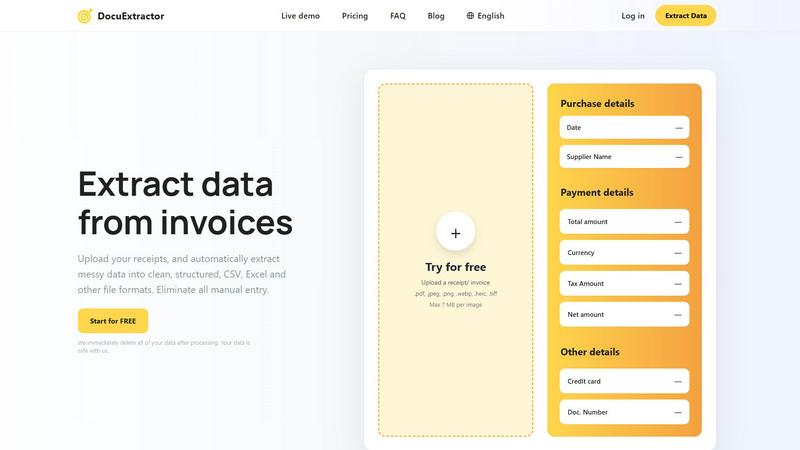
Dokta

Feature Comparison
DocuExtractor
Triple-Layer AI Extraction Engine
DocuExtractor doesn't rely on simple OCR. It employs a powerful, three-tiered AI system combining Optical Character Recognition (OCR) to read text, Deep Learning (DL) to understand document layouts and contexts, and Large Language Models (LLMs) to interpret and categorize the extracted information intelligently. This sophisticated synergy ensures unmatched accuracy, reaching 99.6%, even with complex, messy, or low-quality documents, turning unstructured data into reliable, structured insights.
Batch Processing & Multi-Format Support
Reclaim your time in bulk. Our platform allows you to drag and drop dozens of documents at once for simultaneous processing, eliminating the need for one-by-one uploads. DocuExtractor supports a wide array of file formats including PDF, JPG, PNG, WebP, HEIC, and TIFF, making it effortless to consolidate data from scans, photos, and digital statements into one streamlined, automated workflow.
Specialized Presets & Custom Data Fields
Tailor the extraction to your exact needs. Use our intelligent, pre-configured presets for common documents like receipts and invoices to instantly capture all standard fields. For unique requirements, you can define and train custom data fields, ensuring the AI extracts the specific information—from project codes to internal reference numbers—that is critical for your business's unique accounting processes.
Enterprise-Grade Security & Global Reach
Your data's security is our top priority. We process documents with enterprise-level encryption and have a strict policy of immediately deleting all your data and files after processing is complete. Furthermore, with automatic language detection and support for over 45 languages, DocuExtractor is built for global teams, effortlessly handling international invoices and receipts from suppliers around the world.
Dokta
Automated Invoice Management
Dokta offers a seamless automated invoice management system that simplifies the entire invoicing process. By allowing users to upload any document type, Dokta quickly analyzes and extracts key information, ensuring that you spend less time on admin tasks and more time focusing on your core business activities.
Real-Time Cash Flow Tracking
With Dokta, gain immediate insights into your financial health. The platform provides real-time updates on your revenues, outstanding payments, and tax obligations. This feature empowers you to make informed financial decisions while keeping your cash flow in check.
Contract and Deadline Management
Dokta makes it easy to create, manage, and track contracts with clients. You can set automated reminders for contract deadlines and ensure that you never miss a critical date. This feature helps you maintain professionalism and reliability in your business dealings.
Client Database Enrichment
Dokta automatically builds and enriches your client database as you upload documents. It includes features like automatic SIRET enrichment, payment scoring, and comprehensive historical tracking. This ensures that you have all the essential details at your fingertips for better client relationship management.
Use Cases
DocuExtractor
Automating Accounts Payable (AP)
Revolutionize your AP department by eliminating manual entry of supplier invoices. Simply upload batch files of invoices, and let DocuExtractor extract vendor details, dates, invoice numbers, line items, net amounts, and taxes. The output is a clean, audit-ready CSV or Excel file that can be directly imported into your accounting software, slashing processing time, reducing human error, and accelerating payment cycles.
Streamlining Expense Management & Reconciliation
Empower employees to submit expense receipts via photo while ensuring finance teams aren't buried in data entry. Upload a collection of receipt images, and DocuExtractor will accurately pull the date, merchant, total, and tax. This creates perfectly structured data that seamlessly matches credit card statements and simplifies month-end reconciliation, saving countless hours of manual cross-referencing.
Accelerating Month-End & Year-End Closing
Transform the most stressful time of the accounting cycle. Quickly process piles of bank statements, utility bills, and transaction documents. DocuExtractor rapidly converts these into organized data, providing the clean financial records needed for journal entries, accruals, and financial reporting. This dramatically speeds up the closing process and provides clarity for strategic analysis.
Digitizing Historical Document Archives
Unlock the value trapped in filing cabinets or old digital folders. Batch upload historical PDFs and scanned documents to convert years of unstructured financial data into searchable, analyzable spreadsheets. This use case is perfect for audits, historical analysis, or migrating to a new accounting system, turning archival chaos into a structured digital asset.
Dokta
Freelance IT Management
As a freelance IT professional, streamline your billing process with Dokta. Generate monthly invoices from contracts effortlessly, ensuring that you get paid on time while you focus on coding and developing solutions for your clients.
Creative Project Management
For freelance creatives, Dokta simplifies the management of projects from start to finish. Create quotes, send them for online acceptance, and convert them to invoices with a single click, making it easy to manage your workflow without the hassle of manual processes.
Auto-entrepreneur Compliance
Auto-entrepreneurs can leverage Dokta to ensure compliance with local regulations. With automated alerts for URSSAF deadlines and compliant invoicing, you can focus on growing your business without worrying about regulatory issues.
SMB Financial Oversight
Small-to-medium-sized businesses can benefit from Dokta's comprehensive cash flow tracking and document management capabilities. By having all financial documents organized and easily accessible, SMBs can make strategic decisions and optimize their operations.
Overview
About DocuExtractor
Stop letting manual data entry hold you back and your team from reaching its full potential. DocuExtractor is your intelligent partner in transforming financial chaos into structured clarity, empowering you to reclaim your time and focus on what truly matters. Designed specifically for accountants, bookkeepers, AP specialists, and finance professionals, this powerful software leverages a cutting-edge fusion of advanced OCR, deep learning, and Large Language Model (LLM) technology. It automatically extracts critical data from messy, unstructured documents like receipts, invoices, bank statements, and PDFs. Simply upload your documents, and watch as our AI accurately pulls key details such as dates, supplier names, totals, taxes, and document numbers with incredible precision. The result is perfectly clean, ready-to-use data exported in your preferred CSV or Excel format, seamlessly integrating into your existing accounting software and workflows. With enterprise-grade security, support for over 45 languages, and a firm commitment to deleting your data immediately after processing, DocuExtractor isn't just a tool—it's a complete transformation for your entire financial operation. Eliminate costly errors, reclaim hours every week, and empower your team to shift from tedious typing to strategic analysis. Start for free today and experience the freedom of automated, accurate data extraction.
About Dokta
Dokta is an innovative AI-powered document management platform tailored for freelancers, solo entrepreneurs, auto-entrepreneurs, and small-to-medium-sized businesses (SMBs). Designed to revolutionize the way you handle your paperwork, Dokta allows you to effortlessly drop any document—whether it's an invoice, quote, or contract. Within a remarkable time frame of under 60 seconds, Dokta's advanced AI engine reads, classifies, and extracts essential data, streamlining your workflow and minimizing administrative burdens. By managing the entire document lifecycle, Dokta enables you to create professional invoices and quotes, track payments, automate reminders for overdue invoices, and manage contracts and deadlines—all in one place. Say goodbye to lost files and missed deadlines, and reclaim your weekends. With Dokta, you can build a comprehensive client database, monitor cash flow in real time, and easily export data to CSV for your accountant. Whether you are a freelance developer, consultant, trades contractor, or a growing SMB, Dokta places your documents at the core of your business operations, driven by cutting-edge AI technology. Start with a free tier that allows you to manage 15 documents per month, with paid plans available starting from €9 per month. Rest assured with 100% GDPR compliance, as Dokta is securely hosted in Europe (AWS).
Frequently Asked Questions
DocuExtractor FAQ
How accurate is DocuExtractor's data extraction?
DocuExtractor achieves a remarkable 99.6% accuracy rate by utilizing a triple-layer AI engine that goes beyond basic OCR. Our combination of Optical Character Recognition, Deep Learning for layout understanding, and Large Language Models for contextual interpretation ensures highly reliable extraction from even messy or complex documents, minimizing the need for manual corrections.
What happens to my documents and data after processing?
Your security is paramount. We adhere to a strict data privacy policy where all uploaded documents and the extracted data are permanently and immediately deleted from our servers once the processing is complete and you have downloaded your results. We do not use your data to train our models, ensuring your financial information remains completely confidential.
What file formats and languages does DocuExtractor support?
DocuExtractor is built for versatility. We support all common file formats including PDF, JPG, PNG, WebP, HEIC, and TIFF. Furthermore, our AI features automatic language detection and can accurately process documents in over 45 languages, making it an ideal solution for businesses with international operations or suppliers.
Can I extract custom data fields not in the standard preset?
Absolutely. While our presets for receipts and invoices cover all standard fields, we understand every business has unique needs. You can define and configure custom data fields for extraction. The AI can be directed to look for and capture specific information like internal project codes, department IDs, or custom reference numbers directly from your documents.
Dokta FAQ
How does Dokta ensure data security?
Dokta is fully compliant with GDPR regulations and hosts all data in Europe (AWS), ensuring that your information is secure and protected at all times.
Can I try Dokta for free?
Yes! Dokta offers a free tier that allows you to manage up to 15 documents per month without any credit card required, making it easy for you to test the platform before committing to a paid plan.
What types of documents can I upload?
You can upload a variety of document types including invoices, quotes, contracts, and more. Dokta's AI engine is designed to analyze and extract key data from any document you provide.
How long does it take for Dokta to analyze a document?
Dokta's AI engine analyzes documents in under 60 seconds, allowing you to quickly validate and act on the extracted information without wasting time on manual entry.
Alternatives
DocuExtractor Alternatives
DocuExtractor is a powerful AI-driven solution in the productivity and management category, designed to liberate finance professionals from the tedious grind of manual data entry. It transforms unstructured documents like receipts and invoices into clean, structured data instantly, reclaiming valuable time and eliminating errors. Users often explore alternatives for various reasons, including specific budget constraints, the need for different integration capabilities, or unique feature requirements that match their existing tech stack. It's a natural part of finding the perfect tool to empower your team's workflow and drive greater efficiency. When evaluating other options, focus on core capabilities that deliver transformation. Key considerations should include extraction accuracy, support for batch processing, robust data security protocols, and the flexibility of export formats. The right tool should not just automate a task, but fundamentally elevate your team's strategic potential.
Dokta Alternatives
Dokta is an innovative AI-powered document management platform designed for freelancers, solo entrepreneurs, auto-entrepreneurs, and small to medium-sized businesses (SMBs). It offers a seamless solution for automating document-related tasks, such as creating invoices, managing contracts, and tracking payments, all while harnessing the power of artificial intelligence. Users often seek alternatives to Dokta for various reasons, including pricing, specific feature sets, or varying platform needs that may align better with their unique business requirements. When searching for an alternative, consider factors such as ease of use, the range of features offered, integration capabilities with existing workflows, and the overall cost of the solution. It's essential to choose a platform that not only meets your immediate document management needs but also supports your growth and evolving business processes. The right alternative will empower you to manage your documents efficiently, allowing you to focus on what truly matters—growing your business.