

DocuExtractor
Transform messy receipts into clean, structured data instantly, eliminating manual entry.
About DocuExtractor
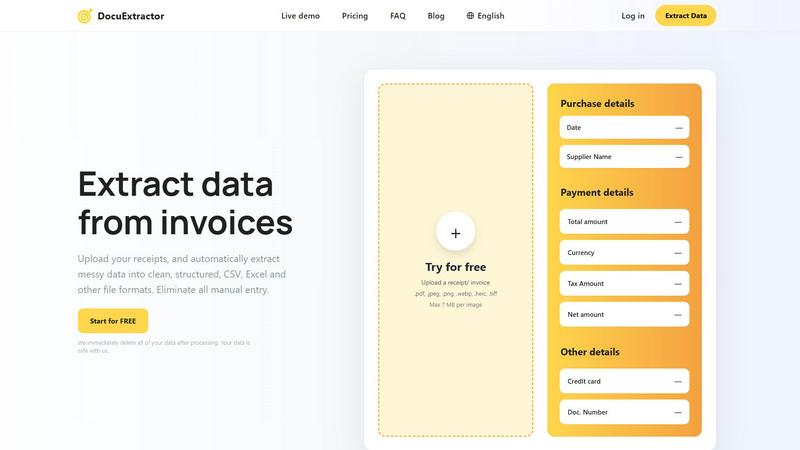
Stop letting manual data entry hold you back and your team from reaching its full potential. DocuExtractor is your intelligent partner in transforming financial chaos into structured clarity, empowering you to reclaim your time and focus on what truly matters. Designed specifically for accountants, bookkeepers, AP specialists, and finance professionals, this powerful software leverages a cutting-edge fusion of advanced OCR, deep learning, and Large Language Model (LLM) technology. It automatically extracts critical data from messy, unstructured documents like receipts, invoices, bank statements, and PDFs. Simply upload your documents, and watch as our AI accurately pulls key details such as dates, supplier names, totals, taxes, and document numbers with incredible precision. The result is perfectly clean, ready-to-use data exported in your preferred CSV or Excel format, seamlessly integrating into your existing accounting software and workflows. With enterprise-grade security, support for over 45 languages, and a firm commitment to deleting your data immediately after processing, DocuExtractor isn't just a tool—it's a complete transformation for your entire financial operation. Eliminate costly errors, reclaim hours every week, and empower your team to shift from tedious typing to strategic analysis. Start for free today and experience the freedom of automated, accurate data extraction.
Features
Triple-Layer AI Extraction Engine
DocuExtractor doesn't rely on simple OCR. It employs a powerful, three-tiered AI system combining Optical Character Recognition (OCR) to read text, Deep Learning (DL) to understand document layouts and contexts, and Large Language Models (LLMs) to interpret and categorize the extracted information intelligently. This sophisticated synergy ensures unmatched accuracy, reaching 99.6%, even with complex, messy, or low-quality documents, turning unstructured data into reliable, structured insights.
Batch Processing & Multi-Format Support
Reclaim your time in bulk. Our platform allows you to drag and drop dozens of documents at once for simultaneous processing, eliminating the need for one-by-one uploads. DocuExtractor supports a wide array of file formats including PDF, JPG, PNG, WebP, HEIC, and TIFF, making it effortless to consolidate data from scans, photos, and digital statements into one streamlined, automated workflow.
Specialized Presets & Custom Data Fields
Tailor the extraction to your exact needs. Use our intelligent, pre-configured presets for common documents like receipts and invoices to instantly capture all standard fields. For unique requirements, you can define and train custom data fields, ensuring the AI extracts the specific information—from project codes to internal reference numbers—that is critical for your business's unique accounting processes.
Enterprise-Grade Security & Global Reach
Your data's security is our top priority. We process documents with enterprise-level encryption and have a strict policy of immediately deleting all your data and files after processing is complete. Furthermore, with automatic language detection and support for over 45 languages, DocuExtractor is built for global teams, effortlessly handling international invoices and receipts from suppliers around the world.
Use Cases
Automating Accounts Payable (AP)
Revolutionize your AP department by eliminating manual entry of supplier invoices. Simply upload batch files of invoices, and let DocuExtractor extract vendor details, dates, invoice numbers, line items, net amounts, and taxes. The output is a clean, audit-ready CSV or Excel file that can be directly imported into your accounting software, slashing processing time, reducing human error, and accelerating payment cycles.
Streamlining Expense Management & Reconciliation
Empower employees to submit expense receipts via photo while ensuring finance teams aren't buried in data entry. Upload a collection of receipt images, and DocuExtractor will accurately pull the date, merchant, total, and tax. This creates perfectly structured data that seamlessly matches credit card statements and simplifies month-end reconciliation, saving countless hours of manual cross-referencing.
Accelerating Month-End & Year-End Closing
Transform the most stressful time of the accounting cycle. Quickly process piles of bank statements, utility bills, and transaction documents. DocuExtractor rapidly converts these into organized data, providing the clean financial records needed for journal entries, accruals, and financial reporting. This dramatically speeds up the closing process and provides clarity for strategic analysis.
Digitizing Historical Document Archives
Unlock the value trapped in filing cabinets or old digital folders. Batch upload historical PDFs and scanned documents to convert years of unstructured financial data into searchable, analyzable spreadsheets. This use case is perfect for audits, historical analysis, or migrating to a new accounting system, turning archival chaos into a structured digital asset.
Frequently Asked Questions
How accurate is DocuExtractor's data extraction?
DocuExtractor achieves a remarkable 99.6% accuracy rate by utilizing a triple-layer AI engine that goes beyond basic OCR. Our combination of Optical Character Recognition, Deep Learning for layout understanding, and Large Language Models for contextual interpretation ensures highly reliable extraction from even messy or complex documents, minimizing the need for manual corrections.
What happens to my documents and data after processing?
Your security is paramount. We adhere to a strict data privacy policy where all uploaded documents and the extracted data are permanently and immediately deleted from our servers once the processing is complete and you have downloaded your results. We do not use your data to train our models, ensuring your financial information remains completely confidential.
What file formats and languages does DocuExtractor support?
DocuExtractor is built for versatility. We support all common file formats including PDF, JPG, PNG, WebP, HEIC, and TIFF. Furthermore, our AI features automatic language detection and can accurately process documents in over 45 languages, making it an ideal solution for businesses with international operations or suppliers.
Can I extract custom data fields not in the standard preset?
Absolutely. While our presets for receipts and invoices cover all standard fields, we understand every business has unique needs. You can define and configure custom data fields for extraction. The AI can be directed to look for and capture specific information like internal project codes, department IDs, or custom reference numbers directly from your documents.
Similar to DocuExtractor

AI Email Filter
AI Email Filter sorts incoming mail into folders using plain-language prompts you write. Works with any IMAP mailbox; bring your own LLM if you want.

Kody Tools
Free collection of online developer utilities, code formatters, and digital converters designed to streamline your daily workflow.
Hishab
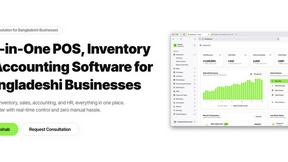
All-in-One POS, Inventory & Accounting Software for Bangladeshi Businesses
Forms Plugin
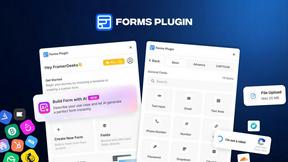
The #1 Native Form Builder Plugin for Framer - No Code, No Embeds, No External Platforms.

JsonTranslate
Translate JSON, Markdown, and TXT files while preserving keys, nested paths, and project structure.


Product Launch Checklist
A free launch checklist for SaaS, apps, AI tools and more. Every step says why it matters and when you can skip it.

Flux Lora
Explore Flux LoRA online workflows in a browser-based AI Studio, with a roadmap for dedicated models, generation, and guided training.