

Unifyca
Unifyca transforms scattered client website chaos into one unified platform for documentation, maintenance, and backup control.
AI tool Details
Explore More
Alternatives

About Unifyca
Unifyca is a comprehensive WordPress website management platform built specifically for agencies, freelancers, and IT professionals who oversee multiple client websites. The core challenge it solves is the chaos of managing dozens of separate WordPress dashboards, scattered credentials, and fragmented documentation. Instead of logging into each site individually, Unifyca provides a single, centralized workspace where you can control every aspect of your client portfolio. The platform combines robust website maintenance tools with a complete documentation and operations hub. You can connect your client websites to run automated WordPress audits that detect outdated plugins, themes, and core versions. From there, you can apply safe maintenance fixes remotely, create manual or scheduled backups, monitor uptime across all sites, and generate professional white-label maintenance reports. Beyond maintenance, Unifyca centralizes all website documentation including hosting accounts, domains, FTP and SSH access, email settings, SSL certificates, credentials, brand assets, project notes, and technical information. The result is a complete operational platform that helps agencies reduce manual work, improve consistency, document every client website thoroughly, and deliver professional maintenance services at scale. Unifyca empowers you to move from scattered information to complete control, transforming how you manage and deliver value to your clients.
Features
Centralized Website Documentation
Stop searching through endless emails, spreadsheets, and chat messages to find critical client information. Unifyca provides a single source of truth for every client website where you can store WordPress, FTP, SSH, hosting, domain, database, email account, plugins, themes, and API credentials, all securely linked to the correct client and website. You can document domains, DNS settings, SSL certificates, server details, plugins, themes, premium licenses, scripts, custom code, integrations, and important website files. This ensures your entire team always works with the complete context of every client website, eliminating hidden knowledge and reducing onboarding time for new team members.
Automated Website Audits
Wake up knowing exactly which client sites need your attention today. Unifyca scans every connected WordPress site for outdated plugins, themes, and WordPress core versions. It also detects security risks, configuration issues, uptime problems, and SEO warnings across every client site in your portfolio. The audit runs automatically and compiles a clear overview so you can prioritize your work. Instead of manually checking each site, you get a comprehensive health report that tells you what needs fixing, where, and how urgently. This proactive approach transforms your maintenance workflow from reactive firefighting to strategic, scheduled management.
Remote Fix Center
Review and apply WordPress updates and safe maintenance actions directly from the Unifyca Fix Center, without ever entering a single wp-admin dashboard. You can perform actions in bulk across multiple sites, saving hours of repetitive login and click work. The Fix Center shows you exactly which updates are available, which sites need them, and allows you to apply fixes with confidence. Every action is logged automatically, so you always have a complete maintenance history per site. This feature alone eliminates the need for dozens of browser tabs and scattered notes, giving you a clean, efficient workflow for keeping client sites secure and up to date.
Reliable Backups and Maintenance History
Run manual or scheduled backups for your client WordPress sites directly from Unifyca. You can set backup schedules that match each client's needs and always know which sites are protected before applying updates or fixes. The platform maintains a clear backup history so you can restore quickly if needed. Beyond backups, every update, fix, and check is logged per site automatically. You always know what was done, when, and on which client website, with no need for manual journaling. This complete maintenance history becomes invaluable for troubleshooting, client communication, and proving the value of your ongoing services.
Use Cases
Freelance WordPress Developer Managing Multiple Clients
A freelance developer maintaining 15 different client WordPress sites can use Unifyca to eliminate the chaos of separate logins, scattered notes, and manual checklists. They connect all client sites, run automated audits weekly, and apply updates in bulk from the Fix Center. All client credentials, hosting details, and technical notes are stored securely in one place. The developer can schedule backups for each site, monitor uptime across the entire portfolio, and generate white-label reports for each client at the end of the month. This transforms their workflow from reactive and stressful to proactive and professional, freeing up time for higher-value work.
Digital Agency Scaling Maintenance Services
A growing digital agency with 50+ client websites can use Unifyca to standardize their maintenance operations across the entire team. New team members can onboard quickly because all client documentation, credentials, and maintenance history are centralized. The agency can create predictable maintenance cycles, apply updates across all client sites efficiently, and ensure every site is backed up before any changes. White-label reports with the agency's branding prove the value of their maintenance service to clients, making it easier to justify recurring fees and renew contracts annually. Unifyca becomes the operational backbone that allows the agency to scale without adding proportional administrative overhead.
IT Professional Managing Client Infrastructure
An IT professional responsible for maintaining multiple clients' web infrastructure can use Unifyca to document every technical detail beyond just WordPress. They can store hosting account information, domain registrar details, SSL certificate expiry dates, FTP and SSH access, email settings, and server configurations for each client. The platform sends alerts before domains, hosting, or SSL certificates expire, preventing costly downtime. The IT professional can track renewals in one calendar view and maintain comprehensive technical documentation that is always accessible. This turns scattered technical knowledge into a reliable, searchable system that protects both the professional and their clients.
Freelance Designer Offering Maintenance Add-Ons
A freelance web designer who builds WordPress sites for clients can use Unifyca to offer a professional maintenance service as an ongoing revenue stream. After launching a site, they connect it to Unifyca and set up automated audits, scheduled backups, and monthly maintenance checks. The designer can provide clients with clean, white-label reports showing exactly what was done each month, including updates applied, issues fixed, and uptime status. This transforms a one-time project into a recurring retainer relationship. The designer can manage all maintenance clients from one dashboard, ensuring consistent quality and freeing up time to focus on new design projects.
Frequently Asked Questions
How does Unifyca connect to my client WordPress sites?
You install the Unifyca Audit Connector plugin on each client WordPress site and link it to your Unifyca account. The process is quick and bulk-friendly, allowing agencies to onboard many sites at once. Once connected, Unifyca can run audits, apply fixes, and manage backups without you needing to log into each site's wp-admin dashboard. The connection is secure and designed for minimal impact on site performance.
Is Unifyca suitable for a single freelancer or only agencies?
Unifyca is built for agencies, freelancers, and IT professionals of all sizes. Whether you manage 5 client sites or 100, the platform scales to meet your needs. Freelancers benefit from the same centralized documentation, automated audits, and white-label reporting that larger agencies use. The free plan allows you to organize your first site in minutes with no credit card required, making it accessible for solo professionals just starting to offer maintenance services.
Can I brand the maintenance reports as my own?
Yes, absolutely. Unifyca's white-label reports allow you to use your own logo, colors, and branding with zero Unifyca branding visible. One click turns the month's maintenance log into a clean, client-friendly report that demonstrates the work you actually do. These reports are designed to help you justify a recurring maintenance fee and renew contracts annually by providing clear proof of value that your clients can understand.
How does Unifyca handle sensitive client credentials?
Unifyca provides a secure credentials vault where you can store WordPress, FTP, SSH, hosting, domain, database, email account, plugins, themes, and API credentials. All information is securely linked to the correct client and website. The platform is designed to replace insecure methods like shared spreadsheets, emails, or chat messages for storing sensitive information. You control who on your team has access to specific credentials and documentation.
Similar to Unifyca
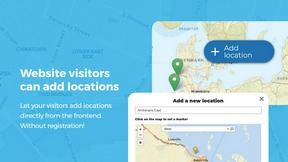
Open User Map
Turn your WordPress site into a living community map where visitors add and manage locations, all without coding or API keys.

aihairstylegen
Stop guessing and start glowing with AI hairstyles that map perfectly to your face, letting you preview 40+ trending styles and salon-grade colors on.

Shadcn Examples
Unlock your web development potential with Shadcn Examples, a powerful collection of reusable React and Tailwind UI kits for stunning apps.
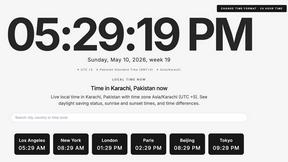
What Time
What Time simplifies global collaboration by effortlessly comparing time zones and planning meetings for teams and remote workers.
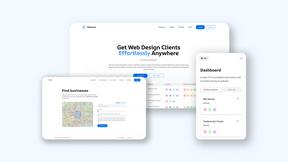
Webleadr
Webleadr instantly finds and contacts businesses without websites so you can transform them into your next web design clients.
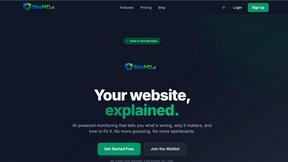
SiteMd
Transform your website's health with SiteMd, the fast and easy tool that identifies issues and provides actionable fixes in seconds.

Idearium
Idearium empowers businesses in Toronto by crafting impactful websites that drive growth and inspire memorable digital.
FilexHost
Effortlessly host and share any file in seconds with FilexHost's simple drag-and-drop and secure sharing features.