

Open User Map
Turn your WordPress site into a living community map where visitors add and manage locations, all without coding or API keys.
AI tool Details
Explore More
Alternatives
About Open User Map
Open User Map is a powerful interactive maps plugin for WordPress that transforms your website into a dynamic, community-driven platform. It allows you to create a map that your visitors can contribute to directly, with frontend submissions, approval workflows, and extensive customization options. The best part is that you can achieve all of this without writing a single line of code, without needing a Google Maps API key, and without any complex setup. This tool is designed for website owners, community managers, local business directories, tourism sites, event organizers, and anyone who wants to build a collaborative map experience. Imagine your visitors adding their favorite local spots, reporting issues, or sharing hidden gems all on your map. With Open User Map, you maintain full control through an intuitive approval workflow, ensuring that only accurate and appropriate content goes live. The plugin currently boasts over 15,000 active installs, a perfect 100% five-star rating, and is ranked as the number two map plugin on WordPress.org. It empowers you to turn your static website into an engaging, ever-evolving resource that grows with your community. Whether you are building a city guide, a real estate portal, or an event map, Open User Map gives you the freedom to create exactly what you envision without technical barriers.
Features
Frontend Location Submissions and Editing
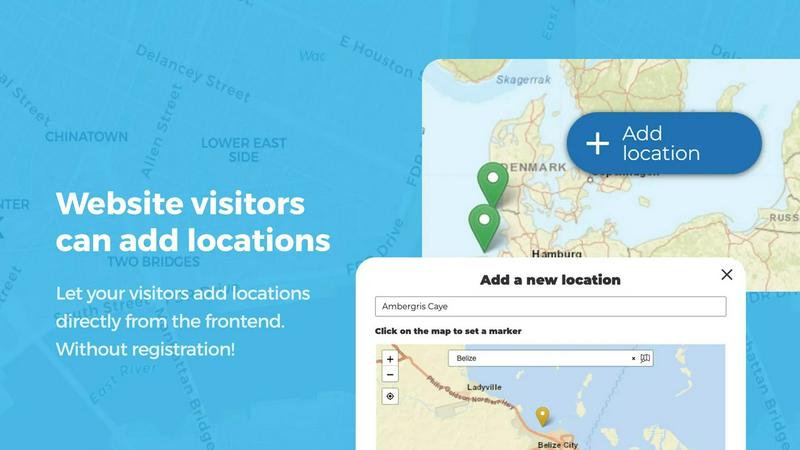
Enable your website visitors to add and edit locations directly on your map with a simple and intuitive interface. By clicking the Add location button, users can place a marker on the map and provide detailed information through customizable fields. All submissions are held for your approval before they become visible, ensuring quality control. Additionally, users can edit their own existing locations, which keeps your map perpetually up to date with the most current information from your community.
Advanced Categorization and Filtering
Organize your map markers into distinct categories, each with its own unique icon, to create a clear and visually appealing layout. This feature allows visitors to filter locations by category, making it effortless to find exactly what they are looking for. Each location can belong to multiple categories, ensuring that all relevant attributes are represented. This powerful organization system transforms a cluttered map into an intuitive exploration tool.
Lines, Areas, and Custom Shapes
Go beyond simple point markers by adding routes, paths, zones, and regions directly to your map. This feature is perfect for highlighting trails, service areas, event grounds, neighborhoods, or construction zones. Distances and area sizes are calculated automatically, so your routes and polygons include helpful measurements right out of the box. You can create any custom shape that helps visitors understand your map at a glance.
Custom Image as Map
Upload any image and transform it into a fully interactive map. Whether it is an overlay, floor plan, event layout, game map, product diagram, campus guide, or seating chart, this feature allows users to place markers directly on top of it with the same powerful functionality as a traditional map. You can add locations, display custom fields, enable filtering, and create an engaging, clickable experience tailored exactly to your use case.
Use Cases
Community-Driven Local Business Directory
Build a comprehensive directory where your visitors can add and rate local businesses, restaurants, and services. With the star rating and upvote features, your community can highlight the best places automatically. The opening hours custom field type displays beautifully styled business hours with a live Open Now indicator, making it perfect for helping people find what is open at any given time.
Interactive Event and Festival Maps
Create an engaging map for conferences, music festivals, or community events where attendees can see all stages, vendors, restrooms, and points of interest. Use the Lines and Areas feature to mark event grounds and walking paths. Allow attendees to add their own meetup spots or share feedback on different areas using the upvote and like features.
Real Estate and Property Listings
Transform your real estate website by allowing property owners or agents to add listings directly on a map. Use custom fields to capture details like price, number of bedrooms, and property type. The Advanced Filter Interface lets potential buyers filter properties by any custom field, while the Custom Image as Map feature can be used for floor plans or neighborhood overlays.
Tourism and City Guides
Empower locals and travelers to contribute points of interest such as hidden gems, hiking trails, historical landmarks, and recommended restaurants. Use the Regions feature to create boundaries for neighborhoods or districts. The upvote system helps surface the most popular spots, and the approval workflow ensures that all contributions are accurate and relevant for visitors.
Pricing
Open User Map offers a PRO version with a free 7-day trial that unlocks all advanced features. The trial does not require a credit card and automatically ends after 7 days without converting into a paid subscription. For specific pricing details on the PRO version beyond the trial, please visit the official Open User Map website. The free version is available for immediate download on WordPress.org.
Frequently Asked Questions
Do I need a Google Maps API key to use Open User Map?
No, you do not need a Google Maps API key to use Open User Map. The plugin is designed to work without any external API keys, which simplifies the setup process significantly. You can create a fully functional interactive map without any complex configuration or additional costs.
Can visitors add and edit locations on my map?
Yes, visitors can add and edit locations directly from the frontend of your website. When a visitor adds a location, it goes into a pending state and requires your approval before it becomes visible on the map. Users can also edit their own previously submitted locations, ensuring that the map always reflects the most current information.
What kind of customizations can I apply to my map?
You have extensive customization options including custom fields like text boxes, links, checkboxes, and dropdowns. You can also categorize markers with unique icons, create lines and areas, use a custom image as your map base, and build an advanced filter sidebar. The plugin gives you complete control over the look and functionality of your map.
Is there a free version of Open User Map available?
Yes, there is a free version of Open User Map available for download on WordPress.org. The free version includes many core features. For advanced functionality like custom fields, regions, upvotes, star ratings, and the advanced filter interface, you can try the PRO version with a free 7-day trial that does not require a credit card and does not auto-renew into a paid subscription.
Similar to Open User Map
Unifyca
Unifyca transforms scattered client website chaos into one unified platform for documentation, maintenance, and backup control.

aihairstylegen
Stop guessing and start glowing with AI hairstyles that map perfectly to your face, letting you preview 40+ trending styles and salon-grade colors on.

Shadcn Examples
Unlock your web development potential with Shadcn Examples, a powerful collection of reusable React and Tailwind UI kits for stunning apps.

What Time
What Time simplifies global collaboration by effortlessly comparing time zones and planning meetings for teams and remote workers.

Webleadr
Webleadr instantly finds and contacts businesses without websites so you can transform them into your next web design clients.

SiteMd
Transform your website's health with SiteMd, the fast and easy tool that identifies issues and provides actionable fixes in seconds.

Idearium
Idearium empowers businesses in Toronto by crafting impactful websites that drive growth and inspire memorable digital.