TinyFast vs WA Reminders
Side-by-side comparison to help you choose the right AI tool.

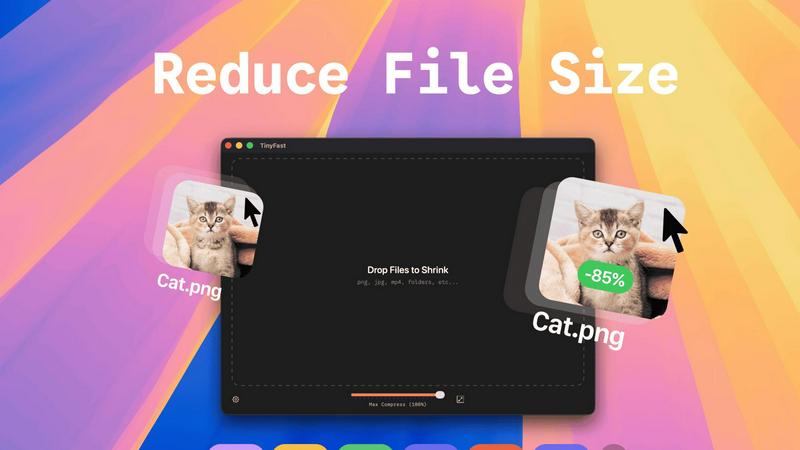
Shrink files instantly on your Mac with TinyFast, ensuring privacy and speed without uploads or waiting in queues.
Last updated: February 28, 2026

WA Reminders
Take control of your time by scheduling WhatsApp messages directly from your calendar or phone.
Last updated: April 4, 2026
Visual Comparison
TinyFast
WA Reminders

Feature Comparison
TinyFast
Batch & Drag-Drop Shrink
With TinyFast, you can drop entire folders for optimization and receive the compressed output in mere seconds. This feature elevates your workflow by allowing you to process multiple files simultaneously, saving you both time and effort.
Blazing-Fast Compression
Experience the power of optimized native engines designed for speed. TinyFast enables you to shrink large files in seconds without the hassle of waiting for uploads and downloads. This ensures that your creative process remains uninterrupted and efficient.
Resize Resolution
TinyFast offers an automatic image and video resizing feature that allows you to set specific resolutions for your files. This ensures that you maintain control over the quality and size of your digital assets, making it easier to share or store them as needed.
100% Local & Private
Your privacy is paramount with TinyFast. Files never leave your machine, ensuring that sensitive information remains secure. There are no uploads or cloud servers involved, so you can compress with confidence knowing that your assets are protected by design.
WA Reminders
Seamless WhatsApp Integration
Connect your personal or WhatsApp Business account in seconds by simply scanning a QR code, just like WhatsApp Web. This secure connection means all scheduled messages are sent directly from your own phone number, preserving the personal touch and trust of your existing client relationships. You can then manage and continue any conversation naturally from your main WhatsApp app, keeping all communication centralized and authentic.
Dual Scheduling Flexibility
Gain ultimate flexibility with two powerful ways to schedule. You can schedule messages directly within the intuitive WA Reminders app, which automatically imports your full phone contact list for effortless selection. Alternatively, schedule directly from Google Calendar by adding an internationally formatted phone number to any event title or description, perfectly syncing your communication with your existing workflow.
Automated Contact Import
Eliminate manual data entry and the risk of errors. When scheduling from the WA Reminders app, your entire phone contact list is automatically and securely synced. This feature saves you tremendous time and ensures you never miss a client, allowing you to select recipients quickly and confidently from a familiar, always-up-to-date list.
Recurring Message Engine
Automate your most critical ongoing communications with powerful recurring scheduling. Set up reminders for weekly appointments, monthly payment notifications, or regular follow-ups to happen automatically, both from within the app and via recurring Google Calendar events. This "set it and forget it" functionality ensures consistency and frees your mental space for higher-value tasks.
Use Cases
TinyFast
Optimizing Images for Web Use
Photographers and web designers can use TinyFast to compress images without sacrificing quality. This is essential for improving website load times and enhancing user experience while keeping storage needs minimal.
Preparing Videos for Social Media
Content creators can effortlessly compress videos for social media platforms using TinyFast. The ability to quickly reduce file sizes allows for smooth uploads and ensures that videos retain their visual integrity without excessive processing times.
Streamlining Document Sharing
Professionals can leverage TinyFast to compress PDFs and other documents, making them easier to share via email or cloud storage. This feature is particularly useful for teams needing to collaborate efficiently without running into file size limitations.
Enhancing Workflow for Developers
Developers can incorporate TinyFast into their workflow to compress code files like CSS and JSON. By maintaining smaller file sizes, they can improve load times and optimize user experiences, all while ensuring their code is neatly organized and easy to manage.
WA Reminders
Reducing Clinic No-Shows
Medical and wellness clinics can dramatically reduce patient no-shows by automating appointment reminders. Schedule a friendly confirmation message 24 hours before an appointment and a final reminder an hour prior, all sent from the clinic's official WhatsApp. This proactive communication improves attendance rates, optimizes practitioner schedules, and enhances patient care through better adherence.
Streamlining Service-Based Bookings
Independent professionals like fitness trainers, consultants, and beauticians can automate their booking follow-ups. Send personalized welcome messages after a booking is made, pre-session instructions, and post-service thank you notes. This creates a professional, automated client journey that builds loyalty and encourages repeat business without any manual effort.
Automating Payment Follow-Ups
Small business owners and freelancers can ensure timely payments without awkward conversations. Schedule discreet and polite payment reminder messages to be sent after an invoice is due. This automated nudge significantly improves cash flow by prompting clients in a professional manner, directly from your business number, reducing the time spent on accounts receivable.
Managing Team Schedules & Alerts
Small business owners can use WA Reminders to coordinate with their team or service providers. Schedule shift reminders, meeting alerts, or task deadlines to be sent to employee or contractor WhatsApp numbers. By leveraging the existing Google Calendar integration, managers can ensure everyone is aligned and informed through the communication channel they use daily.
Pricing Comparison
TinyFast
Free
Forever
Compress up to 5 files per day
Access all features
GET IN APP
It's Free
€17.99
Lifetime Plan
One-Time Unlock
Unlimited local Compressions
Access all features
Support Future Development
Lifetime Updates
GET IN APP
One Time Payment
3 DAY TRIAL, THEN
€2.99
/Month
Unlimited local Compressions
Access all features
Support Future Development
GET IN APP
Monthly Subscription
INCLUDES 3 DAY TRIAL
Get TinyFast on your Mac
Fast, local, and private file compression right on your Mac.
Download
WA Reminders
WA Reminders offers straightforward pricing plans designed to scale with your business needs, ensuring you only pay for what you require.
Basic Plan - $19 per month
Perfect for solo entrepreneurs and one-person businesses. This plan includes sending up to 200 WhatsApp messages per month, reminders from your own number, contact import from your phone, and full sync with Google Calendar including recurring events.
Startup Plan - $29 per month
Ideal for small teams or growing companies. It includes everything in the Basic plan but increases the capacity to 500 messages per month, providing higher volume for client follow-ups, campaigns, and managing more appointments.
Business Plan - $39 per month
Built for medium-sized companies needing to scale communications. This top-tier plan includes all features and allows for 1,000 messages per month, enabling you to manage reminders across a larger organization or client base efficiently.
All plans are billed in US dollars and come with a 14-day money-back guarantee. If WA Reminders isn't the right fit, you can request a full refund with no questions asked.
Overview
About TinyFast
TinyFast is your ultimate Mac companion, designed to reclaim your precious time, valuable storage space, and peace of mind. This powerful, native macOS application allows you to compress a wide array of files—including images, videos, and documents—directly on your computer. With TinyFast, you can say goodbye to the cumbersome and often insecure process of uploading your sensitive assets to online servers. Instead, enjoy a seamless experience with its simple drag-and-drop interface that delivers blazing-fast file size reduction while ensuring your data remains safe on your device. Built specifically for developers, designers, creators, and professionals, TinyFast emphasizes security, speed, and workflow efficiency. This transformative tool empowers you to optimize your digital assets instantly, protect confidential work, and streamline your creative process—all from the safety of your own Mac. Stop waiting for slow online tools and start creating with TinyFast's local, instantaneous compression capabilities.
About WA Reminders
In today's fast-paced world, missed appointments and forgotten follow-ups are more than just minor inconveniences—they are lost revenue, strained client relationships, and wasted valuable time. WA Reminders is the transformative solution designed to put you back in control. It is a powerful WhatsApp scheduling app that empowers independent professionals, clinics, and small shops to automate their most important communications directly from the platform their clients already use and trust. By allowing you to schedule messages for later, WA Reminders seamlessly bridges the gap between your busy schedule and the need for timely, personal touchpoints. Whether you're confirming an appointment, sending a payment reminder, or sharing a promotional update, every message is delivered reliably from your own WhatsApp number, ensuring continuity and authenticity in every conversation. Stop chasing reminders and start experiencing the freedom that comes with a streamlined, professional, and highly effective communication system that actively works to reduce no-shows and grow your business.
Frequently Asked Questions
TinyFast FAQ
What file types does TinyFast support?
TinyFast supports a wide variety of file types, including images (PNG, JPG, TIFF, HEIC, WEBP, GIF, BMP, SVG), videos (MP4, MOV, M4V), documents (PDF, DOCX), code files (JS, CSS, JSON), and audio files (MP3).
Is my data safe when using TinyFast?
Absolutely! With TinyFast, your files remain on your device during the compression process. There are no uploads to external servers, ensuring total privacy by design.
Can I compress multiple files at once?
Yes, TinyFast allows you to use the batch and drag-drop feature, enabling you to drop entire folders for optimization. You'll receive the compressed output in seconds, making it incredibly efficient for your workflow.
Is there a trial version available for TinyFast?
Yes, TinyFast offers a free forever plan that allows you to compress up to 5 files per day. Additionally, you can opt for a monthly subscription with unlimited local compressions after a 3-day trial period.
WA Reminders FAQ
How will my WhatsApp reminder messages look?
Your messages will appear in your client's WhatsApp chat list exactly as if you sent them manually at that moment. They come directly from your linked phone number (personal or WhatsApp Business), with your name and profile picture. The content is whatever you typed when scheduling, allowing for fully personalized and natural communication that maintains your brand's voice and authenticity.
Can I send reminders directly from Google Calendar?
Absolutely. This is a core feature of WA Reminders. Simply add an internationally formatted phone number (e.g., +1234567890) to the title or description of any Google Calendar event. Our system will detect it and automatically schedule a WhatsApp reminder to be sent at the time you specify relative to that event, seamlessly integrating reminders into your existing planning routine.
Do you have a Calendly integration?
Yes, WA Reminders integrates with Calendly through Google Calendar. When you connect your Calendly to Google Calendar, any appointment booked will create a calendar event. WA Reminders can then read that event and send a WhatsApp reminder based on the phone number details included, creating a fully automated booking-to-reminder workflow for you and your clients.
Which countries do you support sending messages from?
WA Reminders is designed to work with WhatsApp's global platform. You can link your WhatsApp account from virtually any country where WhatsApp is available. The service then schedules and sends messages through your connected account. It is compatible with both regular WhatsApp and WhatsApp Business accounts, making it a versatile tool for a worldwide user base.
Alternatives
TinyFast Alternatives
TinyFast is a powerful native macOS application specifically designed for file compression, aimed at helping users reclaim time, space, and privacy on their Macs. By instantly shrinking a variety of file types—from images and videos to documents—TinyFast revolutionizes the way individuals manage their digital assets. Users often seek alternatives for various reasons, including pricing, feature sets, and compatibility with different platforms. It's essential to consider factors such as speed, privacy, and ease of use when exploring alternative solutions, ensuring they align with your specific needs and workflow. When choosing an alternative, prioritize tools that offer local processing capabilities to maintain your data's security while ensuring efficient performance. Look for applications that support a wide range of file formats, enabling you to handle all your compression needs seamlessly. Additionally, a user-friendly interface can significantly enhance your experience, allowing you to focus on your creative projects rather than getting bogged down by complicated software.
WA Reminders Alternatives
WA Reminders is a specialized productivity tool designed for appointment-based businesses. It operates in the category of business communication and management software, focusing on reducing missed appointments by automating WhatsApp reminders. This direct approach to customer engagement is a game-changer for professionals whose time and revenue depend on reliability. Businesses often explore alternatives for various reasons. Needs evolve, and a solution must scale with growth, offer specific integrations, or fit a precise budget. Some may seek platforms that work across multiple messaging channels or require more advanced features beyond simple scheduling. It's a natural step in finding the perfect tool to support your operational flow. When evaluating other options, consider your core requirements. Look for reliability, ease of use, and a clear value for your investment. The right tool should seamlessly integrate into your daily routine, empower you to communicate effortlessly, and ultimately transform how you manage client relationships, turning administrative tasks into strategic advantages.