Fond vs TinyFast
Side-by-side comparison to help you choose the right AI tool.

Fond is your AI cooking partner that simplifies meal planning and shopping while enhancing your cooking skills for confident home cooking.
Last updated: March 19, 2026

Shrink files instantly on your Mac with TinyFast, ensuring privacy and speed without uploads or waiting in queues.
Last updated: February 28, 2026
Visual Comparison
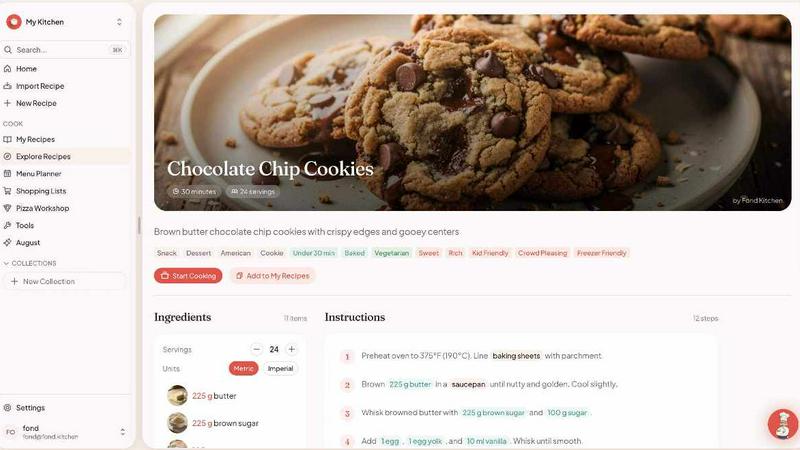
Fond
TinyFast
Feature Comparison
Fond
AI Cooking Agent
Fond’s AI cooking agent, August, is your personal culinary guide. It learns your cooking style, dietary preferences, and available ingredients, providing tailored advice on substitutions and cooking techniques as you prepare meals. The more you cook, the smarter August becomes, ensuring you receive increasingly relevant assistance.
AI Recipe Import
Easily import any recipe from the web by simply pasting the URL into Fond. The AI intelligently extracts all necessary ingredients and steps while filtering out ads and extraneous content, making it easier to focus on what truly matters: cooking.
Meal Planner
Simplify your weekly meal planning with Fond's drag-and-drop feature. Effortlessly organize your recipes into a weekly layout, while the app automatically generates shopping lists based on your chosen meals, reducing food waste and saving you valuable time in the kitchen.
Cook Mode
With Fond’s Cook Mode, you can enjoy a hands-free cooking experience. This feature provides step-by-step guidance, built-in timers, and keeps your screen on, allowing you to focus on your culinary creation without worrying about having to touch your device with messy hands.
TinyFast
Batch & Drag-Drop Shrink
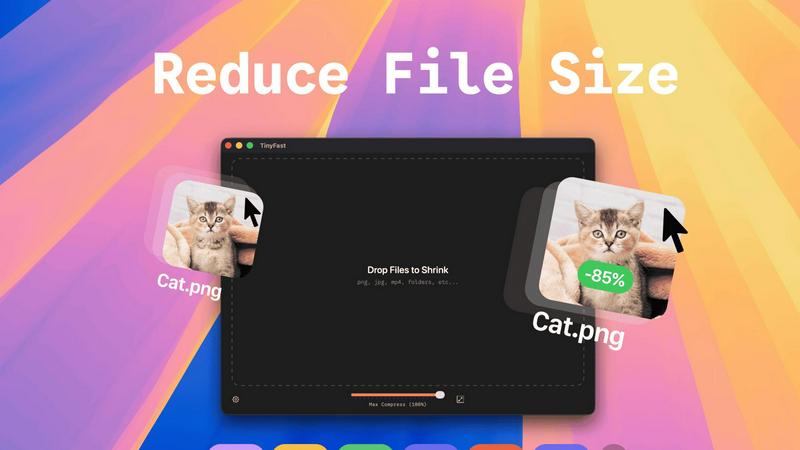
With TinyFast, you can drop entire folders for optimization and receive the compressed output in mere seconds. This feature elevates your workflow by allowing you to process multiple files simultaneously, saving you both time and effort.
Blazing-Fast Compression
Experience the power of optimized native engines designed for speed. TinyFast enables you to shrink large files in seconds without the hassle of waiting for uploads and downloads. This ensures that your creative process remains uninterrupted and efficient.
Resize Resolution
TinyFast offers an automatic image and video resizing feature that allows you to set specific resolutions for your files. This ensures that you maintain control over the quality and size of your digital assets, making it easier to share or store them as needed.
100% Local & Private
Your privacy is paramount with TinyFast. Files never leave your machine, ensuring that sensitive information remains secure. There are no uploads or cloud servers involved, so you can compress with confidence knowing that your assets are protected by design.
Use Cases
Fond
Family Meal Planning
Fond is perfect for families looking to simplify meal planning. Parents can easily create weekly meal schedules, ensuring that their children are eating healthy, balanced meals while also minimizing food waste by utilizing leftovers effectively.
Recipe Organization
For avid cooks who collect recipes from various sources, Fond provides a centralized hub. You can import and organize all your favorite recipes in one place, making it easy to find inspiration and plan meals without the hassle of searching through bookmarks or notes.
Cooking Skill Improvement
Whether you are a beginner or looking to refine your skills, Fond’s AI assistant offers real-time advice and techniques tailored to your level. This guidance helps you improve your cooking skills, ensuring that each meal is not just a task, but a learning experience.
Specialized Cooking Workshops
Fond offers unique modules, such as the Pizza Workshop, for those who want to dive deeper into specific culinary skills. These tailored workshops provide in-depth knowledge and tools, enabling you to master various cooking crafts and techniques.
TinyFast
Optimizing Images for Web Use
Photographers and web designers can use TinyFast to compress images without sacrificing quality. This is essential for improving website load times and enhancing user experience while keeping storage needs minimal.
Preparing Videos for Social Media
Content creators can effortlessly compress videos for social media platforms using TinyFast. The ability to quickly reduce file sizes allows for smooth uploads and ensures that videos retain their visual integrity without excessive processing times.
Streamlining Document Sharing
Professionals can leverage TinyFast to compress PDFs and other documents, making them easier to share via email or cloud storage. This feature is particularly useful for teams needing to collaborate efficiently without running into file size limitations.
Enhancing Workflow for Developers
Developers can incorporate TinyFast into their workflow to compress code files like CSS and JSON. By maintaining smaller file sizes, they can improve load times and optimize user experiences, all while ensuring their code is neatly organized and easy to manage.
Overview
About Fond
Fond is your ultimate kitchen companion, revolutionizing the way you approach cooking, meal planning, and recipe management. Designed specifically for home cooks who are overwhelmed by scattered notes and last-minute grocery chaos, Fond streamlines your cooking journey with a powerful AI assistant named August. This intelligent assistant not only helps you import recipes from the web, eliminating the noise of ads and unnecessary content, but also crafts personalized weekly meal plans tailored to your dietary needs, available ingredients, and cooking skills. With Fond, you can enjoy a seamless cooking experience, from generating organized shopping lists to receiving real-time guidance as you prepare meals. Whether you are a novice or a seasoned chef, Fond empowers you with the knowledge and tools to elevate your culinary skills and transform cooking from a chore into an enjoyable craft.
About TinyFast
TinyFast is your ultimate Mac companion, designed to reclaim your precious time, valuable storage space, and peace of mind. This powerful, native macOS application allows you to compress a wide array of files—including images, videos, and documents—directly on your computer. With TinyFast, you can say goodbye to the cumbersome and often insecure process of uploading your sensitive assets to online servers. Instead, enjoy a seamless experience with its simple drag-and-drop interface that delivers blazing-fast file size reduction while ensuring your data remains safe on your device. Built specifically for developers, designers, creators, and professionals, TinyFast emphasizes security, speed, and workflow efficiency. This transformative tool empowers you to optimize your digital assets instantly, protect confidential work, and streamline your creative process—all from the safety of your own Mac. Stop waiting for slow online tools and start creating with TinyFast's local, instantaneous compression capabilities.
Frequently Asked Questions
Fond FAQ
How does Fond help with meal planning?
Fond streamlines meal planning by allowing users to drag and drop recipes into a weekly layout, automatically generating shopping lists based on selected meals, which saves time and reduces food waste.
Can I import recipes from any website?
Yes, Fond’s AI recipe import feature allows you to paste any recipe URL. It will extract the necessary ingredients and steps while filtering out ads and irrelevant content, making it easy to focus on cooking.
Is Fond suitable for beginners?
Absolutely! Fond is designed for home cooks of all skill levels. The built-in AI assistant offers personalized guidance, helping beginners learn cooking techniques and improve their culinary skills over time.
What devices can I use Fond on?
Fond is available across multiple devices, including web, macOS, iOS, Android, and Windows. This ensures that you can access your recipes and meal plans wherever you are in the kitchen.
TinyFast FAQ
What file types does TinyFast support?
TinyFast supports a wide variety of file types, including images (PNG, JPG, TIFF, HEIC, WEBP, GIF, BMP, SVG), videos (MP4, MOV, M4V), documents (PDF, DOCX), code files (JS, CSS, JSON), and audio files (MP3).
Is my data safe when using TinyFast?
Absolutely! With TinyFast, your files remain on your device during the compression process. There are no uploads to external servers, ensuring total privacy by design.
Can I compress multiple files at once?
Yes, TinyFast allows you to use the batch and drag-drop feature, enabling you to drop entire folders for optimization. You'll receive the compressed output in seconds, making it incredibly efficient for your workflow.
Is there a trial version available for TinyFast?
Yes, TinyFast offers a free forever plan that allows you to compress up to 5 files per day. Additionally, you can opt for a monthly subscription with unlimited local compressions after a 3-day trial period.
Alternatives
Fond Alternatives
Fond is an innovative AI cooking companion that falls under the productivity and management category. It aims to streamline your cooking experience by managing recipes, planning meals, and optimizing your grocery shopping. Users often seek alternatives to Fond for various reasons, such as budget considerations, specific feature requirements, or compatibility with different platforms. When selecting an alternative, it's essential to evaluate the features that matter most to you, like user interface, recipe management capabilities, and real-time assistance. Consider whether the tool aligns with your cooking style, dietary preferences, and the devices you use, ensuring a seamless cooking experience that empowers your culinary journey.
TinyFast Alternatives
TinyFast is a powerful native macOS application specifically designed for file compression, aimed at helping users reclaim time, space, and privacy on their Macs. By instantly shrinking a variety of file types—from images and videos to documents—TinyFast revolutionizes the way individuals manage their digital assets. Users often seek alternatives for various reasons, including pricing, feature sets, and compatibility with different platforms. It's essential to consider factors such as speed, privacy, and ease of use when exploring alternative solutions, ensuring they align with your specific needs and workflow. When choosing an alternative, prioritize tools that offer local processing capabilities to maintain your data's security while ensuring efficient performance. Look for applications that support a wide range of file formats, enabling you to handle all your compression needs seamlessly. Additionally, a user-friendly interface can significantly enhance your experience, allowing you to focus on your creative projects rather than getting bogged down by complicated software.