RocketShare vs SupaSidebar
Side-by-side comparison to help you choose the right AI tool.

RocketShare
RocketShare empowers you to share files privately with zero-knowledge encryption for unmatched security and peace of.
Last updated: March 4, 2026

SupaSidebar
Revolutionize your Mac workflow with SupaSidebar for quick access to your favorite links, files, and folders at your.
Last updated: February 28, 2026
Visual Comparison
RocketShare

SupaSidebar
Feature Comparison
RocketShare
Zero-Knowledge Encryption
RocketShare's zero-knowledge encryption ensures that your files are encrypted before they ever leave your device. This means that your data remains completely private and unreadable to anyone except you and the designated recipients, providing you with unparalleled peace of mind.
Cloud and Local Sharing Options
With RocketShare, you can choose between cloud-based sharing for effortless accessibility or local peer-to-peer sharing for added speed and security. This flexibility allows you to select the method that best suits your needs and circumstances, ensuring that sharing is always convenient.
Secure Data Storage in the EU
RocketShare prioritizes your data's security by ensuring that all files are stored within the EU. This not only complies with stringent data protection regulations but also provides you with the confidence that your information is held in a secure environment, far from prying eyes.
User-Friendly Interface
The intuitive design of RocketShare makes it incredibly easy for anyone to use, regardless of technical expertise. You can simply drag and drop files to upload, or click to browse, ensuring that sharing is a quick and hassle-free experience.
SupaSidebar
Instant Access to Your Digital Workspace
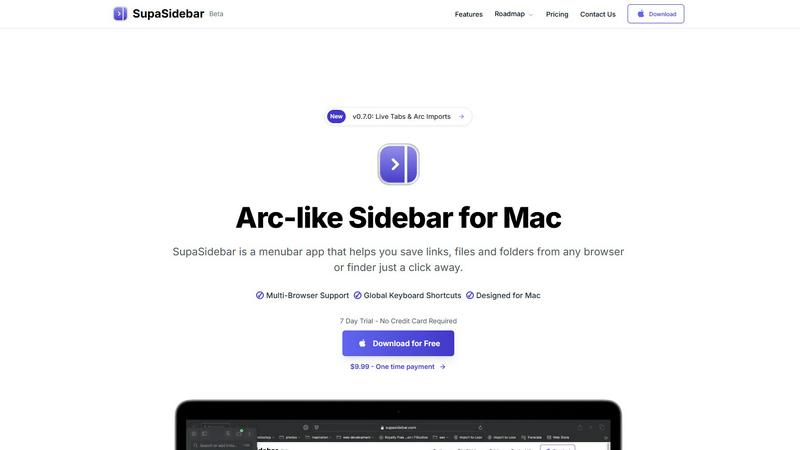
SupaSidebar provides immediate access to links, files, and folders from any browser or Finder, all within a beautifully crafted sidebar. With just one click, you can save essential resources and retrieve them effortlessly, eliminating the need to sift through multiple tabs or applications.
Global Keyboard Shortcuts
Experience unparalleled efficiency with SupaSidebar's global keyboard shortcuts. By simply pressing CMD CTRL S to save or CMD CTRL C to copy a current website link, you can execute commands swiftly from anywhere, allowing you to maintain your momentum without interruption.
Recents Feature
Never lose track of your workflow again. SupaSidebar's Recents feature tracks every website you have visited in the last 48 hours, enabling you to find your work instantly. This functionality ensures that your most recent explorations are always just a click away, enhancing your productivity.
Pinned Favorites
Stay organized with SupaSidebar's Pinned Favorites feature. You can keep your most important links and files at the top of your sidebar for quick access. This functionality is perfect for those who repeatedly access specific resources, ensuring that they are always within reach.
Use Cases
RocketShare
Legal Professionals
Lawyers can rely on RocketShare to send sensitive case files securely to clients or colleagues. The zero-knowledge encryption guarantees that confidential information remains protected throughout the entire sharing process.
Healthcare Providers
In the healthcare sector, professionals can share patient records and sensitive health data without fear of breaches. RocketShare ensures compliance with privacy regulations while maintaining the integrity of critical patient information.
Creative Professionals
Photographers and videographers can safely deliver high-resolution images and videos to clients. With RocketShare, they can confidently share their artistic work without risking exposure to unauthorized parties.
Collaborative Teams
Marketing agencies and other collaborative teams can utilize RocketShare to share project files and confidential documents among team members. The secure sharing capabilities foster a productive environment while safeguarding intellectual property.
SupaSidebar
For Creators
SupaSidebar serves as an invaluable tool for creators who need quick access to a variety of resources. Whether you are researching for a project, gathering inspiration, or managing different files, SupaSidebar keeps everything organized and at your fingertips, allowing your creativity to flow seamlessly.
For Researchers
Researchers can benefit immensely from SupaSidebar by easily saving and retrieving academic articles, data sets, and relevant links. The Recents feature allows quick access to previously visited resources, making it easier to compile and reference essential information for reports or papers.
For Students
Students juggling multiple assignments and projects will find SupaSidebar indispensable. It enables them to organize course materials, lecture notes, and research links effectively, ensuring that they can find everything they need without wasting valuable study time.
For Multitaskers
If you often switch between different applications and browsers, SupaSidebar is your perfect companion. With fast search capabilities and global shortcuts, it allows multitaskers to navigate their digital workspace with ease, enhancing efficiency and reducing the time spent on menial tasks.
Overview
About RocketShare
RocketShare is a groundbreaking file-sharing platform that prioritizes your privacy with unwavering commitment. Designed for individuals and businesses alike, it enables users to send files of any size securely and confidently. The unique zero-knowledge encryption model ensures that your files are encrypted on your device before they even touch the internet, meaning that not even RocketShare itself can access your content. You hold the encryption key, often embedded in the share link, which guarantees that only you and your intended recipients can view the data. This enterprise-grade security is packaged in an elegantly simple, self-serve interface that makes sharing effortless. Whether you are a lawyer tasked with handling sensitive case files, a photographer delivering beautiful client galleries, or a team member collaborating on confidential projects, RocketShare is your trusted ally. With both cloud-based and local peer-to-peer sharing options and data securely stored in the EU, RocketShare is the ultimate tool for anyone who values simplicity without compromising on security.
About SupaSidebar
SupaSidebar is a transformative menubar application designed specifically for Mac users, aiming to streamline digital interactions and enhance productivity. In a world overflowing with tabs, files, and links, SupaSidebar emerges as a powerful command center, providing instant access to everything you need at your fingertips. Created for diverse users, including creators, researchers, students, and anyone who juggles multiple tasks across various browsers and applications, SupaSidebar eliminates digital chaos. Its core value proposition lies in its profound simplicity: it aggregates links, files, and folders into an elegant sidebar that resides in your menu bar. With global keyboard shortcuts and a user-friendly interface, SupaSidebar empowers you to navigate your digital workspace swiftly and efficiently. Forget about losing track of critical resources or wasting time searching; SupaSidebar brings order to your workflow, keeping your data private and secure on your Mac, so you can focus on what truly matters—your creative flow and productivity.
Frequently Asked Questions
RocketShare FAQ
How does RocketShare ensure my files remain private?
RocketShare employs a zero-knowledge encryption model, which means your files are encrypted on your device before they are uploaded. This guarantees that no one, including RocketShare, can access or read your files.
Can I share large files through RocketShare?
Absolutely! RocketShare is designed to handle files of any size, making it easy for you to share everything from small documents to large multimedia files without any hassle.
Is my data stored securely?
Yes, all data shared through RocketShare is securely stored within the EU, ensuring compliance with stringent data protection laws and providing you with peace of mind regarding your information's safety.
Do I need a credit card to start using RocketShare?
No, you can start using RocketShare without needing to provide a credit card. This allows you to experience the platform's features and security without any financial commitment upfront.
SupaSidebar FAQ
Is SupaSidebar a browser extension?
No, SupaSidebar is a menubar application designed for Mac that provides a centralized location for accessing links, files, and apps, enhancing productivity without being a browser extension.
Which browsers does SupaSidebar work with?
SupaSidebar supports all major browsers, including Safari, Chrome, Firefox, and Arc, ensuring that you can save and access resources from your preferred browser seamlessly.
What macOS version do I need?
To use SupaSidebar, you need macOS version 13 or later. This ensures compatibility and optimal performance for all users.
Where is my data stored?
All your data stays securely on your Mac, ensuring your privacy. SupaSidebar is designed to keep your information safe and accessible only to you, without relying on external cloud storage solutions.
Alternatives
RocketShare Alternatives
RocketShare is a cutting-edge file-sharing platform that prioritizes your privacy above all else. Designed for both individuals and businesses, it allows users to securely send files of any size using advanced zero-knowledge encryption. This means that your data is encrypted on your device before it even reaches the internet, ensuring that only you have access to your files. As users explore their options, they often seek alternatives to RocketShare due to various reasons such as pricing, specific features, or compatibility with different platforms. When selecting an alternative, it's essential to consider factors like the level of security offered, ease of use, and the ability to handle the specific file sizes or types you need. This way, you can ensure that your chosen solution aligns perfectly with your privacy needs and workflow requirements.
SupaSidebar Alternatives
SupaSidebar is a powerful productivity tool designed specifically for Mac users, providing an Arc-inspired sidebar that streamlines access to links, files, and folders. As a universal command center, it caters to creators, students, researchers, and anyone seeking to optimize their digital workflow. However, users often seek alternatives due to various reasons such as pricing, feature set, compatibility with other platforms, or specific workflow requirements that may not align with SupaSidebar's offerings. When choosing an alternative to SupaSidebar, consider factors like user experience, ease of access, integration capabilities with your existing tools, and the overall impact on your productivity. Look for features that enhance your workflow without adding complexity, ensuring that you can maintain focus and efficiency in your digital tasks. Ultimately, the right alternative should empower you to regain control over your digital environment and support your unique needs.