
SupaSidebar
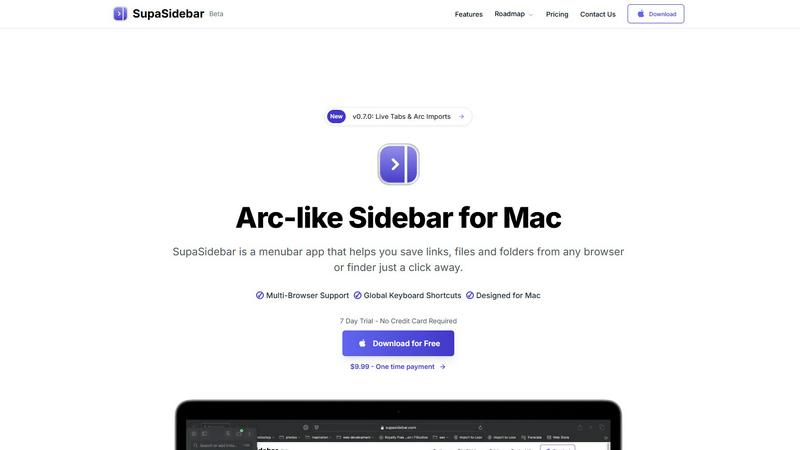
Revolutionize your Mac workflow with SupaSidebar for quick access to your favorite links, files, and folders at your.
AI tool Details
Explore More
Alternatives
About SupaSidebar
SupaSidebar is a transformative menubar application designed specifically for Mac users, aiming to streamline digital interactions and enhance productivity. In a world overflowing with tabs, files, and links, SupaSidebar emerges as a powerful command center, providing instant access to everything you need at your fingertips. Created for diverse users, including creators, researchers, students, and anyone who juggles multiple tasks across various browsers and applications, SupaSidebar eliminates digital chaos. Its core value proposition lies in its profound simplicity: it aggregates links, files, and folders into an elegant sidebar that resides in your menu bar. With global keyboard shortcuts and a user-friendly interface, SupaSidebar empowers you to navigate your digital workspace swiftly and efficiently. Forget about losing track of critical resources or wasting time searching; SupaSidebar brings order to your workflow, keeping your data private and secure on your Mac, so you can focus on what truly matters—your creative flow and productivity.
Features
Instant Access to Your Digital Workspace
SupaSidebar provides immediate access to links, files, and folders from any browser or Finder, all within a beautifully crafted sidebar. With just one click, you can save essential resources and retrieve them effortlessly, eliminating the need to sift through multiple tabs or applications.
Global Keyboard Shortcuts
Experience unparalleled efficiency with SupaSidebar's global keyboard shortcuts. By simply pressing CMD CTRL S to save or CMD CTRL C to copy a current website link, you can execute commands swiftly from anywhere, allowing you to maintain your momentum without interruption.
Recents Feature
Never lose track of your workflow again. SupaSidebar's Recents feature tracks every website you have visited in the last 48 hours, enabling you to find your work instantly. This functionality ensures that your most recent explorations are always just a click away, enhancing your productivity.
Pinned Favorites
Stay organized with SupaSidebar's Pinned Favorites feature. You can keep your most important links and files at the top of your sidebar for quick access. This functionality is perfect for those who repeatedly access specific resources, ensuring that they are always within reach.
Use Cases
For Creators
SupaSidebar serves as an invaluable tool for creators who need quick access to a variety of resources. Whether you are researching for a project, gathering inspiration, or managing different files, SupaSidebar keeps everything organized and at your fingertips, allowing your creativity to flow seamlessly.
For Researchers
Researchers can benefit immensely from SupaSidebar by easily saving and retrieving academic articles, data sets, and relevant links. The Recents feature allows quick access to previously visited resources, making it easier to compile and reference essential information for reports or papers.
For Students
Students juggling multiple assignments and projects will find SupaSidebar indispensable. It enables them to organize course materials, lecture notes, and research links effectively, ensuring that they can find everything they need without wasting valuable study time.
For Multitaskers
If you often switch between different applications and browsers, SupaSidebar is your perfect companion. With fast search capabilities and global shortcuts, it allows multitaskers to navigate their digital workspace with ease, enhancing efficiency and reducing the time spent on menial tasks.
Frequently Asked Questions
Is SupaSidebar a browser extension?
No, SupaSidebar is a menubar application designed for Mac that provides a centralized location for accessing links, files, and apps, enhancing productivity without being a browser extension.
Which browsers does SupaSidebar work with?
SupaSidebar supports all major browsers, including Safari, Chrome, Firefox, and Arc, ensuring that you can save and access resources from your preferred browser seamlessly.
What macOS version do I need?
To use SupaSidebar, you need macOS version 13 or later. This ensures compatibility and optimal performance for all users.
Where is my data stored?
All your data stays securely on your Mac, ensuring your privacy. SupaSidebar is designed to keep your information safe and accessible only to you, without relying on external cloud storage solutions.
Similar to SupaSidebar
Build Mode for Mac
Build Mode is a Mac app that turns focused sessions into visible progress, so you can see the work adding up before the results arrive.

MySOP.guru
Capture any workflow in your browser and export a branded, step-by-step SOP with screenshots. €5 per document, no subscription.

PerPageFax
PerPageFax lets you send a fax online from any browser for a flat $0.50 per page — no account, no subscription, no fax machine.



Glanced
Follow news, blogs, newsletters, and podcasts in a free RSS reader, with AI summaries, top stories, full-text search, saved searches, and a catalog.