Gleem.AI Studio vs SimpleDraw
Side-by-side comparison to help you choose the right AI tool.

Gleem.AI Studio
Gleem.AI Studio empowers you to effortlessly create, edit, and personalize stunning visuals in one seamless workspace.
Last updated: February 26, 2026

SimpleDraw
Transform your space with precise, professional floor plans created effortlessly in your browser.
Last updated: March 1, 2026
Visual Comparison
Gleem.AI Studio

SimpleDraw
Feature Comparison
Gleem.AI Studio
Text-to-Image Generator
Transform your ideas into breathtaking visuals with Gleem.AI Studio's text-to-image generator. Simply input your concept, choose your desired size, and let the platform's advanced AI refine your words into stunning images that capture your vision perfectly.
AI Image Editing
Edit images effortlessly within Gleem.AI Studio's intuitive AI editor. Add or remove objects, adjust poses, apply filters, and even restore old images, all with simple, natural prompts that make the editing process both creative and enjoyable.
AI Avatars
Generate and personalize your own AI avatars to enhance your visual storytelling. Place your avatar into any scene, adjust its pose, or try on different outfits without the need for another photoshoot, expanding your creative capabilities with ease.
Seamless Workflow Management
Gleem.AI Studio is designed to keep your creative process organized. Each project has its dedicated space, allowing you to save prompts, edits, and versions in one location. This ensures that you can easily access and build upon your previous work without losing context.
SimpleDraw
Dedicated Floor Plan Mode
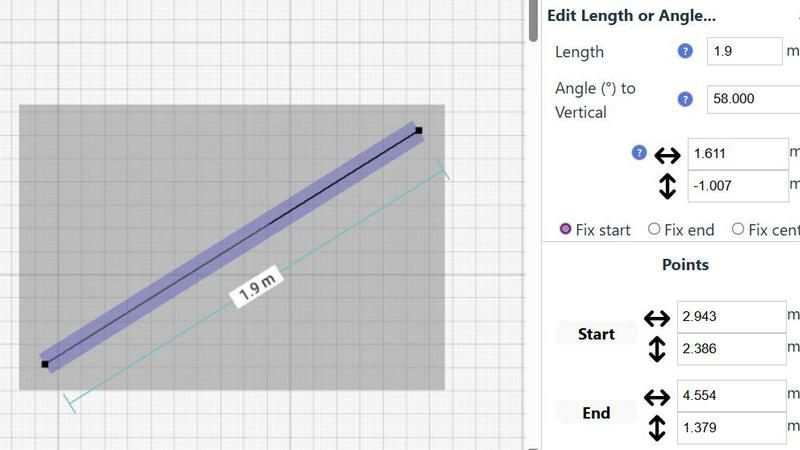
This specialized mode is your gateway to professional architectural sketching without the complexity. With a single click, you can draw walls to scale and seamlessly add standard doors and windows. A comprehensive library of interior fixtures for kitchens, bathrooms, living rooms, and bedrooms allows you to furnish your vision instantly. Real-time measurements update dynamically as you adjust your plan, ensuring every element fits perfectly from the very first sketch, empowering you to build with confidence.
Intelligent Smart Alignment System
SimpleDraw acts as your digital drafting assistant, eliminating the frustration of misaligned lines. The smart alignment system intuitively snaps points and lines into perfect vertical, horizontal, or angled positions, providing clear visual cues as you work. For ultimate control, you can lock movements to axes using keyboard shortcuts or zoom in for meticulous, manual placement. This feature gives you the perfect balance of automated help and precise, hands-on control.
Non-Destructive Editing & Complete Control
Your creative process is protected and flexible. Every element you draw—lines, shapes, fixtures—can be modified, moved, or adjusted at any time without starting over. Powerful tools like undo/redo, group selection for moving/copying entire sections, and direct keyboard entry for exact dimensions and angles give you unparalleled command. This means you can experiment freely, iterate on designs, and refine your plans to perfection without any risk or limitation.
Dynamic Measurement & Unit Flexibility
Clarity is key to any great plan. SimpleDraw’s comprehensive measurement system displays contextual dimensions dynamically as you draw, so you always know the exact size and scale. You have full control over which measurements are shown and can effortlessly switch between metric units and standard US feet/inches. This adaptability ensures your drawings are not only accurate but also communicate perfectly for your specific project, suppliers, or team.
Use Cases
Gleem.AI Studio
Marketing Assets Creation
Marketers can leverage Gleem.AI Studio to swiftly create visually appealing marketing materials. From social media posts to promotional banners, the platform allows for rapid iteration and adaptation, ensuring your visuals stay fresh and engaging.
Social Media Visuals
Social media managers can use Gleem.AI Studio to generate and edit eye-catching images tailored to their audience. With built-in tools for image enhancement and avatar creation, you can maintain a cohesive visual style that resonates with followers.
Product Images Generation
E-commerce businesses can benefit from Gleem.AI Studio by generating high-quality product images that stand out. The ability to edit and customize visuals on the fly streamlines the process of updating and showcasing products effectively.
Creative Variations Testing
Artists and designers can utilize Gleem.AI Studio for testing creative variations of their work. The platform's seamless workflow allows for quick iterations and modifications, enabling you to explore different styles and concepts without hassle.
SimpleDraw
Home Renovation Planning
Take the guesswork out of your next big home project. Whether you're remodeling a kitchen, redesigning a bathroom, or finishing a basement, SimpleDraw lets you create precise scale drawings to experiment with layouts. Visualize where new cabinets, appliances, and fixtures will go before you swing a hammer, ensuring your vision is feasible and helping you communicate clearly with contractors, saving time, money, and stress.
Furniture Arrangement & Space Planning
Stop wondering if your new sofa will fit. Use SimpleDraw to draft an accurate layout of your bedroom, living room, or home office. Place scaled representations of your existing or potential furniture to optimize flow and functionality. This proactive planning prevents costly purchasing mistakes and helps you create a space that is both beautiful and practical, transforming empty rooms into perfectly arranged havens.
Creating Real Estate & Rental Listings
Stand out in the market by providing clear, professional floor plans. Landlords, real estate agents, and homeowners can use SimpleDraw to create accurate and attractive layouts of apartments, houses, or rental properties. These plans give potential buyers or tenants a superior understanding of the space, setting your listing apart and attracting more serious, well-informed inquiries.
DIY Project Visualization & Prototyping
Bring your creative ideas down to earth. From designing a custom garden shed and planning a woodworking project to sketching a new deck layout, SimpleDraw is the perfect tool for prototyping. It allows you to work through dimensions, angles, and material placements in a digital space first, turning abstract concepts into concrete, buildable plans and boosting your confidence to start making.
Overview
About Gleem.AI Studio
Gleem.AI Studio is a transformative AI image workspace designed for creators who prioritize creativity over configuration. In a world where visual content is paramount, Gleem.AI Studio simplifies the creative process by integrating image generation, editing, and iteration into a single, streamlined environment. Whether you are a marketer, content creator, or part of a small team, this platform empowers you to produce consistent, high-quality visuals quickly and intuitively. With Gleem.AI Studio, you can effortlessly generate stunning images from text prompts, edit them seamlessly, and even create personalized AI avatars, all without the burden of technical complexity. By removing unnecessary distractions and fostering a fast, fluid creative flow, Gleem.AI Studio enables you to focus on what truly matters: your vision and the artistry behind it.
About SimpleDraw
SimpleDraw is your free, all-access pass to transforming ideas into precise, actionable plans. It is an innovative online drawing tool that shatters the barrier between creative vision and accurate execution. Designed for anyone with a project in mind—from the DIY homeowner embarking on a weekend renovation to the professional interior designer crafting client presentations—SimpleDraw empowers you to create detailed scale drawings and floor plans with confidence and ease. Forget complex, expensive CAD software that requires downloads and training. SimpleDraw delivers professional-grade precision through an interface as intuitive as pen and paper, all directly within your web browser with no registration required. Its core mission is to democratize design, making the power of accurate spatial planning accessible to everyone. Whether you're visualizing a new kitchen layout, planning furniture for a living room, or mapping an entire apartment, SimpleDraw provides the smart tools and flexible control to bring your structured ideas to life, turning uncertainty into a clear, measurable blueprint for success.
Frequently Asked Questions
Gleem.AI Studio FAQ
What makes Gleem.AI Studio different from other design tools?
Gleem.AI Studio stands out by offering a unified workspace where image generation, editing, and avatar creation happen in one place. This eliminates the need for multiple tools, allowing for a more fluid and intuitive creative process.
Is there a learning curve to using Gleem.AI Studio?
Gleem.AI Studio is designed with simplicity in mind, making it accessible even for users without technical expertise. The intuitive interface and natural language prompts simplify the creative process, enabling users to focus on their ideas.
Can I collaborate with my team using Gleem.AI Studio?
Yes! Gleem.AI Studio is perfect for small teams and collaborations. The platform allows users to share projects, ensuring that everyone can contribute to the creative process without losing track of edits and versions.
How does the AI image editing feature work?
The AI image editing feature uses advanced algorithms to understand your natural prompts, allowing you to make changes like adding or removing elements with ease. This smart approach ensures high-quality edits without needing complex commands.
SimpleDraw FAQ
Is SimpleDraw really free to use with no hidden costs?
Yes, absolutely. SimpleDraw is completely free to use. You can access all its core features, including the Floor Plan Mode, smart alignment tools, and measurement systems, directly in your browser without any cost, registration, or software download. Our mission is to make precise drawing accessible to everyone.
Do I need any prior CAD or technical drawing experience?
Not at all. SimpleDraw is specifically designed to be intuitive for beginners while powerful enough for professionals. The interface mimics simple pen-and-paper drawing, and features like the smart alignment guide you. You can start creating meaningful, accurate plans within minutes, regardless of your background.
Can I use SimpleDraw on my tablet or mobile device?
SimpleDraw is a web-based application optimized for use in a desktop or laptop browser for the best drawing experience with a mouse or trackpad. While it may load on a tablet, the precision required for scale drawing is best achieved with a larger screen and precise pointer control.
How do I save or export my drawings from SimpleDraw?
Your drawings are automatically saved in your browser's local storage as you work. For exporting, you can use your browser's print function to create a PDF or image of your plan. The development team is actively working on enhanced export features based on community feedback shared via platforms like Discord.
Alternatives
Gleem.AI Studio Alternatives
Gleem.AI Studio is an innovative AI image workspace that empowers creators to generate and edit visuals effortlessly. As a tool that falls under the marketing category, it brings together image generation and editing in a single, user-friendly environment. This streamlined approach is particularly appealing to marketers, creators, and small teams who prioritize speed and consistency in their visual assets. Users often seek alternatives to Gleem.AI Studio for various reasons, including pricing, specific feature sets, or compatibility with their existing workflows. When exploring alternatives, it's essential to consider factors such as ease of use, the range of features offered, and the overall cost-effectiveness. A great alternative should enhance your creative process, allowing you to focus on what truly matters: bringing your visions to life.
SimpleDraw Alternatives
SimpleDraw is a powerful, free online tool in the design software category, specifically crafted to help you create precise scale drawings and floor plans. It transforms the complex task of technical drawing into an intuitive, empowering experience, allowing you to visualize and plan your projects with newfound clarity and confidence. You might explore other options for various reasons, such as needing advanced 3D modeling, seeking integrated project management features, or requiring software for a different operating system. Every project and creator has unique needs, and finding the right tool is a key step in bringing your vision to life efficiently. When evaluating alternatives, focus on what will truly empower your creative process. Consider the core functionality you need, the learning curve, collaboration capabilities, and how the tool fits into your overall workflow. The goal is to select a platform that not only meets your technical requirements but also inspires you to design with precision and purpose.