Pinssaver vs Shrinkpad
Side-by-side comparison to help you choose the right AI tool.

Pinssaver
Effortlessly download Pinterest videos, images, and GIFs in HD or 4K to keep your inspirations alive forever.
Last updated: February 28, 2026

Shrinkpad
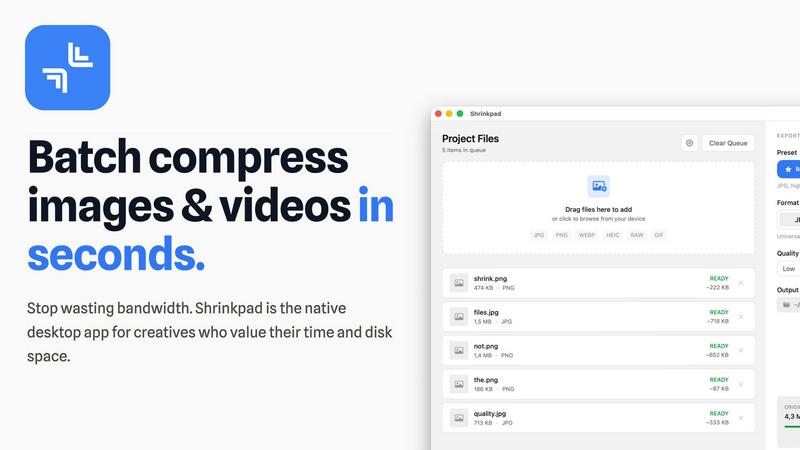
Shrinkpad effortlessly compresses your images and videos on Mac, saving space and enhancing performance in seconds.
Last updated: February 28, 2026
Visual Comparison
Pinssaver

Shrinkpad
Feature Comparison
Pinssaver
High-Quality Downloads
Pinssaver allows users to download Pinterest videos, GIFs, and images in exceptional quality, including HD, 2K, and 4K options. This feature ensures that every visual inspiration is preserved in stunning detail, enhancing your creative projects and personal collections.
User-Friendly Interface
Designed with a modern and minimalist approach, Pinssaver provides an effortless user experience. Its intuitive interface allows anyone to easily paste a link, click download, and receive their content in seconds, making it accessible even for first-time users.
Cross-Device Compatibility
Whether you are using a smartphone, tablet, or desktop, Pinssaver works seamlessly across all major devices and browsers. This cross-device support ensures that you can download and enjoy your favorite Pinterest content from anywhere, at any time.
Privacy and Security
Pinssaver prioritizes user privacy by not requiring accounts, login details, or tracking of usage. You can download content worry-free, knowing that your data remains secure and your creative process stays private.
Shrinkpad
Batch Compression
Shrinkpad allows you to batch compress hundreds of images and videos simultaneously. Just drag and drop your files or entire folders, and watch as the app optimizes them in seconds, saving you time and effort.
Intelligent Compression
No more guesswork with compression settings. Shrinkpad analyzes the visual complexity of your files and automatically applies the perfect compression ratio, ensuring high-quality results without artifacts.
Folder Mode
With Shrinkpad’s Folder Mode, you can simply drop an entire folder, and it will automatically detect and queue all supported images and videos for compression. This feature streamlines your workflow and eliminates the hassle of manual file selection.
Privacy-Focused Processing
All processing occurs locally on your Mac. Shrinkpad ensures that your files do not leave your device, providing peace of mind regarding your sensitive assets and eliminating the need for internet access during compression.
Use Cases
Pinssaver
Collecting Design Inspiration
Graphic designers and artists can leverage Pinssaver to gather design ideas and references efficiently. Saving high-quality images and videos from Pinterest allows them to create mood boards and reference materials that inspire their projects.
Curating Recipes and Tutorials
Food enthusiasts and home cooks can use Pinssaver to download recipe videos and cooking tutorials. This feature enables them to create a personal archive of culinary inspiration that they can reference anytime, whether they are online or offline.
Storing Travel Clips
Travel creators can easily save destination videos and visual stories with Pinssaver. By downloading travel clips, they can curate their own collection of inspiring visuals that motivate their next adventure and serve as reminders of past journeys.
Organizing DIY Projects
DIY crafters can benefit from Pinssaver by downloading step-by-step guides and tutorials. This capability allows them to keep all their project inspirations neatly organized, making it easy to revisit ideas and execute their creative projects.
Shrinkpad
Optimizing Website Assets
Web developers can use Shrinkpad to efficiently compress images and videos for websites, resulting in significantly faster load times and improved performance metrics, such as LCP scores.
Streamlining Creative Workflows
Photographers and designers can save hours of manual exporting by using Shrinkpad to batch process their assets. Export everything at once and let the app handle the optimization and renaming.
Reducing Storage Costs
Businesses and content creators looking to save storage costs can leverage Shrinkpad to reclaim valuable disk space by reducing the size of large media files, freeing up resources for other essential projects.
Enhancing Video Production
Video editors can benefit from Shrinkpad’s ability to compress 4K MP4 videos without sacrificing quality, making it easier to manage large video files and improve editing efficiency.
Overview
About Pinssaver
Pinssaver is your ultimate companion for harnessing the vast creative potential of Pinterest. As a powerful, free, and multi-language online tool, it revolutionizes the way you interact with visual inspiration. Pinterest is a treasure trove of ideas, from stunning travel videos and DIY tutorials to delicious recipes and innovative design concepts. However, Pinterest often limits your ability to keep and expand on this inspiration. Pinssaver breaks down those barriers, empowering you to download videos, images, and GIFs directly to your device in breathtaking HD, 2K, or 4K quality—quickly, safely, and without disruptive watermarks. Designed for creators, dreamers, and organizers, Pinssaver's intuitive interface makes the downloading process effortless and enjoyable. It transforms fleeting ideas into tangible assets for your projects, mood boards, and personal archives, allowing you to save, organize, and revisit your favorite content anytime, anywhere—even offline. With Pinssaver, you are not just saving content; you are claiming your inspiration and taking control of your creative journey.
About Shrinkpad
Shrinkpad is your ultimate companion in the creative journey, designed specifically for macOS users who refuse to let bloated media files hinder their productivity. This powerful native application enables photographers, designers, developers, and content creators to reclaim their storage space and accelerate their workflows. With Shrinkpad, you can batch compress images and videos with stunning speed, reducing file sizes by up to 90% in mere seconds. Its operation is entirely local, ensuring that your sensitive files remain private without the need for cloud uploads or internet dependencies. Whether you work with JPGs, RAW files, or 4K videos, Shrinkpad intelligently applies optimal compression settings, preserving visual quality while freeing up gigabytes of storage. It's not just a tool; it's a transformative solution that empowers you to focus on your creativity rather than on tedious file management.
Frequently Asked Questions
Pinssaver FAQ
How do I download videos from Pinterest using Pinssaver?
To download videos, simply open Pinterest and find the video you want. Tap “Share,” select “Copy link,” then go to PinsSaver.com, paste the link into the provided box, and click “Download.” Choose your preferred quality, and your video will be saved to your device.
Is Pinssaver free to use?
Yes, Pinssaver is completely free to use with no hidden fees or subscriptions. You can download as much content as you want without any cost.
What devices can I use Pinssaver on?
Pinssaver is compatible with all major devices, including Android and iOS smartphones, Windows and Mac desktops, and tablets of all sizes. You can access it from any device with a web browser.
Is my data safe when using Pinssaver?
Absolutely. Pinssaver does not store any personal data, require login information, or track user activity. Your privacy is a top priority, allowing you to download content securely and confidently.
Shrinkpad FAQ
Can I use Shrinkpad for free?
Yes, Shrinkpad offers a Free Starter plan with essential tools for casual use, which allows you to batch compress images in common formats.
What file formats does Shrinkpad support?
Shrinkpad supports over 50 formats, including popular image formats like JPG, PNG, and RAW, as well as video formats like MP4 and MOV, ensuring versatility for all your media needs.
Does Shrinkpad support video compression?
Absolutely! Shrinkpad not only compresses images but also handles video files, allowing you to optimize both types of media in one seamless workflow.
How many files can I process at once?
With Shrinkpad, you can process thousands of files at once without crashing, thanks to its unlimited batching capabilities designed for heavy-duty use.
Alternatives
Pinssaver Alternatives
Pinssaver is a powerful online tool designed to unlock the creative potential of Pinterest by allowing users to download videos, images, and GIFs in stunning HD, 2K, or 4K quality. As a part of the social media category, it empowers creators and dreamers to capture and organize their favorite inspirations seamlessly. Users often seek alternatives to Pinssaver for various reasons, including different pricing models, feature sets, or compatibility with specific platforms. When exploring alternatives, it’s important to consider the quality of downloads, user experience, device compatibility, and any additional features that can enhance your creative process. Choosing the right alternative involves assessing what matters most to your journey as a creator. Look for tools that offer high-resolution downloads, an intuitive user interface, and robust cross-device compatibility. The right choice will not only meet your immediate needs but also support your long-term creative aspirations.
Shrinkpad Alternatives
Shrinkpad is a powerful native macOS application designed specifically for batch compressing images and videos, making it an essential tool for photographers, designers, developers, and content creators. With its ability to reduce file sizes by up to 90% while maintaining visual quality, it stands out as a go-to solution for optimizing storage and enhancing performance. Users often seek alternatives to Shrinkpad due to various reasons, including pricing, feature sets, or compatibility with different platforms. When looking for an alternative, it’s important to consider factors such as the speed of compression, the range of supported file formats, ease of use, and privacy measures. Additionally, evaluate whether the tool processes files locally to ensure your data remains secure and private, as well as the capability to handle batch processing for efficiency. Ultimately, the right choice will align with your specific creative needs and workflow preferences.