
Ray3 AI Video vs Seedance 2 AI Video Generator
Side-by-side comparison to help you choose the right AI tool.
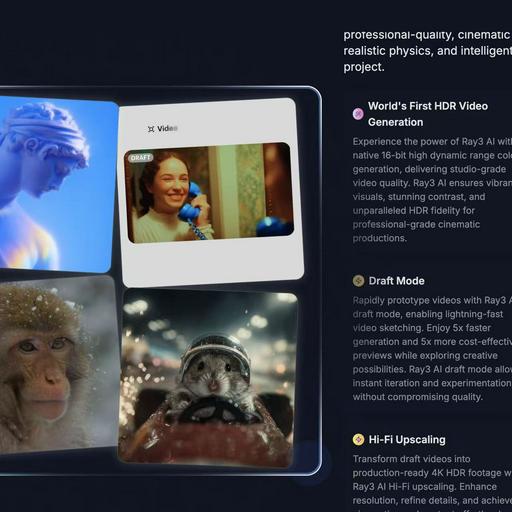
Transform your ideas into breathtaking 4K HDR videos effortlessly with Ray3 AI's innovative video generation technology.
Last updated: March 1, 2026

Transform your ideas into cinematic videos instantly with powerful AI control.
Last updated: March 1, 2026
Visual Comparison
Ray3 AI Video
Seedance 2 AI Video Generator

Feature Comparison
Ray3 AI Video
World's First HDR Video Generation
Ray3 AI harnesses the power of native 16-bit high dynamic range color generation, delivering unparalleled studio-grade video quality. This feature ensures vibrant visuals, stunning contrast, and exceptional HDR fidelity for cinematic productions that stand out.
AI Reasoning Engine
The innovative AI reasoning engine behind Ray3 comprehends user intent and evaluates outputs to enhance results automatically. This dynamic adaptability allows creators to receive accurate and high-quality video generation tailored to their prompts.
Draft Mode
With the Draft Mode feature, users can rapidly prototype videos, allowing for quick iterations and experimentation. This mode provides 5x faster generation and 5x more cost-effective previews, empowering creators to explore their ideas without sacrificing quality.
Visual Annotations
Ray3 AI enables users to draw directly on images, specifying exact motions, positions, and visual details. This feature ensures that annotations are interpreted accurately, maintaining consistency and alignment with the user's creative vision throughout the video.
Seedance 2 AI Video Generator
Multimodal Generation Modes
Seedance 2.0 offers three powerful entry points for creation: Text-to-Video, Image-to-Video, and Video-to-Video. This flexibility allows you to start your creative process wherever inspiration strikes. Begin with a detailed text prompt to generate entirely new scenes, use an image to animate and extend a specific visual style, or transform existing footage with new artistic directions and effects, all within one seamless platform.
Reference-First Creative Control
Move beyond guesswork with a reference-driven workflow. By using source images or video clips as anchors, you gain immense control over character consistency, artistic style, and cinematic feel. This feature ensures your final output aligns with your vision, reducing reliance on perfect prompt wording and delivering more predictable, professional results that stay true to your original concept.
Integrated Audio-Video Synthesis
Create a complete sensory experience in a single generation pass. Seedance 2.0 can synthesize synchronized audio, including sound effects, background music, and voice, directly alongside your video. With support for lip-sync in over 10 languages, this feature eliminates the need for separate audio editing tools, allowing you to produce fully realized videos ready for publishing.
High-Fidelity Output Specifications
Produce content that meets professional standards. Seedance 2.0 generates videos up to 1080p resolution at a cinema-standard 24 frames per second for smooth playback. With support for multiple aspect ratios (16:9, 9:16, 1:1) and durations extendable up to 10 seconds, you can create optimized content for any platform, from YouTube to TikTok, all exported in the universal MP4 format.
Use Cases
Ray3 AI Video
Concept Development for Filmmakers
Filmmakers can utilize Ray3 AI Video to develop visual concepts quickly. By inputting reference images or detailed prompts, they can generate high-quality drafts that capture their vision, facilitating faster decision-making in the pre-production phase.
Artistic Exploration for Designers
Graphic designers can leverage Ray3's capabilities to explore artistic concepts through video. The ability to create visually rich content with HDR fidelity allows them to push boundaries, enhancing their portfolios and showcasing innovative designs.
Marketing and Promotional Content Creation
Businesses can employ Ray3 AI Video to craft engaging marketing materials. With the tool's high-quality output and rapid prototyping features, companies can produce eye-catching video content that effectively communicates their brand messages.
Educational Video Production
Educators and content creators can utilize Ray3 for producing instructional videos. The platform's intuitive design and advanced features enable the creation of informative and visually appealing content that enhances the learning experience for students.
Seedance 2 AI Video Generator
Rapid Social Media Content Creation
Empower social media managers and content creators to produce a high volume of engaging, platform-specific videos quickly. Generate eye-catching stories, Reels, and TikTok clips from trending text prompts or brand images, maintaining a consistent aesthetic and message across all channels without the need for lengthy filming or editing sessions.
Dynamic Advertising and Marketing Campaigns
Transform marketing workflows by rapidly prototyping and producing ad variations. Agencies can test different concepts, styles, and narratives by generating multiple video versions from a single script or storyboard. This allows for faster client approvals and the ability to create targeted, high-impact video ads for different demographics and platforms efficiently.
Product Demonstration and Explainer Videos
Bring products and concepts to life with clear, engaging explainer videos. Use Image-to-Video to animate product shots or create scenarios that demonstrate use cases. The consistent character and scene control ensures your product remains the hero, making complex features easy to understand and visually appealing for potential customers.
Creative Storyboarding and Concept Visualization
Filmmakers, writers, and designers can use Seedance 2.0 as a powerful pre-visualization tool. Turn written scenes from a script into moving visuals to test cinematography ideas, or generate mood videos from concept art. This accelerates the creative development process, allowing teams to align on a visual direction before committing to costly production.
Overview
About Ray3 AI Video
Ray3 AI Video is a groundbreaking tool that transforms the landscape of video generation by integrating advanced reasoning capabilities alongside stunning visual realism. Tailored for artists, filmmakers, and designers, Ray3 empowers users to craft videos that not only captivate with their visuals but also uphold logical consistency and realistic physics. This dual focus allows for a creative fusion that moves beyond mere aesthetics, enabling storytellers to express their visions with precision and clarity. With features such as studio-grade HDR output and a Draft Mode designed for rapid prototyping, Ray3 streamlines the creative process from initial concept to polished final product. Users can expect high-quality results that resonate deeply with audiences, elevating their storytelling and artistic endeavors to new heights. Whether you are a seasoned professional or an aspiring creator, Ray3 AI Video provides the tools necessary to bring your ideas to life effortlessly.
About Seedance 2 AI Video Generator
Unleash your creative vision and transform your ideas into stunning cinematic reality with Seedance 2 AI Video Generator. This powerful, all-in-one platform is engineered to empower creators, marketers, and agencies by turning simple text prompts, reference images, or existing source footage into polished, professional-grade video clips in a fraction of the traditional time. Forget the heavy editing overhead and technical barriers that slow you down. Seedance 2.0 is built for a fast, intuitive workflow that puts the focus back on your creativity, not the complexity of production. Its core value lies in delivering controllable, consistent, and high-quality video output. Whether you're starting from a written concept, a visual mood board, or a raw clip, Seedance 2.0 provides the tools to maintain style coherence, achieve smoother motion, and iterate rapidly. This is more than just a video tool; it's your partner in visual storytelling, designed to help you produce compelling content for ads, social media, product demos, and beyond with unprecedented speed and creative control.
Frequently Asked Questions
Ray3 AI Video FAQ
What types of videos can I create with Ray3 AI Video?
Ray3 AI Video allows users to create a wide range of videos, including promotional content, artistic explorations, educational tutorials, and cinematic productions, all with high-quality HDR rendering.
How does the Draft Mode work?
The Draft Mode in Ray3 AI Video enables users to generate video drafts five times faster and at a lower cost. This feature allows for quick iterations and experimentation, making it easy to explore creative possibilities without compromising quality.
Is there a limit to the number of videos I can generate?
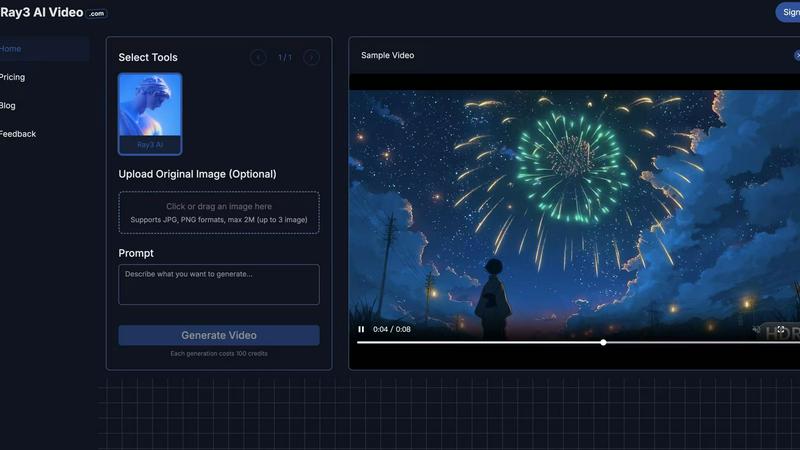
Each video generation consumes 100 credits, and while there may be a limit based on your credit balance, users can earn more credits through referrals or by upgrading to premium versions for enhanced capabilities.
Can I use my own images in the video generation process?
Yes, Ray3 AI Video allows users to upload their own reference images or provide textual prompts to guide the video generation process, ensuring that the final output aligns with their creative vision.
Seedance 2 AI Video Generator FAQ
What input methods does Seedance 2.0 support?
Seedance 2.0 supports three primary input methods for generating video: Text, Image, and Video. You can start from a detailed text prompt, upload a reference image to guide style and composition, or provide source footage to restyle, extend, or modify. This multimodal approach offers maximum flexibility for different creative workflows.
What is the maximum video quality and length I can generate?
The model can generate videos up to 1080p resolution at 24 frames per second, ensuring high-definition, smooth playback. The standard generation duration is between 5 to 10 seconds per clip, with capabilities to extend sequences, making it ideal for short-form content and scenes that can be edited together into longer narratives.
Does Seedance 2.0 include audio generation?
Yes, a standout feature of Seedance 2.0 is its integrated audio synthesis. It can generate synchronized sound effects, background music, and even voiceovers with lip-sync support for over 10 languages in a single pass. This creates a complete, production-ready video asset without requiring separate audio editing software.
How does Seedance 2.0 ensure consistency in characters and scenes?
Seedance 2.0 employs an advanced reference-first workflow. By using an image or video clip as a visual anchor, the AI model maintains consistency in character appearance, artistic style, color palette, and camera feel across the generated footage. This reduces randomness and gives you greater control over the final output compared to text prompts alone.
Alternatives
Ray3 AI Video Alternatives
Ray3 AI Video is a groundbreaking platform that revolutionizes video generation by fusing advanced reasoning capabilities with stunning visual output. As a powerful tool in the video category, it empowers artists, filmmakers, and designers to create visually captivating 4K HDR videos that are both creatively expressive and logically coherent. Users often seek alternatives to Ray3 AI Video for various reasons, including pricing, specific feature sets, or compatibility with different platforms. When searching for an alternative, it's crucial to consider aspects such as output quality, user-friendliness, and the ability to accommodate diverse creative needs. A thorough comparison can help users find a tool that aligns seamlessly with their vision and workflow.
Seedance 2 AI Video Generator Alternatives
Seedance 2 AI Video Generator is a powerful tool in the AI video creation space, designed to transform your text, images, and clips into cinematic videos with remarkable consistency and control. It empowers creators to bring their visions to life through a fast, all-in-one workflow that prioritizes smooth extensions and easy prompt management. Even with such a capable tool, exploring alternatives is a natural part of the creative journey. Your needs are unique—perhaps you're seeking a different pricing model, specific features for a niche project, or a platform that aligns with your existing software ecosystem. The right tool is the one that unlocks your potential without friction. When evaluating other options, focus on what truly matters for your workflow. Consider the core output quality, the intuitiveness of the interface, and how well the tool integrates into your creative process. Look for a solution that not only meets technical requirements but also feels like an empowering extension of your own creativity, helping you transform ideas into stunning visual stories with confidence.