
Ray3 AI Video
Transform your ideas into breathtaking 4K HDR videos effortlessly with Ray3 AI's innovative video generation technology.
AI tool Details
Explore More
Alternatives
About Ray3 AI Video
Ray3 AI Video is a groundbreaking tool that transforms the landscape of video generation by integrating advanced reasoning capabilities alongside stunning visual realism. Tailored for artists, filmmakers, and designers, Ray3 empowers users to craft videos that not only captivate with their visuals but also uphold logical consistency and realistic physics. This dual focus allows for a creative fusion that moves beyond mere aesthetics, enabling storytellers to express their visions with precision and clarity. With features such as studio-grade HDR output and a Draft Mode designed for rapid prototyping, Ray3 streamlines the creative process from initial concept to polished final product. Users can expect high-quality results that resonate deeply with audiences, elevating their storytelling and artistic endeavors to new heights. Whether you are a seasoned professional or an aspiring creator, Ray3 AI Video provides the tools necessary to bring your ideas to life effortlessly.
Features
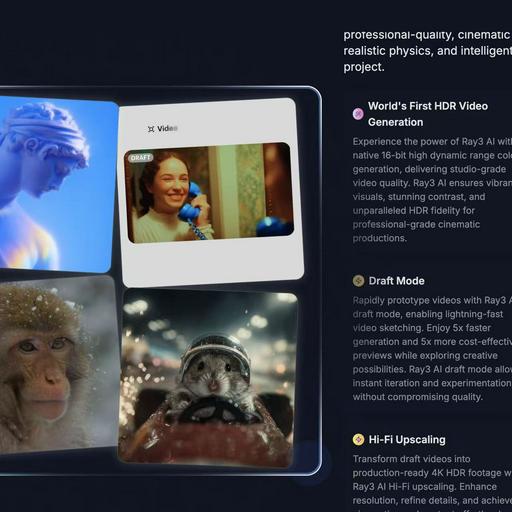
World's First HDR Video Generation
Ray3 AI harnesses the power of native 16-bit high dynamic range color generation, delivering unparalleled studio-grade video quality. This feature ensures vibrant visuals, stunning contrast, and exceptional HDR fidelity for cinematic productions that stand out.
AI Reasoning Engine
The innovative AI reasoning engine behind Ray3 comprehends user intent and evaluates outputs to enhance results automatically. This dynamic adaptability allows creators to receive accurate and high-quality video generation tailored to their prompts.
Draft Mode
With the Draft Mode feature, users can rapidly prototype videos, allowing for quick iterations and experimentation. This mode provides 5x faster generation and 5x more cost-effective previews, empowering creators to explore their ideas without sacrificing quality.
Visual Annotations
Ray3 AI enables users to draw directly on images, specifying exact motions, positions, and visual details. This feature ensures that annotations are interpreted accurately, maintaining consistency and alignment with the user's creative vision throughout the video.
Use Cases
Concept Development for Filmmakers
Filmmakers can utilize Ray3 AI Video to develop visual concepts quickly. By inputting reference images or detailed prompts, they can generate high-quality drafts that capture their vision, facilitating faster decision-making in the pre-production phase.
Artistic Exploration for Designers
Graphic designers can leverage Ray3's capabilities to explore artistic concepts through video. The ability to create visually rich content with HDR fidelity allows them to push boundaries, enhancing their portfolios and showcasing innovative designs.
Marketing and Promotional Content Creation
Businesses can employ Ray3 AI Video to craft engaging marketing materials. With the tool's high-quality output and rapid prototyping features, companies can produce eye-catching video content that effectively communicates their brand messages.
Educational Video Production
Educators and content creators can utilize Ray3 for producing instructional videos. The platform's intuitive design and advanced features enable the creation of informative and visually appealing content that enhances the learning experience for students.
Frequently Asked Questions
What types of videos can I create with Ray3 AI Video?
Ray3 AI Video allows users to create a wide range of videos, including promotional content, artistic explorations, educational tutorials, and cinematic productions, all with high-quality HDR rendering.
How does the Draft Mode work?
The Draft Mode in Ray3 AI Video enables users to generate video drafts five times faster and at a lower cost. This feature allows for quick iterations and experimentation, making it easy to explore creative possibilities without compromising quality.
Is there a limit to the number of videos I can generate?
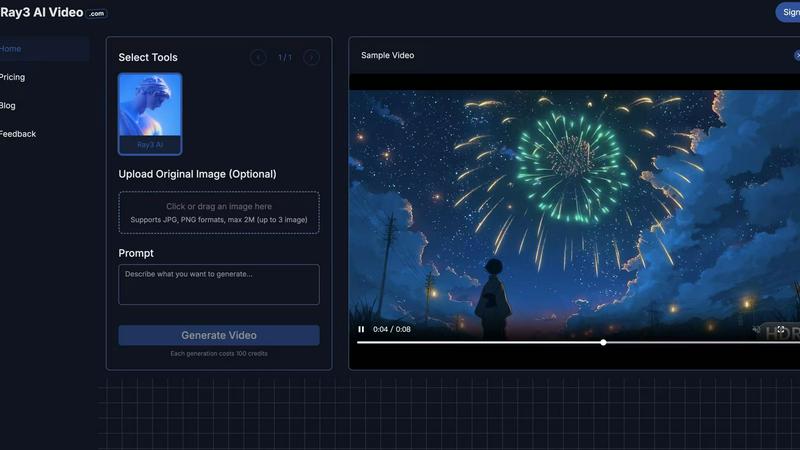
Each video generation consumes 100 credits, and while there may be a limit based on your credit balance, users can earn more credits through referrals or by upgrading to premium versions for enhanced capabilities.
Can I use my own images in the video generation process?
Yes, Ray3 AI Video allows users to upload their own reference images or provide textual prompts to guide the video generation process, ensuring that the final output aligns with their creative vision.
Similar to Ray3 AI Video
opus55video
Opus55video turns written ideas into cinematic motion. Describe a scene, choose the format and duration, and create a striking video.
GetYouTubeTranscript
Free YouTube transcripts on the web, a Chrome extension, and an API + MCP server so AI assistants can read YouTube.
AI STL Generator
The fastest AI STL generator to turn prompts and images into 3D printable STL files.
AIEnhancer
Enhance photos, create images, and generate videos with an all-in-one AI enhancer for flexible creative workflows.
AudioVideo
Turn podcasts, narration, voice recordings, or music into visual content with an audio-aware AI video generator.
Motiofy
Motiofy is an AI creative workspace that helps creators and teams turn ideas into polished visual stories.
VidRush AI
AI-powered long video generator. Create multi-modal AI videos by combining images, video, audio, and text.