
Img Editor vs Sketch To
Side-by-side comparison to help you choose the right AI tool.

Img Editor
Unleash your imagination and instantly create stunning AI images with Img Editor.
Last updated: February 28, 2026
Sketch To
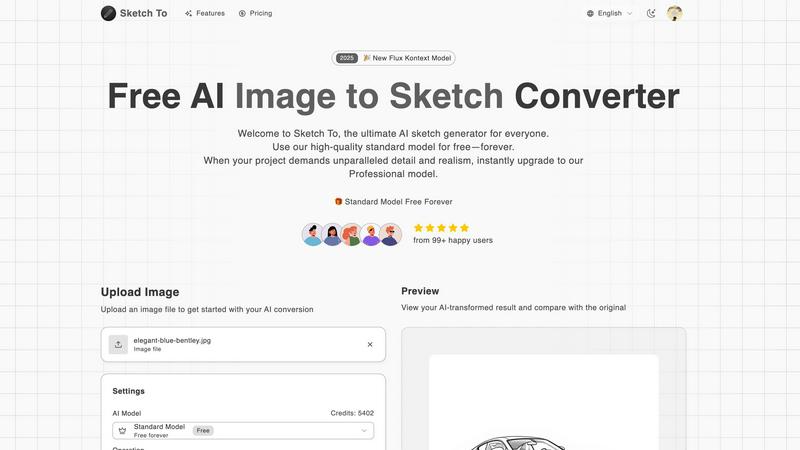
Transform your photos into stunning sketches or animate your drawings instantly with Sketch To's powerful AI technology.
Last updated: March 2, 2026
Visual Comparison
Img Editor

Sketch To
Feature Comparison
Img Editor
Advanced Text-to-Image Generation
Unleash the power of your words with Img Editor's cutting-edge AI. Describe any scene, concept, or emotion in a text prompt, and watch as the platform's advanced understanding transforms your description into a stunning, high-quality image. You have full control over the creative process with adjustable parameters like aspect ratio and image quality, allowing you to tailor the output for social media, print, or digital displays with precision.
Powerful Image Editing & Transformation
Go beyond generation and reimagine your existing visuals. Img Editor's sophisticated AI can edit and alter photos based on new textual instructions. Describe the changes you want—swap elements, modify styles, or completely reinvent the scene—and the AI seamlessly executes your vision, turning any photo into a new masterpiece without requiring complex editing software skills.
Intelligent Prompt Generator & Gallery
Overcome creative block and find instant inspiration. The built-in prompt generator helps you craft effective descriptions, while the public Gallery showcases a wealth of community creations. You can click on any popular prompt to try it yourself, learning from others and discovering new artistic styles, which accelerates your creative journey and connects you with a global network of creators.
Community-Driven Rewards System
Your creativity fuels your potential. By submitting your approved AI-generated images to the public Gallery, you contribute to the community's inspiration pool and are rewarded with extra free generations. This innovative system makes advanced AI art tools sustainably accessible, fostering a collaborative environment where sharing your art directly empowers you and others to create even more.
Sketch To
Image to Sketch Conversion
Sketch To's image to sketch conversion feature utilizes advanced AI technology to transform photographs into stunning pencil sketches. This feature is ideal for artists and designers who want to create unique, artistic interpretations of their images, perfect for social media posts or creative projects.
Sketch to Image AI
With the sketch to image AI functionality, artists can convert their simple sketches into highly detailed and realistic images. This feature is particularly useful for professionals who wish to present their hand-drawn art in a polished and lifelike manner, enhancing the overall quality of their work.
Instant Processing
Sketch To boasts a powerful AI processing engine that guarantees instant image transformations. Users can upload their files and receive high-quality results within seconds, making it an efficient solution for those looking to produce artwork quickly without sacrificing quality.
High Resolution Output
The platform allows users to download their AI-generated creations in high resolution. This feature ensures that the final images are suitable for both print and professional use, enabling artists to showcase their work in the best possible quality.
Use Cases
Img Editor
Digital Marketing & Advertising
Create eye-catching, original visuals for social media campaigns, blog posts, and advertisements in minutes. Generate product mockups, conceptual artwork, and branded graphics that capture audience attention without the need for expensive stock photos or graphic designers, enabling agile and cost-effective marketing.
Concept Art & Creative Inspiration
Artists, writers, and designers can rapidly visualize concepts and characters. Use Img Editor to explore different artistic styles, color palettes, and compositions for storyboards, game assets, or book covers, transforming abstract ideas into concrete visuals that fuel further creative development and presentation.
Personal Branding & Content Creation
Content creators, influencers, and entrepreneurs can build a consistent and unique visual identity. Generate custom profile pictures, channel art, thumbnails, and presentation graphics that stand out, ensuring your personal or business brand is professional and memorable across all digital platforms.
Educational & Presentation Materials
Teachers, students, and professionals can enhance their projects and presentations with custom illustrations. Generate accurate historical scenes, scientific concepts, or abstract data visualizations to make educational content more engaging and understandable, adding a powerful visual dimension to communication.
Sketch To
Social Media Enhancements
Creators can use Sketch To to elevate their social media presence by transforming everyday photos into eye-catching sketches. This unique visual content can help capture the attention of followers and enhance engagement across various platforms.
Artistic Portfolio Development
Artists looking to build a professional portfolio can benefit from the sketch to image functionality. By converting their sketches into realistic images, they can present their work in a more dynamic and engaging way, attracting potential clients and collaborators.
Creative Hobbies and Personal Projects
Hobbyists exploring their creative side can leverage Sketch To for various personal projects. Whether it's creating custom art for home decor or unique gifts for friends and family, the platform empowers users to express their creativity effortlessly.
Educational Applications
Students and educators can utilize Sketch To for art-related projects, enhancing learning experiences in creative subjects. By converting images and sketches, learners can explore different artistic styles and techniques, fostering a deeper appreciation for art.
Overview
About Img Editor
Img Editor is your all-in-one, free AI-powered platform designed to transform your imagination into breathtaking visual reality. It democratizes professional-grade digital artistry by removing cost barriers and technical complexities, empowering anyone to create stunning images. Whether you're a seasoned digital artist, a marketer in need of compelling graphics, a content creator building a brand, or simply someone with a creative vision, Img Editor provides the tools to bring your ideas to life in seconds. At its core, the platform combines a powerful dual-mode AI generation system with an intuitive interface, allowing you to generate images from text prompts or edit and transform existing photos. Beyond creation, Img Editor fosters a vibrant, supportive community where sharing your artwork can reward you with unlimited generations, turning the journey of visual expression into an endlessly rewarding and inclusive experience for everyone.
About Sketch To
Sketch To is an innovative AI-powered creative platform designed to turn your visual concepts into stunning realities. It caters to a wide audience, from beginners exploring their artistic potential to seasoned professionals seeking to enhance their portfolios. The core functionality of Sketch To lies in its ability to perform two remarkable transformations: it can convert any photograph into a beautifully detailed sketch and reverse that process, transforming simple drawings into lifelike images. This versatility opens up endless creative avenues for artists, designers, and hobbyists alike. The platform operates on a creator-first model, offering a powerful Standard Model for free that allows users to experiment with AI art for personal projects or social media. When a project requires a higher degree of detail, texture, and realism, users can seamlessly upgrade to the Professional Model. With no software installation required and a straightforward credit-based system for accessing pro features, Sketch To empowers creators to bring their artistic visions to life, transforming sketches into captivating art and photos into extraordinary sketches.
Frequently Asked Questions
Img Editor FAQ
Is Img Editor really free to use?
Yes, Img Editor is completely free to use. The core mission is to democratize AI art technology. You start with free generations daily and can earn more by participating in the community, such as submitting your approved creations to the Gallery, which rewards you with additional free credits.
How does the image quality and resolution work?
Img Editor offers multiple quality tiers, including Standard (1K) and High Quality (2K). For Ultra Quality (4K) generation, the platform partners with Nano Photo. You can select your desired aspect ratio and quality setting before generation to ensure the output meets your specific needs for web or print.
What can I use the images I create for?
You own the images you create with Img Editor. They can be used for personal projects, commercial branding, marketing materials, social media content, and more. The platform empowers you to create professional-grade visuals for virtually any purpose without licensing restrictions.
How does the community gallery and rewards system work?
The public Gallery is where users share their creations. When you submit an image for review and it gets approved, you earn extra free generations (e.g., 10 credits). This system encourages sharing and provides a vast source of inspiration, allowing you to see and even reuse prompts from other creators' work.
Sketch To FAQ
How does Sketch To work?
Sketch To works by using advanced AI algorithms to analyze and transform images or sketches into artistic renditions. Users simply upload their files, select their desired style, and the AI processes the transformation instantly.
Is there a free version of Sketch To?
Yes, Sketch To offers a Standard Model that is always free for users. New users also receive trial credits to explore various features, making it easy to get started with AI art creation.
Can I use Sketch To for commercial purposes?
Absolutely! For users who need high-level detail and realism, the Professional Model provides the necessary quality for commercial work, ensuring that artists and designers can use their creations in professional settings.
What types of artistic styles are available?
Sketch To offers a variety of artistic styles, including pencil sketches, charcoal sketches, ink sketches, watercolor, and more. Users can choose their preferred style during the conversion process to match their creative vision.
Alternatives
Img Editor Alternatives
Img Editor is a powerful, free AI image generation platform in the image and photo editing category. It transforms text descriptions and existing photos into stunning, professional-grade artwork, making advanced visual creation accessible to everyone. Users often explore alternatives for various reasons. Some may seek different artistic styles or more specialized editing tools, while others might require specific platform integrations or have unique workflow needs. The quest for the perfect creative partner is a personal journey to find the tool that best aligns with your unique vision and goals. When choosing an alternative, focus on what empowers your creative flow. Consider the core technology's output quality, the intuitiveness of the interface, and how the platform supports your growth. Look for a solution that not only meets your technical requirements but also inspires you to push the boundaries of your imagination every day.
Sketch To Alternatives
Sketch To is a groundbreaking AI-powered creative engine that transforms photos into stunning sketches and brings drawings to life. This innovative online tool falls under the category of image and photo editing, allowing users to explore their creative potential with ease. As more individuals seek to enhance their artistic capabilities, they often look for alternatives that may offer different pricing structures, additional features, or improved compatibility with their specific platform needs. When searching for an alternative, users should consider factors such as the variety of artistic transformations available, user-friendliness, and the flexibility of the pricing model. It's also essential to assess the quality of output, whether the platform supports free trials, and how the alternative aligns with personal creative goals. Ultimately, the right choice will empower users to express their imagination and elevate their artistic projects.