
Img Editor vs Imgezy
Side-by-side comparison to help you choose the right AI tool.

Img Editor
Unleash your imagination and instantly create stunning AI images with Img Editor.
Last updated: February 28, 2026

Imgezy
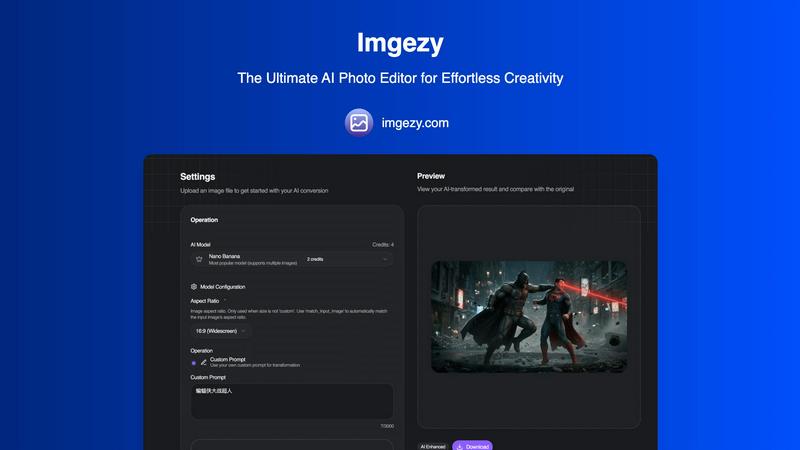
Effortlessly transform your photos with Imgezy's AI editor, removing objects and enhancing images in seconds.
Last updated: February 28, 2026
Visual Comparison
Img Editor

Imgezy
Feature Comparison
Img Editor
Advanced Text-to-Image Generation
Unleash the power of your words with Img Editor's cutting-edge AI. Describe any scene, concept, or emotion in a text prompt, and watch as the platform's advanced understanding transforms your description into a stunning, high-quality image. You have full control over the creative process with adjustable parameters like aspect ratio and image quality, allowing you to tailor the output for social media, print, or digital displays with precision.
Powerful Image Editing & Transformation
Go beyond generation and reimagine your existing visuals. Img Editor's sophisticated AI can edit and alter photos based on new textual instructions. Describe the changes you want—swap elements, modify styles, or completely reinvent the scene—and the AI seamlessly executes your vision, turning any photo into a new masterpiece without requiring complex editing software skills.
Intelligent Prompt Generator & Gallery
Overcome creative block and find instant inspiration. The built-in prompt generator helps you craft effective descriptions, while the public Gallery showcases a wealth of community creations. You can click on any popular prompt to try it yourself, learning from others and discovering new artistic styles, which accelerates your creative journey and connects you with a global network of creators.
Community-Driven Rewards System
Your creativity fuels your potential. By submitting your approved AI-generated images to the public Gallery, you contribute to the community's inspiration pool and are rewarded with extra free generations. This innovative system makes advanced AI art tools sustainably accessible, fostering a collaborative environment where sharing your art directly empowers you and others to create even more.
Imgezy
Object Removal
Imgezy's object removal feature allows you to effortlessly eliminate unwanted elements from your images. Whether it's a photobomber, distracting power lines, or even an unsightly blemish, the AI intelligently identifies objects and reconstructs the background with pixel-perfect accuracy. This ensures that your perfect shot remains undisturbed, allowing you to present your images exactly as you imagined.
Background Replacement
Change the atmosphere of your photos instantly with Imgezy's background replacement feature. You can swap out dull or cluttered backgrounds for breathtaking vistas or serene landscapes with just a simple command. This feature gives you the ability to transport your subject anywhere in the world, enhancing the overall aesthetic of your images and making them more engaging for your audience.
Photo Enhancement
Imgezy automatically enhances your photos to ensure they pop with vibrant colors and sharp details. This feature adjusts lighting, contrast, and saturation levels to create stunning visual effects that draw viewers in. With one click, your ordinary images can transform into extraordinary masterpieces, ready for sharing or professional use.
Batch Processing
For users with multiple images to edit, Imgezy offers a powerful batch processing feature. This allows you to apply edits to several photos simultaneously, saving you time and effort on large projects. Whether you're curating a collection for an event or managing an online store, this feature streamlines your workflow, making it easier to maintain consistency across all your images.
Use Cases
Img Editor
Digital Marketing & Advertising
Create eye-catching, original visuals for social media campaigns, blog posts, and advertisements in minutes. Generate product mockups, conceptual artwork, and branded graphics that capture audience attention without the need for expensive stock photos or graphic designers, enabling agile and cost-effective marketing.
Concept Art & Creative Inspiration
Artists, writers, and designers can rapidly visualize concepts and characters. Use Img Editor to explore different artistic styles, color palettes, and compositions for storyboards, game assets, or book covers, transforming abstract ideas into concrete visuals that fuel further creative development and presentation.
Personal Branding & Content Creation
Content creators, influencers, and entrepreneurs can build a consistent and unique visual identity. Generate custom profile pictures, channel art, thumbnails, and presentation graphics that stand out, ensuring your personal or business brand is professional and memorable across all digital platforms.
Educational & Presentation Materials
Teachers, students, and professionals can enhance their projects and presentations with custom illustrations. Generate accurate historical scenes, scientific concepts, or abstract data visualizations to make educational content more engaging and understandable, adding a powerful visual dimension to communication.
Imgezy
Social Media Content Creation
Social media influencers can leverage Imgezy to produce eye-catching photos that stand out in crowded feeds. With the ability to quickly edit images, remove distractions, and enhance colors, users can maintain a professional aesthetic that attracts followers and increases engagement.
E-Commerce Product Photography
E-commerce entrepreneurs can utilize Imgezy to create stunning product images that drive sales. By easily removing backgrounds and enhancing product details, sellers can showcase their offerings in the best light, making them more appealing to potential customers.
Travel Photography Enhancement
Travel enthusiasts can enhance their vacation photos with Imgezy, allowing them to relive their adventures in vivid detail. Whether it's correcting lighting or changing a background to reflect a picturesque location, this tool helps travelers capture the essence of their experiences.
Event Photography Editing
Photographers covering events can use Imgezy to quickly edit and deliver high-quality images to clients. With features like object removal and photo enhancement, they can ensure that every moment is captured perfectly, making it easier to meet the demands of fast-paced environments.
Overview
About Img Editor
Img Editor is your all-in-one, free AI-powered platform designed to transform your imagination into breathtaking visual reality. It democratizes professional-grade digital artistry by removing cost barriers and technical complexities, empowering anyone to create stunning images. Whether you're a seasoned digital artist, a marketer in need of compelling graphics, a content creator building a brand, or simply someone with a creative vision, Img Editor provides the tools to bring your ideas to life in seconds. At its core, the platform combines a powerful dual-mode AI generation system with an intuitive interface, allowing you to generate images from text prompts or edit and transform existing photos. Beyond creation, Img Editor fosters a vibrant, supportive community where sharing your artwork can reward you with unlimited generations, turning the journey of visual expression into an endlessly rewarding and inclusive experience for everyone.
About Imgezy
Imgezy is the leading-edge AI photo editing tool that empowers users to bring their creative visions to life with remarkable ease. Designed for everyone, from busy professionals and social media influencers to e-commerce entrepreneurs and travel enthusiasts, Imgezy eliminates the complexities of traditional photo editing software. With just a few words, users can describe the changes they want to see in their images, such as removing unwanted objects, swapping out backgrounds, or enhancing colors. The advanced artificial intelligence technology behind Imgezy handles all the intricate editing tasks, delivering stunning results in mere seconds. This innovative platform democratizes professional-grade photo editing, allowing even those without any technical skills to achieve flawless results effortlessly. Imgezy transforms the photo editing process from a time-consuming chore into a quick and gratifying creative experience, making it the only AI photo editor you'll ever need.
Frequently Asked Questions
Img Editor FAQ
Is Img Editor really free to use?
Yes, Img Editor is completely free to use. The core mission is to democratize AI art technology. You start with free generations daily and can earn more by participating in the community, such as submitting your approved creations to the Gallery, which rewards you with additional free credits.
How does the image quality and resolution work?
Img Editor offers multiple quality tiers, including Standard (1K) and High Quality (2K). For Ultra Quality (4K) generation, the platform partners with Nano Photo. You can select your desired aspect ratio and quality setting before generation to ensure the output meets your specific needs for web or print.
What can I use the images I create for?
You own the images you create with Img Editor. They can be used for personal projects, commercial branding, marketing materials, social media content, and more. The platform empowers you to create professional-grade visuals for virtually any purpose without licensing restrictions.
How does the community gallery and rewards system work?
The public Gallery is where users share their creations. When you submit an image for review and it gets approved, you earn extra free generations (e.g., 10 credits). This system encourages sharing and provides a vast source of inspiration, allowing you to see and even reuse prompts from other creators' work.
Imgezy FAQ
How does Imgezy work?
Imgezy uses advanced artificial intelligence algorithms to analyze your images and perform edits based on your verbal or written instructions. Simply upload your photo, describe the changes you want, and let the AI do the rest.
What types of images can I edit with Imgezy?
Imgezy supports all major image formats, including JPG, PNG, and WebP. You can edit any image that meets these specifications, whether it's a personal photo, product image, or travel snapshot.
Is there a learning curve for using Imgezy?
No! Imgezy is designed for users of all skill levels. There is no technical expertise required; all you need is your creativity and a clear idea of the edits you want to make.
Can I use Imgezy for commercial purposes?
Yes, Imgezy offers a commercial license with its Pro plan, allowing you to use edited images for commercial purposes without any restrictions. This is ideal for businesses and professionals looking to create stunning visuals for their work.
Alternatives
Img Editor Alternatives
Img Editor is a powerful, free AI image generation platform in the image and photo editing category. It transforms text descriptions and existing photos into stunning, professional-grade artwork, making advanced visual creation accessible to everyone. Users often explore alternatives for various reasons. Some may seek different artistic styles or more specialized editing tools, while others might require specific platform integrations or have unique workflow needs. The quest for the perfect creative partner is a personal journey to find the tool that best aligns with your unique vision and goals. When choosing an alternative, focus on what empowers your creative flow. Consider the core technology's output quality, the intuitiveness of the interface, and how the platform supports your growth. Look for a solution that not only meets your technical requirements but also inspires you to push the boundaries of your imagination every day.
Imgezy Alternatives
Imgezy is an innovative AI-powered photo editing tool designed to simplify the creative process for users at any skill level. This software allows you to transform your images with just a few descriptive words, making professional-grade editing accessible to everyone. However, users often seek alternatives due to various reasons such as pricing, feature limitations, or specific platform compatibility that may not align with their needs. When searching for an alternative, it’s essential to consider factors like ease of use, the range of features offered, pricing structures, and platform availability. Look for tools that empower your creativity without the requirement for extensive technical knowledge, ensuring you can achieve stunning edits effortlessly.