

Imgezy
Effortlessly transform your photos with Imgezy's AI editor, removing objects and enhancing images in seconds.
AI tool Details
Explore More
Alternatives
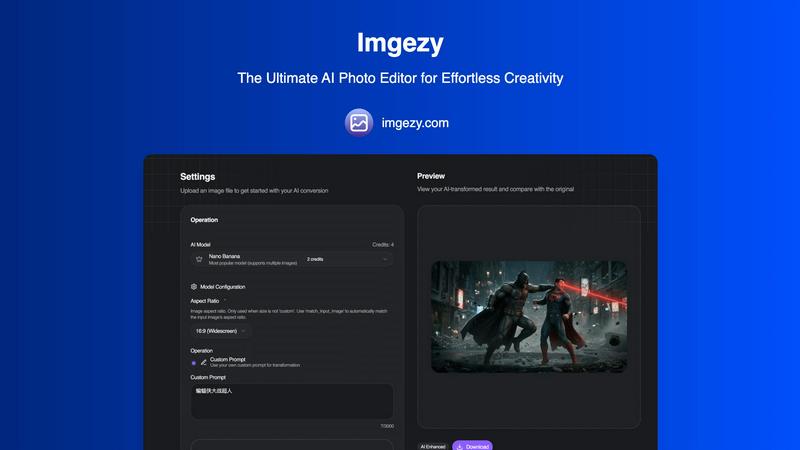
About Imgezy
Imgezy is the leading-edge AI photo editing tool that empowers users to bring their creative visions to life with remarkable ease. Designed for everyone, from busy professionals and social media influencers to e-commerce entrepreneurs and travel enthusiasts, Imgezy eliminates the complexities of traditional photo editing software. With just a few words, users can describe the changes they want to see in their images, such as removing unwanted objects, swapping out backgrounds, or enhancing colors. The advanced artificial intelligence technology behind Imgezy handles all the intricate editing tasks, delivering stunning results in mere seconds. This innovative platform democratizes professional-grade photo editing, allowing even those without any technical skills to achieve flawless results effortlessly. Imgezy transforms the photo editing process from a time-consuming chore into a quick and gratifying creative experience, making it the only AI photo editor you'll ever need.
Features
Object Removal
Imgezy's object removal feature allows you to effortlessly eliminate unwanted elements from your images. Whether it's a photobomber, distracting power lines, or even an unsightly blemish, the AI intelligently identifies objects and reconstructs the background with pixel-perfect accuracy. This ensures that your perfect shot remains undisturbed, allowing you to present your images exactly as you imagined.
Background Replacement
Change the atmosphere of your photos instantly with Imgezy's background replacement feature. You can swap out dull or cluttered backgrounds for breathtaking vistas or serene landscapes with just a simple command. This feature gives you the ability to transport your subject anywhere in the world, enhancing the overall aesthetic of your images and making them more engaging for your audience.
Photo Enhancement
Imgezy automatically enhances your photos to ensure they pop with vibrant colors and sharp details. This feature adjusts lighting, contrast, and saturation levels to create stunning visual effects that draw viewers in. With one click, your ordinary images can transform into extraordinary masterpieces, ready for sharing or professional use.
Batch Processing
For users with multiple images to edit, Imgezy offers a powerful batch processing feature. This allows you to apply edits to several photos simultaneously, saving you time and effort on large projects. Whether you're curating a collection for an event or managing an online store, this feature streamlines your workflow, making it easier to maintain consistency across all your images.
Use Cases
Social Media Content Creation
Social media influencers can leverage Imgezy to produce eye-catching photos that stand out in crowded feeds. With the ability to quickly edit images, remove distractions, and enhance colors, users can maintain a professional aesthetic that attracts followers and increases engagement.
E-Commerce Product Photography
E-commerce entrepreneurs can utilize Imgezy to create stunning product images that drive sales. By easily removing backgrounds and enhancing product details, sellers can showcase their offerings in the best light, making them more appealing to potential customers.
Travel Photography Enhancement
Travel enthusiasts can enhance their vacation photos with Imgezy, allowing them to relive their adventures in vivid detail. Whether it's correcting lighting or changing a background to reflect a picturesque location, this tool helps travelers capture the essence of their experiences.
Event Photography Editing
Photographers covering events can use Imgezy to quickly edit and deliver high-quality images to clients. With features like object removal and photo enhancement, they can ensure that every moment is captured perfectly, making it easier to meet the demands of fast-paced environments.
Frequently Asked Questions
How does Imgezy work?
Imgezy uses advanced artificial intelligence algorithms to analyze your images and perform edits based on your verbal or written instructions. Simply upload your photo, describe the changes you want, and let the AI do the rest.
What types of images can I edit with Imgezy?
Imgezy supports all major image formats, including JPG, PNG, and WebP. You can edit any image that meets these specifications, whether it's a personal photo, product image, or travel snapshot.
Is there a learning curve for using Imgezy?
No! Imgezy is designed for users of all skill levels. There is no technical expertise required; all you need is your creativity and a clear idea of the edits you want to make.
Can I use Imgezy for commercial purposes?
Yes, Imgezy offers a commercial license with its Pro plan, allowing you to use edited images for commercial purposes without any restrictions. This is ideal for businesses and professionals looking to create stunning visuals for their work.
Similar to Imgezy

Try This Skill
One-click AI photo stylization for e-commerce & portraits

Video2Jpg
Convert video to JPG, PNG, or WebP frames in your browser. High-quality video to image converter with no uploads—fast, private, and free.

AI Image Editor
Free AI image editor that edits, retouches, and transforms photos with natural-language text prompts.
GPT Image 2 API
Production-ready image generation and editing with GPT Image 2 API for creators, marketers, and developers.
Imagine2
Private browser-based AI image generation and editing with text-to-image, targeted edits, and multi-image references.

PerchanceAI
PerchanceAI is an AI creative studio for image generation, editing, background removal, product photos, and image-to-video creation.

Perchance AI Image Generator
Free Perchance AI Image Generator that runs in your browser. Multi-model text-to-image with no account required.
