
conceptviz vs Image3D AI
Side-by-side comparison to help you choose the right AI tool.

conceptviz
Instantly transform complex science and math ideas into clear, classroom-ready diagrams.
Last updated: March 1, 2026

Image3D AI
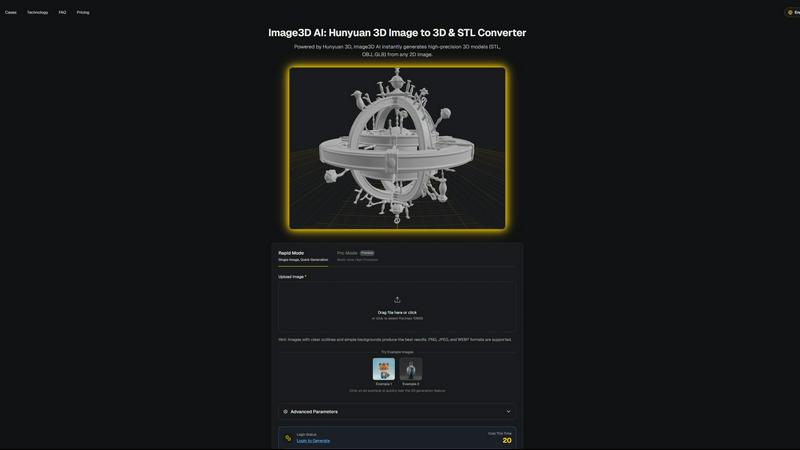
Transform any 2D image into stunning 3D models in minutes, effortlessly unlocking creativity for printing and gaming.
Last updated: March 1, 2026
Visual Comparison
conceptviz
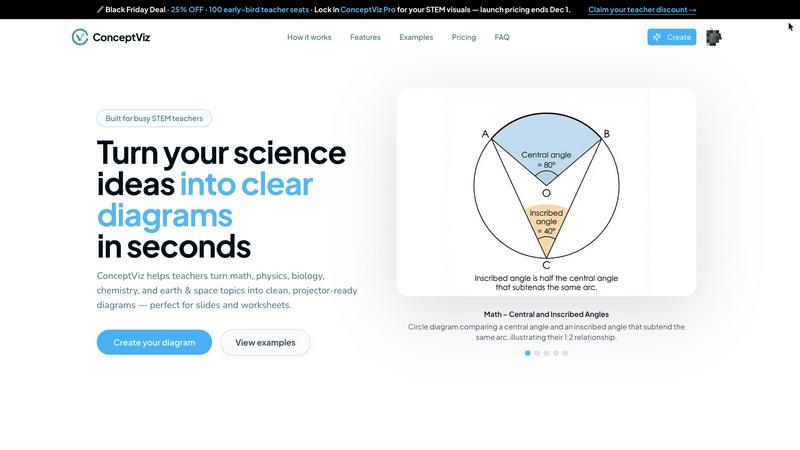
Image3D AI
Feature Comparison
conceptviz
AI-Powered Text-to-Diagram Generation
Simply describe the visual you need in plain English, and ConceptViz's intelligent AI brings it to life. Whether you need a "labeled plant cell cross-section for 8th grade" or a "convex lens ray diagram with object between F and 2F," you can generate a precise, scientifically accurate diagram in seconds. This feature removes the barrier of design skills, allowing you to focus purely on your content and explanation.
Subject & Grade-Level Presets
Jumpstart your creation process with presets specifically tuned for real STEM classrooms. Choose from core subjects like Physics, Biology, Chemistry, Earth & Space, and Math, aligned with U.S. grade bands from elementary to high school. These presets ensure the generated diagrams use appropriate terminology, complexity, and visual styles for your intended audience, saving you time on adjustments.
Projector-Ready & Print-Optimized Output
Every diagram is engineered for real-world use. ConceptViz creates visuals with thick, legible lines, high-contrast colors, and readable labels that remain crisp and clear from the front row to the back of the classroom. Diagrams come in widescreen aspect ratios for slides and clean white backgrounds ideal for printing on worksheets, ensuring they look professional in any format.
High-Resolution Download & Seamless Integration
Easily download your creations as high-resolution PNG files. The diagrams are perfectly sized to drop directly into the tools you already use, such as PowerPoint, Google Slides, or Canva, without needing tedious resizing or reformatting. This seamless workflow integration means you can go from an idea to a slide in your presentation in under a minute.
Image3D AI
Instant 3D Model Generation
Image3D AI swiftly generates high-precision 3D models in formats such as STL, OBJ, and GLB from any 2D image, saving you valuable time and effort. With just a few clicks, you can elevate your designs from flat images to stunning 3D assets.
Rapid and Pro Modes
Choose between Rapid Mode for quick single-image generation and Pro Mode for premium multi-view, high-precision outputs. This flexibility allows you to select the best approach based on your project's specific requirements, whether it’s a quick mockup or a detailed model.
User-Friendly Interface
The intuitive interface of Image3D AI simplifies the 3D modeling process, making it accessible even if you have no prior experience in 3D design. Just upload your image, and let the AI handle the rest, significantly reducing the learning curve.
Multi-View Capability
Enhance the accuracy of your 3D models with the Multi-view mode. By providing additional angles of your subject, the AI can create a more detailed and physically accurate reconstruction, perfect for more complex objects.
Use Cases
conceptviz
Creating Engaging K-12 Classroom Materials
Teachers can instantly generate custom diagrams for worksheets, homework assignments, and slide presentations. Instead of relying on generic online images, educators can create visuals that perfectly match their lesson plan's specific examples and terminology, making abstract concepts like the parts of a plant or states of matter tangible and engaging for young learners.
Developing University-Level Lecture Content
Professors and teaching assistants can produce detailed, accurate figures for complex topics in advanced physics, biology, or chemistry lectures. From illustrating mitosis stages to drawing free-body diagrams for engineering courses, ConceptViz ensures that every visual aid is pedagogically sound and tailored to support higher-level discussion and analysis.
Accelerating Academic Research & Publication
Researchers and graduate students can use ConceptViz to quickly draft figures for papers, grant proposals, and thesis documents. The ability to rapidly iterate on visual explanations of methodologies, experimental setups, or theoretical models streamlines the communication of complex ideas, allowing academics to focus more on their research and less on graphic design.
Enhancing Student Projects and Study Aids
Students can empower their own learning by creating personalized study guides and project visuals. By generating diagrams to visualize concepts they find challenging, students engage in active learning. They can also produce professional-looking visuals for presentations and science fair projects, building both understanding and confidence.
Image3D AI
Game Development
Game developers can rapidly generate 3D assets from concept art or sketches, streamlining the creation of characters, environments, and props. With PBR material support, these assets can be imported directly into popular game engines like Unity and Unreal Engine.
E-commerce
Transform standard product images into interactive 3D models that enhance online shopping experiences. This feature not only captivates customers but also allows for AR previews, helping e-commerce professionals showcase their products more effectively.
3D Printing
With Image3D AI's advanced STL conversion capabilities, 3D printing enthusiasts can quickly turn their designs into print-ready files. The high-precision output ensures that your models are optimized for successful printing every time.
Architectural Visualization
Architects can generate detailed 3D models from 2D plans or sketches, significantly improving workflow efficiency. This capability allows them to present their designs more dynamically and interactively to clients and stakeholders.
Overview
About conceptviz
ConceptViz is a revolutionary AI-powered visual creation tool designed to transform the abstract into the understandable. It empowers STEM educators, researchers, and students to generate clear, accurate, and classroom-ready diagrams in seconds, directly from simple text descriptions. This tool is built for anyone who needs to explain complex scientific and mathematical concepts, from K-12 teachers crafting engaging worksheets to university professors and graduate students preparing detailed research figures. The core mission is to eliminate the frustrating, time-consuming struggle of searching for imperfect images online or wrestling with complex drawing software. ConceptViz puts the power of professional visual explanation directly into your hands, allowing you to create diagrams that match your exact teaching style, curriculum standards, and lesson needs. It's more than just a diagram maker; it's a dedicated partner in pedagogy and communication, built to enhance clarity, ensure consistency, and give you back precious hours of preparation time. Start transforming your ideas into impactful visual lessons and see how effortless teaching and learning with perfect, purpose-built visuals can be.
About Image3D AI
Unlock your creative potential with Image3D AI, a groundbreaking tool that turns your static 2D images into breathtaking 3D models in mere seconds. Leveraging Tencent's advanced Hunyuan 3D engine, this innovative AI tool eliminates the intricate, time-consuming processes typically associated with traditional 3D modeling. Whether you have a simple photograph, a hand-drawn sketch, or a company logo, Image3D AI transforms these into high-fidelity 3D assets complete with realistic textures and geometry. Designed for a diverse array of users—from game developers racing against tight deadlines to e-commerce professionals crafting immersive product experiences—Image3D AI democratizes 3D creation. It removes the steep learning curve associated with complex software like Blender, enabling you to concentrate on your creative vision rather than technical challenges. This tool is not just a converter; it is your gateway to transforming imagination into interactive reality, streamlining your workflow and accelerating your projects from concept to completion.
Frequently Asked Questions
conceptviz FAQ
How accurate are the diagrams generated by ConceptViz?
ConceptViz is specifically trained and fine-tuned on STEM educational content to produce scientifically and mathematically accurate visuals. It is designed to handle standard curriculum topics with high precision. For highly specialized or cutting-edge research concepts, it provides an excellent foundational draft that can be a starting point for further refinement.
Do I need any design or drawing skills to use ConceptViz?
Absolutely not. ConceptViz is built specifically for educators and researchers, not graphic designers. The entire interface is centered on your descriptive text. You only need to describe what you want to see, and the AI handles all the drawing, layout, labeling, and styling for you, making professional diagram creation accessible to everyone.
Can I use the diagrams commercially in my textbooks or online courses?
You should refer to ConceptViz's specific Terms of Service for detailed licensing information. Typically, tools like this allow for educational and personal use of generated content. For commercial publication, such as in textbooks or for-profit courses, there may be specific licensing requirements or plans. It's best to check the official policy for commercial usage rights.
What file formats can I download my diagrams in?
ConceptViz provides high-quality downloads in PNG format, which is a versatile and widely supported image file type. PNG files offer high resolution with transparent or white backgrounds, making them perfect for inserting into presentation slides, documents, worksheets, and online learning management systems without losing clarity.
Image3D AI FAQ
How does Image3D AI transform 2D images into 3D models?
Image3D AI utilizes advanced algorithms powered by the Hunyuan 3D engine to analyze and interpret the details within your 2D images, producing highly accurate 3D models in various formats.
What types of images work best for conversion?
For optimal results, use high-contrast images with clear outlines and simple backgrounds. Avoid blurry or low-light images, as these can hinder the quality of the generated 3D model.
Can I use Image3D AI for free?
Yes! Image3D AI offers free example images that you can test without the need for login or credit card information, allowing you to experience the power of the tool before committing.
What file formats can I export my 3D models to?
You can export your generated 3D models in several formats including STL for 3D printing, OBJ for traditional 3D editing, and GLB for web and AR applications, ensuring compatibility with a wide range of uses.
Alternatives
conceptviz Alternatives
ConceptViz is an AI-powered content creation tool designed specifically for STEM education. It transforms text descriptions into clear, classroom-ready diagrams, saving educators and researchers hours of preparation time. This places it in the categories of AI assistants, design tools, and specialized data visualization software. Users often explore alternatives for various reasons. These can include budget constraints, the need for different feature sets like advanced animation or collaborative editing, or a requirement for tools that integrate with other platforms like specific LMS systems. The search for the right tool is a personal one, driven by unique workflow and pedagogical needs. When evaluating any alternative, focus on what truly empowers your teaching. Consider the tool's ease of use, the quality and clarity of its outputs for a classroom setting, and how well it aligns with your specific subject matter. The goal is to find a solution that transforms your complex ideas into impactful visuals as effortlessly as possible, giving you more time to focus on your students.
Image3D AI Alternatives
Image3D AI is an innovative tool designed to convert 2D images into high-quality 3D models, catering primarily to creators in the fields of gaming, 3D printing, and design. As this technology becomes more popular, users often seek alternatives due to various reasons, including pricing, specific feature sets, or platform compatibility. Finding the right alternative involves assessing your unique needs—whether you require advanced customization options, a user-friendly interface, or specific export formats that align with your projects. When searching for alternatives, it’s essential to consider factors such as the quality of 3D model output, the range of export formats available, ease of use, and the level of support provided. Additionally, evaluating the software's integration capabilities with tools you already use can streamline your workflow and enhance your creative process. Ultimately, the right choice will empower you to bring your 2D visions to life in 3D without unnecessary obstacles.