
Coloring Book Engine vs Image3D AI
Side-by-side comparison to help you choose the right AI tool.

Coloring Book Engine
Transform your creative ideas into stunning coloring books and videos effortlessly with the powerful Coloring Book.
Last updated: February 28, 2026

Image3D AI
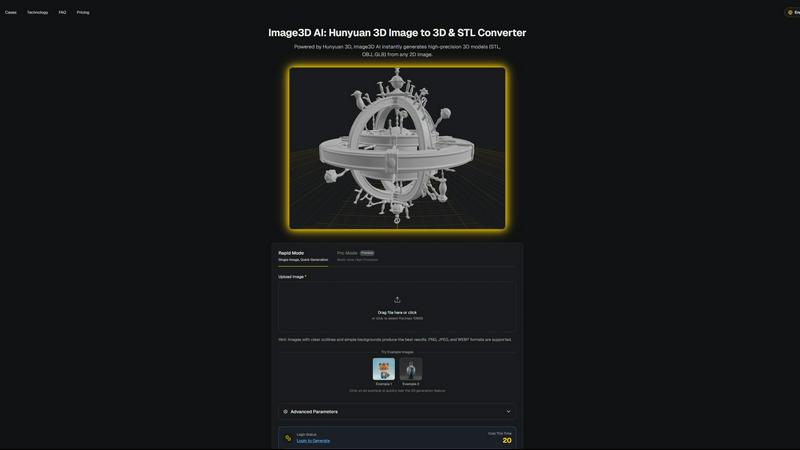
Transform any 2D image into stunning 3D models in minutes, effortlessly unlocking creativity for printing and gaming.
Last updated: March 1, 2026
Visual Comparison
Coloring Book Engine

Image3D AI
Feature Comparison
Coloring Book Engine
No Subscription, Just Freedom
Coloring Book Engine empowers you to create without the pressure of monthly subscriptions. With the BYOK (Bring Your Own Key) model, you can use your own API keys or local GPU, allowing for flexible and cost-effective creativity while maintaining full control over your projects.
Batch Workflow Optimization
Dive into productivity with a highly optimized batch workflow that lets you generate multiple pages at once. Organize your projects seamlessly and scale from a single idea to an entire series, all within the same intuitive workspace.
KDP-Ready Publishing
Avoid the headaches of technical specifications. Coloring Book Engine handles all the necessary details, ensuring that your files are ready for upload to Kindle Direct Publishing (KDP). Publish with confidence, knowing that you have met all the requirements.
Real World Color Palettes
Experience realistic previews that reflect how individuals actually color, rather than just how colors appear on screen. This feature ensures that your final product resonates with users, enhancing their coloring experience and satisfaction.
Image3D AI
Instant 3D Model Generation
Image3D AI swiftly generates high-precision 3D models in formats such as STL, OBJ, and GLB from any 2D image, saving you valuable time and effort. With just a few clicks, you can elevate your designs from flat images to stunning 3D assets.
Rapid and Pro Modes
Choose between Rapid Mode for quick single-image generation and Pro Mode for premium multi-view, high-precision outputs. This flexibility allows you to select the best approach based on your project's specific requirements, whether it’s a quick mockup or a detailed model.
User-Friendly Interface
The intuitive interface of Image3D AI simplifies the 3D modeling process, making it accessible even if you have no prior experience in 3D design. Just upload your image, and let the AI handle the rest, significantly reducing the learning curve.
Multi-View Capability
Enhance the accuracy of your 3D models with the Multi-view mode. By providing additional angles of your subject, the AI can create a more detailed and physically accurate reconstruction, perfect for more complex objects.
Use Cases
Coloring Book Engine
Independent Artists
Independent artists can leverage Coloring Book Engine to create and sell their own unique coloring books. From initial sketches to market-ready designs, the application provides a comprehensive solution that simplifies the production process.
Small Publishers
Small publishing houses can utilize Coloring Book Engine to streamline their workflow, allowing them to produce multiple titles efficiently. The batch processing feature helps in managing larger projects without compromising on quality.
Educators and Schools
Educators can create custom coloring books tailored to their curriculum, making learning engaging for students. With easy-to-use tools, teachers can produce educational materials that foster creativity and enhance classroom experiences.
Content Creators and Influencers
Content creators looking to expand their offerings can use Coloring Book Engine to produce digital coloring books and promotional videos. The ability to create captivating short clips for social media platforms can significantly boost engagement and visibility.
Image3D AI
Game Development
Game developers can rapidly generate 3D assets from concept art or sketches, streamlining the creation of characters, environments, and props. With PBR material support, these assets can be imported directly into popular game engines like Unity and Unreal Engine.
E-commerce
Transform standard product images into interactive 3D models that enhance online shopping experiences. This feature not only captivates customers but also allows for AR previews, helping e-commerce professionals showcase their products more effectively.
3D Printing
With Image3D AI's advanced STL conversion capabilities, 3D printing enthusiasts can quickly turn their designs into print-ready files. The high-precision output ensures that your models are optimized for successful printing every time.
Architectural Visualization
Architects can generate detailed 3D models from 2D plans or sketches, significantly improving workflow efficiency. This capability allows them to present their designs more dynamically and interactively to clients and stakeholders.
Overview
About Coloring Book Engine
Coloring Book Engine is your ultimate production toolkit that empowers creative individuals to transform their artistic visions into thriving businesses. Designed for solo artists, small publishers, and content creators, this powerful desktop application goes beyond merely creating PDFs. It allows you to produce high-quality coloring books from conception to publication. With a streamlined workflow that integrates AI and GPU acceleration, Coloring Book Engine simplifies the complex tasks associated with coloring book production. This means you can focus on what truly matters: your art and business strategy. The application features Bring Your Own Key (BYOK) AI integration, giving you complete control over your creative process, data privacy, and cost management. Whether you are looking to create professional-grade print-ready books, reusable digital assets, or engaging promotional videos for platforms like TikTok and YouTube Shorts, Coloring Book Engine serves as your launchpad to transform imagination into a profitable catalog.
About Image3D AI
Unlock your creative potential with Image3D AI, a groundbreaking tool that turns your static 2D images into breathtaking 3D models in mere seconds. Leveraging Tencent's advanced Hunyuan 3D engine, this innovative AI tool eliminates the intricate, time-consuming processes typically associated with traditional 3D modeling. Whether you have a simple photograph, a hand-drawn sketch, or a company logo, Image3D AI transforms these into high-fidelity 3D assets complete with realistic textures and geometry. Designed for a diverse array of users—from game developers racing against tight deadlines to e-commerce professionals crafting immersive product experiences—Image3D AI democratizes 3D creation. It removes the steep learning curve associated with complex software like Blender, enabling you to concentrate on your creative vision rather than technical challenges. This tool is not just a converter; it is your gateway to transforming imagination into interactive reality, streamlining your workflow and accelerating your projects from concept to completion.
Frequently Asked Questions
Coloring Book Engine FAQ
Is Coloring Book Engine a desktop app or a cloud service?
Coloring Book Engine is a powerful desktop application designed for local use, ensuring that most tasks run locally on your machine rather than in the cloud. This approach prioritizes your data privacy and control.
What exactly does it speed up for coloring book creators?
The application accelerates the entire workflow from ideation to production. By combining AI for idea generation with GPU-accelerated tools for coloring and layout, it eliminates the need to switch between multiple applications, saving time and effort.
Can I use this tool without AI?
Yes, Coloring Book Engine offers an optional AI-free workflow. If you prefer to keep your work untouched by AI, you can bring your handcrafted art, and the software will assist in packaging it into a fully realized coloring book.
Do I need to understand KDP trim sizes, bleed, and margins?
Not at all! Coloring Book Engine simplifies the technical aspects of publishing, including KDP trim sizes, bleed, and margins, so you can focus solely on your creative process without any confusion or second-guessing.
Image3D AI FAQ
How does Image3D AI transform 2D images into 3D models?
Image3D AI utilizes advanced algorithms powered by the Hunyuan 3D engine to analyze and interpret the details within your 2D images, producing highly accurate 3D models in various formats.
What types of images work best for conversion?
For optimal results, use high-contrast images with clear outlines and simple backgrounds. Avoid blurry or low-light images, as these can hinder the quality of the generated 3D model.
Can I use Image3D AI for free?
Yes! Image3D AI offers free example images that you can test without the need for login or credit card information, allowing you to experience the power of the tool before committing.
What file formats can I export my 3D models to?
You can export your generated 3D models in several formats including STL for 3D printing, OBJ for traditional 3D editing, and GLB for web and AR applications, ensuring compatibility with a wide range of uses.
Alternatives
Coloring Book Engine Alternatives
Coloring Book Engine is a powerful design tool that empowers creators to transform their ideas into professional-quality coloring books and videos. As a comprehensive desktop application, it streamlines the entire publishing process, making it accessible for solo artists, small publishers, and content creators looking to expand their offerings. Users may seek alternatives for various reasons, including pricing, specific feature sets, or compatibility with different platforms. When choosing an alternative, it's essential to consider factors such as the ease of use, the range of features offered, the ability to scale production, and how well it supports your creative vision. A suitable tool should not only enhance your workflow but also align with your artistic goals and provide the control you need over your projects.
Image3D AI Alternatives
Image3D AI is an innovative tool designed to convert 2D images into high-quality 3D models, catering primarily to creators in the fields of gaming, 3D printing, and design. As this technology becomes more popular, users often seek alternatives due to various reasons, including pricing, specific feature sets, or platform compatibility. Finding the right alternative involves assessing your unique needs—whether you require advanced customization options, a user-friendly interface, or specific export formats that align with your projects. When searching for alternatives, it’s essential to consider factors such as the quality of 3D model output, the range of export formats available, ease of use, and the level of support provided. Additionally, evaluating the software's integration capabilities with tools you already use can streamline your workflow and enhance your creative process. Ultimately, the right choice will empower you to bring your 2D visions to life in 3D without unnecessary obstacles.