
Dubvid vs StatPecker
Side-by-side comparison to help you choose the right AI tool.

Dubvid
Dubvid instantly translates your videos into any language with natural voices to grow your global audience.
Last updated: February 27, 2026

StatPecker
Transform your data into stunning, secure insights with AI instantly.
Last updated: March 1, 2026
Visual Comparison
Dubvid
StatPecker
Feature Comparison
Dubvid
Multi-Language Dubbing with Natural AI Voices
Dubvid's core technology automatically translates and recreates your audio in multiple target languages using a library of expressive, stock AI voices. These voices are engineered to sound natural, capturing the subtle nuances of emotion, pacing, and intonation to ensure your message resonates authentically with any audience, anywhere in the world.
Optional Lip-Sync for Premium Realism
For talking-head videos and content where speaker presence is key, Dubvid offers an advanced, optional lip-sync feature. This premium technology adjusts the dubbed audio to match the mouth movements of the original speaker on screen, creating a highly realistic and immersive viewing experience that dramatically enhances engagement and credibility.
Simple, Usage-Based Credit System
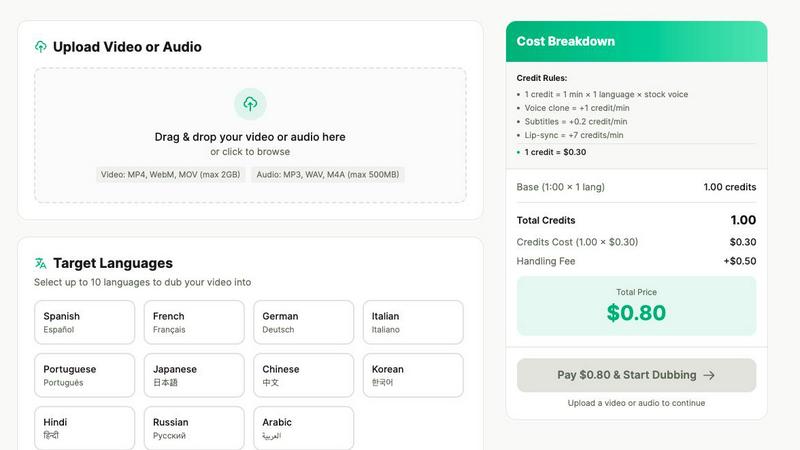
Dubvid operates on a transparent, pay-as-you-go credit system with no subscriptions or hidden fees. You only pay for the minutes you localize. One credit equals one minute of audio dubbed into one language with a stock voice, making costs predictable and scalable for projects of any size, from a short social clip to a full-length course.
Voice Cloning for Brand Consistency
Maintain your unique vocal identity across all languages with Dubvid's voice cloning capability. By creating a digital clone of your own voice, you can ensure brand consistency and personal connection, allowing your authentic tone to deliver the translated message. This feature adds just one extra credit per minute to your project.
StatPecker
Ask Your Query
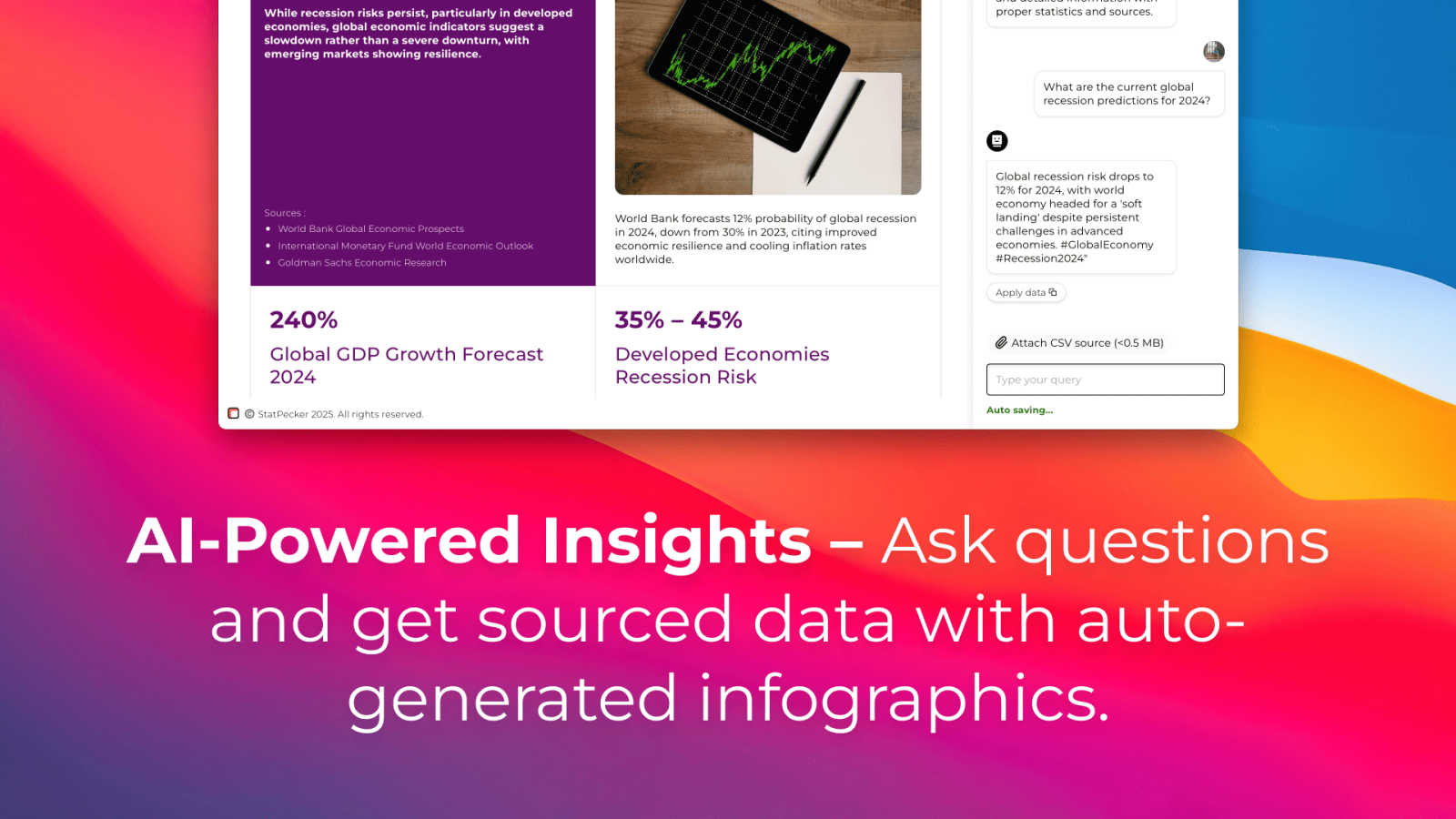
Get instant, credible insights by simply asking a question in natural language. StatPecker's AI queries validated sources to deliver answers, eliminating the need for complex tools or technical expertise. You can move from a question to a clear, visual answer in seconds, making data exploration intuitive and immediate for everyone.
Upload & Analyze CSVs
Extract key insights from your local data files with complete privacy. Upload a CSV (up to 50 MB) and explore it with questions. The Local SQL Agent runs everything directly on your device, ensuring your data never leaves your computer while it's prepared for analysis, keeping your sensitive information secure and under your control.
Publish & Embed
Seamlessly integrate your generated visuals into your workflow. StatPecker allows you to make your charts interactive and embed them directly into blogs, articles, websites, or internal dashboards. This feature turns your insights into a dynamic part of your content, enhancing engagement and professional presentation without any coding.
Download & Use Anywhere
Export your beautiful infographics as high-quality images ready for any platform. Download your visuals for use in reports, presentations, social media, or print materials. This flexibility ensures you can communicate your data story effectively wherever your audience is, maintaining visual consistency and impact across all mediums.
Use Cases
Dubvid
Short-Form Content Creators
Multiply your reach and impact by dubbing your YouTube Shorts, Instagram Reels, and TikTok videos into multiple languages. Instantly connect with new demographics and trends worldwide, turning a single piece of viral content into a global phenomenon that drives massive growth and engagement for your channel.
Online Educators and Course Creators
Democratize knowledge by translating your lessons, tutorials, and webinars for a global classroom. Dubvid allows educators to effortlessly localize entire courses, breaking down language barriers and enabling students from every corner of the world to learn in their native tongue, expanding your educational influence and revenue potential.
Corporate Training and Customer Support
Streamline global operations by localizing onboarding flows, product demos, and help center videos. Provide consistent training and reduce support tickets by ensuring every team and customer, regardless of location, receives clear, professionally dubbed instructions in their primary language, enhancing efficiency and user satisfaction.
Podcasters and Interviewers
Amplify your audio and video podcasts by releasing episodes in new languages without the need for re-recording or hiring foreign-language hosts. Reach untapped listener bases, grow your international audience, and increase your show's authority and advertising appeal by making your conversations accessible to all.
StatPecker
Content Creators & Bloggers
Content creators use StatPecker to transform dry statistics into engaging infographics that boost reader engagement and shareability. By visualizing data points from research or surveys, they can make their articles more persuasive and authoritative, turning complex information into accessible and compelling visual stories for their audience.
Business Analysts & Data Teams
Analysts leverage StatPecker to communicate insights quickly and clearly to stakeholders without friction. Instead of spending hours in complex BI tools, they can upload data, ask questions, and generate presentation-ready charts in seconds, streamlining the reporting process and ensuring key findings are understood and acted upon immediately.
Marketing Professionals
Marketers craft persuasive reports and campaign summaries by visualizing performance metrics, customer demographics, and ROI data. StatPecker helps them create stunning visuals that tell a powerful story, making internal reviews and client presentations more impactful and driving data-informed decisions with compelling clarity.
Educators & Trainers
Educators use StatPecker to make complex topics and numerical concepts accessible to students. By turning datasets, historical trends, or scientific results into clear infographics, they enhance learning materials, foster better understanding, and engage learners with visual explanations that simplify and illuminate the subject matter.
Pricing Comparison
Dubvid
Dubvid uses a simple, usage-based credit system. You only pay for what you use with no subscriptions. One credit ($0.30) covers one minute of audio dubbed into one language using a stock AI voice. Additional features add credits: Voice Clone (+1 credit/min), Subtitles (+0.2 credit/min), and Premium Lip-Sync (+7 credits/min). A fixed $0.50 handling fee is applied per job. You can estimate your cost easily using the website's pricing calculator by adjusting video length, number of languages, and desired features. Start with 2 free credits to dub 60 seconds at no cost.
StatPecker
StatPecker offers straightforward pricing to empower your data storytelling journey. The Free Tier ($0) provides a robust starting point with unlimited projects, unlimited embeds with manual edits, 25 AI queries, and 10 CSV uploads. For users seeking unlimited power and lifetime access, the Lifetime Access plan is available for a one-time payment of $150 (with a limited-time 25% off at checkout). This plan grants lifetime access to all features, including unlimited projects & embeds, unlimited AI queries, unlimited CSV uploads, priority feature requests, and is backed by a 10-day, no-questions-asked refund policy.
Overview
About Dubvid
Dubvid is your gateway to a global stage. This transformative AI-powered platform shatters language barriers, empowering you to dub your video and audio content into over 10 languages with astonishing speed and realism. Imagine uploading your original content and, within minutes, receiving a perfectly localized version that preserves the natural tone, emotion, and pacing of your voice. Dubvid eliminates the complex, costly, and time-consuming traditional dubbing process—no studios, voice actors, or intricate editing required. Built for visionary creators, impactful educators, and forward-thinking businesses, Dubvid turns your local message into a global movement. Whether you're a YouTuber aiming to multiply your audience, an educator sharing knowledge worldwide, or a brand launching a localized campaign, Dubvid provides the tools to scale your influence and connect with billions of people effortlessly. Your story deserves to be heard everywhere. Dubvid makes it possible.
About StatPecker
StatPecker is your AI-powered partner for transforming raw data into compelling visual stories, designed to empower anyone to unlock the narrative hidden within their numbers. It eliminates the traditional barriers of data visualization: the hours of manual design, the high costs of professional artists, and the steep learning curves of complex software. By simply asking a question in plain English or uploading a CSV file, StatPecker's intelligent engine instantly analyzes your data and generates engaging, impactful infographics. This tool is built for the modern storyteller who needs to communicate with clarity and impact. Whether you are a content creator aiming to boost article engagement, a data analyst who must share insights without friction, a marketer crafting persuasive reports, or an educator making complex topics accessible, StatPecker amplifies your voice. It ensures your data makes the maximum impact, turning you into a master of data-driven communication. Start your journey to better storytelling today and see how your data can inspire, inform, and influence your audience with stunning clarity.
Frequently Asked Questions
Dubvid FAQ
How does the free trial work?
You can start for free with 2 complimentary credits, which allows you to dub up to 60 seconds of content to test the platform's quality. No credit card is required for this trial. Simply upload your file, select a target language, and experience the transformation firsthand before committing to any purchase.
What file formats and sizes does Dubvid support?
Dubvid supports a wide range of common video and audio formats for upload, including MP4, MOV, WebM, MP3, and WAV. Your files can be up to 500MB in size, accommodating everything from short social media clips to longer-form content like presentations and podcast episodes.
What is the difference between stock voice and voice clone?
Stock voices are Dubvid's pre-built, high-quality AI voices in various languages and accents. A voice clone is a custom AI model trained on a sample of your own voice, allowing the dubbed audio to sound like you are speaking the target language. Voice cloning adds one extra credit per minute to your project cost.
How long does the dubbing process take?
The process is remarkably fast. Once you upload your file and select your target languages and voice preferences, Dubvid's AI can generate your dubbed content in just minutes. The exact time depends on the length of your file, but it eliminates the weeks-long turnaround typical of traditional dubbing studios.
StatPecker FAQ
How does the Local SQL Agent ensure my data is private?
The Local SQL Agent is designed with privacy as the default. When you upload a CSV file, all processing and analysis occur directly on your device. Your data is prepared, queried, and visualized locally without ever being sent to external servers, ensuring your sensitive business or personal information remains completely secure and under your control.
What kind of questions can I ask StatPecker?
You can ask a wide range of data-related questions in plain English. For example, you can ask for trends, comparisons, summaries, or specific metrics like "Which regions drove the most revenue?" or "Show me sales over time." The AI interprets your intent and generates the appropriate SQL query and visual to answer your question clearly.
Can I edit the infographics after StatPecker creates them?
Yes, you have editing capabilities, especially for embeds. The 'Publish & Embed' feature allows for manual edits to the visuals you plan to integrate into your websites or blogs. This ensures you can fine-tune colors, labels, or other elements to perfectly match your brand guidelines and communication needs before sharing.
What are the limits of the Free Tier?
The Free Tier is a powerful starting point that includes unlimited projects and embeds with manual edits. It allows for 25 AI queries and 10 CSV uploads, giving you ample opportunity to explore the platform's core capabilities and create meaningful data stories without any initial cost or commitment.
Alternatives
Dubvid Alternatives
Dubvid is a powerful AI dubbing platform in the content creation category, designed to transform your audio and video into multiple languages with natural-sounding voices. It empowers creators and businesses to effortlessly reach a global audience by automating the complex process of translation and voice synthesis. Users often explore alternatives for various reasons, such as seeking different pricing models, specific feature sets like advanced audio editing, or compatibility with other platforms in their workflow. It's a natural step in finding the perfect tool that aligns with your unique creative goals and budget. When evaluating other options, focus on what truly matters for your growth. Consider the quality and naturalness of the AI voices, the range of supported languages, the ease of the user interface, and the overall value in helping you scale your content and connect with more people across the world.
StatPecker Alternatives
StatPecker is an AI-powered data visualization and storytelling platform designed to transform raw numbers into compelling visual narratives. It empowers individuals across all skill levels to uncover and share the stories hidden within their data, breaking down traditional barriers like complex software and manual design work. Users often explore alternatives for various reasons, such as specific budget constraints, the need for different feature sets like advanced statistical modeling, or integration requirements with other business platforms. The search for the right tool is a positive step towards finding the perfect fit for your unique communication goals. When evaluating other options, focus on what truly matters for your transformation. Consider the core experience: does the platform make data feel accessible and powerful? Look for tools that prioritize intuitive design, secure data handling, and, most importantly, that amplify your unique voice and turn your insights into influence.