Domer vs Klipzy
Side-by-side comparison to help you choose the right AI tool.

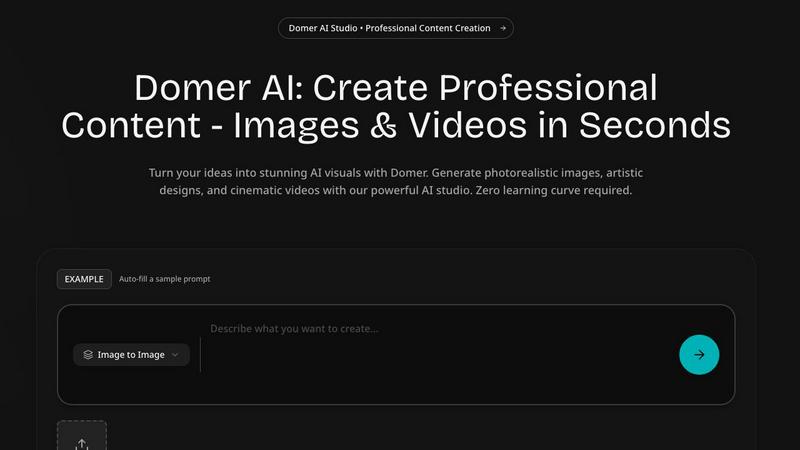
Unlock your creativity with Domer, turning your ideas into stunning videos and images in just minutes with AI.
Last updated: March 3, 2026

Transform your photos into stunning cinematic videos instantly with Klipzy's powerful AI effects for Mac.
Last updated: February 28, 2026
Visual Comparison
Domer
Klipzy

Feature Comparison
Domer
Text-to-Video Generation
Domer's text-to-video feature allows users to create high-definition videos simply by typing a description. Whether you are aiming for social media content or marketing material, the AI processes your words and transforms them into engaging videos in about two minutes, making video creation seamless and efficient.
Image-to-Video Transformation
With the image-to-video feature, you can upload a photo and describe the desired movements or animations. This powerful capability turns static images into dynamic videos, perfect for showcasing products or creative storytelling, ensuring your visuals are as engaging as they are informative.
AI Image Generation
Domer’s AI image generator takes your written descriptions and turns them into stunning visuals in seconds. Ideal for social media posts, marketing materials, or blog illustrations, this feature eliminates the need for design skills, empowering anyone to create beautiful graphics effortlessly.
Video Editing and Effects
Domer offers a range of video editing features, including style transfers and visual effects. Users can upload existing videos and apply various transformations frame by frame, allowing for creative repurposing and enhancement of footage without the need for complex editing software.
Klipzy
AI-Powered Effects
Klipzy boasts over 20 unique AI-powered cinematic effects that allow users to enhance their images creatively. These effects range from the classic Ken Burns effect, which adds a smooth zoom and pan, to more dynamic styles like motion blur and parallax. Each effect is designed to amplify the visual storytelling of your images, making them not just eye-catching, but also emotionally resonant.
User-Friendly Interface
With a focus on simplicity, Klipzy provides a user-friendly interface that streamlines the video creation process. Users can effortlessly upload images in popular formats such as JPG, PNG, or WebP, up to 50MB in size. The intuitive layout guides users through the three simple steps—upload, choose an effect, and download—making it easy for anyone to create professional-quality videos.
Watermark Remover
Klipzy includes a built-in watermark remover, empowering users to create clean, polished videos without any distractions. This feature ensures that your final product is ready for professional use or sharing on social media, allowing you to focus on creativity rather than concerns about branding or copyright issues.
Multiple Aspect Ratios
Klipzy supports five different aspect ratios for video export, catering to the diverse needs of its users. Whether you are creating content for Instagram Reels, TikTok, or YouTube Shorts, you can easily select the appropriate dimensions for your audience. This flexibility ensures your videos look great on any platform.
Use Cases
Domer
Social Media Content Creation
Domer is perfect for social media managers and marketers looking to create eye-catching content quickly. With features like text-to-video and image-to-video, you can produce engaging posts for platforms like Instagram and TikTok that capture attention and drive engagement.
Marketing Campaigns
Entrepreneurs and businesses can leverage Domer to generate promotional videos and visuals for marketing campaigns. The ease of creating professional-grade content means you can test and iterate on ideas without the long lead times typically associated with video production.
Artistic Projects
Artists and creative individuals can use Domer to explore new styles and concepts. The text-to-image and image-to-image features allow for experimentation with various artistic styles, enabling creators to push the boundaries of their imagination and produce unique art pieces.
Educational Content
Educators and trainers can utilize Domer to create informative videos and illustrations for educational purposes. Whether it is for online courses, workshops, or presentations, the platform simplifies the process of producing high-quality visual content that enhances learning experiences.
Klipzy
Social Media Content Creation
Klipzy is perfect for social media influencers and marketers looking to create engaging content. By transforming still images into dynamic videos, users can capture their audience’s attention more effectively, leading to higher engagement rates and a more vibrant online presence.
Real Estate Showcasing
Real estate professionals can utilize Klipzy to showcase properties in a captivating manner. By applying cinematic effects to photos of homes, agents can create virtual tours that highlight the unique features of each property, making listings more appealing to potential buyers.
E-commerce Product Promotion
For e-commerce businesses, Klipzy offers a way to make products come alive through animated video content. By converting product images into engaging clips, sellers can better demonstrate their offerings, thus enhancing customer interest and boosting sales.
Travel Memories Preservation
Travel enthusiasts can leverage Klipzy to turn their favorite vacation photos into cherished video memories. By adding motion and effects, users can create compelling narratives that capture the essence of their adventures, perfect for sharing with friends and family.
Overview
About Domer
Domer is your ultimate AI creative studio, tailored to help individuals unleash their creative potential without any technical constraints. It serves as a versatile platform for marketers, content creators, entrepreneurs, and artists alike, transforming ideas into visually stunning content in mere moments. With Domer, you can describe a vision, upload a photo, or sketch an idea, and watch as cutting-edge AI technology crafts it into high-quality images and videos. The platform is designed for everyone, regardless of design experience, making it easy to generate professional-grade content. From photorealistic images to cinematic videos, abstract art to dynamic animations, Domer covers all bases. With support for text-to-image, image-to-image, text-to-video, and image-to-video generation, it stands out as an all-in-one solution for your creative endeavors. Say goodbye to complex software and high production costs; with Domer, your imagination is the only limit. Step into a new era of creation where your ideas are brought to life in minutes, allowing you to captivate your audience and elevate your brand effortlessly.
About Klipzy
Klipzy is a revolutionary AI-powered platform that transforms still images into stunning, dynamic video clips, breathing life into your creative visions. Designed specifically for content creators, marketers, social media enthusiasts, and anyone with a story to share, Klipzy makes professional video creation accessible to everyone. Gone are the days of struggling with complex editing software; with Klipzy, you can create cinematic effects with just a few clicks. Whether you want to engage your Instagram followers, showcase a product in a captivating way, or relive travel memories, Klipzy provides the tools to do so. By simply uploading a single image, users can apply a diverse range of over 20 effects that add motion, depth, and emotion to their photos. Klipzy's core value proposition is to democratize high-quality video content creation, allowing individuals of all skill levels to tell more compelling stories and grab attention on any platform or presentation.
Frequently Asked Questions
Domer FAQ
How fast can I create videos with Domer?
Domer allows you to create high-definition videos in about two minutes, whether you are using text-to-video or image-to-video features. This rapid turnaround makes it ideal for anyone needing quick content.
What types of files can I upload for video creation?
You can upload various file formats for video creation, including images in PNG, JPG, and WebP formats, as well as videos in MP4 and MOV formats, and audio files in MP3 and WAV formats.
Is there a limit on the credits I can use for video generation?
Domer provides users with 10 free credits to start creating videos. Importantly, these credits never expire, allowing you to use them at your convenience without pressure.
Can I edit videos after they are generated?
Yes, Domer offers editing features that allow you to apply different visual effects and transformations to your videos. This capability enables you to enhance your content further without the need for additional editing software.
Klipzy FAQ
What image formats are supported?
Klipzy supports popular image formats including JPG, PNG, and WebP, allowing users to upload a wide variety of images up to 50MB in size for video creation.
How long can the videos be?
Videos created with Klipzy can be a maximum of 15 seconds long, making them ideal for platforms like Instagram Reels and TikTok, where short, engaging content is key to capturing audience attention.
What aspect ratios are available?
Klipzy offers five different aspect ratios for video exports, ensuring that your videos are optimized for various social media platforms such as Instagram, TikTok, and YouTube.
Is this a subscription?
No, Klipzy operates on a one-time purchase model, requiring a $10 license for the Mac app, which means you can enjoy all its features without the ongoing costs of a subscription plan.
Alternatives
Domer Alternatives
Domer is an innovative AI creative studio that empowers users to transform their ideas into stunning visual content, including videos and images, instantly. It caters to a diverse audience, including marketers, content creators, entrepreneurs, and artists, by offering powerful tools that eliminate technical barriers and simplify the creative process. Users often seek alternatives to Domer for various reasons, such as pricing considerations, specific feature requirements, or compatibility with their preferred platforms. When choosing an alternative, it’s essential to evaluate the capabilities of the tool, its ease of use, the range of features it offers, and how well it aligns with your creative vision. --- [{"question": "What is Domer?", "answer": "Domer is an AI creative studio that allows users to transform their ideas into stunning visual content, such as videos and images, instantly."}, {"question": "Who is Domer for?", "answer": "Domer is designed for marketers, content creators, entrepreneurs, and artists looking to produce professional-grade visual content without technical barriers."}, {"question": "Is Domer free?", "answer": "The specific pricing details for Domer are not mentioned, so users should check the official website for current pricing and subscription options."}, {"question": "What are the main features of Domer?", "answer": "Domer features an AI video generator and a text-to-image AI generator, allowing users to create HD videos and unique images from text descriptions or uploaded photos."}]
Klipzy Alternatives
Klipzy is an innovative AI-powered platform that specializes in transforming still images into captivating cinematic videos. This software falls within the productivity and management category, targeting content creators, marketers, and anyone looking to elevate their storytelling through visual media. Users often seek alternatives to Klipzy for various reasons, including pricing structures, desired features, or specific platform compatibility. When searching for an alternative, it’s essential to consider factors such as the range of effects available, ease of use, and the flexibility of output formats. A good alternative should empower users to create visually stunning content without a steep learning curve while meeting the unique needs of different social media platforms and marketing strategies.