
Cosy vs FilexHost
Side-by-side comparison to help you choose the right AI tool.

Transform your Slack into a vibrant community by automating member onboarding and introductions with ease.
Last updated: February 28, 2026

FilexHost
Effortlessly host and share any file in seconds with FilexHost's simple drag-and-drop and secure sharing features.
Last updated: February 26, 2026
Visual Comparison
Cosy
FilexHost

Feature Comparison
Cosy
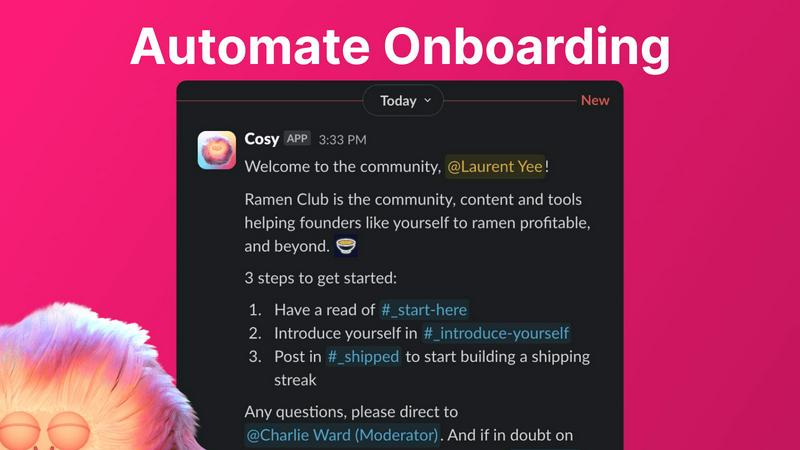
Automate Onboarding
Cosy allows you to create and automate personalized onboarding DM sequences for new members. With the ability to customize messages, including names and links, you can ensure that every new member receives a warm welcome, even when you are not available. This feature saves you hours of manual effort, allowing for a seamless onboarding experience that keeps members engaged from their very first interaction.
Connect Your Members
This feature automates introductions among community members, enhancing engagement by facilitating connections in a relaxed and organic manner. You can customize the frequency and timing of these introductions, allowing opted-in members to meet new acquaintances without any additional effort. This fosters a sense of community and encourages collaboration, making every member feel included.
Member Directory
With Cosy's member directory, you can create a customizable, searchable database of all community members within Slack. Members can easily create and edit their profiles, which can include various fields tailored to your community's needs. This feature allows members to find each other based on specific criteria, promoting networking and collaboration without leaving the Slack environment.
Content Highlights
Cosy empowers you to surface the most engaging posts in your community with ease. By utilizing simple slash commands, you can access insights on the top 10 most engaging messages or identify content that hasn't received replies. This feature helps you maintain an active and vibrant community by ensuring that valuable discussions are acknowledged and continued.
FilexHost
Instant Subdomains
With FileXhost, every upload generates an instant subdomain (your-file.filex.host) that requires zero setup. You can share your files instantly without worrying about complicated DNS configurations or server management.
Free SSL Encryption
Every shared link on FileXhost comes with built-in SSL encryption, ensuring that your files are secure during transmission. This feature protects your data and gives peace of mind to both you and your recipients.
Smart View Modes
FileXhost includes intelligent view modes that allow you to choose how your files are presented. Whether you prefer direct rendering for an interactive experience or a simple download page, you can customize the viewing method to suit your needs.
Optional Password Protection
For users who require an extra layer of security, FileXhost offers optional password protection and expiry settings. You can control access to your files by setting passwords and choosing how long your links remain active, ranging from 24 hours to forever.
Use Cases
Cosy
Streamlined Member Onboarding
Community managers can utilize Cosy to automate the onboarding process for new members, ensuring they feel welcomed and informed right from the start. By sending personalized messages, you can guide them through important resources and community guidelines without lifting a finger.
Enhanced Member Engagement
Leverage the automatic introductions feature to foster connections between community members. This not only boosts engagement but also creates opportunities for collaboration and networking, making your community a more interactive and connected space.
Efficient Member Directory Management
Use the member directory to help members find each other based on skills, interests, or other criteria. This functionality is particularly useful for larger communities, where personal connections can be difficult to establish. It enhances the overall member experience by creating a more accessible and enjoyable environment.
Content Discovery and Retention
Cosy’s content highlights feature ensures that relevant discussions and engaging posts do not go unnoticed. By easily surfacing popular messages, you can encourage ongoing conversations and keep your community active, which is crucial for member retention.
FilexHost
Professionals Sharing Client Reports
FileXhost is perfect for professionals who need to share client reports, presentations, or sensitive documents securely. With instant file hosting, you avoid the hassle of email attachments and manage your documents in one place.
Developers Hosting Projects
Developers can utilize FileXhost to host landing pages, mock APIs, or static sites effortlessly. The drag-and-drop functionality allows for quick uploads, while the smart rendering engine ensures that your projects are displayed correctly.
Creators Distributing Digital Products
For creators, FileXhost is an ideal platform to distribute digital products such as eBooks, music, or video content. The easy sharing process means your audience can access your work without barriers, enhancing their experience.
Anyone Needing Friction-Free File Delivery
Whether you are sharing images, videos, or any other files, FileXhost simplifies the process. Users can quickly share files without the need for complicated setups or "request access" emails, making it an efficient tool for everyone.
Overview
About Cosy
Cosy is an innovative, Slack-native automation platform that revolutionizes the way communities engage and interact. Tailored specifically for community managers, founders, and team leaders, Cosy alleviates the burden of labor-intensive, repetitive tasks that often consume valuable time. In a world where genuine human connection is paramount, Cosy acts as a catalyst for fostering belonging and engagement directly within Slack's familiar interface. By automating essential community management tasks, Cosy empowers leaders to focus on strategic initiatives and authentic interactions. The platform's mission is clear: to create a vibrant ecosystem where members feel valued and connected from the moment they join. With features like automated onboarding sequences, intelligent member introductions, a user-friendly member directory, and insightful content highlights, Cosy transforms your Slack workspace from a mere communication tool into the beating heart of your community, enhancing member experience and retention while saving time.
About FilexHost
FileXhost is your go-to solution for instant file hosting and sharing, designed to simplify the way you manage and distribute your digital content. Whether you are a professional sharing reports, a developer hosting projects, or a creative distributing digital products, FileXhost provides a seamless experience tailored for all your needs. With universal support for various file types—including documents, images, media, and even entire websites—FileXhost empowers users to share their content without the hassle of complicated setups or lengthy configurations. The "Drop & Share" workflow allows you to drag and drop your files, generating secure, instant URLs ready for sharing. It is not just about hosting; it is about enhancing the viewer experience, ensuring that your recipients see your files beautifully presented without unnecessary downloads or plugins. With robust security features and a commitment to high-speed delivery through a global CDN, FileXhost transforms how you share and host files, making your digital interactions smoother and more efficient.
Frequently Asked Questions
Cosy FAQ
How does Cosy automate onboarding for new members?
Cosy automates the onboarding process by sending personalized DM sequences to new members upon joining. You can configure messages to be sent immediately or on a delay, ensuring that every member receives a warm welcome tailored to your community.
Can I customize the member introductions feature?
Yes, you can fully customize how member introductions work. You can select the frequency at which introductions occur, the specific times, and even personalize the intro messages to suit your community's culture and tone.
What does the member directory feature include?
The member directory allows you to create a searchable database of community members, where you can customize fields for profiles. Members can fill in their information, making it easier to connect and collaborate within the community.
How can I surface engaging content within my community?
Cosy provides several slash commands to help you access the top engaging posts and unreplied messages in your community. This functionality allows you to keep the conversation flowing and ensure that important discussions are highlighted, contributing to a lively community atmosphere.
FilexHost FAQ
What is FileXhost?
FileXhost is a platform for instant file hosting and sharing that supports various file types, allowing users to effortlessly share their content via secure URLs without complex setups.
Is it really free?
Yes, FileXhost offers a free plan that allows users to host up to 1,000 files with a maximum size of 25MB each. However, this plan includes ads and limited features compared to the Pro plan.
What file types are supported?
FileXhost supports a wide range of file types, including documents (PDF, TXT), images (JPG, PNG), media files (MP4, MP3), and even archives like ZIP, ensuring versatility in file sharing.
How do I update my site?
To update your hosted site, simply upload the new version of your file or website ZIP. FileXhost will generate a new link, ensuring your recipients always have access to the latest version of your content.
Alternatives
Cosy Alternatives
Cosy is a transformative automation platform designed specifically for Slack, enriching the workspace experience by fostering community engagement and connection. As a powerful tool for community managers, founders, and team leaders, it automates the often tedious tasks associated with community management, allowing users to focus on building genuine relationships. Many users seek alternatives to Cosy for various reasons, including pricing, feature sets, and specific platform requirements. When considering an alternative, it’s essential to evaluate the ease of use, the extent of automation capabilities, and how well the platform integrates with your existing tools. Look for features that will not only enhance engagement but also save you time and effort, ensuring you can cultivate a thriving community atmosphere.
FilexHost Alternatives
FilexHost is an intuitive file hosting and sharing solution that simplifies the process of delivering files online. It falls under the category of productivity and management tools, catering to individuals and professionals who need a seamless way to share a variety of file types without the hassle of complex setups. Users often seek alternatives due to factors such as pricing, specific feature requirements, or compatibility with their preferred platforms. When searching for an alternative, consider key aspects such as storage limits, file size capacities, security features, user experience, and the ability to customize sharing settings. The right choice can empower you to share files more effectively and enhance collaboration without unnecessary barriers.