BRCKS vs Quickfix AI
Side-by-side comparison to help you choose the right AI tool.

Transform your construction projects with BRCKS, the seamless platform that centralizes all communication and updates directly from WhatsApp.
Last updated: April 4, 2026

Quickfix AI
Quickfix AI delivers instant system diagnostics and AI-driven solutions for optimal performance and clarity.
Last updated: February 28, 2026
Visual Comparison
BRCKS

Quickfix AI
Feature Comparison
BRCKS
BRCKS Bot for WhatsApp
Transform your team's existing WhatsApp chats into a powerful project management engine. Simply text the BRCKS Bot to update tasks, check progress, or get instant answers. Every message automatically logs into the central BRCKS platform, creating perfect records without forcing anyone to switch apps or learn new systems. It's zero-disruption communication that turns everyday chatter into organized, actionable data.
Free Subcontractor Access
Empower your entire project ecosystem without bloating your budget. Invite every trade and subcontractor to their relevant projects, granting them full access to checklists, calendars, files, and schedules—completely free of charge. You only pay for your core internal team, breaking down cost barriers and ensuring everyone, from electricians to plasterers, is on the same page and fully integrated.
Client Portal
Keep your clients informed, engaged, and confidently out of your internal workflow. The Client Portal provides homeowners with a beautiful, read-only window into their project's progress. They can view key milestones, photos, and updates in real-time, fostering trust and transparency without gaining access to your team's tools, notes, or internal communications.
Unified Project Feed
Gain instant clarity and control over every project's heartbeat. The central Feed aggregates all updates, tasks, file uploads, and communications into one chronological, searchable timeline. No more digging through emails or message threads. See the entire story of your project unfold in one place, ensuring nothing is missed and every team member is aligned with the latest developments.
Quickfix AI
Intelligent Browser Extension
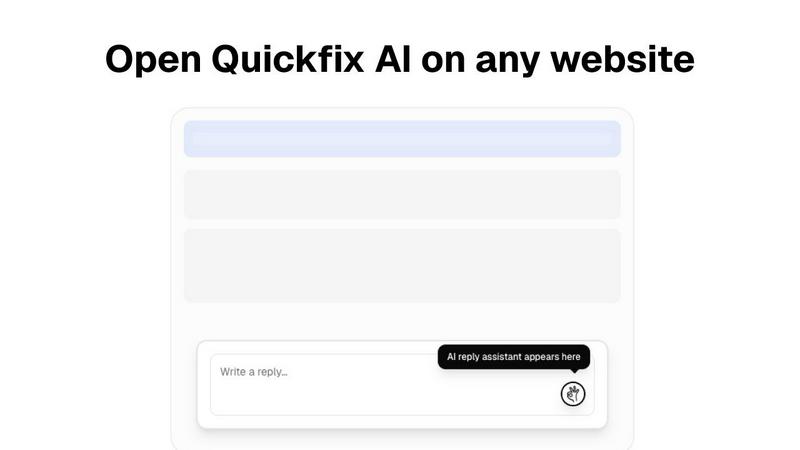
Quickfix AI's intelligent browser extension transforms the way you communicate online. With just a click, it generates contextually relevant replies for various platforms, enhancing your productivity and saving you precious time.
Comprehensive System Diagnostics
Within a minute, Quickfix AI provides a thorough analysis of your computer's health. From performance metrics like CPU and memory usage to security status and battery health, you receive a complete overview that is easy to understand.
AI-Powered Insights and Recommendations
After running a diagnostics scan, you can interact with the AI to gain insights about your system. The AI explains your diagnostics report in clear language, providing tailored recommendations to optimize your device's performance.
Cross-Platform Availability
Quickfix AI is designed for both Windows and macOS users, ensuring that a wide audience can benefit from its powerful features. Whether you're a professional or an everyday user, Quickfix AI adapts to your needs.
Use Cases
BRCKS
Streamlining Daily Site Coordination
Site managers can eliminate morning chaos by using BRCKS to assign daily tasks via digital checklists directly to specific trades. Instead of frantic phone calls and missed WhatsApp messages, every team member starts the day knowing their exact responsibilities. Progress is updated in real-time via the BRCKS Bot, allowing managers to track completion and dynamically adjust resources without leaving the site.
Managing Client Expectations and Updates
Builders and main contractors can proactively manage client relationships by sharing the dedicated Client Portal. After key milestones like foundation pours or roof completion, teams can instantly upload photos and notes. Clients get automatic, transparent updates that build trust and dramatically reduce the volume of "just checking in" emails and calls, freeing the team to focus on building.
Resolving Issues and Avoiding Rework
When an on-site issue arises, such as a clash between plumbing and electrical runs, the foreman can immediately document it in BRCKS. They can tag the relevant trades, attach photos, and log the conversation all in one place. This creates a clear, timestamped record of the problem and the agreed solution, preventing costly miscommunication and rework while ensuring accountability.
Centralizing Project Documentation for Handover
At project close-out, instead of scrambling to compile warranties, manuals, and final photos from dozens of sources, the project team has everything already organized in BRCKS. All project files, meeting notes recording key decisions, and inspection sign-offs are stored and easily exportable. This ensures a smooth, professional handover to the homeowner and creates a valuable archive for future reference.
Quickfix AI
Troubleshooting System Issues
When something is amiss with your device, Quickfix AI swiftly identifies the problem and explains it in simple terms. No technical expertise is required, making it accessible for everyone.
Enhancing Workplace Productivity
Professionals dealing with numerous emails and support requests can utilize Quickfix AI to streamline their communication. The instant reply feature allows them to address issues quickly, thus improving overall productivity.
Remote IT Support
IT support teams can leverage Quickfix AI by sending a diagnostic link to users. This allows them to remotely assess system health and performance, making troubleshooting more efficient and effective.
Understanding System Performance
Tech enthusiasts and power users can delve deeper into their device's performance metrics. Quickfix AI provides critical insights that help them optimize their systems for gaming, development, or any intensive task.
Overview
About BRCKS
BRCKS is the transformative construction project management platform designed to eliminate communication chaos and unlock your team's true potential. Built specifically for residential builders, trades, and homeowners, it replaces the fragmented mess of WhatsApp, email, and scattered documents with one unified, powerful hub. Imagine a world where every project conversation, checklist, task, file, photo, and meeting note is instantly accessible and perfectly organized. BRCKS makes this a reality, empowering you to streamline day-to-day site communication, track actions with clarity, share seamless updates with clients, and maintain an indisputable record of every project decision. Its genius lies in its simplicity and practicality—it integrates seamlessly into your existing workflow, requiring no training or disruptive change. With innovative tools like the BRCKS Bot for WhatsApp, your team can keep working the way they do now, while all the information automatically flows into a professional platform you control. This is more than software; it's the foundation for smoother projects, happier clients, and a more productive, empowered team ready to build the future.
About Quickfix AI
Quickfix AI is your ultimate partner in achieving seamless communication and gaining a profound understanding of your technology. This innovative dual-purpose platform is engineered to elevate two essential aspects of your digital life. First, as an intelligent browser extension, it relieves you from the exhausting task of composing replies. A single click on any platform—whether it's Gmail, LinkedIn, or your customer support dashboard—grants you an expertly crafted, context-aware response in an instant. This means no more tedious typing or constant tab-switching, allowing you to reclaim hours each week. Second, Quickfix AI serves as a sophisticated diagnostic tool that clarifies your computer's health in under a minute. It delivers a straightforward report detailing everything from performance metrics to security checks. This tool is designed for everyone, from overwhelmed professionals managing a flood of emails and support tickets to IT teams who require remote insights, and everyday users who simply want to understand why their devices are sluggish. Quickfix AI empowers you to communicate effectively and gain clarity on your technology, placing you firmly back in control of your digital experience.
Frequently Asked Questions
BRCKS FAQ
How does BRCKS work with WhatsApp?
BRCKS integrates seamlessly with WhatsApp through the intelligent BRCKS Bot. Your team members simply send messages to the bot as they normally would to a contact. The bot understands these messages, extracting tasks, updates, and queries, and automatically syncs them to the correct project in the BRCKS platform. Your team stays in their preferred app, while you gain a structured, searchable record of everything.
Is it really free to invite subcontractors?
Yes, absolutely. One of BRCKS's core principles is removing barriers to full team collaboration. You can invite an unlimited number of subcontractors and trades to the projects they work on. They get full access to the features they need—like viewing tasks, calendars, and files—at no cost to you or to them. You are only billed for your core, internal team seats.
Do clients need to download an app to use the portal?
No, clients do not need to download any software. The Client Portal is a secure, web-based view that clients can access from any device (phone, tablet, or computer) using a simple link and login. It's designed to be extremely user-friendly and requires no training, providing a beautiful and professional window into their project's progress.
How does BRCKS improve project accountability?
BRCKS creates an automatic, unchangeable audit trail for every action and decision. Tasks are assigned to specific individuals with deadlines, conversations are logged against relevant project items, and file uploads are timestamped. This clear visibility means everyone knows who is responsible for what, and managers can track progress in real-time, significantly reducing missed items and improving overall team accountability.
Quickfix AI FAQ
Is Quickfix AI free?
Yes, Quickfix AI offers a free version for users to explore its basic features without any cost, making it accessible to everyone who wants to enhance their digital experience.
Is my data secure?
Absolutely. Quickfix AI prioritizes user security by employing robust encryption methods and ensuring that your data remains confidential and secure during diagnostics and analyses.
Do I need technical knowledge to use Quickfix AI?
Not at all. Quickfix AI is designed to be user-friendly, requiring no technical expertise. The AI provides clear explanations and guidance throughout the process.
What information does Quickfix AI collect?
Quickfix AI collects essential data related to system performance, diagnostics, and security status to generate comprehensive reports and recommendations, all while respecting user privacy.
Alternatives
BRCKS Alternatives
BRCKS is a specialized construction project management and communication platform. It falls into the productivity and management software category, designed to bring order to the chaos of residential construction projects by centralizing all communication, tasks, and documents. Builders and teams often explore alternatives for various reasons. Needs evolve, budgets change, or a team might require specific integrations or features that better match their unique workflow. The search for the right tool is a positive step toward greater efficiency and project clarity. When evaluating options, focus on what truly transforms your daily operations. Look for a solution that genuinely simplifies site communication, empowers your team with clear accountability, and strengthens client trust through transparency. The right platform should feel like a natural extension of your team's effort, turning scattered information into a streamlined path to project success.
Quickfix AI Alternatives
Quickfix AI is an innovative solution that falls under the category of productivity and management tools. It combines an intelligent browser extension with a powerful AI diagnostics tool, enabling users to streamline communication and gain insights into their system's health with ease. Many users may seek alternatives due to various reasons such as pricing concerns, specific feature needs, or compatibility with their preferred platforms. When considering alternatives, it’s crucial to evaluate the features that best suit your workflow, the ease of integration with your existing systems, and the overall user experience. Look for solutions that not only enhance productivity but also empower you with the insights needed to maintain optimal performance.