Blueberry vs Shrinkpad
Side-by-side comparison to help you choose the right AI tool.

Blueberry
Blueberry is your all-in-one Mac workspace that seamlessly integrates coding, terminal, and browsing for effortless app.
Last updated: February 26, 2026

Shrinkpad
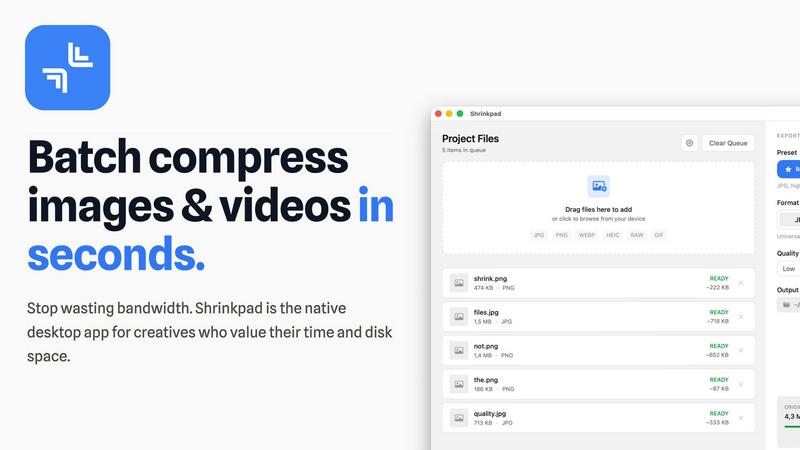
Shrinkpad effortlessly compresses your images and videos on Mac, saving space and enhancing performance in seconds.
Last updated: February 28, 2026
Visual Comparison
Blueberry

Shrinkpad
Feature Comparison
Blueberry
Integrated Workspace
Blueberry combines a terminal, code editor, and preview browser into a cohesive workspace, allowing you to seamlessly switch between coding, testing, and viewing your web applications. This integration eliminates the need for constant app switching, enhancing productivity and focus.
Live AI Context
With Blueberry's MCP server, you can run AI models directly in the terminal, providing them with live context from your entire workspace. This means your AI can understand your project better, offering intelligent suggestions and real-time assistance tailored to your specific needs.
Multi-Device Preview
Blueberry allows you to preview your applications across multiple devices, including desktops, tablets, and smartphones. This feature ensures that you can see exactly how your users will experience your application without leaving your workspace, helping you make informed design decisions.
Pinned Apps and Tools
Keep essential tools like GitHub, Linear, Figma, and PostHog docked within your Blueberry workspace. These pinned apps load with your project and share live context with your AI, making collaboration easier and more efficient as you build and iterate on your products.
Shrinkpad
Batch Compression
Shrinkpad allows you to batch compress hundreds of images and videos simultaneously. Just drag and drop your files or entire folders, and watch as the app optimizes them in seconds, saving you time and effort.
Intelligent Compression
No more guesswork with compression settings. Shrinkpad analyzes the visual complexity of your files and automatically applies the perfect compression ratio, ensuring high-quality results without artifacts.
Folder Mode
With Shrinkpad’s Folder Mode, you can simply drop an entire folder, and it will automatically detect and queue all supported images and videos for compression. This feature streamlines your workflow and eliminates the hassle of manual file selection.
Privacy-Focused Processing
All processing occurs locally on your Mac. Shrinkpad ensures that your files do not leave your device, providing peace of mind regarding your sensitive assets and eliminating the need for internet access during compression.
Use Cases
Blueberry
Streamlined Development
Developers can leverage Blueberry to streamline their workflow by having a terminal, code editor, and browser all in one place. This setup allows for quick iterations, testing, and debugging, significantly reducing the time spent switching between different applications.
Collaborative Design
Designers can use Blueberry to collaborate effectively with developers by keeping design tools and live previews accessible within the same workspace. This integration fosters real-time feedback and adjustments, resulting in a more cohesive design and development process.
Enhanced Learning Experience
Educational institutions and coding bootcamps can utilize Blueberry as a teaching tool, providing students with an integrated environment to learn coding, testing, and debugging. The live context and immediate feedback from AI models can enhance the learning experience, making it more engaging and effective.
Product Management Efficiency
Product managers can benefit from Blueberry by having all relevant tools and context in one place. This enables them to monitor project progress, collaborate with teams, and make data-driven decisions without the distraction of managing multiple applications.
Shrinkpad
Optimizing Website Assets
Web developers can use Shrinkpad to efficiently compress images and videos for websites, resulting in significantly faster load times and improved performance metrics, such as LCP scores.
Streamlining Creative Workflows
Photographers and designers can save hours of manual exporting by using Shrinkpad to batch process their assets. Export everything at once and let the app handle the optimization and renaming.
Reducing Storage Costs
Businesses and content creators looking to save storage costs can leverage Shrinkpad to reclaim valuable disk space by reducing the size of large media files, freeing up resources for other essential projects.
Enhancing Video Production
Video editors can benefit from Shrinkpad’s ability to compress 4K MP4 videos without sacrificing quality, making it easier to manage large video files and improve editing efficiency.
Overview
About Blueberry
Blueberry is a transformative Mac application designed for modern product builders, merging the functionalities of an editor, terminal, and browser into a single, focused workspace. This AI-native product development platform empowers developers to build and ship web applications with ease, eliminating the hassle of juggling multiple tools and windows. With Blueberry, you can connect advanced AI models like Claude, Gemini, or Codex through its built-in MCP server, allowing the AI to access your files, terminal output, and live preview simultaneously. This creates an environment where context is always at your fingertips, enabling you to focus on creativity and productivity. Ideal for developers, designers, and product managers, Blueberry fosters collaboration and innovation, ensuring that building products feels seamless and intuitive. By providing all the essential tools in one place, Blueberry allows you to shift your mindset from multitasking to a more streamlined focus on delivering delightful web applications.
About Shrinkpad
Shrinkpad is your ultimate companion in the creative journey, designed specifically for macOS users who refuse to let bloated media files hinder their productivity. This powerful native application enables photographers, designers, developers, and content creators to reclaim their storage space and accelerate their workflows. With Shrinkpad, you can batch compress images and videos with stunning speed, reducing file sizes by up to 90% in mere seconds. Its operation is entirely local, ensuring that your sensitive files remain private without the need for cloud uploads or internet dependencies. Whether you work with JPGs, RAW files, or 4K videos, Shrinkpad intelligently applies optimal compression settings, preserving visual quality while freeing up gigabytes of storage. It's not just a tool; it's a transformative solution that empowers you to focus on your creativity rather than on tedious file management.
Frequently Asked Questions
Blueberry FAQ
What platforms is Blueberry available on?
Blueberry is currently available exclusively for macOS users. It is designed to take advantage of the Mac ecosystem, ensuring optimal performance and user experience.
How does Blueberry enhance AI integration?
Blueberry integrates with AI models via its MCP server, allowing the AI to access your project files, terminal output, and live preview. This provides the AI with full contextual awareness, enabling more accurate suggestions and assistance.
Is Blueberry truly free during beta?
Yes, Blueberry is 100% free during its beta phase. Users can download and utilize the full range of features without any cost, giving them an opportunity to experience the platform's capabilities.
Can I access Blueberry from multiple devices?
Yes, Blueberry allows you to access your workspace from any device on your local network. This feature ensures that you can continue your work seamlessly, regardless of the device you are using.
Shrinkpad FAQ
Can I use Shrinkpad for free?
Yes, Shrinkpad offers a Free Starter plan with essential tools for casual use, which allows you to batch compress images in common formats.
What file formats does Shrinkpad support?
Shrinkpad supports over 50 formats, including popular image formats like JPG, PNG, and RAW, as well as video formats like MP4 and MOV, ensuring versatility for all your media needs.
Does Shrinkpad support video compression?
Absolutely! Shrinkpad not only compresses images but also handles video files, allowing you to optimize both types of media in one seamless workflow.
How many files can I process at once?
With Shrinkpad, you can process thousands of files at once without crashing, thanks to its unlimited batching capabilities designed for heavy-duty use.
Alternatives
Blueberry Alternatives
Blueberry is a powerful Mac app designed to streamline your workflow by combining your editor, terminal, and browser into one cohesive workspace. This innovative tool empowers developers by eliminating the hassle of switching between multiple windows, allowing for a more focused and efficient coding experience. Users often seek alternatives to Blueberry for various reasons, including pricing considerations, specific feature requirements, or compatibility with different operating systems. When searching for an alternative, it's essential to evaluate the features that will best support your workflow, such as integration capabilities, user interface design, and overall functionality. Consider whether the alternative can maintain the seamless experience that Blueberry provides and if it aligns with your unique development needs. Prioritize tools that enhance your productivity and help you achieve your goals without unnecessary distractions.
Shrinkpad Alternatives
Shrinkpad is a powerful native macOS application designed specifically for batch compressing images and videos, making it an essential tool for photographers, designers, developers, and content creators. With its ability to reduce file sizes by up to 90% while maintaining visual quality, it stands out as a go-to solution for optimizing storage and enhancing performance. Users often seek alternatives to Shrinkpad due to various reasons, including pricing, feature sets, or compatibility with different platforms. When looking for an alternative, it’s important to consider factors such as the speed of compression, the range of supported file formats, ease of use, and privacy measures. Additionally, evaluate whether the tool processes files locally to ensure your data remains secure and private, as well as the capability to handle batch processing for efficiency. Ultimately, the right choice will align with your specific creative needs and workflow preferences.