3DAIStudio vs Ray3 AI Video
Side-by-side comparison to help you choose the right AI tool.

3DAIStudio
Transform your ideas into stunning 3D models instantly with just a text prompt or an image, no experience required.
Last updated: April 4, 2026
Ray3 AI Video
Transform your ideas into breathtaking 4K HDR videos effortlessly with Ray3 AI's innovative video generation technology.
Last updated: March 1, 2026
Visual Comparison
3DAIStudio

Ray3 AI Video
Feature Comparison
3DAIStudio
Text to 3D
Unleash the power of language to create 3D worlds. Simply type a descriptive prompt—like "realistic fantasy orc warrior, muscular, wearing rugged armor"—and watch as our AI generates a fully textured, detailed 3D model in seconds. This feature breaks down the barrier between idea and execution, allowing for rapid prototyping and exploration of countless creative concepts without any technical 3D skills required.
Image to 3D
Transform any 2D reference into a three-dimensional asset instantly. Upload a sketch, photograph, digital painting, or any other image, and 3DAIStudio intelligently extrapolates depth and form to construct a coherent 3D model. This is perfect for converting concept art into usable models, bringing real-world objects into digital scenes, or giving new dimension to your existing 2D artwork.
AI Texturing
Apply stunning, realistic textures to your models with AI-powered precision. Go beyond basic colors and generate complex PBR (Physically Based Rendering) materials from text descriptions or by painting directly onto the model. This tool ensures your assets look professional and game-ready, with materials that react correctly to light in any engine like Unity or Unreal.
Quad-Remesh & Optimization Tools
Ensure your generated models are not just beautiful but also technically sound for production. The automated Quad-Remesh tool cleans up mesh topology, reduces polygon counts intelligently, and generates LODs (Levels of Detail), fixing common mesh issues. This means you get optimized, efficient assets that won't bog down your game or render, ready for export and immediate use.
Ray3 AI Video
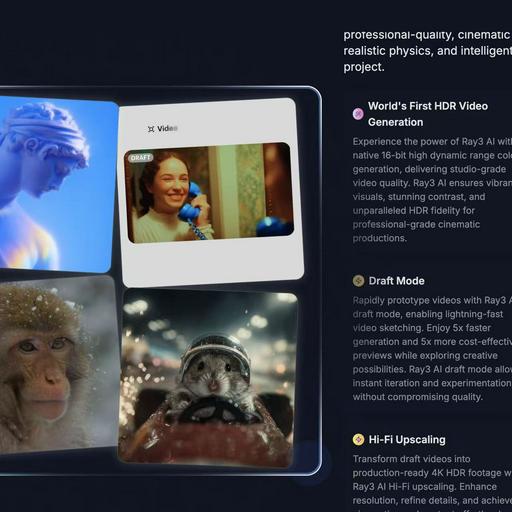
World's First HDR Video Generation
Ray3 AI harnesses the power of native 16-bit high dynamic range color generation, delivering unparalleled studio-grade video quality. This feature ensures vibrant visuals, stunning contrast, and exceptional HDR fidelity for cinematic productions that stand out.
AI Reasoning Engine
The innovative AI reasoning engine behind Ray3 comprehends user intent and evaluates outputs to enhance results automatically. This dynamic adaptability allows creators to receive accurate and high-quality video generation tailored to their prompts.
Draft Mode
With the Draft Mode feature, users can rapidly prototype videos, allowing for quick iterations and experimentation. This mode provides 5x faster generation and 5x more cost-effective previews, empowering creators to explore their ideas without sacrificing quality.
Visual Annotations
Ray3 AI enables users to draw directly on images, specifying exact motions, positions, and visual details. This feature ensures that annotations are interpreted accurately, maintaining consistency and alignment with the user's creative vision throughout the video.
Use Cases
3DAIStudio
Game Development
Radically accelerate game asset creation for indie developers and large studios alike. Generate entire libraries of characters, props, weapons, and environmental assets from text descriptions or concept art in minutes. This allows for faster iteration, quicker prototyping of game ideas, and the ability to meet tight production deadlines without compromising on the visual quality of your game world.
Film & Animation Pre-Visualization
Quickly build detailed 3D scenes and characters for storyboarding, animatics, and pre-visualization. Directors and concept artists can visualize complex shots early in production, making creative decisions faster and communicating vision more effectively to entire teams, all before a single frame of final animation is rendered.
Product Design & Prototyping
Visualize product concepts in realistic 3D instantly. Designers can upload sketches or describe new product ideas to generate 3D models for client presentations, marketing materials, or initial prototyping phases. This streamlines the design feedback loop and helps bring physical and digital products to market faster.
Education & Learning
Demystify 3D design for students and educators. Provide a hands-on, accessible tool for learning 3D concepts, art history (by recreating artifacts), or scientific visualization. It lowers the technical barrier, allowing learners to focus on creativity, spatial understanding, and project-based learning without getting stuck on complex software interfaces.
Ray3 AI Video
Concept Development for Filmmakers
Filmmakers can utilize Ray3 AI Video to develop visual concepts quickly. By inputting reference images or detailed prompts, they can generate high-quality drafts that capture their vision, facilitating faster decision-making in the pre-production phase.
Artistic Exploration for Designers
Graphic designers can leverage Ray3's capabilities to explore artistic concepts through video. The ability to create visually rich content with HDR fidelity allows them to push boundaries, enhancing their portfolios and showcasing innovative designs.
Marketing and Promotional Content Creation
Businesses can employ Ray3 AI Video to craft engaging marketing materials. With the tool's high-quality output and rapid prototyping features, companies can produce eye-catching video content that effectively communicates their brand messages.
Educational Video Production
Educators and content creators can utilize Ray3 for producing instructional videos. The platform's intuitive design and advanced features enable the creation of informative and visually appealing content that enhances the learning experience for students.
Overview
About 3DAIStudio
3DAIStudio is the revolutionary AI-powered platform that transforms your imagination into stunning, production-ready 3D models in seconds. It democratizes 3D content creation by allowing anyone—from complete beginners to seasoned professionals—to generate high-quality 3D assets from a simple text prompt or a single image. Forget the weeks of painstaking manual modeling, sculpting, and texturing. With 3DAIStudio, you describe your vision or upload a reference, and our advanced AI does the heavy lifting, delivering textured, optimized models ready for your projects. It's designed for game developers, film and VFX artists, product designers, architects, educators, and indie creators who need to accelerate their workflow and unlock new levels of creative potential. The core value proposition is undeniable: instant creation speed without sacrificing quality. This is the future of 3D asset generation, putting the power to create vast worlds, characters, and objects directly into your hands, empowering you to bring your most ambitious ideas to life faster than ever before.
About Ray3 AI Video
Ray3 AI Video is a groundbreaking tool that transforms the landscape of video generation by integrating advanced reasoning capabilities alongside stunning visual realism. Tailored for artists, filmmakers, and designers, Ray3 empowers users to craft videos that not only captivate with their visuals but also uphold logical consistency and realistic physics. This dual focus allows for a creative fusion that moves beyond mere aesthetics, enabling storytellers to express their visions with precision and clarity. With features such as studio-grade HDR output and a Draft Mode designed for rapid prototyping, Ray3 streamlines the creative process from initial concept to polished final product. Users can expect high-quality results that resonate deeply with audiences, elevating their storytelling and artistic endeavors to new heights. Whether you are a seasoned professional or an aspiring creator, Ray3 AI Video provides the tools necessary to bring your ideas to life effortlessly.
Frequently Asked Questions
3DAIStudio FAQ
Do I need any 3D modeling experience to use 3DAIStudio?
Absolutely not. 3DAIStudio is built specifically to require no prior 3D experience. The interface is designed to be intuitive: you provide input via text or an image, and the AI handles the complex generation process. It's the perfect starting point for beginners while being a powerful accelerator for seasoned pros.
What formats can I export my 3D models in?
3DAIStudio focuses on providing production-ready output. You can export your generated models in industry-standard formats that are compatible with all major 3D engines and software, including Unity, Unreal Engine, Blender, Maya, and web frameworks like Three.js, complete with optimized meshes and textures.
How accurate is the Image to 3D conversion?
The AI is highly sophisticated at interpreting 2D images to infer depth and three-dimensional structure. While results are incredibly fast and impressive, the accuracy can depend on the clarity and perspective of the source image. For best results, use clear, well-lit reference images. The tool is perfect for creating base models that can be refined.
Is there a community or gallery to see what others have created?
Yes! 3DAIStudio features an extensive Example Gallery where you can explore a wide variety of models generated by the community. You can filter by creation method (Text to 3D or Image to 3D) and even interact with the 3D models directly in your browser, providing fantastic inspiration and showcasing the platform's capabilities.
Ray3 AI Video FAQ
What types of videos can I create with Ray3 AI Video?
Ray3 AI Video allows users to create a wide range of videos, including promotional content, artistic explorations, educational tutorials, and cinematic productions, all with high-quality HDR rendering.
How does the Draft Mode work?
The Draft Mode in Ray3 AI Video enables users to generate video drafts five times faster and at a lower cost. This feature allows for quick iterations and experimentation, making it easy to explore creative possibilities without compromising quality.
Is there a limit to the number of videos I can generate?
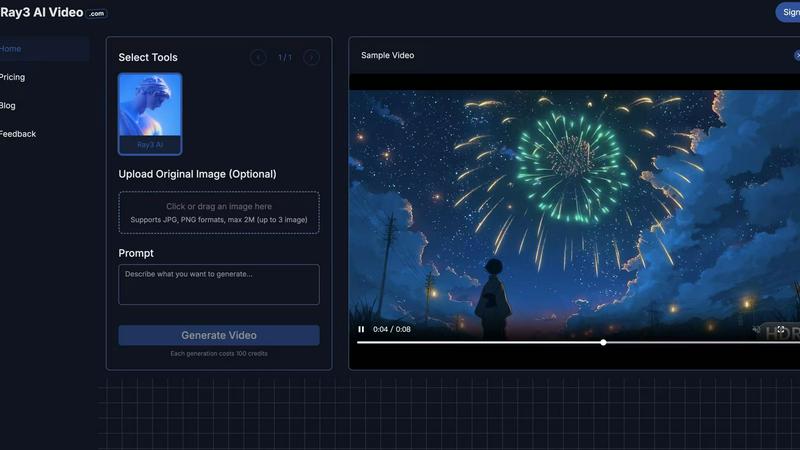
Each video generation consumes 100 credits, and while there may be a limit based on your credit balance, users can earn more credits through referrals or by upgrading to premium versions for enhanced capabilities.
Can I use my own images in the video generation process?
Yes, Ray3 AI Video allows users to upload their own reference images or provide textual prompts to guide the video generation process, ensuring that the final output aligns with their creative vision.
Alternatives
3DAIStudio Alternatives
3DAIStudio is a powerful AI-driven content creation tool that transforms your ideas into reality, allowing you to generate high-quality 3D models from simple text prompts or images in mere seconds. It belongs to the innovative category of AI-powered 3D generation platforms, empowering designers, developers, and creatives to bypass traditional, time-consuming modeling workflows. Even with such a transformative tool, exploring alternatives is a natural part of the creative journey. Your specific needs for project scale, budget considerations, desired output formats, or unique feature sets might lead you to evaluate other options. The perfect platform for one visionary might differ for another based on their unique workflow and aspirations. When seeking an alternative, focus on what will truly unlock your potential. Consider the core quality and style of the 3D outputs, the flexibility of input methods, how well the tool integrates into your existing creative suite, and the value it provides for your investment. The goal is to find a solution that feels like a natural extension of your creativity, removing barriers and accelerating your path from concept to creation.
Ray3 AI Video Alternatives
Ray3 AI Video is a groundbreaking platform that revolutionizes video generation by fusing advanced reasoning capabilities with stunning visual output. As a powerful tool in the video category, it empowers artists, filmmakers, and designers to create visually captivating 4K HDR videos that are both creatively expressive and logically coherent. Users often seek alternatives to Ray3 AI Video for various reasons, including pricing, specific feature sets, or compatibility with different platforms. When searching for an alternative, it's crucial to consider aspects such as output quality, user-friendliness, and the ability to accommodate diverse creative needs. A thorough comparison can help users find a tool that aligns seamlessly with their vision and workflow.