3D AI Maker vs dmaya
Side-by-side comparison to help you choose the right AI tool.

3D AI Maker
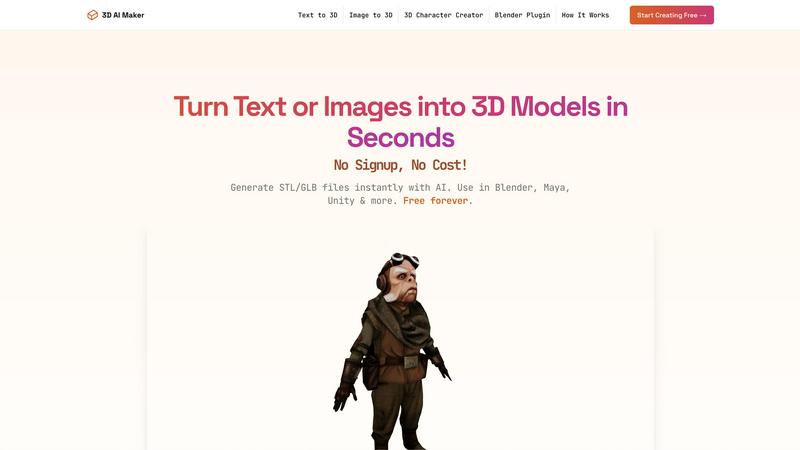
Transform text or images into stunning 3D models instantly and for free, perfect for creators and innovators alike.
Last updated: February 28, 2026

dmaya
Transform your design process with dMaya, the AI platform that accelerates UI creation, client collaboration, and code export for teams.
Last updated: April 13, 2026
Visual Comparison
3D AI Maker
dmaya
Feature Comparison
3D AI Maker
AI-Powered 3D Generation
Harness cutting-edge AI technology to transform your text prompts or 2D images into fully textured 3D models. This feature allows users to unleash their creativity without the need for extensive design skills, making it accessible for everyone.
Direct Blender Integration
Seamlessly integrate 3D AI Maker with Blender using our specialized plugin. This feature is perfect for users looking for a free alternative to other tools, enabling them to generate models directly in their preferred 3D software environment.
Export GLB & STL Files
Flexibly export your creations in GLB format for animation and game engines or STL format for 3D printing. This versatility ensures that designers can use their models across a variety of platforms, including popular software like Maya and ZBrush.
Free Forever, No Strings
Experience the freedom of creating without hidden costs or the need for signup. 3D AI Maker offers 100% free access to all its features, empowering users to create professional-grade 3D characters and assets without any financial commitment.
dmaya
AI-Powered Design Generation
dMaya harnesses the power of AI to generate production-ready UI designs based on plain language input. This feature allows users to create complete layouts, component systems, and responsive variants in seconds, drastically reducing design time.
Multi-Screen Canvas
This feature provides an infinite canvas where users can work across both desktop and mobile frames simultaneously. It combines the flexibility of tools like Figma with the speed of AI, enabling users to drag, zoom, and organize screens effortlessly.
Built for Teams & Collaboration
dMaya is designed with teamwork in mind. It allows users to invite team members, share projects with clients, and leave comments in real-time. Role-based access ensures that everyone collaborates effectively, keeping the design process streamlined.
Client Presentation Mode
With this feature, users can share interactive previews of their designs through a single link, requiring no accounts for viewers. This capability fosters instant feedback from clients, allowing for rapid iterations and approvals without leaving the platform.
Use Cases
3D AI Maker
Custom 3D Character Creation
Design unique 3D characters tailored for games, virtual reality experiences, or animations. This feature allows artists and developers to bring their imaginative characters to life quickly and efficiently.
3D Printing Models from Photos
Easily convert JPG or PNG images into STL files suitable for 3D printing. Ideal for hobbyists and professionals alike, this functionality simplifies the process of turning visual memories into tangible objects.
Rapid Prototyping for Game Development
Game developers can utilize 3D AI Maker to quickly prototype and iterate on their 3D assets. This accelerates the development cycle, allowing for faster testing and refinement of game environments and characters.
Educational Projects and Presentations
Students and educators can leverage 3D AI Maker to create engaging visual aids for projects and presentations. The ability to generate custom 3D models enhances learning experiences and fosters creativity in educational settings.
dmaya
Agencies
Agencies can leverage dMaya to generate design concepts rapidly during discovery calls, presenting multiple design directions to stakeholders in hours. This efficiency helps win more clients and enhances the agency's credibility.
Product Teams
Product teams can use dMaya to explore various UI directions before allocating engineering resources. The platform facilitates collaboration across design, product, and engineering, ensuring alignment and reducing discrepancies between designed and built products.
Freelancers
Freelancers can enhance their productivity by taking on more projects without increasing their workload. dMaya enables them to deliver high-quality designs quickly, allowing for higher charges without compromising on project timelines.
Startups
Startups can use dMaya to rapidly prototype and iterate on their product designs. By obtaining client feedback in real-time and making necessary adjustments, they can align their vision with market needs efficiently.
Overview
About 3D AI Maker
3D AI Maker is your revolutionary gateway to the world of three-dimensional creativity, designed to empower users of all backgrounds—whether you're a novice, a hobbyist, or a seasoned professional. This groundbreaking, free tool harnesses the power of artificial intelligence to transform simple text prompts or 2D images into intricate, production-ready 3D models in a matter of seconds. With no complex software to master, no costly subscriptions, and absolutely no signup required, 3D AI Maker places limitless creative potential at your fingertips. Whether you want to create a "cyberpunk robot" or turn a cherished memory into a tangible 3D-printed model, this tool meticulously generates high-quality models you can download in versatile formats like GLB for animation and gaming or STL for 3D printing. With over 2 million models generated and counting, 3D AI Maker is a game-changer for artists, developers, and 3D enthusiasts, enabling rapid prototyping and creative expression like never before.
About dmaya
dMaya is a revolutionary vibe design platform engineered specifically for agencies, teams, and freelancers who prioritize the design phase before diving into coding. With dMaya, users can effortlessly chat with an AI agent to create professional UI designs from simple text descriptions. Whether you're envisioning a SaaS dashboard, a seamless e-commerce flow, or an innovative mobile app, dMaya generates polished screens in mere seconds. This platform is tailored for collaboration, allowing for instant design iterations through natural language commands, where you can change colors, swap layouts, adjust typography, or add new sections effortlessly. As design tokens maintain consistency across all screens, dMaya empowers teams to present, approve, and ship designs with confidence. The review process that previously took days can now be completed in minutes, enhancing productivity and teamwork. Once designs are approved, users can export clean HTML, CSS, and JS code, which can be handed off to coding agents for development in various frameworks like React, Next.js, or Flutter. By bridging the gap between design and development, dMaya transforms the design workflow, ensuring teams make intentional decisions and catch issues early in the process.
Frequently Asked Questions
3D AI Maker FAQ
Is 3D AI Maker really free?
Yes, 3D AI Maker is completely free to use with no hidden costs or subscription fees. You can create as many models as you desire without any financial commitment.
How does this compare to Meshy or other tools?
3D AI Maker offers unlimited free exports and a user-friendly interface, making it a strong alternative to tools like Meshy. Our Blender plugin further enhances your workflow by integrating directly into your favorite software.
Can I use models commercially?
Yes, you can use the models generated by 3D AI Maker for commercial purposes. However, it is always advisable to review the specific terms and conditions to ensure compliance.
How do I install the Blender plugin?
Installing the Blender plugin is straightforward. Simply download the plugin from our website and follow the provided installation instructions to integrate it seamlessly into your Blender workflow.
dmaya FAQ
How does dMaya enhance the design process?
dMaya enhances the design process by combining AI-driven design generation with real-time collaboration features. This allows teams to create, iterate, and finalize designs quickly, ensuring alignment before development begins.
Can I use dMaya for mobile app designs?
Yes, dMaya is versatile and can be used for designing mobile apps, SaaS dashboards, e-commerce flows, and more. The AI can generate responsive designs that cater to various screen sizes.
What happens after my design is approved?
Once your design is approved, you can export it as clean HTML, CSS, and JS code. You can then hand this code over to coding agents like Cursor or Claude Code for development in your preferred framework.
Is there a limit to how many designs I can create?
dMaya allows you to create an infinite number of designs on its multi-screen canvas. You can iterate and refine your designs without any limitations, fostering creativity and exploration.
Alternatives
3D AI Maker Alternatives
3D AI Maker is an innovative tool that falls under the category of AI-powered 3D model generation. It allows users to effortlessly create production-ready 3D models from simple text or image inputs. With its user-friendly design and powerful capabilities, it unlocks a world of creativity, making it accessible to a broad audience, from hobbyists to professionals. Users often seek alternatives to 3D AI Maker for various reasons, including pricing, specific features that may cater to niche needs, or compatibility with different platforms. When searching for a suitable alternative, it’s essential to consider factors such as ease of use, the range of export options, integration capabilities, and whether the tool aligns with both your creative vision and technical requirements.
dmaya Alternatives
dmaya is an innovative AI vibe design platform specifically tailored for agencies, teams, and freelancers. It empowers users to create stunning UI designs through intuitive conversations with an AI agent, seamlessly bridging the gap between design and development. As a design tool, dmaya allows users to generate professional layouts from simple text descriptions, making the design process faster and more efficient. Users often seek alternatives to dmaya for various reasons, including pricing structures, specific feature sets, or compatibility with their existing workflows and platforms. When exploring alternatives, it's crucial to consider factors such as ease of use, the ability to collaborate effectively, and the range of design capabilities offered. Selecting the right tool can enhance creativity, streamline processes, and ultimately lead to more successful project outcomes.