TaleHug AI Story Generator for Kids
Turn a child's voice, drawing, or idea into a safe, illustrated AI storybook that transforms imagination into shared reading adventures.
AI tool Details
Explore More
Alternatives
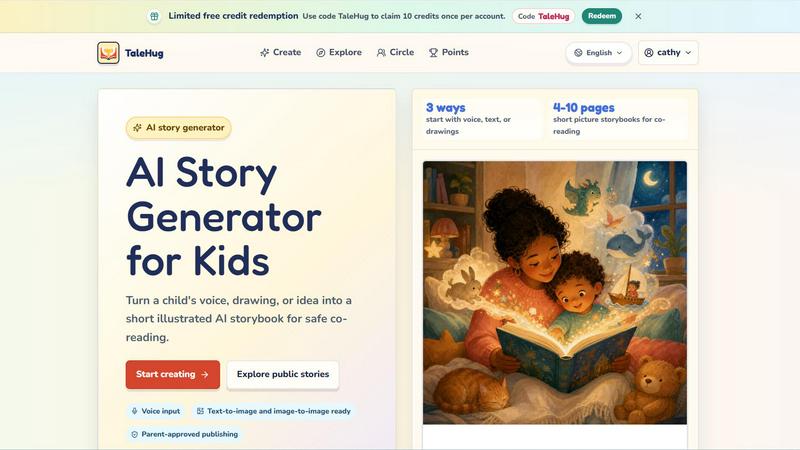
About TaleHug AI Story Generator for Kids
TaleHug is an AI-powered storytelling platform designed specifically for children, transforming their ideas, drawings, and voices into beautifully illustrated short storybooks. This innovative tool empowers young minds aged 3 to 6 to become creators of their own imaginative worlds, combining the magic of storytelling with the accessibility of artificial intelligence. At its core, TaleHug bridges the gap between a child's boundless creativity and the technical challenge of writing and illustrating, making the entire process as simple as speaking, drawing, or describing an idea. The platform offers three distinct ways to start a story: voice input, text prompts, or uploading original drawings, which the AI then converts into 4 to 10 page picture storybooks perfect for co-reading with parents or teachers. Every story generated is private by default, with parent-approved sharing options that include private, circle, and public visibility modes. TaleHug prioritizes safety above all else, implementing features like safe display names, no public comments in the MVP, and no collection of school names, addresses, or child contact details. The result is a secure, inspiring environment where children can explore their creativity, build confidence in self-expression, and develop early literacy skills through the joy of seeing their ideas come to life on every page. Whether a child dreams of moon rabbits, brave soldiers, or sharing trucks with friends, TaleHug turns those sparks of imagination into lasting storybook memories.
Features
Three Ways to Start: Voice, Text, or Drawings
TaleHug meets every child where they are most comfortable expressing themselves. A child can simply speak their story idea aloud, type a few words or sentences, or upload a drawing they have created. The AI instantly transforms any of these inputs into a complete illustrated storybook, removing barriers for children who may not yet be confident writers or readers. This flexibility ensures that every child, regardless of their developmental stage, can experience the thrill of becoming a storyteller.
AI-Powered Illustration Generation
Every story page comes to life with vivid, colorful illustrations generated by the AI based on the child's input. The platform uses both text-to-image and image-to-image technology, meaning it can create pictures from words or build new illustrations from a child's own drawing. Each page features one strong image paired with a single short sentence, making the story easy to follow for young readers. The system also stores prompts for each image, allowing parents and children to regenerate illustrations if they want a different visual style or scene.
Safe, Parent-Approved Publishing System
TaleHug is built around a safety-first philosophy that puts parents in control of their child's sharing experience. All story drafts are private by default, visible only to the child and their parent. Before any story can be shared to a circle of trusted family members or published publicly in the gallery, it requires explicit adult approval. The platform uses safe display names instead of full child names and collects no school names, addresses, or contact details. Public comments are disabled in the MVP, creating a read-only gallery environment that protects young creators.
Parent-Approved Story Prompts and Scene Templates
For children who need a little inspiration to get started, TaleHug offers a curated library of parent-approved story prompts and pre-built scene templates. These include themes like "Moon rabbit bedtime" for gentle friendship stories, "Sharing the red truck" for classroom social stories, and "First school morning" for helping nervous kindergartners. Each template provides a safe, age-appropriate foundation that children can customize with their own characters, settings, and plot twists, ensuring every story feels uniquely theirs while staying within positive, constructive themes.
Use Cases
Bedtime Story Creation for Families
Parents can use TaleHug to create personalized bedtime stories that feature their own child as the main character, making the nightly reading routine even more magical. A child can describe their favorite animals, friends, or imaginary worlds, and within minutes the family has a custom 4 to 10 page picture book ready for co-reading. This transforms bedtime from passive consumption into an active, creative bonding experience where children feel proud to have authored the story they are about to hear.
Classroom Social and Emotional Learning Activities
Kindergarten and preschool teachers can leverage TaleHug to help children explore social situations and emotions through storytelling. A teacher might prompt a child to create a story about sharing toys, making new friends, or asking for help when feeling scared. The AI generates gentle, age-appropriate narratives that reinforce positive behaviors and emotional vocabulary. Children gain a sense of ownership over these lessons because they created the story themselves, making the learning more memorable and impactful than a pre-written book.
Encouraging Reluctant Writers and Readers
For children who struggle with traditional writing or feel intimidated by blank pages, TaleHug removes the pressure by accepting voice and drawing inputs. A child who cannot yet write can still tell elaborate stories by speaking aloud, and the AI handles the text generation. This builds confidence and shows reluctant learners that they have valuable ideas worth sharing. Over time, seeing their spoken words transformed into printed stories can motivate children to engage more with reading and writing activities.
Developing Creative Confidence and Self-Expression
TaleHug serves as a daily creativity gym for young minds, encouraging children to experiment with different characters, settings, and plot ideas without fear of failure. Because stories are private by default and can be easily regenerated, children feel free to try wild ideas, change their minds, and explore multiple versions of the same story. This iterative creative process teaches resilience, decision-making, and the joy of bringing an inner vision to life, skills that extend far beyond storytelling into all areas of learning and personal development.
Frequently Asked Questions
How does TaleHug ensure my child's safety and privacy?
TaleHug is designed with privacy and safety as foundational principles, not afterthoughts. All story drafts are private by default and only visible to the child and their parent. Before any story can be shared with a circle of trusted contacts or published publicly, the parent must explicitly approve it. The platform uses safe display names instead of full child names and does not collect school names, addresses, or any contact details for children. Public comments are disabled in the MVP, so the gallery is a read-only space where children can showcase their work without receiving unsolicited feedback. TaleHug also uses essential cookies to keep the platform working and offers optional analytics cookies that parents can choose to accept or reject.
What age group is TaleHug designed for?
TaleHug is specifically designed for children aged 3 to 6, which corresponds to preschool and kindergarten ages. The platform's interface is kid-friendly and intuitive, with large buttons, colorful visuals, and simple navigation that young children can manage with minimal adult assistance. The generated stories are 4 to 10 pages long, each with one short sentence and one strong illustration, which is the ideal format for co-reading with a parent or teacher. However, older children who are beginning to read and write independently can also enjoy creating more complex stories using the text input option.
Can my child start a story using their own drawing?
Yes, absolutely. One of TaleHug's three primary input methods is drawing. A child can upload a picture they have drawn, and the AI will use image-to-image technology to generate illustrated story pages based on that drawing. This is a powerful feature for young children who may not yet be able to articulate their ideas in words but can express themselves through art. The AI respects the child's original creative vision while enhancing it with professional-quality illustrations, making the child feel like a true author and illustrator of their own storybook.
How many pages can a TaleHug story have, and can I edit it later?
Each TaleHug storybook contains between 4 and 10 pages, which is the ideal length for short picture storybooks designed for co-reading with young children. This range ensures the story is long enough to be engaging but short enough to hold a preschooler's attention from beginning to end. Yes, stories can be edited after generation. The AI stores prompts for each page's illustration, so parents and children can regenerate images if they want a different visual style or scene. This flexibility allows families to refine their stories until they are exactly as the child imagined, making the creative process collaborative and iterative.
Similar to TaleHug AI Story Generator for Kids

SQLCrab
SQLCrab is a website where you can practice SQL database queries right in your web browser. It uses a real Postgres database engine so you can learn.

Wordy
Learn languages with real movie and TV show clips.

Delta Report
Free, Live 3D Satellite, Space Weather & Climate Tracker in real time on an interactive globe alongside articles and insights.

The French Corner
Learn French through visual stories told by a native speaker. Words you meet come back on their own, right before you'd forget them.

YT Video Summarizer
Turn Long YouTube Videos into Quick AI Summaries in Seconds.