

Picture Enhancer
Turn blurry, small, or damaged photos into sharp, high-quality images instantly with Picture Enhancer's free AI tools in your browser.
AI tool Details
Explore More
Alternatives
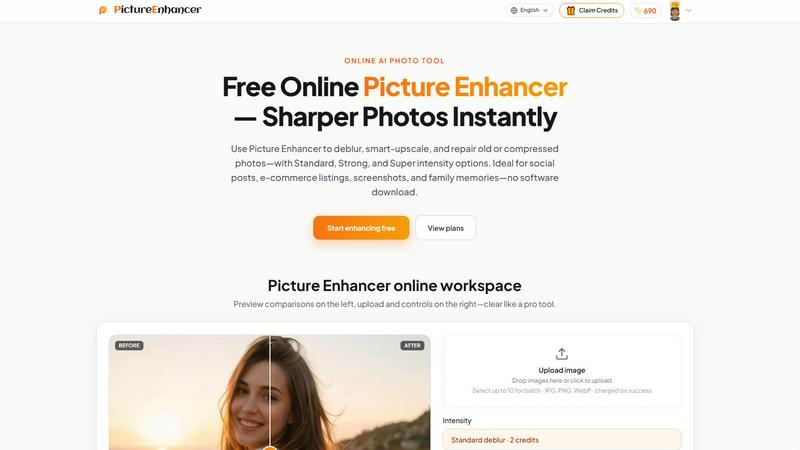
About Picture Enhancer
Picture Enhancer is a free online AI photo enhancer designed to transform your blurry, low-resolution, or damaged images into sharp, high-quality visuals in seconds. This powerful tool is built for creators, sellers, and everyday users who need sharper images fast without the hassle of downloading complex software. Picture Enhancer empowers you to take control of your image quality with three core modes: Deblur, Upscale, and Restore. Each mode offers three intensity levels (Standard, Strong, and Super) so you can dial in exactly the right amount of enhancement for any photo. The workflow is incredibly simple: upload a JPG, PNG, or WebP photo, choose your mode and intensity, preview the transformation with a before/after slider, and download a watermark-free result. Picture Enhancer is ideal for social media posts, e-commerce product listings, screenshots, UI captures, and treasured family photos. The tool is accessible to everyone with three free lifetime guest tries per IP, no signup required. For regular users, signing in unlocks a credit-based system where you only pay when your enhancement succeeds. Picture Enhancer is not just a tool; it is your partner in elevating every image to its fullest potential, making every pixel count and every memory clear.
Features
AI Deblur
Picture Enhancer uses advanced AI to intelligently rebuild edges and texture from common image problems like camera shake, soft focus, and mild motion blur. You can choose from Standard, Strong, or Super deblur intensity to match the severity of the blur. This feature ensures that faces, text, and fine details become crisp and readable again, transforming a frustratingly blurry photo into a usable, professional-looking image.
Smart Upscale
The Smart Upscale feature allows you to enlarge your images by 2x or 4x while adding realistic detail instead of just stretching pixels. This is perfect for turning small source files into hero shots for product pages, social media covers, or print previews. The AI intelligently fills in missing information to maintain sharpness and clarity, so your enlarged photos look natural and high-resolution, not pixelated or artificial.
Old Photo and Damage Restore
This feature is designed to breathe new life into your cherished memories by reducing scratches, fade, and compression artifacts. The Restore mode works wonders on scanned family prints and old digital photos. Strong and Super restore settings handle heavier damage, such as significant fading or deep scratches, allowing you to preserve and share your family history with the clarity it deserves.
Batch Enhance for Paid Users
For power users who need to process multiple images efficiently, Picture Enhancer offers batch enhancement capabilities. Subscribers and permanent credit pack buyers can enhance up to 10 images at once. This feature is a game-changer for e-commerce sellers, content creators, and anyone managing large volumes of photos, saving significant time and effort while ensuring consistent, high-quality results across all your images.
Use Cases
Portraits and Everyday Photos
Reduce mild blur and enhance clarity in your personal photos so faces, clothing, and backgrounds look cleaner and more vibrant. Whether you are posting to your social feed, building a portfolio, or simply preserving a special moment, Picture Enhancer ensures your everyday photos look their absolute best, making you proud to share them.
E-commerce and Product Shots
Upscale product detail and tame compression noise to make your product images stand out in a crowded marketplace. Sharp, clear photos build trust with customers and can directly impact sales. Picture Enhancer helps you create hero shots and listing images that look professional, even if you started with a small or low-quality source file.
Screenshots and UI Captures
Sharpen text edges and clean up artifacts in screenshots for tutorials, support threads, documentation, or design portfolios. Clear, readable screenshots improve communication and professionalism. Picture Enhancer ensures that every UI element and line of text is crisp and easy to understand, making your technical content more effective.
Old Photo Memories
Repair faded, scratched, or damaged scans of old family photos so they are ready to share digitally or print. Preserving your family history is important, and Picture Enhancer helps you restore those precious memories to their former glory. Transform damaged heirlooms into clear, vibrant images that can be enjoyed by future generations.
Pricing
Picture Enhancer offers a flexible credit-based pricing system. New signed-in users receive starter credits to begin enhancing immediately. Credits are only charged when an enhancement succeeds, ensuring you never pay for a failed attempt. Standard intensity enhancements cost 2 credits, Strong costs 4 credits, and Super costs 6 credits. For regular users, there are two main purchasing options. Monthly subscription plans grant a set number of credits each billing cycle, perfect for ongoing use. Permanent credit packs never expire, giving you the freedom to use them whenever you need. Paid users unlock exclusive benefits including Super intensity tiers and the ability to batch enhance up to 10 images at once. This pricing model is designed to be fair and flexible, allowing you to choose the plan that best fits your needs and usage frequency.
Frequently Asked Questions
What is Picture Enhancer?
Picture Enhancer is a free online AI photo enhancement tool that sharpens, upscales, and restores images. It is designed for creators, sellers, and everyday users who need to improve image quality quickly without downloading software. The tool offers three modes: Deblur, Upscale, and Restore, each with three intensity levels.
Can I try Picture Enhancer without signing in?
Yes, you can try Picture Enhancer without signing in. Guests receive three free lifetime tries per IP address. This allows you to test the tool and see the quality of the results before committing to an account or payment.
How does billing work after sign-in?
After signing in, you use credits to enhance images. New accounts receive starter credits. Credits are only charged on successful enhancements: Standard intensity costs 2 credits, Strong costs 4 credits, and Super costs 6 credits. You can purchase monthly subscriptions that grant credits each cycle or permanent credit packs that never expire.
Will downloads include a watermark?
No, all successful enhancements from Picture Enhancer are downloaded without any watermark. You receive the full, clean, high-quality result that you can use for any personal or commercial purpose without restrictions.
Similar to Picture Enhancer
AIPetGen
AIPetGen turns a photo of your dog, cat, or other pet, or a written description, into a new picture or a short animation.

AI Object Remover
Remove unwanted people, objects, text and watermarks from photos with AI
ideogram-45
AI image generation and editing with sharp typography, native 2K output, and localized edits that preserve the rest of your image.

ImageGPT
ImageGPT is an all-in-one AI creative platform for generating, editing and transforming images and videos using AI.

Qwen Image 2.1
Qwen Image 2.1 is a powerful AI model for text-to-image creation and image editing.

AI Album Cover Maker
Create release-ready album covers from a prompt or photo. Generate, refine, and export art for singles, EPs, mixtapes, and playlists.

Sprite Sheet Maker
A free browser-based toolkit for creating, cutting, converting, and previewing sprite sheet animations.

Flux Lora
Explore Flux LoRA online workflows in a browser-based AI Studio, with a roadmap for dedicated models, generation, and guided training.