

EditTextImage
EditTextImage lets you replace text in any image online while perfectly preserving the original font, color, lighting, and perspective.
AI tool Details
Explore More
Alternatives
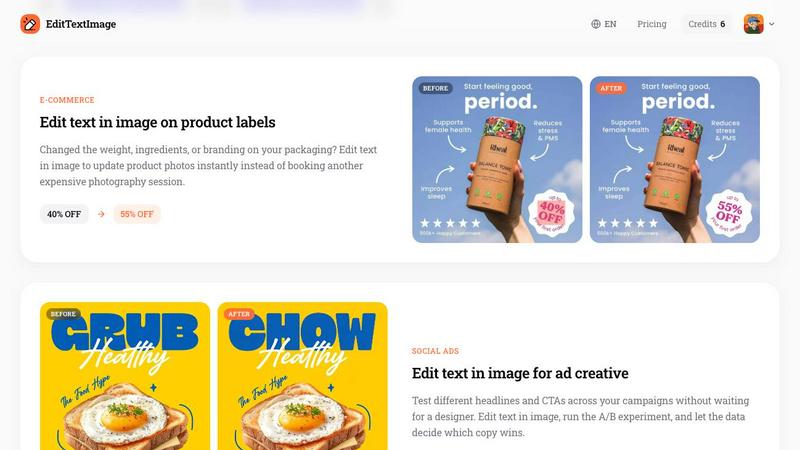
About EditTextImage
EditTextImage is a revolutionary online AI tool that liberates you from the tyranny of lost design files and expensive software subscriptions. It empowers you to change the text in any image while keeping the original font, color, layout, and perspective pixel-perfect. Imagine needing to fix a single typo on a finished poster, swap a date on a product photo, or A/B test a headline on a social media ad, but you have lost the original design file. With EditTextImage, you simply upload the image, type the existing text and your replacement, and the AI samples the typography straight from the pixels. This means paid fonts, hand-lettering, and complex effects like drop shadows all stay intact. The entire process takes about 10 seconds and outputs at a crisp 2K resolution. This tool is for anyone who creates or manages visual content: marketers, designers, business owners, event organizers, and e-commerce sellers. It transforms a frustrating bottleneck into a swift, empowering workflow, giving you back control over your images without needing Photoshop skills or a Canva subscription. Your first edit is free with no credit card required, and then it is a simple one-time payment for a pack of edits. No recurring fees, no credit expiration, and commercial use is included.
Features
Pixel-Perfect AI Text Replacement
This is the core magic of EditTextImage. The AI does not just paste new text over the old one. It intelligently samples the typeface, color, size, and even the perspective and lighting effects from the surrounding pixels. It then generates the replacement text to match these characteristics perfectly. This means you can edit text in images with paid fonts you do not own, hand-drawn lettering, or complex 3D text without any degradation. The background is cleaned up seamlessly, leaving no smears or artifacts, ensuring your final image looks as if it was originally created with the new text.
Blazing Fast Results in Seconds
Time is your most valuable asset, and EditTextImage respects that. The entire process, from upload to download, takes approximately 10 to 12 seconds. You no longer need to wait hours for a designer to open a source file or spend 30 minutes in complex software for a simple text change. This speed is transformative for rapid iteration, whether you are fixing a last-minute typo in a contract, updating pricing on a product label for a flash sale, or swapping languages in app screenshots for a global launch. It turns a potential delay into a quick, frictionless step in your workflow.
No Software, Fonts, or Subscriptions Required
EditTextImage operates entirely in your browser, freeing you from the need to install heavy software like Photoshop or manage a library of font files. This is a game-changer for paid or rare fonts that you might not have licensed. The AI handles the font identification and rendering for you. Furthermore, the pricing model is a breath of fresh air. Instead of a monthly subscription that you might forget about, you get a set number of edits with a simple one-time payment. Credits never expire, and you only pay for what you use. This makes it an incredibly accessible and cost-effective tool for anyone.
High-Resolution 2K Output
Quality is never compromised for speed. EditTextImage outputs your edited images at a resolution of 2K. This high fidelity ensures that the results are suitable for professional use, whether you are printing a poster, publishing an ad on social media, or including an image in a presentation. The high resolution maintains the sharpness and clarity of the original image, so your final product looks polished and credible. You can confidently use the output for both digital and print applications without worrying about pixelation or loss of detail.
Use Cases
Fixing Typos and Errors in Documents
You have a final version of a contract, an invoice, or a report that is ready to send, but you spot a critical typo in a name, date, or number. The original design file is long gone, and recreating it would take hours. EditTextImage is your perfect solution. Simply upload the scanned document or screenshot, enter the incorrect text and the correction, and the AI will edit the text in the image flawlessly. It preserves the font and layout, making the document look untouched. This saves you from the embarrassment of sending an error-filled document and the time cost of a full redesign.
Updating Event Posters and Flyers
The date for your conference changed, a speaker had to cancel, or the venue moved. Your beautiful, professionally designed poster is now outdated. Instead of panicking and paying a designer to recreate it, you can use EditTextImage to edit the text in the image directly. You can update the date, swap a name, or change the location in seconds. The AI perfectly matches the original design’s font and style, so your updated poster looks just as professional as the original. This allows you to reuse high-quality event materials season after season, saving hundreds of dollars in design fees.
Localizing App Screenshots for Global Markets
App stores require screenshots for every new language you support. Rebuilding your UI mockups for 10 different languages is a massive, repetitive task. EditTextImage empowers you to edit text in your existing screenshots to swap the language. You take your English screenshot, upload it, and replace the English text with the translated French or German text. The AI keeps the UI elements, buttons, and layout perfectly intact. This dramatically accelerates your localization workflow, allowing you to launch in new markets faster and with pixel-perfect consistency across all your app store assets.
A/B Testing Headlines for Social Media Ads
You want to test which headline gets more clicks for your next ad campaign. Instead of waiting for a designer to create two separate images, you can use EditTextImage to edit the text in your ad creative instantly. Create one base image, then quickly generate variations with different headlines, calls to action, or promotional offers. You can run your A/B experiment immediately, letting the data decide which copy wins. This speed of iteration is a superpower for marketers, enabling you to optimize campaigns in real-time and drive better results without a creative bottleneck.
Pricing
EditTextImage offers a simple and transparent pricing model that breaks away from recurring subscriptions. You start with one free credit to edit your first image, no credit card required. After that, you can purchase a pack of 30 edits for a one-time payment of $9.90. This is a credit-based system, meaning your credits never expire and you can use them at your own pace. Commercial use of the edited images is included in the price, making it an excellent value for professionals and businesses. There are no hidden fees, no monthly bills, and no penalty for taking a break. You simply buy credits when you need them.
Frequently Asked Questions
What types of images can I upload to EditTextImage?
You can upload images in PNG, JPEG, or WebP formats, with a maximum file size of 10 MB. This covers the vast majority of images you will encounter, from screenshots and product photos to scanned documents and digital art. The tool is designed to work with any image containing text that you need to edit.
Is my first edit really free, and do I need a credit card?
Yes, your first edit is completely free. You do not need to provide a credit card to get started. You simply sign in with your Google account, and you will receive one free credit to use. This allows you to test the tool and see the quality of the results for yourself before making any financial commitment.
How does EditTextImage handle paid or custom fonts I don't have?
This is one of the tool's most powerful features. EditTextImage does not require you to have the font file installed on your computer. The AI analyzes the pixels of the original text in your image to understand the typeface, color, size, and perspective. It then uses this analysis to generate the new text that matches the original. This means paid fonts, hand-lettering, and rare typefaces are all handled seamlessly.
What are the acceptable use policies for this tool?
EditTextImage is designed for legitimate and ethical edits. You must own the image or have a license to edit it. The tool is strictly prohibited from being used for deceptive purposes, such as altering immigration documents, creating fake proofs of transactions, or falsifying email or chat timestamps. The platform does not process IDs, passports, or official seals. Violations of these policies will result in account termination without refund, and logs may be shared with law enforcement.
Similar to EditTextImage
Sprite Sheet Maker
A free browser-based toolkit for creating, cutting, converting, and previewing sprite sheet animations.

Flux Lora
Explore Flux LoRA online workflows in a browser-based AI Studio, with a roadmap for dedicated models, generation, and guided training.
Qwen Image Edit
Prompt-based Qwen Image editing and generation for backgrounds, text, product visuals, posters, and outpainting.
Ideogram Studio
Ideogram Studio creates typography-rich images, logos, posters, ads, packaging, and ecommerce visuals with Ideogram 4 AI.
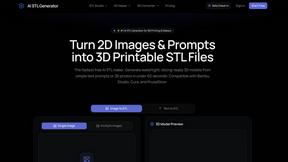
AI STL Generator
The fastest AI STL generator to turn prompts and images into 3D printable STL files.

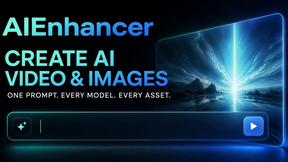
AIEnhancer
Enhance photos, create images, and generate videos with an all-in-one AI enhancer for flexible creative workflows.
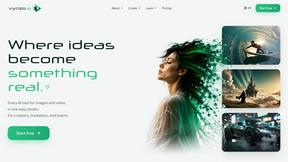
Vynzo
AI image and video studio. Generate from a prompt, animate stills, swap faces, restyle clips and edit — one credit pool, no subscription.