

archmaster
Transform any room or building into a photorealistic design in seconds with Archmaster's AI, no skills required.
AI tool Details
Explore More
Alternatives

About archmaster
Archmaster is an AI-powered interior design and architectural rendering platform that puts the power of professional design directly into your hands. Imagine being able to transform any room, exterior facade, or outdoor space with just a single photo and a few clicks. That is the reality Archmaster delivers. You simply upload a photo of your space, choose from over 20 distinct style presets ranging from Scandinavian Minimalist to Cyberpunk, and receive a photorealistic, designer-quality render in under 60 seconds. There is no need to learn complex 3D modeling software, no CAD files to manage, and no expensive designer to hire. Archmaster is built for homeowners planning renovations, renters visualizing non-permanent changes, real estate agents creating virtual staging, interior designers generating early-stage client concepts, and architects producing quick visualizations. The platform offers six core capabilities: interior redesign, exterior redesign, sketch-to-image conversion, AI render enhancement, architecture video generation, and targeted AI inpainting for edits. Additionally, Archmaster provides free tools including a room size calculator, paint calculator, renovation cost estimator, and color palette generator. With over 800 designers and homeowners already trusting the platform, Archmaster empowers you to see your space transformed before you commit to any changes.
Features
Interior AI Design
This feature allows you to completely redesign any interior space including living rooms, bedrooms, bathrooms, and kitchens. Simply upload a photo of your current room, choose from 20 style presets, and Archmaster generates a photorealistic before-and-after visualization. You can experiment with different aesthetics from cozy and rustic to modern and luxury, all without moving a single piece of furniture. The drag slider comparison tool lets you see the dramatic transformation instantly.
Exterior and Facade Design
Transform the entire exterior of your home, front yard, or outdoor space with this powerful feature. Upload a photo of your building facade or outdoor area, select a style, and watch as Archmaster reimagines your property. Whether you want a Mediterranean villa look, a tropical paradise, or a sleek modern facade, the AI handles all the complex architectural details. This is perfect for homeowners planning curb appeal improvements or real estate agents staging properties for sale.
Sketch to Image
This feature converts your hand-drawn architectural sketches into fully realized, photorealistic images in seconds. No need for professional drafting skills or expensive rendering software. Simply draw your vision on paper, upload the sketch, and Archmaster interprets your design intent to produce a stunning visual representation. This capability is invaluable for architects and designers who want to quickly communicate concepts to clients or for homeowners who have a rough idea they want to see come to life.
Edit and Modify with AI Inpainting
This advanced editing tool allows you to make precise changes to any generated design. If you love a render but want to change a specific element like a sofa, light fixture, or wall color, you can use AI inpainting to refine just that area. Simply select the portion you want to modify, describe the change, and Archmaster updates only that section while preserving the rest of the design. This gives you complete creative control without having to regenerate the entire image.
Use Cases
Homeowners Planning Renovations
Homeowners can use Archmaster to visualize their renovation projects before spending any money. Whether you are remodeling a kitchen, updating a bathroom, or completely redecorating a living room, you can experiment with different styles, layouts, and color schemes. See how new countertops, cabinets, and flooring would look in your actual space. This eliminates guesswork and helps you make confident decisions about materials, colors, and design directions, potentially saving thousands of dollars in costly mistakes.
Interior Designers Creating Client Concepts
Professional interior designers can leverage Archmaster to generate rapid visual concepts for client presentations. Instead of spending hours or days creating mood boards and renderings, designers can upload client photos and produce multiple style options in minutes. This accelerates the design approval process and allows clients to see realistic previews of proposed changes. Designers can also use the edit and modify feature to fine-tune specific elements based on client feedback, making revisions fast and effortless.
Real Estate Agents for Virtual Staging
Real estate agents can use Archmaster to virtually stage empty or outdated properties for listing photos. Instead of paying for expensive physical staging or furniture rental, agents can upload photos of vacant rooms and apply style transformations that make spaces look furnished, inviting, and move-in ready. This significantly improves listing appeal, helps potential buyers visualize the property's potential, and can lead to faster sales and higher offers. The before-and-after comparison is also a powerful marketing tool.
Architects for Quick Client Visualizations
Architects can use Archmaster to quickly generate photorealistic renders from their initial sketches or concept drawings. The sketch-to-image feature is particularly valuable for communicating design intent to clients who may struggle to interpret traditional architectural drawings. Architects can also use the exterior redesign capability to explore different facade treatments and landscaping options. The architecture video feature allows them to create short walkthrough animations that bring static renders to life, providing a more immersive client experience.
Frequently Asked Questions
What is a credit and how does it work?
A credit is the basic unit of usage on Archmaster. One credit allows you to generate one design, upscale one image, or perform one edit. Multi-view generations, which produce multiple design variations at once, cost 3 credits. Architecture video generation, which animates a still render into a walkthrough, costs 5 credits. The weekly plan gives you 30 credits that auto-renew each week, so you can generate, upscale, and edit as needed throughout the week.
What photo formats are supported?
Archmaster supports common image formats including JPEG, PNG, and WEBP. For best results, upload a clear, well-lit photo of your space taken from a straight-on angle. The AI works best when it can clearly see the room layout, existing furniture, and architectural features. Avoid heavily filtered or distorted images for optimal rendering quality.
Can I cancel my subscription at any time?
Yes, you can cancel your Archmaster subscription at any time. There are no long-term contracts or cancellation fees. When you cancel, your current week's credits remain available until the end of your billing period, but they will not auto-renew for the next week. You can always resubscribe later if you need more design work done.
Are my uploaded photos used to train AI models?
Archmaster takes your privacy seriously. Your uploaded photos are processed to generate your requested designs and are not used to train or improve the AI models without your explicit consent. The platform's privacy policy details how your data is handled and protected. You can review the full policy on the Archmaster website for complete transparency.
Similar to archmaster

ArchOne AI
All-in-one AI spatial design visualization platform for interior, exterior and landscape design.

Kogashitsuka AI
An online AI image tool that enhances photos and illustrations at their original size or upscales them by 2x or 4x.

RoofReport
Upload your house photo and instantly preview real shingle colors from top brands for free with no signup required.
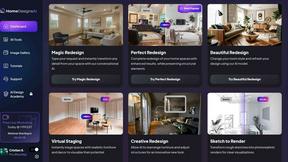
HomeDesignsAI
Transform any home or garden from a single photo with AI powered redesigns in under 30 seconds.
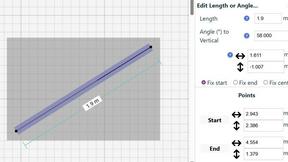
SimpleDraw
Transform your space with precise, professional floor plans created effortlessly in your browser.