
Melograph vs Sovideo
Side-by-side comparison to help you choose the right AI tool.

Transform your music into stunning, export-ready videos effortlessly with customizable templates in minutes.
Last updated: February 28, 2026

Create stunning AI videos and images effortlessly with Sovideo's all-in-one platform and top-tier models.
Last updated: February 28, 2026
Visual Comparison
Melograph

Sovideo
Feature Comparison
Melograph
Intuitive Template Selection
Melograph offers a variety of beautifully crafted templates tailored to different musical styles. Users can easily browse and select the perfect look that resonates with their track, making the visual creation process enjoyable and efficient.
Audio-Reactive Visuals
Experience real-time visualization with Melograph's audio-reactive technology. As you upload your audio, the waveforms dynamically respond, creating a stunning visual representation of your music that captivates viewers and enhances engagement.
Quick Export Options
With Melograph, users can effortlessly export their creations in high-definition 1080p MP4 format. The platform ensures that the exports are clean, professional, and optimized for various social media platforms, allowing creators to share their work instantly.
Customizable Artist Branding
Melograph provides options to personalize videos by adding artist names, song titles, and even logos or album covers. This feature ensures that your branding remains consistent and recognizable across all your visual content.
Sovideo
All-in-One Platform
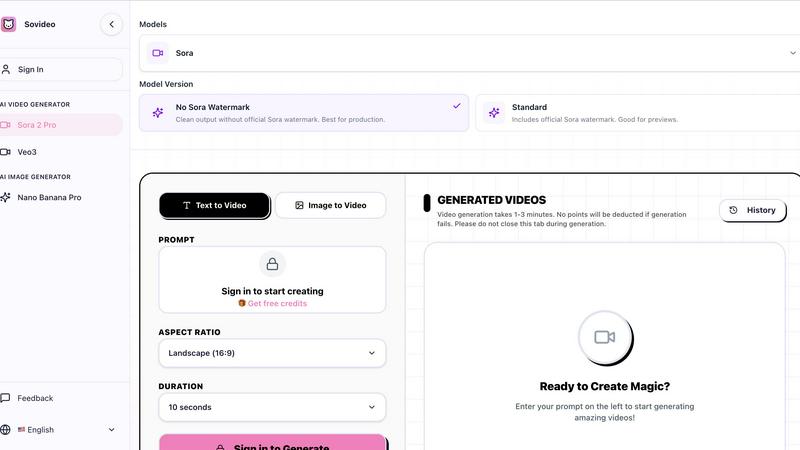
Sovideo combines advanced AI image and video generation capabilities into a single platform. This eliminates the need for multiple subscriptions and tools, providing a streamlined experience for users.
Powerful AI Models
Utilizing top-tier models like Sora2, Veo3, Nano Banana Pro, and Seedream, Sovideo empowers users to generate high-quality content effortlessly. These models are designed to create photorealistic images and dynamic videos from simple prompts.
Browser-Based Access
Sovideo runs entirely in your browser, requiring no downloads or installations. This feature allows you to create and manage projects from anywhere, making it ideal for remote work and collaboration.
Fast Generation Times
With Sovideo, video generation typically takes only 1-3 minutes. This quick turnaround enables users to iterate on their ideas and produce content rapidly, keeping pace with the fast-moving digital landscape.
Use Cases
Melograph
Indie Artists Showcasing New Releases
Indie musicians can leverage Melograph to create visually appealing videos for their latest tracks. With minimal effort, they can enhance their releases and attract more listeners on platforms like YouTube and Instagram.
Producers Promoting Beats
Music producers can use Melograph to showcase their beats in a visually engaging manner. By turning instrumental tracks into eye-catching videos, they can capture the attention of potential clients or collaborators.
Labels Enhancing Artist Content
Record labels can utilize Melograph to provide their artists with high-quality visual content for promotional purposes. This tool allows labels to enhance their marketing efforts without requiring extensive video editing skills.
DJs Creating Performance Visuals
DJs can create captivating visuals for their live performances using Melograph. By generating audio-reactive videos that sync with their sets, they can elevate the overall experience for their audience, making their shows more memorable.
Sovideo
Social Media Content Creation
Sovideo is perfect for creators looking to produce engaging social media clips. With the ability to generate eye-catching videos quickly, users can keep their content fresh and relevant in a fast-paced environment.
Marketing and Advertising
Marketers can leverage Sovideo to create compelling visual assets for campaigns. The platform's advanced generation capabilities allow for the rapid production of promotional materials that captivate audiences.
Concept Visualization
For designers and innovators, Sovideo serves as a powerful tool for visualizing ideas and concepts. Users can transform rough ideas into stunning visuals, aiding in presentations and pitches.
Educational Content Production
Educators and trainers can utilize Sovideo to create informative and engaging video content for their subjects. By generating professional-quality educational videos, they can enhance learning experiences and reach wider audiences.
Overview
About Melograph
Melograph is a revolutionary web-based music visualizer maker designed specifically for musicians and creators seeking stunning visuals to accompany their audio. It eliminates the complexities associated with traditional video editing, allowing users to create mesmerizing audio-reactive videos in mere minutes. The platform features a simple and intuitive interface where users can select from a diverse range of premium templates that align with various musical vibes, such as chill, cinematic, retro, and futuristic. With just a few clicks, you can upload your track, input your artist name and song title, and export high-quality videos ready for social media. This tool is ideal for indie artists, producers, labels, and DJs who are eager to enhance their music releases with consistent, professional-looking visuals while saving time and effort. The main value proposition of Melograph lies in its ability to streamline the visual creation process, empowering users to focus on their musical artistry while effortlessly generating captivating content.
About Sovideo
Sovideo is your all-in-one creative command center, designed to revolutionize how creators bring their visions to life. This advanced AI SaaS platform integrates the most powerful image and video generation models into a seamless, user-friendly workspace. Whether you're a creator, marketer, or part of an innovative team, Sovideo eliminates the complications of managing multiple tools, allowing you to focus on what matters most: your creativity. With Sovideo, you can easily craft stunning photorealistic images, awe-inspiring illustrations, and cinematic videos using simple text prompts or visual references. The platform harnesses cutting-edge models such as Sora2, Veo3, Nano Banana Pro, and Seedream, giving you the freedom to explore limitless avenues of visual storytelling. Entirely browser-based, Sovideo requires no installation, empowering you to create, manage, and refine your projects from anywhere. Whether your goal is to produce viral social media content, compelling marketing materials, or groundbreaking visual concepts, Sovideo streamlines your workflow. It is more than just a tool; it is a catalyst for creativity, drastically cutting production time and costs while expanding your creative potential exponentially. Step into the future of content creation, where the only limit is your imagination.
Frequently Asked Questions
Melograph FAQ
Do I need editing experience to use Melograph?
No, you do not need any editing skills to use Melograph. The platform is designed for users of all experience levels, making it easy for anyone to create stunning visuals by simply selecting a template and entering text.
Will Melograph work for TikTok, Reels, or Shorts?
Absolutely! Melograph exports videos in formats that are perfectly sized for platforms like TikTok, Instagram Reels, and YouTube Shorts, ensuring your content looks great wherever you share it.
Can I use Melograph for multiple songs?
Yes, you can use Melograph for multiple songs. Depending on your chosen pricing plan, you can create visuals for as many tracks as your export credits allow, giving you the flexibility to promote all your music.
Is Melograph a web-based tool?
Yes, Melograph is entirely web-based, meaning you can access it from any device with an internet connection. There’s no need for downloads or installations, allowing you to create stunning visuals from anywhere.
Sovideo FAQ
How do I get started with Sovideo?
To start using Sovideo, simply sign up on the website. Once registered, you can access the platform and begin creating by entering prompts for images or videos.
What types of content can I create with Sovideo?
With Sovideo, you can create a wide range of content, including photorealistic images, illustrations, and cinematic videos. The platform's versatility allows for various applications in marketing, social media, and education.
Are there any costs associated with using Sovideo?
While Sovideo offers free credits for new users, there may be subscription plans for advanced features and increased usage. Check the website for detailed pricing information.
Is there a support system available for users?
Yes, Sovideo provides support resources, including tutorials and a feedback mechanism, to assist users in navigating the platform and optimizing their creative processes.
Alternatives
Melograph Alternatives
Melograph is an innovative web-based music visualizer maker designed for musicians and creators seeking stunning visuals without the complexities of traditional video editing. This tool allows users to create eye-catching audio-reactive videos quickly and efficiently, making it an essential resource in the realm of music production and promotion. Users often search for alternatives to Melograph for various reasons, including pricing, specific feature sets, or platform compatibility. When choosing an alternative, it's vital to consider the ease of use, available templates, and the quality of the final output. Selecting a tool that aligns with your creative vision and meets your technical requirements will empower you to elevate your music's visual representation effectively.
Sovideo Alternatives
Sovideo is an advanced AI SaaS platform designed to revolutionize visual content creation by merging top-tier image and video generation models into a single, easy-to-use workspace. This powerful tool caters to creators, marketers, and innovative teams, enabling them to bring their visions to life without the hassle of using multiple applications. Users often seek alternatives to Sovideo due to factors such as pricing, specific features, or the need for compatibility with different platforms or workflows. When searching for an alternative, it's essential to consider aspects like user-friendliness, the variety of AI models available, and the flexibility of the platform. Additionally, look for options that provide seamless integration into your existing projects, ensuring a smooth transition and maintaining the high quality of output you desire. The right alternative should empower your creative process just as effectively as Sovideo does.