Shrinkpad vs SparkPix
Side-by-side comparison to help you choose the right AI tool.

Shrinkpad
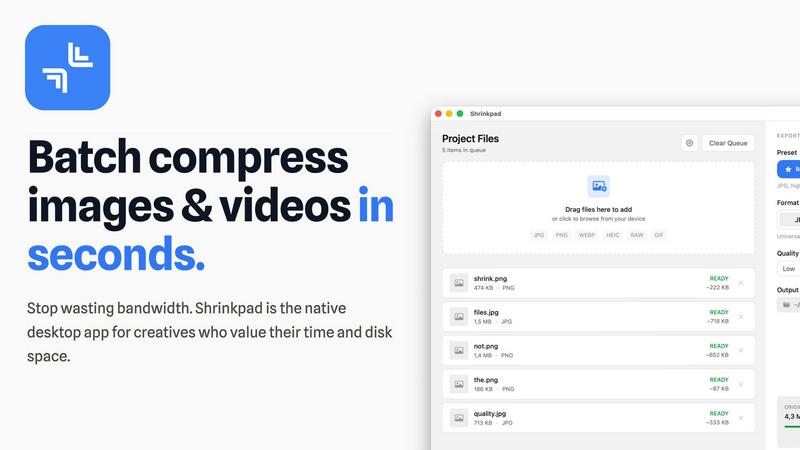
Shrinkpad effortlessly compresses your images and videos on Mac, saving space and enhancing performance in seconds.
Last updated: February 28, 2026

SparkPix
Transform your photos effortlessly by typing commands to remove backgrounds, enhance quality, and restore images with SparkPix's AI editor.
Last updated: March 11, 2026
Visual Comparison
Shrinkpad
SparkPix

Feature Comparison
Shrinkpad
Batch Compression
Shrinkpad allows you to batch compress hundreds of images and videos simultaneously. Just drag and drop your files or entire folders, and watch as the app optimizes them in seconds, saving you time and effort.
Intelligent Compression
No more guesswork with compression settings. Shrinkpad analyzes the visual complexity of your files and automatically applies the perfect compression ratio, ensuring high-quality results without artifacts.
Folder Mode
With Shrinkpad’s Folder Mode, you can simply drop an entire folder, and it will automatically detect and queue all supported images and videos for compression. This feature streamlines your workflow and eliminates the hassle of manual file selection.
Privacy-Focused Processing
All processing occurs locally on your Mac. Shrinkpad ensures that your files do not leave your device, providing peace of mind regarding your sensitive assets and eliminating the need for internet access during compression.
SparkPix
AI Photo Editor
The AI Photo Editor feature allows users to edit images by simply typing instructions, such as "remove background" or "enhance colors." This intuitive approach means that anyone can achieve professional-looking results in under 30 seconds, making photo editing accessible and straightforward for everyone.
Background Remover
With the Background Remover feature, users can instantly eliminate backgrounds from portraits, product images, or even complex scenes with just a single click. This tool is essential for creating clean, professional images suitable for marketing materials, personal projects, or social media.
Unblur Image
The Unblur Image feature harnesses advanced AI technology to fix motion blur, out-of-focus shots, and compression artifacts. This means that even if your original photo is less than perfect, SparkPix can restore clarity and sharpness, allowing your images to shine.
Photo Restoration
SparkPix excels in photo restoration by repairing old, faded, scratched, or damaged photographs. This feature is particularly valuable for preserving family archives, as it can breathe new life into treasured memories, making them vibrant and shareable once again.
Use Cases
Shrinkpad
Optimizing Website Assets
Web developers can use Shrinkpad to efficiently compress images and videos for websites, resulting in significantly faster load times and improved performance metrics, such as LCP scores.
Streamlining Creative Workflows
Photographers and designers can save hours of manual exporting by using Shrinkpad to batch process their assets. Export everything at once and let the app handle the optimization and renaming.
Reducing Storage Costs
Businesses and content creators looking to save storage costs can leverage Shrinkpad to reclaim valuable disk space by reducing the size of large media files, freeing up resources for other essential projects.
Enhancing Video Production
Video editors can benefit from Shrinkpad’s ability to compress 4K MP4 videos without sacrificing quality, making it easier to manage large video files and improve editing efficiency.
SparkPix
Social Media Enhancement
Social media managers and influencers can utilize SparkPix to create eye-catching posts by effortlessly editing their images. Whether it's removing distractions, enhancing colors, or applying artistic filters, SparkPix helps users stand out in a crowded digital landscape.
E-commerce Product Photography
Online sellers can take advantage of SparkPix's tools to create professional-quality product images. With features like background removal and image enhancement, sellers can present their products in the best light, boosting engagement and driving sales.
Family Photo Restoration
Families can use SparkPix to restore and preserve their cherished memories. By repairing old photographs and enhancing their quality, users can create digital keepsakes that can be shared and enjoyed by future generations.
Creative Art Projects
Artists and designers can explore their creativity using SparkPix's style transfer feature, which allows them to convert photos into various artistic styles, such as anime or watercolor. This opens up endless possibilities for unique artwork and personal expression.
Overview
About Shrinkpad
Shrinkpad is your ultimate companion in the creative journey, designed specifically for macOS users who refuse to let bloated media files hinder their productivity. This powerful native application enables photographers, designers, developers, and content creators to reclaim their storage space and accelerate their workflows. With Shrinkpad, you can batch compress images and videos with stunning speed, reducing file sizes by up to 90% in mere seconds. Its operation is entirely local, ensuring that your sensitive files remain private without the need for cloud uploads or internet dependencies. Whether you work with JPGs, RAW files, or 4K videos, Shrinkpad intelligently applies optimal compression settings, preserving visual quality while freeing up gigabytes of storage. It's not just a tool; it's a transformative solution that empowers you to focus on your creativity rather than on tedious file management.
About SparkPix
SparkPix is an innovative AI-powered photo editing tool designed to empower everyone, regardless of their technical skills, to transform and enhance their images effortlessly. With SparkPix, users can edit photos simply by typing what they want, eliminating the need for complex software like Photoshop. This makes it perfect for casual users, hobbyists, and professionals alike who wish to elevate their photography without investing significant time in learning complicated editing techniques. SparkPix provides a user-friendly interface where creativity meets technology, allowing users to execute edits such as background removal, image restoration, and artistic transformations in under 30 seconds. Whether you are a social media manager, an artist, or someone looking to revive cherished family photographs, SparkPix is your go-to solution for all photo editing needs, enabling you to create stunning visuals quickly and easily.
Frequently Asked Questions
Shrinkpad FAQ
Can I use Shrinkpad for free?
Yes, Shrinkpad offers a Free Starter plan with essential tools for casual use, which allows you to batch compress images in common formats.
What file formats does Shrinkpad support?
Shrinkpad supports over 50 formats, including popular image formats like JPG, PNG, and RAW, as well as video formats like MP4 and MOV, ensuring versatility for all your media needs.
Does Shrinkpad support video compression?
Absolutely! Shrinkpad not only compresses images but also handles video files, allowing you to optimize both types of media in one seamless workflow.
How many files can I process at once?
With Shrinkpad, you can process thousands of files at once without crashing, thanks to its unlimited batching capabilities designed for heavy-duty use.
SparkPix FAQ
How does SparkPix work?
SparkPix uses advanced AI algorithms to analyze and edit images based on user instructions. By simply typing what you want to change, the AI applies edits quickly and efficiently, making photo editing accessible to everyone.
Is there a cost to use SparkPix?
SparkPix offers a free trial with 5 credits, allowing users to explore its features without requiring a credit card. Paid plans start from $9.99 for 350 credits, providing flexibility for more extensive editing needs.
What platforms is SparkPix available on?
SparkPix is a web-based application, making it accessible on various devices, including desktop computers, iPhones, and Android devices. There is no need for downloads, allowing for easy and convenient use.
Can I use SparkPix for professional projects?
Absolutely! SparkPix is designed for both casual users and professionals, making it an excellent tool for a range of projects, from social media posts to e-commerce product images and creative art projects. Its powerful features ensure high-quality results, suitable for any professional setting.
Alternatives
Shrinkpad Alternatives
Shrinkpad is a powerful native macOS application designed specifically for batch compressing images and videos, making it an essential tool for photographers, designers, developers, and content creators. With its ability to reduce file sizes by up to 90% while maintaining visual quality, it stands out as a go-to solution for optimizing storage and enhancing performance. Users often seek alternatives to Shrinkpad due to various reasons, including pricing, feature sets, or compatibility with different platforms. When looking for an alternative, it’s important to consider factors such as the speed of compression, the range of supported file formats, ease of use, and privacy measures. Additionally, evaluate whether the tool processes files locally to ensure your data remains secure and private, as well as the capability to handle batch processing for efficiency. Ultimately, the right choice will align with your specific creative needs and workflow preferences.
SparkPix Alternatives
SparkPix is an innovative AI photo editor that allows users to enhance and transform their images effortlessly through simple text commands. This web-based platform caters to both casual users and photography enthusiasts by offering features like background removal, photo restoration, and artistic style conversion. As users explore their creative potential, they may seek alternatives for various reasons, such as pricing, additional features, or compatibility with different devices and operating systems. When choosing an alternative to SparkPix, it's essential to consider factors like ease of use, the range of editing capabilities, and the overall cost-effectiveness of the service. Users should also look for platforms that offer a seamless experience on their preferred devices, whether that's a desktop, tablet, or smartphone. Ultimately, the right alternative should empower users to achieve their creative vision without any technical hurdles.