
Seedance 2.0 vs Shrinkpad
Side-by-side comparison to help you choose the right AI tool.

Seedance 2.0
Transform your ideas into stunning videos with Seedance 2.0, the AI tool for seamless text and image animation.
Last updated: February 26, 2026

Shrinkpad
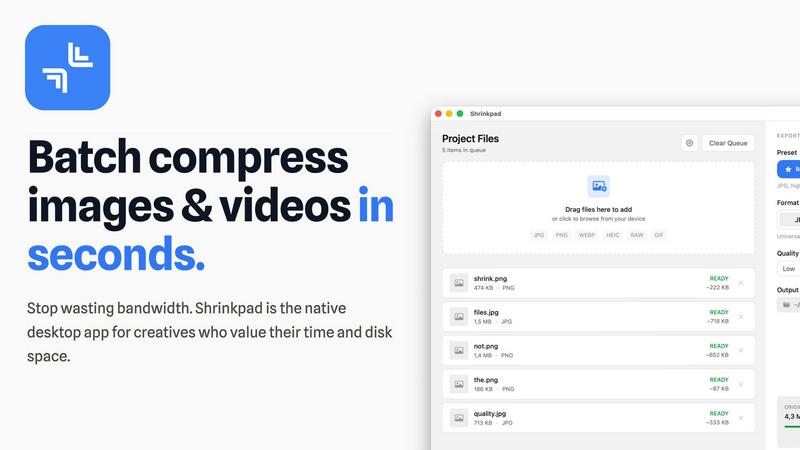
Shrinkpad effortlessly compresses your images and videos on Mac, saving space and enhancing performance in seconds.
Last updated: February 28, 2026
Visual Comparison
Seedance 2.0

Shrinkpad
Feature Comparison
Seedance 2.0
Text-to-Video
Seedance 2.0 allows users to convert a single sentence into an entire cinematic scene. This feature ensures coherent motion and storytelling, letting creators bring their ideas to life effortlessly. By simply inputting text, users can generate visually appealing content that engages viewers and conveys their message effectively.
Image-to-Video
With the image-to-video feature, creators can utilize reference images to guide the composition, identity, and visual style of their videos. This capability ensures that the generated video reflects the desired aesthetic and narrative, allowing for greater creative control and consistency across projects.
Integrated Audio Generation
The Pro version of Seedance 2.0 introduces integrated audio generation, creating synchronized video and audio in one seamless pass. This includes realistic sound effects, background music, speech synthesis, and multilingual lip-syncing. This all-in-one solution simplifies the production workflow, eliminating the need for separate audio post-production, and enhancing the overall viewing experience.
Physics-Aware Motion
Seedance 2.0 excels in understanding and simulating physical dynamics, providing realistic animations such as cloth fluttering in the wind, water splashes, and complex particle effects. This feature adds a layer of authenticity to the generated content, making it visually captivating and believable, which is essential for high-quality video production.
Shrinkpad
Batch Compression
Shrinkpad allows you to batch compress hundreds of images and videos simultaneously. Just drag and drop your files or entire folders, and watch as the app optimizes them in seconds, saving you time and effort.
Intelligent Compression
No more guesswork with compression settings. Shrinkpad analyzes the visual complexity of your files and automatically applies the perfect compression ratio, ensuring high-quality results without artifacts.
Folder Mode
With Shrinkpad’s Folder Mode, you can simply drop an entire folder, and it will automatically detect and queue all supported images and videos for compression. This feature streamlines your workflow and eliminates the hassle of manual file selection.
Privacy-Focused Processing
All processing occurs locally on your Mac. Shrinkpad ensures that your files do not leave your device, providing peace of mind regarding your sensitive assets and eliminating the need for internet access during compression.
Use Cases
Seedance 2.0
Marketing and Advertising
Businesses can leverage Seedance 2.0 to create engaging promotional videos that capture audience attention. By transforming product descriptions into dynamic visuals, marketers can effectively communicate their brand message and enhance customer engagement.
Educational Content
Educators and content creators can utilize Seedance 2.0 to develop immersive educational videos. By turning lesson plans into animated clips, they can present complex ideas in an engaging manner, making learning more enjoyable and accessible for students of all ages.
Social Media Content Creation
Content creators on social media platforms can generate eye-catching videos quickly using Seedance 2.0. The ability to produce high-quality video content that aligns with current trends can significantly boost their online presence and follower engagement.
Film and Animation Production
Filmmakers and animators can harness the power of Seedance 2.0 to streamline their production processes. The model's capabilities in generating coherent narratives and realistic animations allow for efficient storytelling, making it a valuable tool in the cinematic production landscape.
Shrinkpad
Optimizing Website Assets
Web developers can use Shrinkpad to efficiently compress images and videos for websites, resulting in significantly faster load times and improved performance metrics, such as LCP scores.
Streamlining Creative Workflows
Photographers and designers can save hours of manual exporting by using Shrinkpad to batch process their assets. Export everything at once and let the app handle the optimization and renaming.
Reducing Storage Costs
Businesses and content creators looking to save storage costs can leverage Shrinkpad to reclaim valuable disk space by reducing the size of large media files, freeing up resources for other essential projects.
Enhancing Video Production
Video editors can benefit from Shrinkpad’s ability to compress 4K MP4 videos without sacrificing quality, making it easier to manage large video files and improve editing efficiency.
Overview
About Seedance 2.0
Seedance 2.0 is a revolutionary AI video generation model developed by the innovative Seed research team at ByteDance. This cutting-edge technology transforms the creative landscape by enabling users to generate high-quality videos from simple prompts, whether they are text, images, or scripts. With its advanced capabilities, Seedance 2.0 delivers cinematic scenes with coherent motion, stunning realism, and a comprehensive integration of audio and visuals. It is designed for content creators, marketers, filmmakers, and anyone looking to elevate their video production quality without the need for extensive technical skills. The model's unique features, including an intuitive interface and powerful generation capabilities, empower users to create professional-grade videos effortlessly. Seedance 2.0 isn’t just a tool; it’s a gateway to a new era of storytelling and creativity, allowing users to bring their visions to life with unprecedented ease and precision.
About Shrinkpad
Shrinkpad is your ultimate companion in the creative journey, designed specifically for macOS users who refuse to let bloated media files hinder their productivity. This powerful native application enables photographers, designers, developers, and content creators to reclaim their storage space and accelerate their workflows. With Shrinkpad, you can batch compress images and videos with stunning speed, reducing file sizes by up to 90% in mere seconds. Its operation is entirely local, ensuring that your sensitive files remain private without the need for cloud uploads or internet dependencies. Whether you work with JPGs, RAW files, or 4K videos, Shrinkpad intelligently applies optimal compression settings, preserving visual quality while freeing up gigabytes of storage. It's not just a tool; it's a transformative solution that empowers you to focus on your creativity rather than on tedious file management.
Frequently Asked Questions
Seedance 2.0 FAQ
How does Seedance 2.0 improve video quality compared to other models?
Seedance 2.0 utilizes a novel diffusion transformer architecture designed for temporal consistency, ensuring smooth transitions and coherent motion across frames. This architecture enhances video quality by preserving character identity and maintaining consistent lighting, resulting in a more polished final product.
Can I generate audio with my videos using Seedance 2.0?
Yes, the Pro version of Seedance 2.0 includes integrated audio generation, allowing you to create synchronized video and audio in one pass. This feature includes sound effects, background music, and speech synthesis, streamlining the video production process.
Is Seedance 2.0 suitable for beginners in video creation?
Absolutely! Seedance 2.0 is designed with user-friendliness in mind, making it accessible even for those with no prior experience in video production. Its intuitive interface and straightforward features empower users to create professional-quality videos with ease.
What types of files can I use for input in Seedance 2.0?
Seedance 2.0 supports various input types, including text prompts, reference images, and scripts. This flexibility allows users to choose the best method for their creative projects, enhancing the overall versatility of the model.
Shrinkpad FAQ
Can I use Shrinkpad for free?
Yes, Shrinkpad offers a Free Starter plan with essential tools for casual use, which allows you to batch compress images in common formats.
What file formats does Shrinkpad support?
Shrinkpad supports over 50 formats, including popular image formats like JPG, PNG, and RAW, as well as video formats like MP4 and MOV, ensuring versatility for all your media needs.
Does Shrinkpad support video compression?
Absolutely! Shrinkpad not only compresses images but also handles video files, allowing you to optimize both types of media in one seamless workflow.
How many files can I process at once?
With Shrinkpad, you can process thousands of files at once without crashing, thanks to its unlimited batching capabilities designed for heavy-duty use.
Alternatives
Seedance 2.0 Alternatives
Seedance 2.0 is an advanced AI video generation model developed by ByteDance's Seed research team, designed to transform text and images into high-quality videos. This innovative tool excels in delivering cinematic scenes with coherent motion and integrated audio, making it a powerful asset for creators looking to enhance their storytelling capabilities. Users often seek alternatives for various reasons, including pricing, specific feature sets, or compatibility with their existing platforms. When exploring options, it's essential to consider the quality of video output, ease of use, and the range of functionalities offered to ensure the chosen solution meets your creative needs. As you embark on the journey of finding an alternative to Seedance 2.0, prioritize tools that offer robust video generation capabilities and maintain high standards of visual fidelity. Look for platforms that provide seamless integration of audio elements, ensuring a synchronized experience that enhances the overall impact of your videos. Flexibility in terms of pricing models and user accessibility can also significantly influence your decision, empowering you to select a solution that aligns perfectly with your creative vision and project requirements.
Shrinkpad Alternatives
Shrinkpad is a powerful native macOS application designed specifically for batch compressing images and videos, making it an essential tool for photographers, designers, developers, and content creators. With its ability to reduce file sizes by up to 90% while maintaining visual quality, it stands out as a go-to solution for optimizing storage and enhancing performance. Users often seek alternatives to Shrinkpad due to various reasons, including pricing, feature sets, or compatibility with different platforms. When looking for an alternative, it’s important to consider factors such as the speed of compression, the range of supported file formats, ease of use, and privacy measures. Additionally, evaluate whether the tool processes files locally to ensure your data remains secure and private, as well as the capability to handle batch processing for efficiency. Ultimately, the right choice will align with your specific creative needs and workflow preferences.