
Seedance 2.0 vs Shrinkpad
Side-by-side comparison to help you choose the right AI tool.

Seedance 2.0 transforms your ideas into stunning 2K videos with seamless audio sync and character consistency.
Last updated: February 26, 2026

Shrinkpad
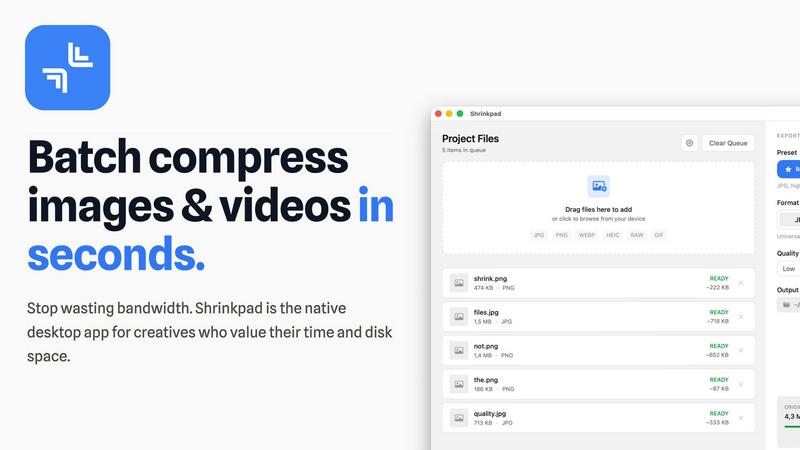
Shrinkpad effortlessly compresses your images and videos on Mac, saving space and enhancing performance in seconds.
Last updated: February 28, 2026
Visual Comparison
Seedance 2.0

Shrinkpad
Feature Comparison
Seedance 2.0
Text-to-Video Generation
Seedance 2.0 allows users to generate cinematic videos up to 12 seconds long at 2K resolution simply from natural language prompts. Whether you want to describe scenes, characters, or camera movements, the model renders clips that are rich in detail and realism, making it easier than ever to visualize your concepts.
Character Consistency Across Shots
With Seedance 2.0's multi-shot storytelling engine, creators can maintain identical characters across various camera angles and shots. This feature is essential for building series or films where visual consistency is key, enabling characters to remain visually identical throughout the narrative.
Image-to-Video Conversion
The image-to-video mode in Seedance 2.0 enables users to upload images—such as product photos or concept art—and transform them into dynamic videos. This feature preserves the original composition while adding smooth, cinematic animations, making it perfect for showcasing designs in a more engaging format.
Native Audio & Lip-Sync Generation
Seedance 2.0 excels in generating synchronized audio alongside video. It can create Foley effects, ambient sound, and phoneme-level lip-sync in over eight languages, achieving near motion-capture accuracy. This integrated audio generation eliminates the need for separate audio editing, streamlining the entire production process.
Shrinkpad
Batch Compression
Shrinkpad allows you to batch compress hundreds of images and videos simultaneously. Just drag and drop your files or entire folders, and watch as the app optimizes them in seconds, saving you time and effort.
Intelligent Compression
No more guesswork with compression settings. Shrinkpad analyzes the visual complexity of your files and automatically applies the perfect compression ratio, ensuring high-quality results without artifacts.
Folder Mode
With Shrinkpad’s Folder Mode, you can simply drop an entire folder, and it will automatically detect and queue all supported images and videos for compression. This feature streamlines your workflow and eliminates the hassle of manual file selection.
Privacy-Focused Processing
All processing occurs locally on your Mac. Shrinkpad ensures that your files do not leave your device, providing peace of mind regarding your sensitive assets and eliminating the need for internet access during compression.
Use Cases
Seedance 2.0
Content Creation for Social Media
Seedance 2.0 is perfect for content creators looking to produce engaging videos for platforms like Instagram, TikTok, and YouTube. Its ability to generate high-quality video quickly allows creators to keep their channels filled with fresh content without the hassle of traditional video editing.
Marketing Campaigns
Businesses can leverage Seedance 2.0 to create promotional videos that effectively showcase their products or services. The tool’s cinematic quality and character consistency help brands tell compelling stories that resonate with their target audience, driving engagement and conversions.
Educational Videos
Educators and trainers can use Seedance 2.0 to develop informative and visually appealing educational content. By converting text and images into engaging videos, educators can enhance learning experiences and make complex topics more accessible to students.
Film and Animation Production
Filmmakers and animators can utilize Seedance 2.0 to streamline their production process. With its multi-shot consistency and advanced motion synthesis, creators can bring their scripts to life, allowing for more focus on storytelling and character development rather than technical challenges.
Shrinkpad
Optimizing Website Assets
Web developers can use Shrinkpad to efficiently compress images and videos for websites, resulting in significantly faster load times and improved performance metrics, such as LCP scores.
Streamlining Creative Workflows
Photographers and designers can save hours of manual exporting by using Shrinkpad to batch process their assets. Export everything at once and let the app handle the optimization and renaming.
Reducing Storage Costs
Businesses and content creators looking to save storage costs can leverage Shrinkpad to reclaim valuable disk space by reducing the size of large media files, freeing up resources for other essential projects.
Enhancing Video Production
Video editors can benefit from Shrinkpad’s ability to compress 4K MP4 videos without sacrificing quality, making it easier to manage large video files and improve editing efficiency.
Overview
About Seedance 2.0
Seedance 2.0 is a revolutionary AI-powered video generator that enables creators to effortlessly produce stunning 2K cinematic videos from text, images, or audio prompts. Designed for content creators, filmmakers, and marketing teams, it harnesses advanced technology to ensure character consistency and seamless audio synchronization. With its powerful V2 motion synthesis engine, Seedance 2.0 delivers high-quality output while maintaining realistic physics and smooth motion. This innovative tool empowers users to transform their ideas into captivating visual narratives, making it ideal for everything from promotional videos to artistic storytelling. The main value proposition lies in its ability to streamline the video creation process, allowing users to focus on their creativity while Seedance 2.0 handles the technical intricacies of video production.
About Shrinkpad
Shrinkpad is your ultimate companion in the creative journey, designed specifically for macOS users who refuse to let bloated media files hinder their productivity. This powerful native application enables photographers, designers, developers, and content creators to reclaim their storage space and accelerate their workflows. With Shrinkpad, you can batch compress images and videos with stunning speed, reducing file sizes by up to 90% in mere seconds. Its operation is entirely local, ensuring that your sensitive files remain private without the need for cloud uploads or internet dependencies. Whether you work with JPGs, RAW files, or 4K videos, Shrinkpad intelligently applies optimal compression settings, preserving visual quality while freeing up gigabytes of storage. It's not just a tool; it's a transformative solution that empowers you to focus on your creativity rather than on tedious file management.
Frequently Asked Questions
Seedance 2.0 FAQ
What types of inputs can Seedance 2.0 process?
Seedance 2.0 can generate videos from various inputs, including text prompts, images, and audio files. This versatility allows users to create cinematic content from different forms of media.
How long can the videos generated by Seedance 2.0 be?
Users can generate videos up to 12 seconds in length at a stunning 2K resolution, providing ample time to convey impactful messages and engaging narratives.
Is there a limit to the number of characters in text prompts?
Yes, the text prompts for Seedance 2.0 are limited to 2500 characters, which allows users to describe scenes, characters, and camera movements in sufficient detail for the AI to generate high-quality videos.
Can I upload my own audio for the videos created by Seedance 2.0?
Absolutely! Seedance 2.0 includes an audio-to-video feature that allows users to upload their voiceovers, enabling a personalized touch to the generated videos.
Shrinkpad FAQ
Can I use Shrinkpad for free?
Yes, Shrinkpad offers a Free Starter plan with essential tools for casual use, which allows you to batch compress images in common formats.
What file formats does Shrinkpad support?
Shrinkpad supports over 50 formats, including popular image formats like JPG, PNG, and RAW, as well as video formats like MP4 and MOV, ensuring versatility for all your media needs.
Does Shrinkpad support video compression?
Absolutely! Shrinkpad not only compresses images but also handles video files, allowing you to optimize both types of media in one seamless workflow.
How many files can I process at once?
With Shrinkpad, you can process thousands of files at once without crashing, thanks to its unlimited batching capabilities designed for heavy-duty use.
Alternatives
Seedance 2.0 Alternatives
Seedance 2.0 is a revolutionary AI model designed for versatile applications in chat, image, and video generation. Positioned in the forefront of AI technology, it boasts advanced features that cater to developers, researchers, and businesses seeking to harness the power of artificial intelligence. Users often explore alternatives to Seedance 2.0 for various reasons, such as pricing, specific feature sets tailored to their needs, or compatibility with different platforms. When choosing an alternative, it's essential to consider factors like performance, ease of integration, and the ability to support the unique demands of your projects. In the fast-evolving world of AI, finding the right tool can significantly impact your productivity and creativity. Seek platforms that not only match or exceed the capabilities of Seedance 2.0 but also align with your goals and workflows. A thoughtful evaluation of user reviews, feature comparisons, and support options can empower you to make an informed choice that maximizes your potential in leveraging AI technology.
Shrinkpad Alternatives
Shrinkpad is a powerful native macOS application designed specifically for batch compressing images and videos, making it an essential tool for photographers, designers, developers, and content creators. With its ability to reduce file sizes by up to 90% while maintaining visual quality, it stands out as a go-to solution for optimizing storage and enhancing performance. Users often seek alternatives to Shrinkpad due to various reasons, including pricing, feature sets, or compatibility with different platforms. When looking for an alternative, it’s important to consider factors such as the speed of compression, the range of supported file formats, ease of use, and privacy measures. Additionally, evaluate whether the tool processes files locally to ensure your data remains secure and private, as well as the capability to handle batch processing for efficiency. Ultimately, the right choice will align with your specific creative needs and workflow preferences.