RemoveTexts vs Ultra Face Swap
Side-by-side comparison to help you choose the right AI tool.

RemoveTexts
Unlock your images' true potential by instantly erasing any text with a simple brushstroke, no skills needed.
Last updated: March 11, 2026

Ultra Face Swap
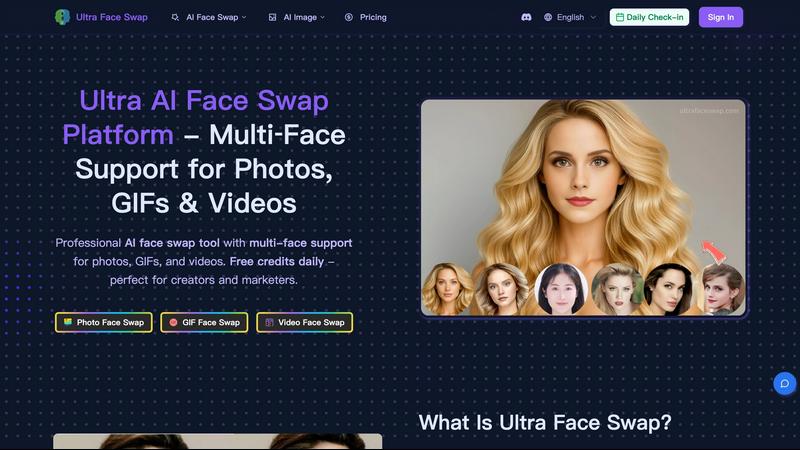
Effortlessly swap faces in photos, GIFs, and videos with stunning realism using Ultra Face Swap's advanced AI.
Last updated: February 28, 2026
Visual Comparison
RemoveTexts

Ultra Face Swap
Feature Comparison
RemoveTexts
Paint to Remove
Take absolute control over your edits with the intuitive Paint to Remove feature. Simply upload your image and use the brush tool to highlight the exact text or element you wish to vanish. This precision allows you to target specific words in a paragraph, single watermarks, or subtle date stamps without affecting the rest of your pristine image. It’s the power of surgical editing at your fingertips, giving you the freedom to clean your visuals exactly how you envision them, with no compromises.
Auto Remove All Text
Embrace the power of full automation and watch every text element disappear in an instant. With the Auto Remove All feature, our advanced AI scans your entire image, intelligently detecting and erasing all text—including watermarks, subtitles, captions, and overlays—with a single click. This is your shortcut to a perfectly clean canvas, saving you precious time and effort while delivering seamless, traceless results that maintain the original quality and composition of your photo.
Edit & Replace Text
Transform existing text instead of just removing it. The groundbreaking Edit & Replace Text feature allows you to modify words directly within your image. Type your new text, and our AI will match the original font style, size, color, and blending to make it look naturally authentic. This is perfect for updating prices, correcting information, or localizing content, empowering you to revise images without starting from scratch and maintaining a perfectly professional appearance.
Remove Objects & Watermarks
Extend your creative control beyond text. The Remove Objects feature empowers you to erase any unwanted element from your photos, be it a stray logo, an unexpected photobomber, or an unsightly blemish. Using the same powerful inpainting AI, it seamlessly fills the space by analyzing the surrounding background, ensuring a flawless finish. This feature, combined with dedicated watermark removal, provides a comprehensive toolkit for achieving absolutely clean, distraction-free visuals.
Ultra Face Swap
Unified Multi-Scenario Flow
Ultra Face Swap offers a single streamlined pipeline for swapping faces in photos, GIFs, and videos. This feature enables users to process either single or multiple faces with just one click, ensuring high-quality outputs across diverse media formats.
Stable Multi-Face Tracking
This feature intelligently detects and locks onto multiple faces, allowing for smooth alignment of expressions and perspectives. This stability reduces the risk of drift or visible artifacts, resulting in seamless and professional-looking swaps.
High-Fidelity Blending
Ultra Face Swap excels in merging lighting, skin tone, texture, and fine details, which minimizes artifacts and edge halos. This high-fidelity blending ensures that the output maintains sharp quality, making it perfect for production-ready content.
One-Tap Swap Functionality
The one-tap swap functionality allows users to initiate the face swap process effortlessly. After uploading the source and target faces, users can click to swap and receive high-quality, realistic results in just 20-40 seconds, making it quick and user-friendly.
Use Cases
RemoveTexts
Cleaning Product Photos for E-Commerce
Elevate your online store by creating pristine, professional product images. Sellers can effortlessly remove distracting watermarks from supplier photos, erase promotional text overlays, or clean up pricing labels from mockups. This results in a clean, consistent, and trustworthy product gallery that enhances brand credibility, reduces customer confusion, and directly contributes to higher conversion rates and sales success.
Preparing Professional Presentations & Reports
Make every slide and document visually impeccable. Professionals can use RemoveTexts to clean up screenshots by removing irrelevant UI elements, browser tabs, or personal data. It’s perfect for redacting sensitive information from documents or erasing unwanted annotations from charts. This ensures your materials are polished, confidential, and communicate with clarity and authority, leaving a lasting professional impression.
Revitalizing Social Media & Marketing Content
Unlock endless content possibilities from your existing image library. Social media managers and content creators can repurpose images by removing dated captions, outdated logos, or location stamps from photos. Easily edit text in meme templates or create clean quote graphics from text-heavy screenshots. This agility allows for faster, more dynamic content creation that keeps your audience engaged and your brand looking fresh.
Personal Photo Enhancement & Restoration
Reclaim your personal memories and photos. Remove unwanted text like timestamps, subtitles from screengrabs, or intrusive watermarks from downloaded images. You can even erase photobombers or distracting objects from vacation pictures. This empowers you to curate a perfect personal photo collection, turning good snaps into great keepsakes that are focused purely on the moment and the people that matter.
Ultra Face Swap
Transform Group Photos
Ultra Face Swap can instantly enhance group photos, ensuring everyone looks their best. This is perfect for family gatherings, weddings, or events where someone may have closed eyes or awkward expressions, effortlessly creating picture-perfect memories.
Create Viral Content
Content creators can leverage Ultra Face Swap to generate engaging and shareable content for platforms like TikTok and Instagram. Swapping faces in popular memes or trending videos can capture audience attention and boost viewership significantly.
Professional Headshot Alternatives
Marketers and professionals can use Ultra Face Swap to place their faces onto high-quality business portraits, eliminating the need for time-consuming photoshoots. This feature helps users present themselves in a polished manner, enhancing their online presence.
Fun and Imaginative Scenarios
Users can explore creativity by swapping faces with celebrities or characters, allowing for entertaining and unique visual creations. This feature is ideal for social media enthusiasts looking to add a fun twist to their content.
Overview
About RemoveTexts
Unlock the true potential of your images and reclaim your creative freedom with RemoveTexts. This is more than just an editing tool; it's your gateway to flawless visuals. RemoveTexts is a state-of-the-art, AI-powered platform designed to intelligently erase unwanted text, watermarks, logos, and objects from any image in seconds. Imagine transforming cluttered screenshots, dated memes, or branded photos into clean, professional assets without ever needing complex software like Photoshop. Our mission is to empower you—whether you're a marketer, designer, content creator, or business professional—to achieve perfection effortlessly. By leveraging advanced deep learning inpainting technology, pioneered by industry leaders, RemoveTexts doesn't just delete; it seamlessly reconstructs the background so no one can tell anything was ever removed. Join over 100,000 users worldwide who have processed more than 100,000 images, and experience the transformation from obstructed to outstanding in under 30 seconds. Your vision, clean and clear, is just one click away.
About Ultra Face Swap
Ultra Face Swap is an innovative, AI-powered platform designed for creative minds seeking to transform their identity or the identities of others seamlessly. This tool is perfect for content creators, marketers, and anyone looking to explore imaginative scenarios. With Ultra Face Swap, you can effortlessly swap faces across photos, GIFs, and videos, achieving breathtaking, lifelike quality that captivates any audience. Built on advanced deep learning technology, it delivers high-fidelity face replacements where lighting, skin tone, texture, and expressions blend naturally, ensuring realistic results. Whether you are aiming to create the next viral sensation on TikTok or need professional headshot variations in a hurry, Ultra Face Swap provides all the necessary tools. It allows users to swap multiple faces (1-8 simultaneously) with just a click, supports various formats, and emphasizes user privacy through encrypted storage and auto-deletion. Begin your transformative journey today with free daily credits and unlock your potential to create stunning, watermark-free content that stands out.
Frequently Asked Questions
RemoveTexts FAQ
How does RemoveTexts work?
RemoveTexts utilizes advanced deep learning inpainting technology, a class of neural network architecture researched by leaders like NVIDIA and Adobe. When you indicate text to remove, the AI analyzes the pixels surrounding the selected area. It then intelligently reconstructs the background by generating new pixels that match the texture, lighting, and patterns of the original image, resulting in a seamless fill where the text once was, often with over 95% structural similarity to the original.
What image formats and sizes are supported?
You can upload images in JPG, PNG, or WebP format. The current maximum file size supported is 10 MB. This ensures that most high-quality images from smartphones, cameras, and screenshots can be processed quickly and efficiently through our online platform, providing you with fast, high-quality results.
Is RemoveTexts completely free to use?
Yes, RemoveTexts offers a powerful free online tool that allows you to upload images, paint over text, and download the cleaned results without any watermarks. For access to advanced features like Auto Remove All Text, Edit & Replace Text, and higher resolution outputs, we offer premium plans. You can start for free and upgrade to unlock even more transformative editing power.
What are the limitations of the tool?
The AI is designed for removing text and objects from general images. It does not support the removal of NSFW (Not Safe For Work) content or copyrighted logos and trademarks for misuse. For best results, images with very complex, patterned backgrounds or extremely large text areas may require more precise manual brushing with the Paint to Remove tool for optimal seamless reconstruction.
Ultra Face Swap FAQ
How does Ultra Face Swap maintain privacy?
Ultra Face Swap prioritizes user privacy by employing encrypted storage for all files. Additionally, it features an auto-deletion policy that removes files after processing, ensuring your data remains secure.
Can I swap multiple faces at once?
Yes, Ultra Face Swap supports the swapping of multiple faces simultaneously, allowing users to transform 1-8 faces in a single click. This feature is perfect for group photos or collaborative projects.
What formats does Ultra Face Swap support?
Ultra Face Swap supports a variety of formats, including photos, GIFs, and videos. This versatility enables users to create content across different media easily.
How long does it take to generate results?
After initiating a face swap, users typically wait about 20-40 seconds to receive high-quality, realistic results. This quick turnaround makes Ultra Face Swap an efficient tool for content creation.
Alternatives
RemoveTexts Alternatives
RemoveTexts is an AI-powered image editing tool that specializes in quickly and intelligently removing text from any image. It belongs to the category of automated, AI-driven photo editing software, designed to give anyone the power to clean up images without professional skills. This capability transforms cluttered screenshots, watermarked photos, and branded visuals into clean, professional assets in seconds. Users often explore alternatives for various reasons, such as finding a tool that fits a specific budget, offers a different set of features like object removal or inpainting, or better aligns with their preferred platform or workflow. The need might stem from a desire for more control, different pricing models, or simply to compare the leading options in a dynamic market. When choosing an alternative, focus on what empowers your creative process. Look for core capabilities like accuracy in text detection, the quality of the background reconstruction, and speed. Consider the user experience, output resolution, and whether the tool offers the specific functionality you need most, whether that's batch processing, language support, or precision editing tools. The right tool is the one that removes barriers and lets you focus on your vision.
Ultra Face Swap Alternatives
Ultra Face Swap is a cutting-edge AI-powered platform that allows users to transform their identity across photos, GIFs, and videos with astonishing realism. This innovative tool falls under the category of AI Assistants, specifically designed for creative expression and professional content creation. Users often seek alternatives due to various reasons, including pricing considerations, specific feature needs, or compatibility with different platforms. When searching for an alternative, it's essential to evaluate the quality of face swapping, ease of use, privacy features, and overall performance to ensure it meets your creative aspirations. --- [{"question": "What is Ultra Face Swap?", "answer": "Ultra Face Swap is an AI-powered platform that enables users to perform realistic face swaps in photos, GIFs, and videos."}, {"question": "Who is Ultra Face Swap for?", "answer": "Ultra Face Swap is designed for content creators, marketers, and anyone looking to explore creative and imaginative scenarios."}, {"question": "Is Ultra Face Swap free?", "answer": "Yes, Ultra Face Swap offers free daily credits to get started with face swapping."}, {"question": "What are the main features of Ultra Face Swap?", "answer": "Main features include unified multi-scenario processing, stable multi-face detection and tracking, and a high-fidelity natural blending engine."}]