Changeflow vs Refbox
Side-by-side comparison to help you choose the right AI tool.

Changeflow
Changeflow delivers AI-driven insights on critical market changes, ensuring you stay informed without the hassle.
Last updated: March 4, 2026

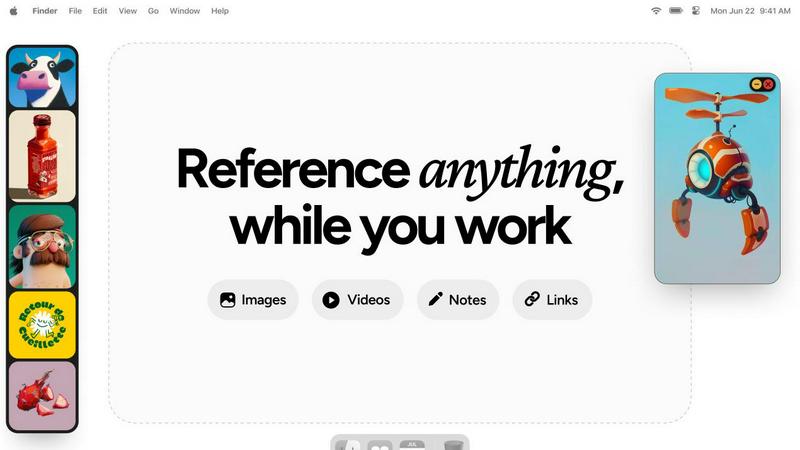
Refbox floats your references above your work for instant, distraction-free creative focus.
Last updated: February 28, 2026
Visual Comparison
Changeflow

Refbox
Feature Comparison
Changeflow
AI-Powered Intelligence
Changeflow’s AI technology intelligently analyzes web pages to filter out irrelevant changes. This means users receive updates that genuinely matter, saving time and preventing information overload that comes from false positives.
Natural Language Setup
Forget about complex configurations and technical jargon. With Changeflow, users can simply describe what they want to track in plain English, making it accessible for everyone, regardless of their technical background.
Customized Summaries
Changeflow delivers concise, AI-generated summaries of what changed and why it matters. This feature allows users to quickly grasp the significance of updates without wading through full web pages, streamlining their decision-making process.
Advanced Anti-Blocking Technology
Changeflow employs sophisticated anti-blocking measures that allow it to access web pages that other tools struggle to reach. This ensures a high success rate in monitoring updates, even on sites with stringent access controls.
Refbox
Always-on-Top Floating Frames
Keep your inspiration literally in sight. Refbox lets you pin reference media in resizable, transparent frames that stay visible over any other application you're using. This means you can glance at a color palette, study a composition, or follow a tutorial video without ever leaving your creative canvas, maintaining an unbroken state of deep focus and productivity.
Infinite Canvas & Instant Collections
Organize your visuals effortlessly on a limitless canvas. Group references into instant Collections for different projects or stages of work. See everything at once for a holistic view or flip through items like a slideshow for rapid comparison. Swap between entire sets of inspiration with a single click, making context switching between tasks a thing of the past.
Advanced Media Handling & Tools
Refbox goes beyond simple image viewing. It includes powerful tools tailored for creators: step-through GIF playback for animation reference, a built-in color picker to sample from any media, SVG file support, and the ability to take website screenshots by pasting a link. You can even add styled notes and checklists directly into your workflow.
Smart Shortcuts & Flow Optimizers
Regain full control with intuitive shortcuts and smart features designed to minimize friction. Quickly swap references with arrow keys, auto-hide your box until you need it, lock frames to work behind them, or minimize them to access underlying apps. These little touches are engineered to save you hours, keeping you in the creative zone.
Use Cases
Changeflow
Monitoring Competitor Pricing
Businesses can utilize Changeflow to stay ahead of the competition by tracking competitor pricing changes in real-time, enabling timely strategic adjustments that can significantly impact market positioning.
Regulatory Compliance Tracking
Compliance teams at major corporations can monitor regulatory changes efficiently. Changeflow keeps them informed about new FDA guidance and SEC filings, ensuring they remain compliant without manual oversight.
Legal Research and Monitoring
Legal librarians at top law firms leverage Changeflow to keep tabs on court dockets and legal citations. This tool streamlines legal research, allowing professionals to focus on strategic tasks rather than tedious monitoring.
Market News Monitoring
Changeflow enables businesses to stay updated on news mentions and market movements. This allows teams to quickly react to industry developments, ensuring they are always informed and ready to make data-driven decisions.
Refbox
Digital Illustration & Concept Art
Illustrators and concept artists can keep mood boards, anatomical references, color studies, and style guides pinned around their drawing software. This allows for constant visual feedback, ensuring accuracy in proportions, lighting, and palette without breaking concentration to search for files, dramatically speeding up the sketching and rendering process.
UI/UX & Web Design
Designers can float brand guidelines, component libraries, competitor screenshots, and wireframes directly over their design tool like Figma or Sketch. Having immediate access to these references ensures consistency and inspiration are always visible, streamlining the design process from prototype to pixel-perfect final asset.
3D Modeling & Animation
3D artists and animators can reference orthographic views, texture maps, motion studies, and video tutorials in always-on-top windows over Blender, Maya, or ZBrush. This is invaluable for matching proportions, studying movement frame-by-frame with GIF controls, and applying textures correctly, all while keeping the main viewport clear for work.
Motion Graphics & Video Editing
Motion designers and editors can keep storyboards, style frames, asset lists, and video references visible while working in After Effects or Premiere Pro. This enables precise timing, effect matching, and compositional planning without constantly scrubbing through source files in a separate window, leading to a more fluid and efficient editing timeline.
Overview
About Changeflow
Changeflow is an innovative web monitoring tool designed to help businesses stay informed about critical changes on websites that matter to them. With its advanced AI technology, Changeflow not only alerts users when something changes but also provides meaningful insights into what those changes entail. This makes it an invaluable resource for teams needing to track competitor pricing, regulatory updates, and market movements without the hassle of manual checks. Changeflow simplifies the setup process, allowing users to describe what they want to monitor in plain English and receive tailored updates directly in their inbox or dashboard. Trusted by Fortune 500 companies and Am Law 200 firms, Changeflow enhances decision-making and keeps teams aligned, ensuring that no critical information slips through the cracks.
About Refbox
Refbox is the essential catalyst for professional creativity, a powerful desktop application designed to transform your workflow by eliminating disruptive context switching. It is built for artists, designers, animators, and creators of all kinds who demand both organization and immediacy. The core mission is simple yet profound: to protect your creative flow state. Refbox achieves this by allowing you to keep your entire inspiration library—images, GIFs, videos, notes, and web links—visibly pinned in always-on-top, resizable frames that float directly over your primary work applications like Photoshop, Blender, or Figma. No more digging through cluttered folders, juggling dozens of browser tabs, or constantly minimizing your project. Your references are always at your fingertips, seamlessly integrated into your desktop environment. This isn't just a utility; it's a transformation in how you work. By reducing friction and distraction, Refbox empowers you to maintain intense focus, accelerate your creative process, and translate inspiration into execution with unprecedented speed and accuracy. It's the ultimate floating reference companion for bringing your boldest visions to life without interruption.
Frequently Asked Questions
Changeflow FAQ
How does Changeflow determine what changes are relevant?
Changeflow uses advanced AI algorithms to analyze web pages and identify changes. It assesses the context of changes, ensuring that only the most pertinent updates are presented to users, reducing noise and irrelevant alerts.
Can I track multiple pages at once?
Yes, Changeflow allows users to monitor multiple pages simultaneously. You can easily add new sources through the AI agent, making it simple to expand your tracking without any technical setup.
Is there a trial period available for new users?
Absolutely! Changeflow offers a 30-day free trial for new users, allowing them to explore the full capabilities of the tool and experience the benefits of effective web monitoring firsthand.
What types of businesses benefit from using Changeflow?
Changeflow is designed for a variety of sectors, including legal, compliance, marketing, and competitive intelligence. Its flexibility and powerful features make it suitable for any business that needs to stay informed on web changes relevant to their operations.
Refbox FAQ
What types of files does Refbox support?
Refbox supports a wide range of media essential for creative work. You can directly import and view images (JPG, PNG, SVG, etc.), GIFs (with frame-by-frame playback), and MP4 videos. It also supports web links, which can be saved as visual screenshots, and includes a rich notes feature for text, lists, and checklists.
Does Refbox work on all my applications?
Yes, absolutely. Refbox is a desktop application that creates always-on-top windows. These windows will float over any other application on your system, whether it's creative software like Adobe Creative Suite, 3D tools, coding IDEs, or even web browsers. It integrates into your entire desktop environment.
Can I organize my references into different projects?
Yes, organization is a core strength. You can create unlimited "Collections" to group references by project, client, or task. Your entire library is displayed on an infinite canvas, and you can switch between these Collections instantly with a single click, keeping your workspace clean and context-specific.
Is there a free trial available?
The provided context indicates Refbox is offered as a one-time purchase. For the most accurate and current information regarding a trial, demos, or pricing details, it is best to visit the official Refbox website or their sales page for the latest offerings and any potential updates to their business model.
Alternatives
Changeflow Alternatives
Changeflow is an innovative AI-driven platform that specializes in providing market and competitor insights by tracking changes on web pages. It falls under the Productivity & Management category, offering businesses a streamlined way to monitor essential updates relevant to their operations. Users often seek alternatives to Changeflow for various reasons, including pricing considerations, specific feature requirements, or the need for compatibility with different platforms. When exploring alternatives, it's crucial to assess factors such as ease of use, the effectiveness of the technology, and the overall value it brings to your team's workflow. As you search for an alternative, prioritize solutions that offer robust features tailored to your industry needs while ensuring they provide comprehensive support for different types of content and web pages. Look for platforms that facilitate collaboration and integration with existing tools, as these aspects can enhance productivity and ensure your team stays aligned with vital market shifts. Remember, the right choice can empower your organization to stay ahead of the competition and make informed decisions.
Refbox Alternatives
Refbox is a powerful desktop application in the productivity and management category, designed to be the ultimate floating reference companion. It transforms creative workflows by keeping essential inspiration—images, videos, notes, and links—in always-on-top windows directly over your work, eliminating disruptive context switching to protect your creative flow state. Users may explore alternatives for various reasons, such as budget considerations, specific feature needs not covered by their current setup, or compatibility requirements with different operating systems. The quest for the right tool is deeply personal, as every creator's process and digital environment are unique. When evaluating any solution, focus on how it serves your core creative mission. The ideal tool should feel like a natural extension of your workflow, reducing friction rather than adding complexity. Prioritize solutions that offer seamless integration, intuitive organization, and, most importantly, uphold your focus by keeping inspiration immediately accessible without pulling you out of your zone.