QuickData.ai vs SoloTools
Side-by-side comparison to help you choose the right AI tool.

QuickData.ai
Accelerate your multifamily underwriting with QuickData.ai, automating data entry into Excel for faster, smarter.
Last updated: March 1, 2026

SoloTools
Transform your projects into signed deals instantly with AI-generated client proposals.
Last updated: March 4, 2026
Visual Comparison
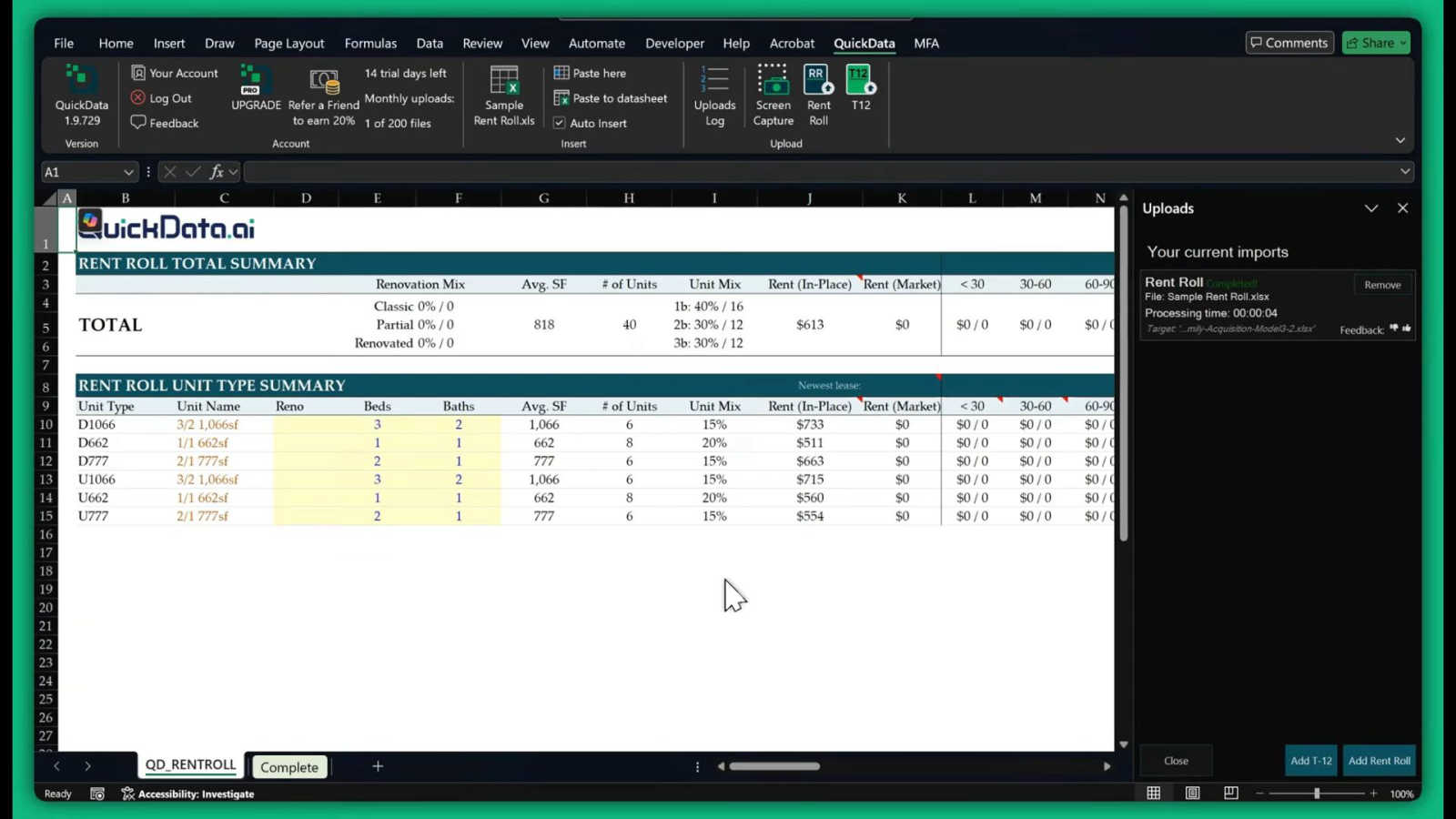
QuickData.ai
SoloTools

Feature Comparison
QuickData.ai
Multifamily Excel Model
The Multifamily Excel Model feature is designed to enhance your data analysis capabilities within Excel. It allows users to create tailored models that suit their specific underwriting needs, ensuring that all critical metrics are easily accessible and up-to-date.
Automated Data Entry
QuickData.ai automates the data entry process for T12 and rent roll documents, significantly reducing the time spent on manual tasks. This feature eliminates the risk of human error, allowing professionals to focus on analysis and decision-making rather than data gathering.
14 Day Free Trial
Experience the power of QuickData.ai risk-free with our 14-day free trial. This feature allows prospective users to explore all functionalities of the tool and see firsthand how it can revolutionize their workflow before committing to a subscription.
One-on-One Onboarding
Our free 1:1 onboarding sessions ensure that you are set up for success right from the start. This personalized support guarantees that you can leverage QuickData.ai's features effectively, maximizing your productivity and investment analysis capabilities.
SoloTools
AI-Powered Proposal Generation
Go beyond basic templates with an AI that truly understands context. In roughly 12 seconds, it generates a complete, polished proposal tailored to your project. It writes persuasive executive summaries, breaks down the scope of work with clarity, structures professional pricing tables, and drafts persuasive terms and conditions. This intelligent core ensures every proposal is uniquely crafted to impress your specific client and win their confidence from the first read.
Intelligent Section-Level Editing
Maintain full creative control with powerful, AI-driven editing. For any section of your proposal—like the executive summary or scope—you can give specific commands such as "Make more persuasive," "Make shorter," or "Rewrite in a formal tone." The AI refines the content on the spot, allowing you to perfect the messaging without starting from scratch. This feature ensures your voice and strategic goals are always front and center in the final document.
Client Engagement & E-Signature Tools
Streamline the entire closing process from sent to signed. Send proposals directly to clients via email with a personalized message. Then, track their engagement with real-time notifications for when they open your proposal. Clients can accept and provide a drawn e-signature directly on the document, or decline with an optional reason. This integrated system eliminates back-and-forth emails and chasing for signatures, making the process professional and effortless.
Proposal Analytics & Automation
Gain valuable insights to win more deals. The dashboard shows your complete conversion funnel, tracking proposals from "Sent" to "Viewed" to "Accepted/Declined." Understand your win rate and where you might be losing deals. Set automatic follow-up reminders and proposal expiry dates to create urgency. With Zapier-ready webhooks, you can connect this data to your other business tools, automating your workflow and ensuring you never miss a follow-up opportunity.
Use Cases
QuickData.ai
Streamlined Underwriting Process
With QuickData.ai, multifamily professionals can dramatically accelerate their underwriting processes. By automating data extraction, users can underwrite deals ten times faster, enabling quicker responses to market opportunities.
Enhanced Decision-Making
The ability to analyze data in minutes rather than hours empowers real estate professionals to make informed investment decisions promptly. This feature is crucial for those looking to capitalize on fast-paced market changes.
Increased Transaction Capacity
As the demand for multifamily properties rises, QuickData.ai helps teams manage increased transaction volumes without sacrificing accuracy. By reducing time spent on data entry, teams can explore more deals simultaneously.
Improved Collaboration
QuickData.ai facilitates better collaboration among team members by providing a centralized platform for data analysis. This ensures that everyone has access to the same information, promoting transparency and informed discussions.
SoloTools
Freelance Web Designers & Developers
Quickly propose website redesigns or development projects with detailed technical scopes and phased pricing. Use the AI to highlight UX improvements and estimated conversion rate boosts, then send a polished, visually clear proposal that justifies your investment. Track client views and secure e-signatures fast to move from discussion to project kick-off without delay.
Independent Marketing & SEO Consultants
Craft compelling proposals for marketing campaigns or SEO audits that focus on ROI and strategic outcomes. Leverage the AI to write persuasive executive summaries that speak to business growth. Use the analytics to see which proposals get the most engagement and refine your approach to close more retainers and project-based work efficiently.
Solo Business & Management Consultants
Impress corporate clients with professionally structured proposals for strategic projects. Utilize the AI's ability to adopt a formal tone and create detailed work breakdowns. The e-signature and expiry date features add a layer of professionalism and urgency, helping you secure high-value contracts with established businesses seamlessly.
Creative Freelancers (Writers, Designers, Video Producers)
Overcome the challenge of pricing creative work confidently. Use the AI's smart pricing suggestions to get market-rate guidance for your project type. Generate proposals that beautifully articulate the creative process and value, then share them via a sleek client link or PDF to showcase your professionalism and secure the green light.
Overview
About QuickData.ai
QuickData.ai is a groundbreaking Excel Add-In specifically designed for professionals in the multifamily real estate sector. This innovative tool harnesses the power of advanced artificial intelligence to automate the tedious process of extracting critical data from rent rolls, T12 statements, and offering memorandums, seamlessly integrating it into Excel underwriting models. By targeting acquisitions teams, commercial real estate brokers, lenders, and accounting firms, QuickData.ai empowers users to streamline their workflows and focus on what truly matters: making informed investment decisions. Imagine eliminating the cumbersome and error-prone manual data entry process, saving up to 15 hours each month. With QuickData.ai, you can analyze deals in mere minutes, confidently manage increased transaction volumes, and transform your approach to multifamily real estate analysis. Experience the efficiency and clarity that QuickData.ai brings to your business and elevate your investment strategies to new heights.
About SoloTools
Stop letting proposal writing steal your time and energy. SoloTools is your AI-powered partner, transforming the way freelancers and independent consultants win work. This innovative platform is designed for the busy professional who knows their craft but dreads the blank page. In about 30 seconds, you can move from a simple project idea to a stunning, client-ready proposal. Just input basic details like the client's name, project type, budget, and scope notes. Our powerful AI then crafts a comprehensive document complete with a compelling executive summary, detailed scope of work, professional pricing tables, a clear timeline, and standard terms. It's more than a template filler; it's an intelligent writing assistant that tailors content to your specific project. SoloTools empowers you to present your best self, every time, while reclaiming hours in your week. Send proposals directly via email, track when clients view them, and collect e-signatures seamlessly—all from one intuitive dashboard. Start for free and experience the transformation from spending hours on documents to closing deals in minutes.
Frequently Asked Questions
QuickData.ai FAQ
What types of documents can QuickData.ai extract data from?
QuickData.ai specializes in extracting data from rent rolls, T12 statements, and offering memorandums, making it an essential tool for multifamily real estate professionals.
How much time can I save using QuickData.ai?
Users can save up to 15 hours each month by automating the data entry process, allowing them to focus on analyzing deals and making strategic investment decisions.
Is there a free trial available for QuickData.ai?
Yes, QuickData.ai offers a 14-day free trial that allows prospective users to explore all features of the tool and experience its transformative capabilities without any commitment.
How does the onboarding process work?
QuickData.ai provides free 1:1 onboarding sessions to help users get started quickly and effectively. This personalized support ensures that you can maximize the tool's features right from the beginning.
SoloTools FAQ
How does the AI proposal generator work?
You simply enter key project details like client name, project type, budget, and a brief scope description. Our advanced AI analyzes this input and generates a complete, tailored proposal in about 12 seconds. It creates all standard sections including an executive summary, scope of work, pricing table, timeline, and terms. You can then review and edit every part before sending.
Is there a free plan available?
Yes, SoloTools offers a completely free plan to get started. It allows you to create and send up to three proposals per month at no cost, with no credit card required. This includes access to the core AI generator, basic editing, and sharing via link. You can upgrade to the Pro plan anytime for unlimited proposals and advanced features like custom branding and analytics.
Are the e-signatures collected legally binding?
Yes, the e-signatures collected through SoloTools are designed to be legally binding. The platform provides a clear audit trail showing the client's intent to sign, their drawn signature, and the timestamp of acceptance. For critical contracts, we always recommend consulting with a legal professional to ensure compliance with specific jurisdictional requirements.
Can I connect SoloTools to other tools I use?
Absolutely. SoloTools offers Zapier-ready webhooks, allowing you to connect your proposal data to thousands of other apps like your CRM, accounting software, or calendar. Automate workflows by triggering actions when a proposal is sent, viewed, or signed, keeping all your tools in sync and saving you even more time.
Alternatives
QuickData.ai Alternatives
QuickData.ai is a cutting-edge Excel Add-In tailored for professionals in the multifamily real estate sector. It harnesses the power of advanced artificial intelligence to automate the extraction of crucial data from rent rolls, T12 statements, and offering memorandums directly into Excel underwriting models, significantly enhancing workflow efficiency. Users often seek alternatives to QuickData.ai for various reasons, including pricing, specific feature sets, or platform compatibility. When evaluating alternatives, it is important to consider factors such as ease of integration, the range of automated features offered, and overall user experience to ensure that the chosen solution aligns with your unique business needs and enhances your workflow.
SoloTools Alternatives
SoloTools is a powerful AI proposal generator in the business and finance category, designed to help freelancers and consultants create professional client proposals in seconds. It transforms a few simple inputs into a comprehensive document, saving valuable time and elevating your client interactions. Users often explore alternatives for various reasons, such as needing different pricing structures, specific advanced features, or integration with other platforms they use. It's a natural step in finding the perfect tool that aligns with your unique workflow and business growth goals. When evaluating other options, focus on what truly matters for your success. Consider the core value: does it save you meaningful time while improving quality? Look for flexibility in editing, professional output formats, and insights into client engagement. The right tool should feel like a seamless extension of your expertise, empowering you to close deals with confidence.