AssiPilot vs Pullsy
Side-by-side comparison to help you choose the right AI tool.

AssiPilot
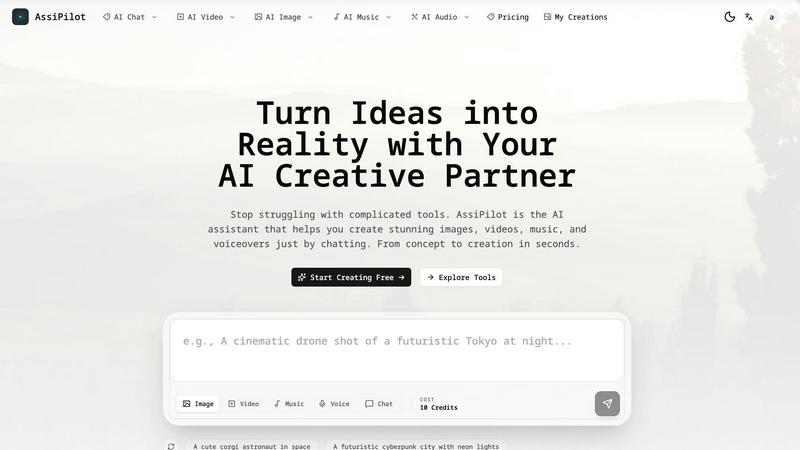
Transform your ideas into stunning images, videos, and music effortlessly with AssiPilot, your all-in-one AI creative assistant.
Last updated: March 11, 2026

Transform your inbox with Pullsy, where AI organizes emails and drafts replies in your voice for effortless control.
Last updated: February 26, 2026
Visual Comparison
AssiPilot
Pullsy

Feature Comparison
AssiPilot
AI Image Generation
AssiPilot employs advanced AI models to create photorealistic images, art, and graphics tailored to your needs. Whether you want a minimalist logo or a vibrant landscape, this feature allows you to generate high-quality visuals that stand out in any context.
AI Video Creation
Transform your concepts into compelling videos with just a few clicks. AssiPilot's AI video creation tool allows you to turn text and images into engaging marketing clips or social media videos, helping you convey your message effectively and creatively.
Music & Soundtrack Generation
Create the perfect soundtrack for any project with AssiPilot's music generation feature. This tool composes royalty-free music and sound effects that align perfectly with your content's mood, ensuring an immersive experience for your audience.
Voiceover & Audio Synthesis
Generate human-like voiceovers in various languages and emotional tones. This feature is ideal for enhancing videos, podcasts, and presentations, providing a professional touch that elevates your audio content without the need for studio recording.
Pullsy
Context-Aware Drafting
Pullsy's advanced AI understands the context of incoming emails, allowing it to draft tailored responses that address specific actions. It identifies questions needing answers, tasks to confirm or decline, reminders for broken promises, scheduling needs, and requested documents. This ensures that every response is relevant and actionable.
Multiple Tone Options
Users can choose from various tones for their replies—Professional, Friendly, or Quick—allowing for flexibility in communication style. This feature helps maintain the user's personal touch, ensuring that every email sent aligns with their preferred voice and approach.
Intelligent Inbox Organization
Pullsy automatically highlights the most important messages in your inbox, making it easier to prioritize tasks and stay focused. By filtering out irrelevant emails and surfacing what matters, users can avoid distractions and concentrate on their key responsibilities.
Smart Meeting Management
With Pullsy, users receive a personalized overview of their upcoming meetings and tasks for the day. This feature consolidates information into a smart dashboard, ensuring that users are always prepared and organized for their calls and responsibilities without additional effort.
Use Cases
AssiPilot
Social Media Content Creation
Social media managers can leverage AssiPilot to quickly generate eye-catching images, informative videos, and engaging audio clips that captivate their audience and enhance brand visibility across platforms.
Educational Material Development
Educators can use AssiPilot to create dynamic learning materials, including visually rich presentations, instructional videos, and interactive audio content, making lessons more engaging and effective for students.
Marketing Campaigns
Startup founders and marketing teams can utilize AssiPilot to streamline their content production for campaigns. From promotional videos to social ads and graphics, the platform simplifies creation, allowing teams to focus on strategy.
Indie Game Development
Indie makers can benefit from AssiPilot by generating unique artwork, soundtracks, and voiceovers for their games. This tool empowers creators to bring their gaming visions to life without a hefty budget or extensive resources.
Pullsy
Efficient Email Management for Entrepreneurs
Entrepreneurs can harness Pullsy to manage overwhelming email volumes, allowing them to focus on strategic business decisions rather than getting bogged down by every message. The ability to draft quick replies helps them maintain responsiveness without sacrificing productivity.
Streamlined Communication for Small Teams
Small teams benefit from Pullsy's collaboration features, which enable members to coordinate effectively by managing shared inboxes. The AI's ability to draft context-aware responses ensures that team communications remain clear and efficient.
Enhanced Productivity for Busy Professionals
Professionals juggling multiple responsibilities can utilize Pullsy to prioritize emails and manage their time better. By summarizing threads and flagging urgent messages, Pullsy helps users tackle their most pressing tasks first.
Simplified Meeting Preparation
For anyone with a packed meeting schedule, Pullsy provides a clear overview of upcoming appointments and related tasks. This functionality ensures users are always prepared, reducing pre-meeting stress and enhancing overall engagement during discussions.
Overview
About AssiPilot
AssiPilot is your ultimate AI creative partner, designed to simplify the multimedia production process. With a unique chat interface, AssiPilot allows users to effortlessly generate stunning images, engaging videos, captivating music, and professional voiceovers, all in just seconds. Instead of juggling multiple tools and platforms, creators can articulate their ideas in natural language, and AssiPilot intelligently interprets those requests to deliver high-quality results. Whether you are a content creator, social media manager, startup founder, or educator, AssiPilot caters to a diverse audience by making multimedia creation accessible without the need for technical expertise. Its goal is to bridge the gap between creative ideas and tangible outcomes, ensuring that everyone can bring their visions to life quickly and efficiently.
About Pullsy
Pullsy is an innovative AI-powered inbox assistant designed specifically for busy professionals, entrepreneurs, and small teams who aim to reclaim their time from the clutches of email overload. Seamlessly integrating with both Gmail and Outlook, Pullsy transforms the way users manage their inboxes by intelligently labeling incoming emails and drafting context-aware replies in a tone that reflects the user's unique voice. With features like instant summarization of email threads, PDF review, and the "Ask Pullsy" function that extracts key insights, users can navigate their inboxes up to three times faster. Pullsy eliminates the hours spent on organizing, responding, and searching for information, enabling professionals to focus on what truly matters. With an easy setup, a clean interface, and a risk-free 14-day trial, Pullsy empowers users to turn their email experience from chaotic to streamlined, fostering a more efficient and productive workflow.
Frequently Asked Questions
AssiPilot FAQ
What types of content can I create with AssiPilot?
With AssiPilot, you can create a variety of multimedia content, including images, videos, music tracks, and voiceovers, all tailored to your specific needs and preferences.
Do I need any technical skills to use AssiPilot?
No, AssiPilot is designed to be intuitive and user-friendly. You can simply describe what you want to create in natural language, and the platform will handle the rest, making it accessible for everyone.
Are there commercial rights to the content generated?
Yes, you own 100% of the content created through AssiPilot. This means you can use your creations for client work, monetization on platforms like YouTube, or any marketing initiatives without restrictions.
How fast can I generate content with AssiPilot?
AssiPilot is designed for speed, allowing you to generate content in seconds. You can also iterate on your creations quickly by requesting adjustments and refinements until they meet your expectations.
Pullsy FAQ
What is Pullsy and how does it work?
Pullsy is an AI-driven inbox management tool that connects to Gmail and Outlook, organizing messages and highlighting important communications automatically. By suggesting replies based on context, it helps users clear their inboxes faster and with less mental burden.
Is Pullsy safe to use?
Yes, Pullsy prioritizes data security and is Google OAuth Verified. It follows stringent security protocols and is compliant with GDPR, ensuring that your information remains protected throughout your use of the tool.
Do I need a credit card to start the free trial?
No, users can try Pullsy for free without needing to provide credit card information. The free 14-day trial allows you to experience all features risk-free.
Can Pullsy draft replies for me?
Absolutely! Pullsy can draft context-aware replies based on the content of your emails, allowing you to send responses with just one click while maintaining your unique tone and style.
Alternatives
AssiPilot Alternatives
AssiPilot is an all-in-one AI creative assistant that empowers users to generate images, videos, music, and voiceovers simply by using chat prompts. As part of the AI Assistants category, it aims to streamline the creative process by integrating various media generation capabilities into a single, user-friendly interface. Users often seek alternatives to AssiPilot for various reasons, including pricing concerns, specific feature requirements, or compatibility with different platforms. When exploring alternatives, it's essential to consider factors such as the range of creative tools offered, ease of use, the speed of generation, and overall value for money. Finding the right fit can enhance your creative workflow and ensure that your needs are met efficiently.
Pullsy Alternatives
Pullsy is an AI-powered inbox assistant designed to help busy professionals, entrepreneurs, and small teams regain control over their email. By seamlessly integrating with popular platforms like Gmail and Outlook, Pullsy streamlines the email management process, allowing users to organize their inbox, draft replies, and extract key insights effortlessly. Many users seek alternatives to Pullsy due to various reasons, such as pricing, specific feature needs, or platform compatibility. When exploring options, it's essential to consider factors like ease of use, integration capabilities, and the ability to provide tailored solutions that fit individual workflow requirements. The right alternative should empower users to enhance their productivity and transform their email experience.