PseudoRun vs The Ultimate Piano
Side-by-side comparison to help you choose the right AI tool.

PseudoRun
Master IGCSE pseudocode for free with instant testing and exam-focused practice.
Last updated: March 1, 2026

The Ultimate Piano
Transform your piano practice with interactive tools and real-time feedback, all in your browser.
Last updated: March 4, 2026
Visual Comparison
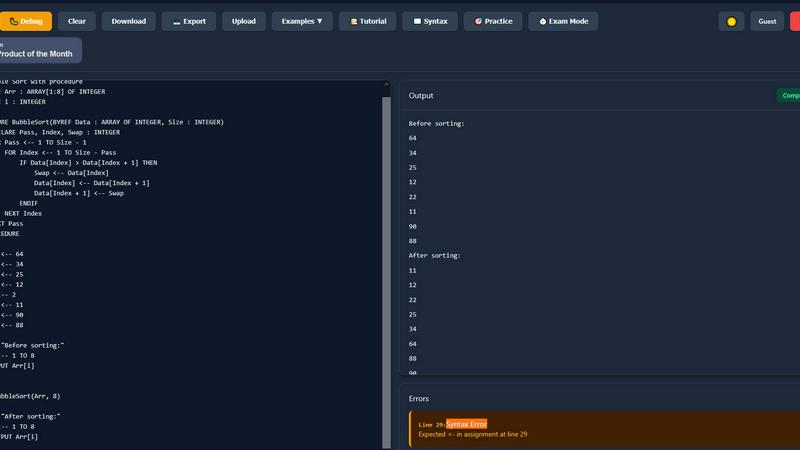
PseudoRun
The Ultimate Piano

Feature Comparison
PseudoRun
IGCSE Exam-Focused Editor
Our editor is not just a text box; it's a precision learning environment built from the ground up for the Cambridge IGCSE syllabus. It understands the specific syntax, structures, and conventions required for your exams, ensuring that every line of pseudocode you write is practice for the real thing. This focused approach means you're not just learning to code, you're training for exam success with every keystroke, building muscle memory for the patterns that will appear on your paper.
Real-Time Validation & Error Detection
Stop second-guessing your syntax. As you type, PseudoRun provides instant feedback, highlighting errors and offering guidance just like a professional programming environment. This immediate validation helps you correct mistakes on the fly, reinforcing correct practices and preventing bad habits from forming. It transforms learning from a passive, read-and-remember task into an active, doing-and-understanding experience, accelerating your path to writing flawless pseudocode.
Step-by-Step Interactive Debugger
Unlock the true logic behind algorithms with our powerful debugger. Execute your code line-by-line, watch variable values update in real-time, and trace the exact flow of execution. This feature demystifies complex procedures, loops, and conditionals, providing a crystal-clear window into how your pseudocode actually works. It's the ultimate tool for moving from memorizing algorithms to genuinely understanding and mastering them.
Comprehensive IGCSE Practice Library
Gain confidence with a vast, built-in library of over 50 IGCSE-style problems and examples. Covering every key topic from basic output and loops to complex array manipulations and procedure calls, this library provides structured, progressive practice. Each problem is designed to mirror exam questions, allowing you to apply your skills in context and identify areas for improvement, turning uncertainty into exam-ready competence.
The Ultimate Piano
Interactive MIDI Player & Falling Notes
Transform any song into a personalized lesson. Load your favorite MIDI files and watch as the notes cascade down onto the keyboard in real-time, lighting up the exact keys to press. Take full control of your learning by slowing down the tempo to a comfortable pace, looping tricky sections until they become second nature, or stepping through a complex passage note-by-note. This visual feedback system turns abstract sheet music into an intuitive, game-like experience that accelerates muscle memory and understanding.
Real-Time Chord Detection & Explorer
Play freely and watch as the platform intelligently identifies and displays the chords you're creating in real time. This instant feedback demystifies music theory, allowing you to understand the harmonic landscape of your improvisations and compositions. Dive deeper with the integrated Chord Explorer to study voicings, inversions, and the theory behind every chord, turning casual playing into a powerful learning session that builds your theoretical knowledge effortlessly.
Comprehensive Scale Trainer & Learning Modes
Master the building blocks of music with a dedicated trainer for 14 different scale types. Select any scale and key, and watch it instantly visualized across the keyboard with clear note highlighting. The Scale Trainer provides detailed performance analysis as you play, helping you improve accuracy, speed, and fluency. This targeted practice tool ensures you're not just playing notes, but internalizing patterns that will fuel your improvisation and technical prowess.
Integrated Audio & YouTube Player
Bring your entire music library into your practice routine. Upload any MP3 file or simply paste a YouTube URL to practice along with your favorite songs, tutorials, or performances. Slow down the audio without changing the pitch, set precise A-B loop points to isolate difficult sections, and save markers to jump back to specific moments. This feature bridges the gap between passive listening and active playing, making every song a potential lesson.
Use Cases
PseudoRun
Mastering Exam-Specific Algorithms
Use PseudoRun to deconstruct and practice the standard algorithms explicitly mentioned in the IGCSE syllabus, such as linear search, bubble sort, or finding totals and averages. The step-by-step debugger allows you to follow the data flow through each iteration, transforming abstract textbook descriptions into tangible, understandable processes that you can confidently reproduce in exams.
Independent Homework & Revision
Transform your independent study sessions. Instead of passively reading notes, actively write and test pseudocode solutions to past paper questions or textbook exercises. The real-time validation acts as your personal tutor, providing instant feedback and allowing for rapid experimentation and correction, making your revision time vastly more effective and productive.
Building Speed with Exam Mode
Simulate the pressure of the exam hall with the built-in timer in Exam Mode. Practice completing full pseudocode tasks under timed conditions to build not only accuracy but also essential speed. This use case helps you manage exam anxiety, improve time management, and develop the quick, logical thinking required to perform your best when it matters most.
Collaborative Learning & Debugging
Work through challenging problems with classmates by sharing your saved pseudocode programs. You can collaboratively debug logic errors, compare different algorithmic approaches to the same problem, and explain your reasoning using the visual debugger. This turns learning into a social, interactive process, deepening understanding for everyone involved.
The Ultimate Piano
The Aspiring Songwriter & Composer
Capture your musical ideas the moment inspiration strikes. Use the MIDI recorder to effortlessly save your improvisations as downloadable files. Experiment with chord progressions using the real-time chord detection, and layer melodies over them using the scale trainer for guidance. It's your always-available sketchpad for turning fleeting ideas into fully-formed musical pieces, all without any complex software.
The Dedicated Music Student
Supercharge your assigned practice. Use the falling notes visualizer to tackle challenging pieces from your lessons, slowing them down to perfection. Strengthen your core skills with structured scale and chord drills, and use the built-in metronome with speed training to build rock-solid rhythm. The sheet music display shows your playing on a real staff, reinforcing the connection between the keys you press and musical notation.
The Ear Training Enthusiast
Develop a professional ear for music. Utilize the dedicated ear training modules to practice identifying intervals and chords by sound alone. Play along with songs in the audio player, trying to match melodies and harmonies by ear. The real-time visual feedback on the keyboard provides immediate correction, accelerating your ability to recognize, replicate, and understand music purely by listening.
The Mobile Practice Advocate
Maintain your practice streak no matter where life takes you. With full touch support and a mobile-friendly design, The Ultimate Piano turns your tablet or smartphone into a portable piano studio. Practice scales during your commute, work on chord shapes in a coffee shop, or use the YouTube player to learn a new song from a tutorial while traveling. Your musical growth never has to hit pause.
Overview
About PseudoRun
PseudoRun is the definitive, student-first platform engineered to transform how IGCSE Computer Science students master pseudocode. It is the #1 free online editor and simulator, meticulously crafted to align perfectly with Cambridge IGCSE specifications and exam patterns. This powerful tool is designed for students who are tired of navigating cluttered, ad-ridden learning sites, offering instead a completely distraction-free and privacy-focused environment. Every aspect of PseudoRun is built with a single goal: your exam success. It bridges the critical gap between theoretical knowledge and practical application, allowing you to write, run, debug, and test pseudocode in real-time with instant validation and feedback. This hands-on approach makes algorithmic thinking accessible, deeply understandable, and genuinely engaging. Built by students for students, PseudoRun empowers you to experiment without fear, debug with efficiency, and build the unshakeable speed and accuracy needed to excel. Your journey from confusion to clarity, from theory to top marks, starts here with the ultimate tool for IGCSE pseudocode mastery.
About The Ultimate Piano
Unlock your musical potential and transform your piano practice from a chore into a daily joy. The Ultimate Piano is your all-in-one, browser-based sanctuary for learning, creativity, and mastery. Designed for the modern musician, it eliminates all barriers to entry—no downloads, no accounts, just instant access to a world-class practice tool right from your web browser. Whether you're taking your first steps on the keys or you're an experienced player refining your artistry, this platform meets you where you are and propels you forward. Connect your MIDI keyboard or use your computer to dive into a feature-rich environment where every tool is designed to make theory visual, practice interactive, and progress undeniable. See chords light up as you play them, deconstruct songs note-by-note, and train your ear to recognize musical patterns. This is more than a virtual piano; it's your personal coach, sheet music library, and recording studio, fused into one seamless experience. Your journey to confident, expressive playing starts here, anytime and anywhere.
Frequently Asked Questions
PseudoRun FAQ
Is PseudoRun really completely free?
Yes, absolutely. PseudoRun is and always will be 100% free with no hidden costs, premium tiers, or feature paywalls. We are committed to providing an accessible, high-quality learning tool for all IGCSE students. Our platform is sustained by community support, not by charging users or showing advertisements, ensuring a completely focused learning experience.
How does PseudoRun help with the actual IGCSE exam?
PseudoRun is meticulously aligned with the Cambridge IGCSE Computer Science syllabus and exam format. By practicing with our editor, you become fluent in the exact pseudocode syntax and structures required by the exam board. The practice problems mirror exam-style questions, and the Exam Mode builds the time-management skills crucial for success, making your preparation direct and highly effective.
Do I need to create an account to use it?
No, you do not need an account to start coding immediately. You can begin writing and running pseudocode the moment you visit the site. However, creating a free account enables you to save your programs to our secure cloud storage, access them from any device, and track your progress over time, which is highly recommended for ongoing study.
Can I use PseudoRun on my phone or tablet?
Yes, PseudoRun is designed to be fully responsive and works on modern smartphones, tablets, and desktop computers. The interface adjusts to your screen size, allowing you to write, run, and review pseudocode wherever you are, making it easy to squeeze in productive practice sessions during your day.
The Ultimate Piano FAQ
Do I need to install anything to use Ultimate Piano?
Absolutely not! The Ultimate Piano is entirely browser-based, meaning you can start practicing immediately without any downloads or installations. Simply visit the website on your computer, tablet, or smartphone, and you have a full-featured piano lab ready to go. This instant access removes all friction between you and your musical goals.
Can I connect my MIDI keyboard?
Yes, and we highly encourage it! The Ultimate Piano fully supports connection to any MIDI keyboard or digital piano. Once connected, you can play with realistic piano sounds, use a sustain pedal for expressive playing (with on-screen visualization), and access all interactive features like chord detection and the scale trainer with your physical instrument for the most authentic and effective practice experience.
What chords and scales can I learn?
The platform offers a vast library for music theory exploration. You can learn and visualize all essential scales, including major, minor (natural, harmonic, melodic), blues, pentatonic, and modes like Dorian and Mixolydian—14 types in total. The chord explorer covers a comprehensive range from basic triads to more advanced seventh and extended chords, complete with theoretical explanations and keyboard diagrams.
Can I practice along with my own songs?
Definitely! The integrated Audio Player allows you to upload your own MP3, WAV, or other audio files to play along with. Furthermore, the YouTube Player lets you paste the link to any YouTube video—be it a song, a tutorial, or a concert performance—and practice directly within the tool. You can slow down playback, loop sections, and analyze the music, making it an incredibly powerful way to learn by ear.
Alternatives
PseudoRun Alternatives
PseudoRun is the definitive, free platform for mastering IGCSE Computer Science pseudocode. It belongs to the education and learning category, specifically designed to help students write, test, and debug algorithms in a distraction-free environment that perfectly mirrors their exam requirements. Students might explore other options for various reasons. Some may seek platforms with different teaching methodologies, while others might prioritize mobile access or require tools that cover a broader curriculum beyond IGCSE. It's a natural part of the learning journey to find the resource that best fits one's personal study style and goals. When evaluating different learning tools, focus on what truly empowers your success. Look for alignment with the official Cambridge syllabus, instant feedback to accelerate understanding, and a clean interface that lets you concentrate on building logic. The right platform should transform confusion into clarity, making complex concepts feel accessible and engaging.
The Ultimate Piano Alternatives
The Ultimate Piano is a powerful, browser-based platform in the Audio & Music and Education & Learning categories. It transforms practice by offering realistic sound, MIDI support, and interactive theory tools directly in your web browser, eliminating software downloads. People explore alternatives for various reasons. Your journey is unique—you might need a different price point, specific advanced features, a dedicated mobile app, or a learning method that better aligns with your personal goals. It's all about finding the tool that unlocks your next level of musical growth. When choosing your ideal platform, focus on what empowers your transformation. Consider the core experience: the quality of sound, the responsiveness of the keyboard input, and the depth of learning modules. Your perfect match will feel intuitive and provide the specific guidance that turns practice into tangible progress.