
Img Editor vs poseup
Side-by-side comparison to help you choose the right AI tool.

Img Editor
Unleash your imagination and instantly create stunning AI images with Img Editor.
Last updated: February 28, 2026

poseup
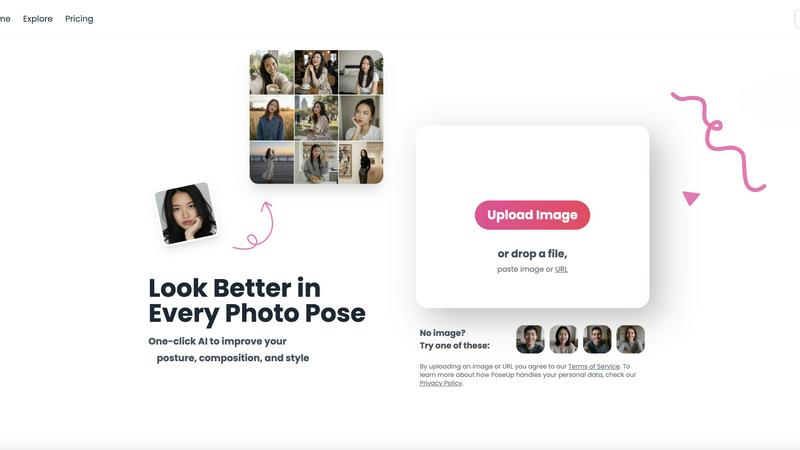
Elevate your photos effortlessly with PoseUp's AI, enhancing posture and composition in just one click.
Last updated: February 28, 2026
Visual Comparison
Img Editor

poseup
Feature Comparison
Img Editor
Advanced Text-to-Image Generation
Unleash the power of your words with Img Editor's cutting-edge AI. Describe any scene, concept, or emotion in a text prompt, and watch as the platform's advanced understanding transforms your description into a stunning, high-quality image. You have full control over the creative process with adjustable parameters like aspect ratio and image quality, allowing you to tailor the output for social media, print, or digital displays with precision.
Powerful Image Editing & Transformation
Go beyond generation and reimagine your existing visuals. Img Editor's sophisticated AI can edit and alter photos based on new textual instructions. Describe the changes you want—swap elements, modify styles, or completely reinvent the scene—and the AI seamlessly executes your vision, turning any photo into a new masterpiece without requiring complex editing software skills.
Intelligent Prompt Generator & Gallery
Overcome creative block and find instant inspiration. The built-in prompt generator helps you craft effective descriptions, while the public Gallery showcases a wealth of community creations. You can click on any popular prompt to try it yourself, learning from others and discovering new artistic styles, which accelerates your creative journey and connects you with a global network of creators.
Community-Driven Rewards System
Your creativity fuels your potential. By submitting your approved AI-generated images to the public Gallery, you contribute to the community's inspiration pool and are rewarded with extra free generations. This innovative system makes advanced AI art tools sustainably accessible, fostering a collaborative environment where sharing your art directly empowers you and others to create even more.
poseup
One-Click Pose Enhancement
PoseUp's one-click enhancement feature allows users to instantly improve their photo poses with minimal effort. By simply uploading an image, the AI analyzes it and makes intelligent adjustments that enhance your posture and reposition your limbs for optimal visual appeal. This feature is perfect for those who want professional results without needing extensive photography knowledge.
AI Posture Correction
The AI posture correction technology meticulously examines your photos to suggest better positioning tailored to your body type and the context of the image. This ensures that your photos not only look great but also represent your best self. Whether you're standing, sitting, or in action, PoseUp optimizes your posture for stunning results.
Intelligent Composition Optimization
PoseUp intelligently reconfigures your image composition, adhering to established photographic principles. This feature helps create a balanced and aesthetically pleasing frame, ensuring that your subject is highlighted effectively. Whether it’s a casual selfie or a professional headshot, this optimization elevates the overall quality of your photographs.
Versatile Use Cases
PoseUp is designed with versatility in mind. Whether you are capturing casual lifestyle moments, outdoor adventures, or professional portraits, the tool adapts to your needs. It supports various photo types, ensuring that you can achieve stunning results regardless of the context. This makes PoseUp an essential tool for social media influencers, families, and professionals alike.
Use Cases
Img Editor
Digital Marketing & Advertising
Create eye-catching, original visuals for social media campaigns, blog posts, and advertisements in minutes. Generate product mockups, conceptual artwork, and branded graphics that capture audience attention without the need for expensive stock photos or graphic designers, enabling agile and cost-effective marketing.
Concept Art & Creative Inspiration
Artists, writers, and designers can rapidly visualize concepts and characters. Use Img Editor to explore different artistic styles, color palettes, and compositions for storyboards, game assets, or book covers, transforming abstract ideas into concrete visuals that fuel further creative development and presentation.
Personal Branding & Content Creation
Content creators, influencers, and entrepreneurs can build a consistent and unique visual identity. Generate custom profile pictures, channel art, thumbnails, and presentation graphics that stand out, ensuring your personal or business brand is professional and memorable across all digital platforms.
Educational & Presentation Materials
Teachers, students, and professionals can enhance their projects and presentations with custom illustrations. Generate accurate historical scenes, scientific concepts, or abstract data visualizations to make educational content more engaging and understandable, adding a powerful visual dimension to communication.
poseup
Social Media Content Creation
For social media creators striving for visually captivating feeds, PoseUp enhances every photo effortlessly. By optimizing poses and compositions, it helps you stand out in a crowded digital landscape, ensuring your content attracts more engagement and attention.
Professional Headshots
Professionals needing polished headshots can rely on PoseUp to deliver stunning results quickly. The AI technology enhances your posture and composition, providing you with a professional image that reflects your personality and professionalism, perfect for LinkedIn or corporate profiles.
Family Photography
Parents capturing precious family memories can utilize PoseUp to ensure everyone looks their best in every shot. The tool makes it easy to enhance group photos, ensuring that everyone is positioned perfectly and looking great, making family moments even more memorable.
Fitness and Wellness Shots
For fitness enthusiasts and wellness advocates, PoseUp ensures that your workout photos reflect your dedication and hard work. The AI technology adjusts your posture for the most flattering angles, helping you present your best self in every fitness shot, whether at the gym or outdoors.
Overview
About Img Editor
Img Editor is your all-in-one, free AI-powered platform designed to transform your imagination into breathtaking visual reality. It democratizes professional-grade digital artistry by removing cost barriers and technical complexities, empowering anyone to create stunning images. Whether you're a seasoned digital artist, a marketer in need of compelling graphics, a content creator building a brand, or simply someone with a creative vision, Img Editor provides the tools to bring your ideas to life in seconds. At its core, the platform combines a powerful dual-mode AI generation system with an intuitive interface, allowing you to generate images from text prompts or edit and transform existing photos. Beyond creation, Img Editor fosters a vibrant, supportive community where sharing your artwork can reward you with unlimited generations, turning the journey of visual expression into an endlessly rewarding and inclusive experience for everyone.
About poseup
PoseUp is your personal AI-powered photography coach, meticulously crafted to help you unlock your inner confidence in every photograph you take. This innovative tool transforms ordinary, awkward, or imperfect snapshots into extraordinary, professional-looking portraits, all with a single click. Designed for everyone, from social media creators to professional photographers and families capturing cherished moments, PoseUp democratizes high-end photo editing. It leverages advanced artificial intelligence to analyze your images, focusing on three core pillars: pose, posture, and composition. With its intelligent corrections, PoseUp adjusts slouches, enhances limb positioning for a more flattering silhouette, and reconfigures the frame to adhere to professional photographic principles. Say goodbye to hours spent learning complex software or feeling disappointed by a bad pose. PoseUp empowers you to present your best self to the world, ensuring you look as incredible in photos as you do in real life. Its mission is clear: to provide everyone with instant access to photographer-level results, making perfect posture and composition accessible to all.
Frequently Asked Questions
Img Editor FAQ
Is Img Editor really free to use?
Yes, Img Editor is completely free to use. The core mission is to democratize AI art technology. You start with free generations daily and can earn more by participating in the community, such as submitting your approved creations to the Gallery, which rewards you with additional free credits.
How does the image quality and resolution work?
Img Editor offers multiple quality tiers, including Standard (1K) and High Quality (2K). For Ultra Quality (4K) generation, the platform partners with Nano Photo. You can select your desired aspect ratio and quality setting before generation to ensure the output meets your specific needs for web or print.
What can I use the images I create for?
You own the images you create with Img Editor. They can be used for personal projects, commercial branding, marketing materials, social media content, and more. The platform empowers you to create professional-grade visuals for virtually any purpose without licensing restrictions.
How does the community gallery and rewards system work?
The public Gallery is where users share their creations. When you submit an image for review and it gets approved, you earn extra free generations (e.g., 10 credits). This system encourages sharing and provides a vast source of inspiration, allowing you to see and even reuse prompts from other creators' work.
poseup FAQ
How does PoseUp enhance my photos?
PoseUp utilizes advanced AI technology to analyze your images, focusing on pose, posture, and composition. It makes intelligent adjustments to enhance these elements, resulting in professional-looking photos with just one click.
Do I need any photography skills to use PoseUp?
No! PoseUp is designed for everyone, regardless of their photography experience. The user-friendly interface allows you to upload an image and instantly receive enhancements without needing extensive knowledge of photography principles.
What types of images can I upload to PoseUp?
PoseUp supports various image formats, including JPG, PNG, WEBP, and HEIC, with a maximum file size of 5MB per image. This versatility allows you to enhance a wide range of photos, from casual selfies to professional portraits.
Is my personal data safe with PoseUp?
Absolutely. PoseUp is committed to protecting your privacy and personal data. By using the platform, you agree to our Terms of Service and can review our Privacy Policy to understand how your data is handled.
Alternatives
Img Editor Alternatives
Img Editor is a powerful, free AI image generation platform in the image and photo editing category. It transforms text descriptions and existing photos into stunning, professional-grade artwork, making advanced visual creation accessible to everyone. Users often explore alternatives for various reasons. Some may seek different artistic styles or more specialized editing tools, while others might require specific platform integrations or have unique workflow needs. The quest for the perfect creative partner is a personal journey to find the tool that best aligns with your unique vision and goals. When choosing an alternative, focus on what empowers your creative flow. Consider the core technology's output quality, the intuitiveness of the interface, and how the platform supports your growth. Look for a solution that not only meets your technical requirements but also inspires you to push the boundaries of your imagination every day.
poseup Alternatives
PoseUp is an innovative AI-powered photography tool designed to enhance your posture and composition in photos with just one click. It falls under the category of image and photo editing software, offering users a seamless solution to transform their images into professional-quality portraits. Many users seek alternatives to PoseUp for various reasons, including pricing, specific features that may not align with their needs, or compatibility with different platforms. When choosing an alternative, it's essential to consider factors such as ease of use, the range of enhancement features, and the overall quality of the results to ensure you find a tool that meets your photography goals. Finding the right alternative can significantly impact your photography experience. Look for solutions that offer intuitive interfaces, effective AI capabilities for pose and posture correction, and reliable support to help you maximize your results. Additionally, consider whether the tool provides flexibility for various user needs, from casual social media snapshots to professional-grade headshots, allowing you to present your best self in any context.