
Phishly vs Zovo
Side-by-side comparison to help you choose the right AI tool.

Phishly
Take back your inbox security with AI that instantly detects phishing emails.

Unlock 20 powerful privacy-first Chrome extensions for developers and writers, all crafted by a solo developer.
Last updated: February 26, 2026
Visual Comparison
Phishly
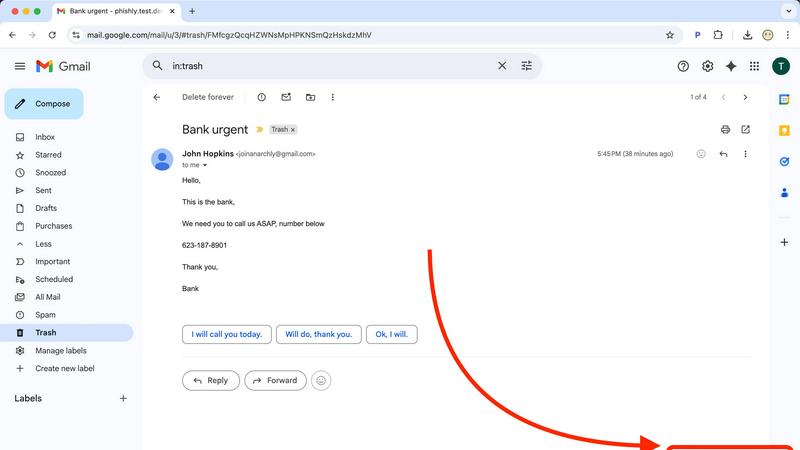
Zovo

Feature Comparison
Phishly
One-Click AI Analysis in Gmail
Transform your Gmail inbox into a fortress of security with seamless, one-click protection. Our intuitive Chrome extension integrates directly into your email interface. The moment an email raises your suspicion, simply open it and click the "Scan with Phishly" button. There's no copying, pasting, or navigating to another site. Our powerful AI engine goes to work instantly, scanning the content, headers, and links behind the scenes, delivering a comprehensive risk assessment directly within your familiar workflow. This frictionless integration makes advanced security a natural part of your daily routine.
Comprehensive Web Tool for Any Email
Not every threat arrives in Gmail. Phishly empowers you to scrutinize any suspicious communication, no matter its source. Our dedicated web tool is your universal security checkpoint. Whether it's an email from a different client, a forwarded message, or text copied from a social media direct message, you can paste the content directly onto our secure website. The same advanced AI analysis is performed, giving you a definitive verdict on legitimacy. This flexibility ensures you have a trusted ally for every corner of your digital life.
Clear, Educational Risk Assessment
Knowledge is your greatest defense. Phishly doesn't just give you a vague warning; it provides a clear, color-coded risk rating (Safe, Medium Risk, High Risk) accompanied by a detailed breakdown. Our AI explains why an email is suspicious, pointing out specific red flags like mismatched sender domains, suspicious link destinations, or the use of urgent, fear-based language. This transforms every scan into a learning opportunity, steadily building your ability to spot phishing attempts independently and fostering true digital literacy.
Uncompromising Privacy by Design
Your security should not come at the cost of your privacy. Phishly is built on a fundamental principle of respect: we only analyze what you explicitly ask us to. We do not scan, read, or store any emails automatically. You are always in complete control, initiating every analysis with a conscious click or paste. This ensures your private communications remain exactly that—private. You gain powerful protective insight without ever surrendering your data to continuous monitoring or invasive processes.
Zovo
BeLikeNative
BeLikeNative is a transformative writing tool that allows users to write like a native speaker with just one keystroke. Supporting 80 languages, this extension is perfect for anyone looking to enhance their writing skills, whether for professional or personal use. With its intuitive design, users can seamlessly integrate it into their writing process, elevating their communication in an instant.
Tab Suspender Pro
Tab Suspender Pro intelligently manages your browser's memory usage by auto-suspending inactive tabs. This feature is crucial for users who often have multiple tabs open, providing a smoother browsing experience while freeing up system resources. The smart detection algorithm ensures that your active work remains uninterrupted, allowing for efficient multitasking.
JSON Formatter Pro
JSON Formatter Pro is an essential tool for developers and data analysts, enabling users to format, validate, and explore JSON data effortlessly. With features like beautification, minification, and a tree explorer, this extension simplifies working with complex data structures, making it easier to debug and analyze JSON outputs.
Clipboard History Pro
Clipboard History Pro ensures that you never lose any copied text again. With the ability to store up to 10,000 clips, this extension allows for instant search and smart paste functionalities. Whether you're working on a writing project or need to reference past content, this tool keeps your copied items organized and easily accessible.
Use Cases
Phishly
Empowering Remote Workers & Freelancers
As a remote professional, you are your own IT department, often handling sensitive client data and financial communications. A successful phishing attack can be devastating. Phishly acts as your on-demand security consultant, allowing you to instantly verify invoice requests, client directives, or platform login emails before taking any action. This empowers you to work with confidence, protect your business assets, and build trust with clients by demonstrating proactive security awareness.
Safeguarding Small Business Teams
Small businesses are prime targets for phishing due to often-limited IT resources. Phishly provides an immediate, cost-effective security uplift for your entire team. By encouraging employees to scan uncertain emails—especially those related to payroll, banking, or shipping—you create a human firewall. It reduces the risk of costly data breaches or financial fraud, fostering a culture of shared vigilance without the need for complex training or expensive enterprise software deployments.
Protecting Personal & Family Digital Lives
From bank alerts and package delivery notices to social media messages and lottery scams, phishing threatens your personal world. Phishly gives you and your family a simple tool to question everything. Before clicking a link in an email from your "bank" or entering details on a website, a quick scan can reveal the truth. It’s an empowering habit that protects personal finances, prevents identity theft, and brings peace of mind to your household's online activities.
Verifying Urgent or High-Stakes Communications
Phishers thrive on creating a sense of urgency—"Your account is locked!" "Confirm your payment now!" This pressure can lead to hasty, dangerous clicks. Phishly is your pause button. When you feel that rush of anxiety from an urgent email, use it to scan the message. The AI calmly assesses the tactics, allowing you to replace panic with a fact-based assessment. This empowers you to respond appropriately to real emergencies while safely ignoring fabricated crises.
Zovo
Enhancing Writing Skills
BeLikeNative can be a game changer for students, professionals, and anyone who writes in a second language. By offering instant rewrites, it helps users articulate their thoughts more clearly and confidently, ensuring they communicate effectively in various contexts.
Optimizing Browser Performance
Tab Suspender Pro is perfect for power users who tend to keep multiple tabs open. By auto-suspending inactive tabs, this feature not only boosts your browser's performance but also significantly reduces memory consumption, making your work environment more efficient.
Streamlining Data Management
JSON Formatter Pro serves as an invaluable tool for developers and data professionals. It simplifies the process of working with JSON data, making it easier to validate and explore data structures, which enhances productivity and reduces errors during development.
Organizing Copied Content
Clipboard History Pro is ideal for writers, researchers, and professionals who frequently copy and paste information. This extension keeps your copied items organized, allowing you to retrieve and utilize previous data quickly, thus improving overall workflow efficiency.
Overview
About Phishly
In a digital world where a single click can compromise your security, peace of mind is the ultimate power. Phishly is your intelligent shield, an AI-powered platform designed to transform you from a potential victim into a confident, security-aware individual. It cuts through the noise and complexity of online threats, offering a brilliantly simple solution: instant, intelligent analysis of suspicious emails. Available as a Chrome extension for Gmail and a web tool, Phishly empowers you to take control. Simply open any email and click "Scan with Phishly" or paste suspicious content directly on our website. Our advanced AI instantly scans for sophisticated phishing indicators like spoofed sender addresses, deceptive domains, urgent language, and manipulative social engineering tactics. You receive a clear, actionable risk assessment—Safe, Medium Risk, or High Risk—with a detailed explanation that educates as it protects. Built for individuals, freelancers, and small businesses, Phishly delivers enterprise-grade security insight without the enterprise complexity or cost. We champion your privacy by only analyzing emails you explicitly choose to scan. No technical knowledge is required, it's free to use, and it delivers the instant answers you need to navigate your inbox with confidence and reclaim your digital safety.
About Zovo
Zovo is a comprehensive suite of 20 powerful Chrome extensions crafted by a solo developer with over 10 years of experience and a remarkable track record of earning $400K on Upwork, boasting a 100% success rate. Designed for the modern browser user, Zovo empowers individuals and professionals alike to enhance their productivity and streamline their online tasks. With flagship tools like BeLikeNative, which assists over 3,300 users in achieving native-level writing proficiency in 80 languages through one-keystroke rewrites, Zovo stands out as a privacy-first solution. Each extension is built with user feedback in mind, ensuring that the development roadmap is shaped by the community. This means every feature you wish for can become a reality. Plus, Zovo is committed to user privacy; no data harvesting occurs, and all data remains local to your device. With new tools launched monthly and a vibrant user community, Zovo is the go-to choice for anyone looking to optimize their browser experience without compromising their privacy.
Frequently Asked Questions
Phishly FAQ
How does Phishly protect my privacy?
Your privacy is our core design principle. Phishly operates on an explicit, user-initiated model. We do not access, read, or store any emails from your inbox automatically. Our AI only analyzes the specific content of the single email you choose to scan by clicking our button or pasting text. Once the analysis is complete and delivered to you, we do not retain the email content for any other purpose. You are always in full control.
What makes Phishly different from my email provider's spam filter?
Your built-in spam filter is a passive, broad-brush first line of defense that often misses sophisticated "spear phishing" emails designed to look legitimate. Phishly is an active, on-demand tool that empowers you to investigate specific emails that have already passed through the spam filter and landed in your inbox. It provides a deeper, AI-powered analysis with clear explanations, turning you from a passive recipient into an active, informed participant in your own security.
Is technical knowledge required to use Phishly?
Absolutely not. Phishly is designed for everyone. We have eliminated all technical complexity. Using the Chrome extension requires just a single click within Gmail. Using the web tool is as simple as copying text and pasting it into a box. The results are presented in plain language with clear risk levels and explanations, making advanced cybersecurity accessible to anyone, regardless of their technical background.
Is Phishly really free to use?
Yes, Phishly is completely free to use. We believe powerful phishing protection should be accessible to everyone. You can install our Chrome extension and use our web analysis tool without any cost, subscription, or hidden fees. Our mission is to empower individuals and small businesses with the tools they need to stay safe, breaking down the financial barriers to essential digital security.
Zovo FAQ
How does Zovo ensure user privacy?
Zovo is committed to a privacy-first approach, ensuring that all data processed by the extensions remains on your device. There is no data harvesting or sharing with third parties, so your information is always secure.
Can I request new features for Zovo extensions?
Absolutely! Users are encouraged to submit feature requests directly to the developer. The most requested features are prioritized for development, making it a community-driven process.
How often are new extensions released?
Zovo releases new extensions monthly, with early access given to members of the community. This ensures that users can benefit from the latest tools before they are available to the general public.
What support options are available for Zovo users?
Users can easily reach out for support directly via email or through the Discord community. The developer personally addresses inquiries, ensuring that you get the help you need without any automated systems getting in the way.