
Nano Photo vs Seedance 2 AI Video Generator
Side-by-side comparison to help you choose the right AI tool.

Transform your ideas into stunning AI videos effortlessly with NanoPhoto.
Last updated: March 1, 2026

Transform your ideas into cinematic videos instantly with powerful AI control.
Last updated: March 1, 2026
Visual Comparison
Nano Photo
Seedance 2 AI Video Generator

Feature Comparison
Nano Photo
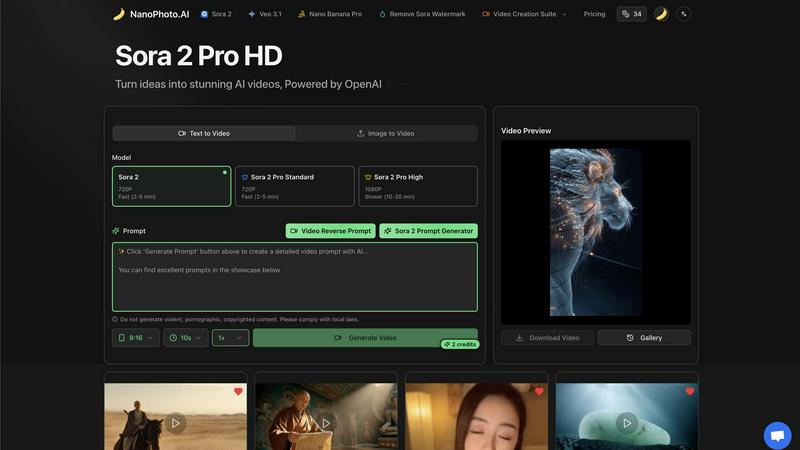
Sora 2 Pro HD Video Generation
Harness the power of OpenAI's most advanced model to turn your ideas into stunning, high-definition AI videos. With Sora 2 Pro HD, you can generate 1080P videos directly from text prompts or existing images, creating professional-grade visual narratives that were once only possible with extensive resources and expertise. This feature brings cinematic quality within reach, allowing for slower, more detailed rendering to achieve exceptional results.
Intuitive Prompt Engineering Suite
Overcome creative block with built-in tools designed to refine your vision. Utilize the Sora 2 Prompt Generator to craft perfect instructions, or deconstruct existing videos with the Video Reverse Prompt tool to understand and replicate styles. This suite empowers you to communicate effectively with AI, transforming vague concepts into precise, actionable commands for breathtaking outcomes.
Comprehensive Video Creation Suite
Go beyond simple generation with a full suite of editing and enhancement tools. This feature allows you to create videos in versatile formats like 9:16 for social media, control duration, and access fast processing options. The integrated gallery and preview system lets you manage and perfect your projects, while options like watermark removal provide a polished, final product ready for any platform.
Cutting-Edge Model Integration
Nano Photo stays at the forefront of AI technology by integrating top-tier models like OpenAI's Sora 2 and Google's Veo 3.1. This gives you access to the latest advancements in AI video and image generation from a single, unified dashboard. You can choose the best model for your specific task, ensuring you always have the most powerful and up-to-date creative engine working for you.
Seedance 2 AI Video Generator
Multimodal Generation Modes
Seedance 2.0 offers three powerful entry points for creation: Text-to-Video, Image-to-Video, and Video-to-Video. This flexibility allows you to start your creative process wherever inspiration strikes. Begin with a detailed text prompt to generate entirely new scenes, use an image to animate and extend a specific visual style, or transform existing footage with new artistic directions and effects, all within one seamless platform.
Reference-First Creative Control
Move beyond guesswork with a reference-driven workflow. By using source images or video clips as anchors, you gain immense control over character consistency, artistic style, and cinematic feel. This feature ensures your final output aligns with your vision, reducing reliance on perfect prompt wording and delivering more predictable, professional results that stay true to your original concept.
Integrated Audio-Video Synthesis
Create a complete sensory experience in a single generation pass. Seedance 2.0 can synthesize synchronized audio, including sound effects, background music, and voice, directly alongside your video. With support for lip-sync in over 10 languages, this feature eliminates the need for separate audio editing tools, allowing you to produce fully realized videos ready for publishing.
High-Fidelity Output Specifications
Produce content that meets professional standards. Seedance 2.0 generates videos up to 1080p resolution at a cinema-standard 24 frames per second for smooth playback. With support for multiple aspect ratios (16:9, 9:16, 1:1) and durations extendable up to 10 seconds, you can create optimized content for any platform, from YouTube to TikTok, all exported in the universal MP4 format.
Use Cases
Nano Photo
Dynamic Social Media Content Creation
Constantly feed your social channels with fresh, engaging, and trend-aligned content. Create eye-catching short-form videos, promotional clips, and branded imagery in minutes, not days. This allows content creators and influencers to maintain a consistent, high-quality presence that captivates their audience and boosts engagement without a massive production burden.
Rapid Marketing and Advertising Asset Production
Empower marketing teams and entrepreneurs to produce compelling ad campaigns, product demos, and brand story videos on demand. Quickly visualize concepts for pitches, create A/B testing variants, and develop full-fledged commercial content that looks professionally produced, all while drastically reducing time-to-market and agency costs.
Visual Storytelling and Concept Visualization
Bring narratives, presentations, and creative concepts to life with vivid clarity. Authors, educators, and strategists can use Nano Photo to generate visual aids, book trailers, educational content, or mood boards that perfectly illustrate complex ideas and stories, making communication more impactful and memorable.
Entrepreneurial Brand Building
For startups and small businesses, Nano Photo is the ultimate brand identity toolkit. Craft a cohesive visual language from the ground up by generating logo concepts, brand story videos, website banners, and product mock-ups. Establish a professional and innovative brand image from day one, without the need for a large design budget.
Seedance 2 AI Video Generator
Rapid Social Media Content Creation
Empower social media managers and content creators to produce a high volume of engaging, platform-specific videos quickly. Generate eye-catching stories, Reels, and TikTok clips from trending text prompts or brand images, maintaining a consistent aesthetic and message across all channels without the need for lengthy filming or editing sessions.
Dynamic Advertising and Marketing Campaigns
Transform marketing workflows by rapidly prototyping and producing ad variations. Agencies can test different concepts, styles, and narratives by generating multiple video versions from a single script or storyboard. This allows for faster client approvals and the ability to create targeted, high-impact video ads for different demographics and platforms efficiently.
Product Demonstration and Explainer Videos
Bring products and concepts to life with clear, engaging explainer videos. Use Image-to-Video to animate product shots or create scenarios that demonstrate use cases. The consistent character and scene control ensures your product remains the hero, making complex features easy to understand and visually appealing for potential customers.
Creative Storyboarding and Concept Visualization
Filmmakers, writers, and designers can use Seedance 2.0 as a powerful pre-visualization tool. Turn written scenes from a script into moving visuals to test cinematography ideas, or generate mood videos from concept art. This accelerates the creative development process, allowing teams to align on a visual direction before committing to costly production.
Overview
About Nano Photo
Nano Photo is your all-in-one AI-powered creative studio, designed to transform your ideas into stunning visual realities. It's more than just a tool; it's a partner in creation, breaking down the complex barriers of video and image production. This platform is built for anyone who has ever had a great idea but lacked the means to bring it to life visually. Whether you're a marketer needing a compelling ad, a content creator building a social media presence, a storyteller visualizing a narrative, or an entrepreneur crafting a brand identity, Nano Photo empowers you to produce professional-grade content with unprecedented speed and simplicity. Its core mission is to democratize high-end creative production. You no longer need a film crew, expensive software, or years of editing experience. By integrating cutting-edge models like OpenAI's Sora 2 and Google's Veo 3.1, Nano Photo offers state-of-the-art video generation alongside powerful image creation tools. With intuitive prompt tools and automated workflows, it puts the power of a full production suite in your hands, enabling you to focus entirely on your vision while it handles the technical execution. This is where your creative potential is unlocked, and your stories are given the visual power they deserve.
About Seedance 2 AI Video Generator
Unleash your creative vision and transform your ideas into stunning cinematic reality with Seedance 2 AI Video Generator. This powerful, all-in-one platform is engineered to empower creators, marketers, and agencies by turning simple text prompts, reference images, or existing source footage into polished, professional-grade video clips in a fraction of the traditional time. Forget the heavy editing overhead and technical barriers that slow you down. Seedance 2.0 is built for a fast, intuitive workflow that puts the focus back on your creativity, not the complexity of production. Its core value lies in delivering controllable, consistent, and high-quality video output. Whether you're starting from a written concept, a visual mood board, or a raw clip, Seedance 2.0 provides the tools to maintain style coherence, achieve smoother motion, and iterate rapidly. This is more than just a video tool; it's your partner in visual storytelling, designed to help you produce compelling content for ads, social media, product demos, and beyond with unprecedented speed and creative control.
Frequently Asked Questions
Nano Photo FAQ
What AI models does Nano Photo use for video generation?
Nano Photo integrates state-of-the-art AI models to provide the best possible results. This primarily includes OpenAI's advanced Sora 2 model for high-quality text-to-video and image-to-video generation, offering various tiers like Standard and Pro HD. We also integrate other leading models like Google's Veo 3.1 to ensure versatility and access to cutting-edge technology in one platform.
How long does it take to generate a video?
Generation time depends on the model and quality tier you select. For faster iterations, options like Sora 2 Pro Standard can deliver a 720P video in approximately 2-5 minutes. For the highest quality 1080P output using Sora 2 Pro High, the rendering process is more detailed and may take between 10-20 minutes. We provide clear estimates so you can plan your workflow accordingly.
Can I remove the watermark from my generated videos?
Yes, absolutely. Nano Photo offers the ability to remove the Sora watermark from your final video outputs. This is part of our commitment to providing you with professional, ready-to-use assets. Your created content is yours to share, publish, and use in your projects without any platform branding, ensuring a clean and polished final product.
Is there a free trial or any special offers available?
We frequently run special promotions to make our powerful tools accessible. Currently, we have an exciting Annual Payment Special Offer that provides significant savings, effectively a half-price offer for annual commitments. This is designed to ensure price never holds back your creative potential. Check our official Pricing page at NanoPhoto.AI for the most current offers and plan details.
Seedance 2 AI Video Generator FAQ
What input methods does Seedance 2.0 support?
Seedance 2.0 supports three primary input methods for generating video: Text, Image, and Video. You can start from a detailed text prompt, upload a reference image to guide style and composition, or provide source footage to restyle, extend, or modify. This multimodal approach offers maximum flexibility for different creative workflows.
What is the maximum video quality and length I can generate?
The model can generate videos up to 1080p resolution at 24 frames per second, ensuring high-definition, smooth playback. The standard generation duration is between 5 to 10 seconds per clip, with capabilities to extend sequences, making it ideal for short-form content and scenes that can be edited together into longer narratives.
Does Seedance 2.0 include audio generation?
Yes, a standout feature of Seedance 2.0 is its integrated audio synthesis. It can generate synchronized sound effects, background music, and even voiceovers with lip-sync support for over 10 languages in a single pass. This creates a complete, production-ready video asset without requiring separate audio editing software.
How does Seedance 2.0 ensure consistency in characters and scenes?
Seedance 2.0 employs an advanced reference-first workflow. By using an image or video clip as a visual anchor, the AI model maintains consistency in character appearance, artistic style, color palette, and camera feel across the generated footage. This reduces randomness and gives you greater control over the final output compared to text prompts alone.
Alternatives
Nano Photo Alternatives
Nano Photo is a powerful AI-powered creative studio in the video generation category, designed to transform your ideas into stunning visual content with ease. It empowers creators by simplifying complex production tasks, making professional-grade visuals accessible to everyone. Users often explore alternatives for various reasons, such as budget constraints, specific feature needs not covered, or compatibility with different operating systems and workflows. The quest for the right tool is a natural step in finding the perfect creative partner for your unique journey. When evaluating other options, focus on the core capabilities that align with your vision. Consider the quality and style of AI-generated output, the intuitiveness of the workflow, and how well the tool integrates into your creative process. The right alternative should feel like an extension of your imagination, removing barriers rather than creating new ones.
Seedance 2 AI Video Generator Alternatives
Seedance 2 AI Video Generator is a powerful tool in the AI video creation space, designed to transform your text, images, and clips into cinematic videos with remarkable consistency and control. It empowers creators to bring their visions to life through a fast, all-in-one workflow that prioritizes smooth extensions and easy prompt management. Even with such a capable tool, exploring alternatives is a natural part of the creative journey. Your needs are unique—perhaps you're seeking a different pricing model, specific features for a niche project, or a platform that aligns with your existing software ecosystem. The right tool is the one that unlocks your potential without friction. When evaluating other options, focus on what truly matters for your workflow. Consider the core output quality, the intuitiveness of the interface, and how well the tool integrates into your creative process. Look for a solution that not only meets technical requirements but also feels like an empowering extension of your own creativity, helping you transform ideas into stunning visual stories with confidence.