
Melograph vs Shrinkpad
Side-by-side comparison to help you choose the right AI tool.

Transform your music into stunning, export-ready videos effortlessly with customizable templates in minutes.
Last updated: February 28, 2026

Shrinkpad
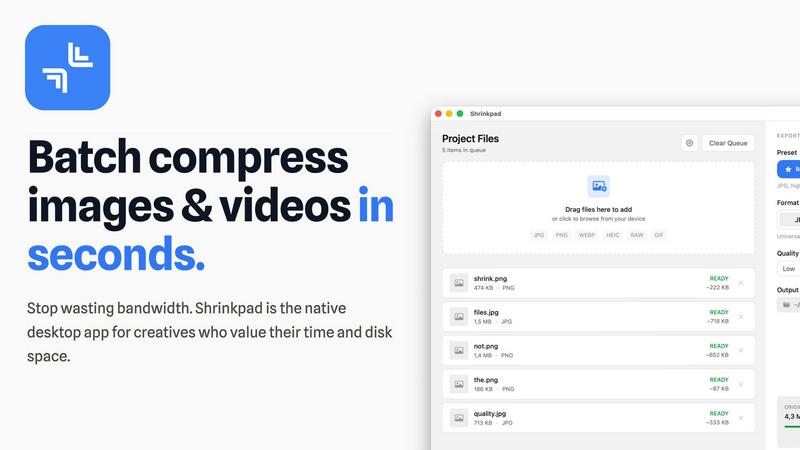
Shrinkpad effortlessly compresses your images and videos on Mac, saving space and enhancing performance in seconds.
Last updated: February 28, 2026
Visual Comparison
Melograph

Shrinkpad
Feature Comparison
Melograph
Intuitive Template Selection
Melograph offers a variety of beautifully crafted templates tailored to different musical styles. Users can easily browse and select the perfect look that resonates with their track, making the visual creation process enjoyable and efficient.
Audio-Reactive Visuals
Experience real-time visualization with Melograph's audio-reactive technology. As you upload your audio, the waveforms dynamically respond, creating a stunning visual representation of your music that captivates viewers and enhances engagement.
Quick Export Options
With Melograph, users can effortlessly export their creations in high-definition 1080p MP4 format. The platform ensures that the exports are clean, professional, and optimized for various social media platforms, allowing creators to share their work instantly.
Customizable Artist Branding
Melograph provides options to personalize videos by adding artist names, song titles, and even logos or album covers. This feature ensures that your branding remains consistent and recognizable across all your visual content.
Shrinkpad
Batch Compression
Shrinkpad allows you to batch compress hundreds of images and videos simultaneously. Just drag and drop your files or entire folders, and watch as the app optimizes them in seconds, saving you time and effort.
Intelligent Compression
No more guesswork with compression settings. Shrinkpad analyzes the visual complexity of your files and automatically applies the perfect compression ratio, ensuring high-quality results without artifacts.
Folder Mode
With Shrinkpad’s Folder Mode, you can simply drop an entire folder, and it will automatically detect and queue all supported images and videos for compression. This feature streamlines your workflow and eliminates the hassle of manual file selection.
Privacy-Focused Processing
All processing occurs locally on your Mac. Shrinkpad ensures that your files do not leave your device, providing peace of mind regarding your sensitive assets and eliminating the need for internet access during compression.
Use Cases
Melograph
Indie Artists Showcasing New Releases
Indie musicians can leverage Melograph to create visually appealing videos for their latest tracks. With minimal effort, they can enhance their releases and attract more listeners on platforms like YouTube and Instagram.
Producers Promoting Beats
Music producers can use Melograph to showcase their beats in a visually engaging manner. By turning instrumental tracks into eye-catching videos, they can capture the attention of potential clients or collaborators.
Labels Enhancing Artist Content
Record labels can utilize Melograph to provide their artists with high-quality visual content for promotional purposes. This tool allows labels to enhance their marketing efforts without requiring extensive video editing skills.
DJs Creating Performance Visuals
DJs can create captivating visuals for their live performances using Melograph. By generating audio-reactive videos that sync with their sets, they can elevate the overall experience for their audience, making their shows more memorable.
Shrinkpad
Optimizing Website Assets
Web developers can use Shrinkpad to efficiently compress images and videos for websites, resulting in significantly faster load times and improved performance metrics, such as LCP scores.
Streamlining Creative Workflows
Photographers and designers can save hours of manual exporting by using Shrinkpad to batch process their assets. Export everything at once and let the app handle the optimization and renaming.
Reducing Storage Costs
Businesses and content creators looking to save storage costs can leverage Shrinkpad to reclaim valuable disk space by reducing the size of large media files, freeing up resources for other essential projects.
Enhancing Video Production
Video editors can benefit from Shrinkpad’s ability to compress 4K MP4 videos without sacrificing quality, making it easier to manage large video files and improve editing efficiency.
Overview
About Melograph
Melograph is a revolutionary web-based music visualizer maker designed specifically for musicians and creators seeking stunning visuals to accompany their audio. It eliminates the complexities associated with traditional video editing, allowing users to create mesmerizing audio-reactive videos in mere minutes. The platform features a simple and intuitive interface where users can select from a diverse range of premium templates that align with various musical vibes, such as chill, cinematic, retro, and futuristic. With just a few clicks, you can upload your track, input your artist name and song title, and export high-quality videos ready for social media. This tool is ideal for indie artists, producers, labels, and DJs who are eager to enhance their music releases with consistent, professional-looking visuals while saving time and effort. The main value proposition of Melograph lies in its ability to streamline the visual creation process, empowering users to focus on their musical artistry while effortlessly generating captivating content.
About Shrinkpad
Shrinkpad is your ultimate companion in the creative journey, designed specifically for macOS users who refuse to let bloated media files hinder their productivity. This powerful native application enables photographers, designers, developers, and content creators to reclaim their storage space and accelerate their workflows. With Shrinkpad, you can batch compress images and videos with stunning speed, reducing file sizes by up to 90% in mere seconds. Its operation is entirely local, ensuring that your sensitive files remain private without the need for cloud uploads or internet dependencies. Whether you work with JPGs, RAW files, or 4K videos, Shrinkpad intelligently applies optimal compression settings, preserving visual quality while freeing up gigabytes of storage. It's not just a tool; it's a transformative solution that empowers you to focus on your creativity rather than on tedious file management.
Frequently Asked Questions
Melograph FAQ
Do I need editing experience to use Melograph?
No, you do not need any editing skills to use Melograph. The platform is designed for users of all experience levels, making it easy for anyone to create stunning visuals by simply selecting a template and entering text.
Will Melograph work for TikTok, Reels, or Shorts?
Absolutely! Melograph exports videos in formats that are perfectly sized for platforms like TikTok, Instagram Reels, and YouTube Shorts, ensuring your content looks great wherever you share it.
Can I use Melograph for multiple songs?
Yes, you can use Melograph for multiple songs. Depending on your chosen pricing plan, you can create visuals for as many tracks as your export credits allow, giving you the flexibility to promote all your music.
Is Melograph a web-based tool?
Yes, Melograph is entirely web-based, meaning you can access it from any device with an internet connection. There’s no need for downloads or installations, allowing you to create stunning visuals from anywhere.
Shrinkpad FAQ
Can I use Shrinkpad for free?
Yes, Shrinkpad offers a Free Starter plan with essential tools for casual use, which allows you to batch compress images in common formats.
What file formats does Shrinkpad support?
Shrinkpad supports over 50 formats, including popular image formats like JPG, PNG, and RAW, as well as video formats like MP4 and MOV, ensuring versatility for all your media needs.
Does Shrinkpad support video compression?
Absolutely! Shrinkpad not only compresses images but also handles video files, allowing you to optimize both types of media in one seamless workflow.
How many files can I process at once?
With Shrinkpad, you can process thousands of files at once without crashing, thanks to its unlimited batching capabilities designed for heavy-duty use.
Alternatives
Melograph Alternatives
Melograph is an innovative web-based music visualizer maker designed for musicians and creators seeking stunning visuals without the complexities of traditional video editing. This tool allows users to create eye-catching audio-reactive videos quickly and efficiently, making it an essential resource in the realm of music production and promotion. Users often search for alternatives to Melograph for various reasons, including pricing, specific feature sets, or platform compatibility. When choosing an alternative, it's vital to consider the ease of use, available templates, and the quality of the final output. Selecting a tool that aligns with your creative vision and meets your technical requirements will empower you to elevate your music's visual representation effectively.
Shrinkpad Alternatives
Shrinkpad is a powerful native macOS application designed specifically for batch compressing images and videos, making it an essential tool for photographers, designers, developers, and content creators. With its ability to reduce file sizes by up to 90% while maintaining visual quality, it stands out as a go-to solution for optimizing storage and enhancing performance. Users often seek alternatives to Shrinkpad due to various reasons, including pricing, feature sets, or compatibility with different platforms. When looking for an alternative, it’s important to consider factors such as the speed of compression, the range of supported file formats, ease of use, and privacy measures. Additionally, evaluate whether the tool processes files locally to ensure your data remains secure and private, as well as the capability to handle batch processing for efficiency. Ultimately, the right choice will align with your specific creative needs and workflow preferences.