
DreamFace vs Seedance 2 AI Video Generator
Side-by-side comparison to help you choose the right AI tool.

DreamFace instantly transforms your ideas into stunning AI videos, photos, and avatar voices.
Last updated: February 28, 2026

Transform your ideas into cinematic videos instantly with powerful AI control.
Last updated: March 1, 2026
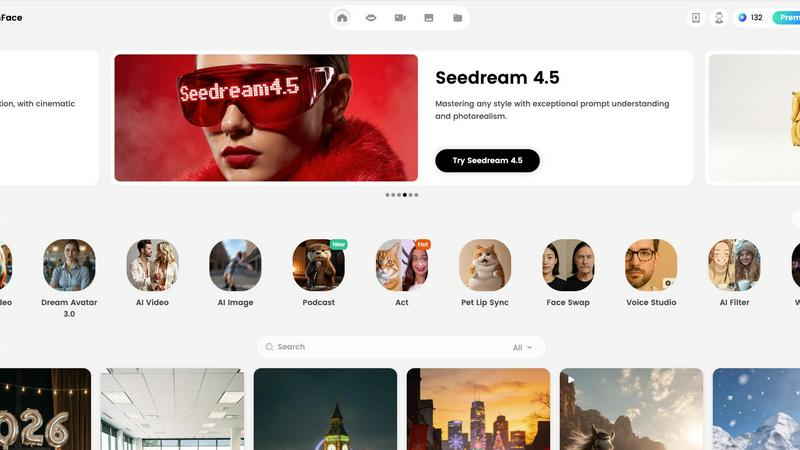
Visual Comparison
DreamFace
Seedance 2 AI Video Generator

Feature Comparison
DreamFace
Dream Avatar 3.0
Dream Avatar 3.0 revolutionizes video creation by allowing you to generate high-quality videos featuring realistic digital avatars. Simply input your text or upload an audio file, and the AI will produce a video where the avatar lip-syncs perfectly with lifelike voices. This eliminates the need for actors, filming equipment, or complex editing software, making professional video production accessible to everyone in just minutes.
AI Video Generator
Unleash your imagination and turn any concept into a stunning, high-quality video with a single click. The AI Video Generator can create dynamic scenes from text prompts or transform static images into engaging video clips. This feature is perfect for creating explainer videos, social media content, or visual stories, providing a powerful tool to visualize ideas that were once difficult or expensive to produce.
AI Photo & Enhancement Suite
Go beyond basic generation with a full suite of AI-powered photo tools. Create unique images from text descriptions, instantly remove or change photo backgrounds, enhance image quality to restore details, and apply artistic AI filters to transform photos into extraordinary artworks. This comprehensive suite ensures every image you use is polished and professional.
Voice Studio & Lip Sync
Breathe life into any image or avatar with advanced lip-syncing technology. The Voice Studio allows you to generate realistic voiceovers or use your own audio. The AI then perfectly synchronizes the mouth movements of avatars, pets, or even photos of people to match the audio track, creating incredibly convincing and engaging talking-head videos for entertainment, education, or marketing.
Seedance 2 AI Video Generator
Multimodal Generation Modes
Seedance 2.0 offers three powerful entry points for creation: Text-to-Video, Image-to-Video, and Video-to-Video. This flexibility allows you to start your creative process wherever inspiration strikes. Begin with a detailed text prompt to generate entirely new scenes, use an image to animate and extend a specific visual style, or transform existing footage with new artistic directions and effects, all within one seamless platform.
Reference-First Creative Control
Move beyond guesswork with a reference-driven workflow. By using source images or video clips as anchors, you gain immense control over character consistency, artistic style, and cinematic feel. This feature ensures your final output aligns with your vision, reducing reliance on perfect prompt wording and delivering more predictable, professional results that stay true to your original concept.
Integrated Audio-Video Synthesis
Create a complete sensory experience in a single generation pass. Seedance 2.0 can synthesize synchronized audio, including sound effects, background music, and voice, directly alongside your video. With support for lip-sync in over 10 languages, this feature eliminates the need for separate audio editing tools, allowing you to produce fully realized videos ready for publishing.
High-Fidelity Output Specifications
Produce content that meets professional standards. Seedance 2.0 generates videos up to 1080p resolution at a cinema-standard 24 frames per second for smooth playback. With support for multiple aspect ratios (16:9, 9:16, 1:1) and durations extendable up to 10 seconds, you can create optimized content for any platform, from YouTube to TikTok, all exported in the universal MP4 format.
Use Cases
DreamFace
Viral Social Media Content Creation
Creators and marketers can produce eye-catching, trend-ready content for platforms like TikTok, Instagram, and YouTube in record time. Generate funny avatar skits, create captivating video hooks from text, or enhance product photos with AI filters to stop the scroll and dramatically increase engagement and follower growth without a production team.
Professional Marketing & Explainer Videos
Entrepreneurs and small businesses can develop compelling product demos, brand stories, and customer testimonial videos using realistic avatars. This allows for the creation of consistent, high-quality marketing materials that explain complex ideas simply, build trust, and drive conversions, all while maintaining a professional brand image on a budget.
Personalized Content & Memory Restoration
Individuals can create unique, personalized gifts and revive precious memories. Animate old family photos to see loved ones speak, create a talking birthday card with a friend's photo, or use Old Photo Restoration to colorize and repair damaged black-and-white pictures, transforming cherished moments into vibrant, shareable experiences.
Educational & Training Material
Educators and trainers can develop engaging learning modules and instructional videos. Create animated tutor avatars to explain concepts, generate visual aids from text descriptions, or produce consistent training videos for onboarding. This makes learning more interactive and accessible, improving knowledge retention for students and employees.
Seedance 2 AI Video Generator
Rapid Social Media Content Creation
Empower social media managers and content creators to produce a high volume of engaging, platform-specific videos quickly. Generate eye-catching stories, Reels, and TikTok clips from trending text prompts or brand images, maintaining a consistent aesthetic and message across all channels without the need for lengthy filming or editing sessions.
Dynamic Advertising and Marketing Campaigns
Transform marketing workflows by rapidly prototyping and producing ad variations. Agencies can test different concepts, styles, and narratives by generating multiple video versions from a single script or storyboard. This allows for faster client approvals and the ability to create targeted, high-impact video ads for different demographics and platforms efficiently.
Product Demonstration and Explainer Videos
Bring products and concepts to life with clear, engaging explainer videos. Use Image-to-Video to animate product shots or create scenarios that demonstrate use cases. The consistent character and scene control ensures your product remains the hero, making complex features easy to understand and visually appealing for potential customers.
Creative Storyboarding and Concept Visualization
Filmmakers, writers, and designers can use Seedance 2.0 as a powerful pre-visualization tool. Turn written scenes from a script into moving visuals to test cinematography ideas, or generate mood videos from concept art. This accelerates the creative development process, allowing teams to align on a visual direction before committing to costly production.
Overview
About DreamFace
DreamFace is your all-in-one AI-powered creative studio, designed to transform your ideas into stunning visual content with unprecedented speed and ease. It empowers creators, marketers, entrepreneurs, and businesses of all sizes to break through creative barriers and produce professional-grade avatar videos, AI-generated videos, and captivating images—all from simple text, audio, or photo inputs. With a global community of over 20 million users, DreamFace has democratized high-end content creation, removing the need for expensive equipment, technical skills, or actors. Its comprehensive suite extends beyond generation to include powerful editing tools like background removal, photo enhancement, and artistic AI filters. Whether you're crafting a viral social media clip, a compelling product explainer, or restoring a cherished memory, DreamFace puts the power of advanced AI directly at your fingertips, enabling you to tell your story, your way, and connect with your audience on a deeper level. Accessible via web, iOS, and Android, DreamFace is the ultimate tool for anyone ready to unleash their creativity and bring their vision to life.
About Seedance 2 AI Video Generator
Unleash your creative vision and transform your ideas into stunning cinematic reality with Seedance 2 AI Video Generator. This powerful, all-in-one platform is engineered to empower creators, marketers, and agencies by turning simple text prompts, reference images, or existing source footage into polished, professional-grade video clips in a fraction of the traditional time. Forget the heavy editing overhead and technical barriers that slow you down. Seedance 2.0 is built for a fast, intuitive workflow that puts the focus back on your creativity, not the complexity of production. Its core value lies in delivering controllable, consistent, and high-quality video output. Whether you're starting from a written concept, a visual mood board, or a raw clip, Seedance 2.0 provides the tools to maintain style coherence, achieve smoother motion, and iterate rapidly. This is more than just a video tool; it's your partner in visual storytelling, designed to help you produce compelling content for ads, social media, product demos, and beyond with unprecedented speed and creative control.
Frequently Asked Questions
DreamFace FAQ
What is DreamFace and who is it for?
DreamFace is an all-in-one AI creative studio that generates and edits videos and images from simple inputs like text, audio, or a photo. It's designed for a wide range of users including content creators, social media marketers, small business owners, entrepreneurs, educators, and even individuals looking to create fun, personalized content or restore old photos—essentially, anyone who wants to create professional visual content without needing technical skills or a large budget.
How does the Avatar Video feature work?
The Avatar Video feature is simple and powerful. You choose a digital avatar from the platform's library, then either type a script or upload an audio file. DreamFace's AI then generates a video where the selected avatar delivers your speech with perfectly synchronized lip movements and realistic voice narration. No camera, microphone, or acting skills are required.
Can I use DreamFace on my phone?
Absolutely. DreamFace is designed for ultimate accessibility and offers a seamless experience across devices. You can download dedicated apps from the iOS App Store or Google Play for Android. There is also a web version you can use directly in your browser, and an APK option is available for Android users, allowing you to create stunning content anytime, anywhere.
What kind of support does DreamFace offer?
DreamFace supports a vast global community with resources in over 20 languages, making the platform accessible worldwide. Users can explore a template gallery for inspiration, access a blog for tips and updates, and utilize an API for developers. The platform is constantly updated with new features, like Dream Act or Pet Lip Sync, based on user feedback and technological advancements.
Seedance 2 AI Video Generator FAQ
What input methods does Seedance 2.0 support?
Seedance 2.0 supports three primary input methods for generating video: Text, Image, and Video. You can start from a detailed text prompt, upload a reference image to guide style and composition, or provide source footage to restyle, extend, or modify. This multimodal approach offers maximum flexibility for different creative workflows.
What is the maximum video quality and length I can generate?
The model can generate videos up to 1080p resolution at 24 frames per second, ensuring high-definition, smooth playback. The standard generation duration is between 5 to 10 seconds per clip, with capabilities to extend sequences, making it ideal for short-form content and scenes that can be edited together into longer narratives.
Does Seedance 2.0 include audio generation?
Yes, a standout feature of Seedance 2.0 is its integrated audio synthesis. It can generate synchronized sound effects, background music, and even voiceovers with lip-sync support for over 10 languages in a single pass. This creates a complete, production-ready video asset without requiring separate audio editing software.
How does Seedance 2.0 ensure consistency in characters and scenes?
Seedance 2.0 employs an advanced reference-first workflow. By using an image or video clip as a visual anchor, the AI model maintains consistency in character appearance, artistic style, color palette, and camera feel across the generated footage. This reduces randomness and gives you greater control over the final output compared to text prompts alone.
Alternatives
DreamFace Alternatives
DreamFace is a leading AI-powered creative studio in the video generation and avatar creation space. It empowers millions to transform simple text, photos, or audio into professional videos and images, democratizing high-end content creation for everyone. Creators often explore alternatives for various reasons. This could be due to specific budget considerations, a need for different feature sets, or platform compatibility requirements. The quest for the perfect tool is a natural part of finding the right creative partner for your unique journey. When evaluating other platforms, focus on what truly unlocks your potential. Consider the core AI capabilities, the ease of the creative workflow, and the quality of the final output. The right tool should feel like an extension of your vision, removing technical barriers so you can focus on storytelling and connection.
Seedance 2 AI Video Generator Alternatives
Seedance 2 AI Video Generator is a powerful tool in the AI video creation space, designed to transform your text, images, and clips into cinematic videos with remarkable consistency and control. It empowers creators to bring their visions to life through a fast, all-in-one workflow that prioritizes smooth extensions and easy prompt management. Even with such a capable tool, exploring alternatives is a natural part of the creative journey. Your needs are unique—perhaps you're seeking a different pricing model, specific features for a niche project, or a platform that aligns with your existing software ecosystem. The right tool is the one that unlocks your potential without friction. When evaluating other options, focus on what truly matters for your workflow. Consider the core output quality, the intuitiveness of the interface, and how well the tool integrates into your creative process. Look for a solution that not only meets technical requirements but also feels like an empowering extension of your own creativity, helping you transform ideas into stunning visual stories with confidence.