
AISeedance2 vs Shrinkpad
Side-by-side comparison to help you choose the right AI tool.

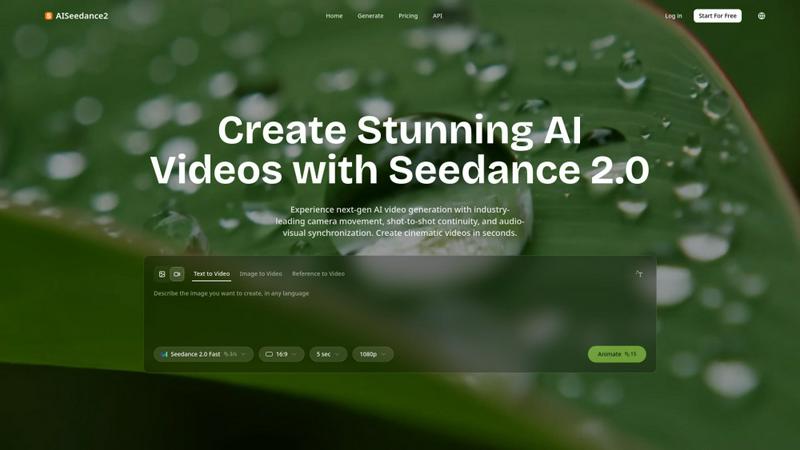
Transform your ideas into stunning videos effortlessly with AISeedance2's advanced text-to-video and image-to-video.
Last updated: February 27, 2026

Shrinkpad
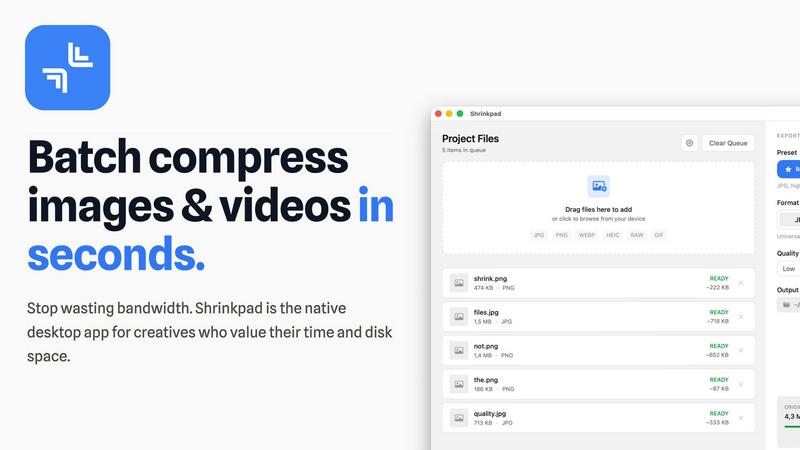
Shrinkpad effortlessly compresses your images and videos on Mac, saving space and enhancing performance in seconds.
Last updated: February 28, 2026
Visual Comparison
AISeedance2
Shrinkpad
Feature Comparison
AISeedance2
Wide-Range Cinematic Camera Movement
AISeedance2 offers industry-leading camera control, enabling users to execute advanced camera movements that rival professional cinematography. From sweeping crane shots to dynamic tracking, the platform creates fluid and natural camera paths that enhance the visual experience. This feature allows for immersive storytelling that captivates audiences and elevates your video quality significantly.
Shot-to-Shot Continuity
Maintaining visual coherence across scenes is crucial in storytelling. AISeedance2's shot-to-shot continuity feature ensures that transitions between different shots are seamless and natural. This capability allows creators to weave together various scenes without losing visual integrity, making it perfect for projects that demand a high level of professionalism and polish.
Precision Audio-Visual Synchronization
With AISeedance2, every frame aligns perfectly with the audio, ensuring that visuals sync seamlessly with sound elements. This precision audio-visual synchronization elevates the overall production quality and enhances the viewing experience, allowing for a more impactful narrative that resonates with audiences.
Character Identity Lock
AISeedance2 introduces a unique character identity lock feature that maintains the consistency of characters throughout complex scenes. This means that facial features, clothing, and body types remain consistent, even during dynamic action sequences. This feature is particularly beneficial for creators who want to preserve character integrity while delivering thrilling and visually engaging content.
Shrinkpad
Batch Compression
Shrinkpad allows you to batch compress hundreds of images and videos simultaneously. Just drag and drop your files or entire folders, and watch as the app optimizes them in seconds, saving you time and effort.
Intelligent Compression
No more guesswork with compression settings. Shrinkpad analyzes the visual complexity of your files and automatically applies the perfect compression ratio, ensuring high-quality results without artifacts.
Folder Mode
With Shrinkpad’s Folder Mode, you can simply drop an entire folder, and it will automatically detect and queue all supported images and videos for compression. This feature streamlines your workflow and eliminates the hassle of manual file selection.
Privacy-Focused Processing
All processing occurs locally on your Mac. Shrinkpad ensures that your files do not leave your device, providing peace of mind regarding your sensitive assets and eliminating the need for internet access during compression.
Use Cases
AISeedance2
Short Films and Independent Cinema
Filmmakers can utilize AISeedance2 to produce high-quality short films efficiently. The platform's capabilities allow for rapid video generation without sacrificing cinematic quality, enabling independent creators to bring their stories to life with less time and effort.
Marketing and Promotional Content
Marketers can leverage AISeedance2 to create captivating promotional videos that grab attention on social media and other platforms. With its cinematic features, businesses can elevate their brand storytelling, making their marketing campaigns more engaging and effective.
Educational Videos
Educators can harness AISeedance2 to develop informative and visually appealing educational content. The tool's ability to produce clear and coherent visuals enhances learning experiences, making complex subjects more accessible and engaging for students.
Social Media Production
For social media influencers and content creators, AISeedance2 offers an efficient way to generate eye-catching videos that stand out in crowded feeds. The platform's quick rendering capabilities and high-quality output make it an ideal choice for creating shareable content that resonates with audiences.
Shrinkpad
Optimizing Website Assets
Web developers can use Shrinkpad to efficiently compress images and videos for websites, resulting in significantly faster load times and improved performance metrics, such as LCP scores.
Streamlining Creative Workflows
Photographers and designers can save hours of manual exporting by using Shrinkpad to batch process their assets. Export everything at once and let the app handle the optimization and renaming.
Reducing Storage Costs
Businesses and content creators looking to save storage costs can leverage Shrinkpad to reclaim valuable disk space by reducing the size of large media files, freeing up resources for other essential projects.
Enhancing Video Production
Video editors can benefit from Shrinkpad’s ability to compress 4K MP4 videos without sacrificing quality, making it easier to manage large video files and improve editing efficiency.
Overview
About AISeedance2
AISeedance2 is a groundbreaking AI video generation tool that empowers creators and teams to revolutionize their visual storytelling. Designed for filmmakers, marketers, educators, and social media influencers, this innovative platform leverages advanced AI technology to produce high-quality cinematic videos efficiently. With its trio of standout features—wide-range cinematic camera movement, seamless shot-to-shot continuity, and precision audio-visual synchronization—AISeedance2 transforms the video creation process into a streamlined and enjoyable experience. Users can generate stunning videos in seconds, all while maintaining 2K cinematic resolution and character identity lock, ensuring that every frame is cohesive and visually captivating. Whether you're crafting a short film, a marketing campaign, educational content, or social media visuals, AISeedance2 equips you with the tools you need to bring your creative vision to life faster than ever before.
About Shrinkpad
Shrinkpad is your ultimate companion in the creative journey, designed specifically for macOS users who refuse to let bloated media files hinder their productivity. This powerful native application enables photographers, designers, developers, and content creators to reclaim their storage space and accelerate their workflows. With Shrinkpad, you can batch compress images and videos with stunning speed, reducing file sizes by up to 90% in mere seconds. Its operation is entirely local, ensuring that your sensitive files remain private without the need for cloud uploads or internet dependencies. Whether you work with JPGs, RAW files, or 4K videos, Shrinkpad intelligently applies optimal compression settings, preserving visual quality while freeing up gigabytes of storage. It's not just a tool; it's a transformative solution that empowers you to focus on your creativity rather than on tedious file management.
Frequently Asked Questions
AISeedance2 FAQ
What type of videos can I create with AISeedance2?
AISeedance2 enables you to create a wide range of videos including short films, marketing content, educational materials, and social media posts, all with cinematic quality.
Is AISeedance2 user-friendly for beginners?
Yes, AISeedance2 is designed with an intuitive interface that makes it easy for both beginners and experienced creators to use, allowing anyone to generate stunning videos quickly.
Can I customize the camera movements in my videos?
Absolutely! AISeedance2 provides advanced options for customizing camera movements, giving you the freedom to create unique and dynamic visual experiences tailored to your project needs.
What resolution do the videos produced by AISeedance2 support?
AISeedance2 supports up to 2K cinematic resolution, ensuring that your videos maintain high visual fidelity, whether for personal projects or professional presentations.
Shrinkpad FAQ
Can I use Shrinkpad for free?
Yes, Shrinkpad offers a Free Starter plan with essential tools for casual use, which allows you to batch compress images in common formats.
What file formats does Shrinkpad support?
Shrinkpad supports over 50 formats, including popular image formats like JPG, PNG, and RAW, as well as video formats like MP4 and MOV, ensuring versatility for all your media needs.
Does Shrinkpad support video compression?
Absolutely! Shrinkpad not only compresses images but also handles video files, allowing you to optimize both types of media in one seamless workflow.
How many files can I process at once?
With Shrinkpad, you can process thousands of files at once without crashing, thanks to its unlimited batching capabilities designed for heavy-duty use.
Alternatives
AISeedance2 Alternatives
AISeedance2 is an innovative web-based video generator that transforms text and images into high-quality videos. It belongs to the video creation category and is designed to empower creators and teams with advanced features that enhance the video production process. Users often seek alternatives to AISeedance2 due to various reasons including pricing, specific feature sets, or compatibility with different platforms. When searching for an alternative, it's essential to consider factors such as the range of creative tools available, ease of use, and the ability to produce high-quality outputs in a timely manner. Look for solutions that align with your unique needs, whether you’re focused on cinematic storytelling, marketing, or educational content. Choosing the right tool can elevate your video projects and help you connect more deeply with your audience.
Shrinkpad Alternatives
Shrinkpad is a powerful native macOS application designed specifically for batch compressing images and videos, making it an essential tool for photographers, designers, developers, and content creators. With its ability to reduce file sizes by up to 90% while maintaining visual quality, it stands out as a go-to solution for optimizing storage and enhancing performance. Users often seek alternatives to Shrinkpad due to various reasons, including pricing, feature sets, or compatibility with different platforms. When looking for an alternative, it’s important to consider factors such as the speed of compression, the range of supported file formats, ease of use, and privacy measures. Additionally, evaluate whether the tool processes files locally to ensure your data remains secure and private, as well as the capability to handle batch processing for efficiency. Ultimately, the right choice will align with your specific creative needs and workflow preferences.