AI Photo Assistant vs Prompt Builder
Side-by-side comparison to help you choose the right AI tool.

AI Photo Assistant
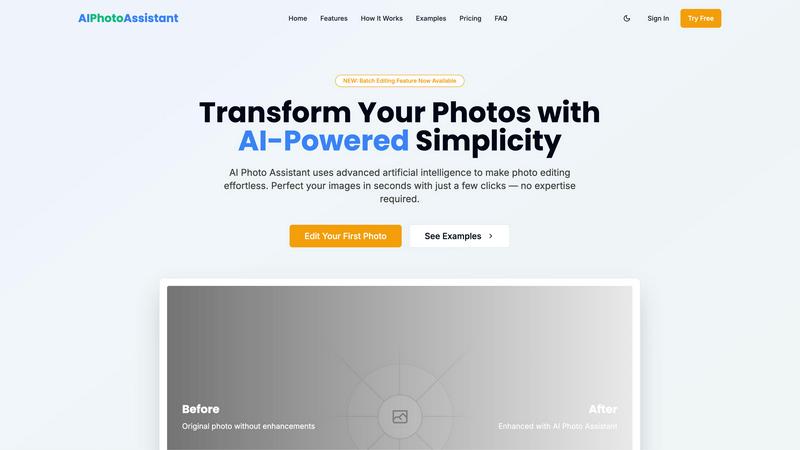
Transform your photos effortlessly with AI Photo Assistant's one-click enhancements for stunning, professional results.
Last updated: February 28, 2026

Prompt Builder
Transform your ideas into optimized AI prompts in seconds, manage them effortlessly, and boost your results with Prompt Builder.
Last updated: April 13, 2026
Visual Comparison
AI Photo Assistant
Prompt Builder
Feature Comparison
AI Photo Assistant
One-Click Enhancement
With just a single click, AI Photo Assistant optimizes your photos to perfection. The AI analyzes your image and automatically adjusts brightness, contrast, saturation, and more, providing you with flawless results without any effort.
Batch Editing
The newly introduced batch editing feature allows you to process multiple photos at once, saving you valuable time. Whether you have a series of product shots or a collection of vacation photos, you can enhance them all with just a few clicks.
Smart Auto-Enhancement
Our smart auto-enhancement feature takes the guesswork out of editing. It intelligently determines the best adjustments needed for your photos, ensuring they look their best without requiring any editing knowledge on your part.
High-Quality Exports
AI Photo Assistant offers HD and even the highest resolution exports, allowing you to download your enhanced photos in stunning quality. Whether for web use or print, your images will always look professional.
Prompt Builder
Prompt Generator
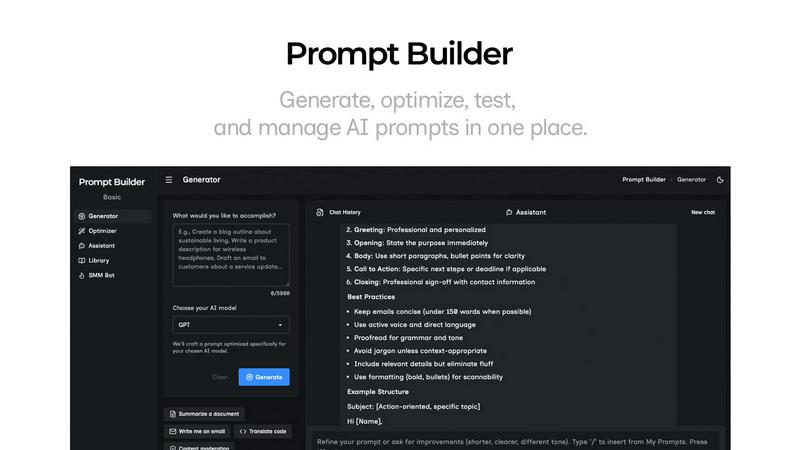
The Prompt Generator feature allows users to convert their ideas into model-optimized prompts effortlessly. By simply describing the idea and selecting a target model, users receive a high-quality prompt that can be refined in a dedicated chat workspace. This feature ensures that prompts are tailored specifically to the nuances of each AI model, enhancing the chances of generating precise and relevant outputs.
Chat Refinement
With the Chat Refinement feature, users can interactively refine their prompts in a built-in chat environment. This allows for quick iterations and adjustments, enabling users to experiment with different phrasing and structures until they achieve the desired result. The chat history function keeps track of changes, allowing for easy revisiting of successful iterations or ideas.
Prompt Optimizer
The Prompt Optimizer is a game-changing feature that helps users enhance existing prompts for clarity and effectiveness. By pasting a prompt or selecting one from their library, users receive structured improvements in seconds, focusing on aspects like clarity, constraints, and output format. This ensures that users can quickly upgrade their prompts without starting from scratch.
Prompt Library
The Prompt Library feature provides a centralized space for users to save, organize, and reuse their best prompts. Users can easily search and filter their collection by category or model, making it simple to retrieve specific prompts when needed. Additionally, the library includes community prompts that users can explore and add to their collection, fostering collaboration and inspiration.
Use Cases
AI Photo Assistant
Social Media Creators
For social media creators aiming for a visually appealing feed, AI Photo Assistant makes it easy to edit and enhance images quickly. With professional results at your fingertips, you can maintain a consistent and beautiful aesthetic.
Small Business Owners
Small business owners can benefit immensely from AI Photo Assistant by creating eye-catching product photos without the need for expensive photography services. Enhance your product images to attract customers and boost sales effortlessly.
Event Photographers
Event photographers can streamline their workflow using AI Photo Assistant. Quickly edit and enhance images from events, ensuring that clients receive stunning, memorable photos in a fraction of the time it would traditionally take.
Busy Professionals
For busy professionals managing multiple images, AI Photo Assistant provides a quick and efficient solution. Edit photos for presentations, reports, or marketing materials in seconds, helping you maintain a polished image without sacrificing time.
Prompt Builder
Content Creation for Marketing
Marketers can leverage Prompt Builder to generate tailored content quickly, such as social media posts, blog articles, and email campaigns. By utilizing the platform's model-optimized prompts, they can ensure their messaging resonates with target audiences across various channels.
Educational Tools
Educators can use Prompt Builder to create prompts for AI-driven tutoring systems or educational content generation. By refining prompts specifically designed for models like GPT or Claude, they can improve student engagement and facilitate personalized learning experiences.
Software Development
Developers can benefit from Prompt Builder by creating prompts that aid in generating code snippets, documentation, or user guides. The ability to save and optimize prompts ensures that they can streamline their development processes and enhance productivity.
Research and Data Analysis
Researchers can utilize Prompt Builder to formulate prompts for data analysis and report generation. By crafting precise prompts that align with various AI models, they can extract meaningful insights and present data in a clear, structured manner.
Overview
About AI Photo Assistant
AI Photo Assistant is your ultimate partner for transforming ordinary images into breathtaking visuals, all powered by cutting-edge artificial intelligence. Designed for everyone from social media influencers to small business owners, this innovative platform demystifies the world of photo editing, making it accessible to all. Whether you have minimal technical skills or are just short on time, AI Photo Assistant simplifies the editing process. By utilizing advanced neural networks and machine learning algorithms, it meticulously analyzes every pixel of your images, applying the ideal adjustments in lighting, color, and composition. In mere seconds, you can achieve studio-quality results that elevate your photos to professional standards. Say goodbye to complicated software and hello to an empowering tool that ensures your photos always reflect the quality and impact you deserve. Share stunning images effortlessly, knowing that AI Photo Assistant has your back.
About Prompt Builder
Prompt Builder is a comprehensive prompt engineering workspace designed to empower users in creating, testing, and saving prompts tailored to various AI models. Catering to writers, marketers, developers, and anyone keen on optimizing their interactions with AI, Prompt Builder simplifies the process of generating effective prompts. By transforming an idea into a polished prompt within seconds, it allows users to start with a draft, refine it through an intuitive chat interface, and organize their best iterations in a library for future use. This tool supports a wide array of models, including GPT, Claude, Gemini, and many others, making it a versatile solution for diverse AI applications. With built-in optimization features and a community library of reusable prompts, Prompt Builder not only saves time but enhances the quality of outputs, ensuring users get the results they desire without the hassle of constant rewriting or switching between tools.
Frequently Asked Questions
AI Photo Assistant FAQ
How does AI Photo Assistant work?
AI Photo Assistant uses advanced artificial intelligence to analyze your images and make automatic adjustments. By leveraging neural networks and machine learning, it enhances your photos for professional-quality results.
Is there a learning curve to using AI Photo Assistant?
Not at all! One of the main advantages of AI Photo Assistant is its user-friendly interface. You can achieve stunning edits without any prior photo editing experience, making it accessible for everyone.
Can I edit multiple photos at once?
Yes, with our new batch editing feature, you can enhance several photos simultaneously. This feature is designed to save you time and streamline your editing process, making it perfect for busy users.
What formats are supported by AI Photo Assistant?
AI Photo Assistant supports all popular image formats, allowing you to upload photos from your device or cloud storage seamlessly. This ensures that you can work with the images you have, no matter the source.
Prompt Builder FAQ
How does Prompt Builder improve prompt creation?
Prompt Builder simplifies the prompt creation process by offering model-optimized prompts and a chat refinement feature. This ensures users can quickly generate high-quality prompts without the need for extensive rewriting or adjustments.
What AI models does Prompt Builder support?
Prompt Builder supports a wide range of AI models, including GPT, Claude, Gemini, Llama, Mistral, DeepSeek, Grok, and Perplexity, allowing users to tailor their prompts for the specific nuances of each model.
Can I save my prompts for later use?
Yes, Prompt Builder features a Prompt Library where users can save, organize, and manage their best prompts. This allows for easy retrieval and reuse across different projects and applications.
Is there a free trial available for Prompt Builder?
Yes, Prompt Builder offers a free trial, allowing users to make 25 assistant requests per month without requiring a credit card. This gives potential users a chance to explore the platform and its features before committing.
Alternatives
AI Photo Assistant Alternatives
AI Photo Assistant is a groundbreaking tool designed to revolutionize the way we approach photo editing. As part of the AI Assistants category, it employs sophisticated technology to deliver professional-grade enhancements with just a single click. Users often seek alternatives due to various reasons, including pricing constraints, feature limitations, or specific platform needs that may not align with what AI Photo Assistant offers. When searching for an alternative, consider the essential features that matter most to you, such as auto-enhancement capabilities, ease of use, and the quality of results. Additionally, think about compatibility with your devices and whether the pricing structure fits within your budget. Ultimately, the right alternative should empower you to elevate your photography without the hassle of complex editing processes.
Prompt Builder Alternatives
Prompt Builder is a powerful prompt engineering workspace designed to help users effortlessly generate, optimize, test, and manage AI prompts all in one place. As part of the AI Assistants category, it empowers users to turn their ideas into actionable prompts within seconds, enhancing productivity and creativity. Users often seek alternatives to Prompt Builder for various reasons, including pricing considerations, specific feature requirements, or compatibility with particular platforms. When searching for an alternative, it's essential to evaluate aspects such as user-friendliness, the range of AI models supported, and the availability of community resources, as these factors greatly influence the overall experience and effectiveness of the tool.