
AI Formatter vs LuxSign
Side-by-side comparison to help you choose the right AI tool.
AI Formatter
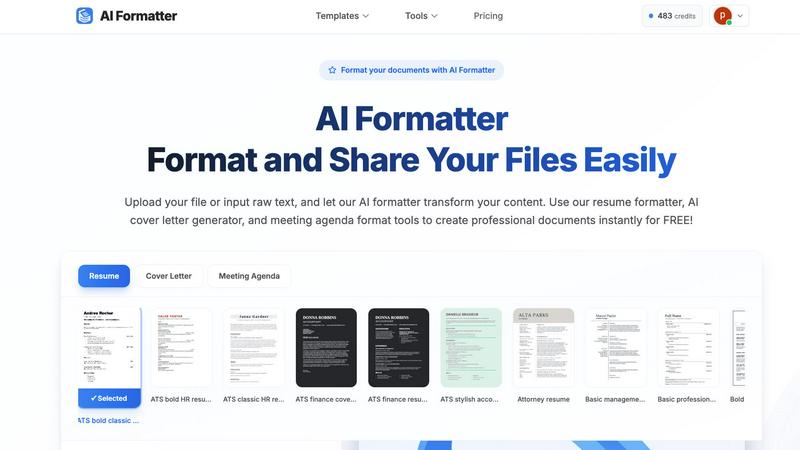
Transform raw text into polished, professional documents effortlessly with AI Formatter's intuitive tools and templates.
Last updated: March 1, 2026

Transform your document signing with LuxSign, the secure and compliant e-signature platform designed for effortless.
Last updated: February 26, 2026
Visual Comparison
AI Formatter
LuxSign

Feature Comparison
AI Formatter
Extensive Template Library
AI Formatter offers an extensive library of over 162 professionally designed templates, specifically tailored for resumes, cover letters, and meeting agendas. These templates are optimized for ATS compatibility, ensuring your documents pass automated screening systems and impress recruiters.
Intuitive Real-Time Editor
The platform includes an intuitive real-time editor that allows users to customize their formatted documents easily. You can make adjustments and edit your content as needed, ensuring that your documents reflect your unique voice and style.
Multi-Format Export Options
After formatting your document, AI Formatter enables you to download it in various formats, including Word, PDF, and more. This flexibility ensures you can share your documents in the format that best suits your needs.
AI-Powered Formatting
AI Formatter employs advanced artificial intelligence to automatically format your content. Simply upload your raw text or existing documents, select a template, and watch as the AI transforms your content into a polished, professional format that adheres to industry standards.
LuxSign
Multiple Signature Methods
LuxSign offers various signature options to suit your preferences. You can draw your signature using a mouse, type your name, or upload an image of your signature. This flexibility ensures that signing documents is quick and easy, enhancing your productivity.
Advanced Security
Security is paramount at LuxSign. The platform employs industry-standard encryption to protect your documents throughout the entire process—from upload to storage and transmission. Your documents remain secure, allowing you to focus on what really matters: your business.
Complete Audit Trail
Every action taken on the LuxSign platform is meticulously logged. This includes timestamps, IP addresses, and signer information, creating a comprehensive audit trail that enhances transparency and compliance. This feature is vital for businesses that need to maintain strict records for legal and regulatory purposes.
Collaboration Workspaces
LuxSign facilitates teamwork through its collaboration workspaces. You can create shared spaces for your team, organize documents into folders, manage member access, and collaborate seamlessly on signing workflows. This feature enhances communication and efficiency within your organization.
Use Cases
AI Formatter
Job Seekers
For job seekers, AI Formatter simplifies the daunting task of creating resumes and cover letters. By using the AI-powered tools, candidates can generate ATS-optimized documents that significantly increase their chances of getting noticed by recruiters.
Professionals
Professionals in various industries can utilize AI Formatter to standardize their business communications. From polished meeting agendas to professional invoices, this tool ensures that all documents maintain a high level of professionalism and clarity.
Students
Students preparing critical papers or presentations can benefit from AI Formatter's ability to format academic documents quickly and efficiently. The platform helps students focus on content quality rather than formatting hassles.
Entrepreneurs
Entrepreneurs can leverage AI Formatter to create compelling business proposals and reports. With the ability to customize documents and ensure they meet industry standards, entrepreneurs can present their ideas confidently to potential investors or partners.
LuxSign
Streamlining Contract Management
LuxSign is perfect for companies that need to manage multiple contracts simultaneously. By allowing parallel or sequential signing workflows, businesses can ensure that all necessary approvals are gathered quickly and efficiently, reducing turnaround times.
Enhancing Compliance for Legal Documents
Law firms and financial institutions can benefit from LuxSign's strong compliance features. The platform's detailed audit trails and end-to-end encryption make it easy to maintain compliance with legal requirements, ensuring that all documents are secure and verifiable.
Facilitating Remote Work
With the rise of remote work, LuxSign provides an ideal solution for teams that need to sign documents from various locations. Its mobile-friendly interface ensures that users can access and sign documents anytime, anywhere, making it a valuable tool for modern businesses.
Supporting Bulk Signing
Organizations that frequently deal with mass document signing can leverage LuxSign's bulk signing capabilities. This feature allows users to send multiple documents for signature at once, streamlining processes and saving valuable time for busy professionals.
Overview
About AI Formatter
AI Formatter is an innovative cloud-based platform designed to revolutionize the way you create professional documents. No longer will you be bogged down by tedious formatting tasks; instead, AI Formatter operates as your intelligent partner, capable of transforming raw text or uploaded files into stunning, polished documents in just seconds. This powerful tool is ideal for a diverse range of users, including job seekers looking to secure their dream roles, professionals needing to standardize business communications, and students preparing critical papers. With a robust library of over 100 ATS-optimized templates for resumes, cover letters, meeting agendas, and invoices, AI Formatter empowers you to present yourself with confidence and professionalism. Its remarkable 95%+ ATS pass rate ensures that your resume stands out and gets noticed by hiring managers. By saving users an average of 2+ hours per document, AI Formatter streamlines your workflow, enhances your professional image, and opens new doors to opportunities. Embark on your journey to impeccable documents today.
About LuxSign
LuxSign is a revolutionary cloud-based electronic signature platform designed specifically for businesses that prioritize security and compliance. With its roots in Luxembourg, LuxSign ensures that all documents are encrypted end-to-end and stored securely within the country, guaranteeing adherence to GDPR regulations. This makes it an ideal choice for organizations that handle sensitive data and require a trustworthy solution for electronic documentation. LuxSign supports eIDAS SES standards, providing legal validity for contracts across the entire European Union. Its user-friendly interface allows for seamless document management, enabling users to sign, send, and track documents effortlessly. Whether you are a small business or a large enterprise, LuxSign empowers you to streamline your signing processes while ensuring the highest levels of security and compliance.
Frequently Asked Questions
AI Formatter FAQ
How does AI Formatter work?
AI Formatter allows users to upload raw text or existing documents, select a professional template, and then automatically formats the content. The AI ensures that the document maintains a polished, industry-standard appearance.
What types of documents can I create with AI Formatter?
You can create a variety of documents, including resumes, cover letters, meeting agendas, invoices, and other business-related documents. The platform supports multiple file uploads and raw text input.
Is there a limit on file sizes I can upload?
Yes, AI Formatter supports file uploads up to a maximum of 10MB. You can upload documents in formats such as PDF, DOC, DOCX, and TXT.
Can I customize the templates after formatting?
Absolutely! After the AI has formatted your document, you can use the intuitive editor to make any necessary adjustments or customizations before downloading your final version.
LuxSign FAQ
How does LuxSign ensure document security?
LuxSign employs industry-standard encryption for all documents during upload, storage, and transmission. Additionally, all data is hosted securely in Luxembourg, complying with strict EU data protection regulations.
Is LuxSign compliant with GDPR?
Yes, LuxSign is fully compliant with GDPR and Luxembourg data protection laws. This ensures that your documents and personal information are handled with the utmost care and security.
Can I use LuxSign for international transactions?
Absolutely! LuxSign supports eIDAS SES standards, making its electronic signatures legally valid for contracts across all EU member states, ensuring your international transactions are secure and compliant.
What types of documents can I sign with LuxSign?
LuxSign supports a variety of document formats, including PDF, DOC, and DOCX. You can easily upload files up to 10MB and use the platform to manage and sign your documents efficiently.
Alternatives
AI Formatter Alternatives
AI Formatter is a powerful, cloud-based document formatting solution designed to transform raw text into professional documents in seconds. It falls under the category of productivity and management tools, specifically targeting users seeking to enhance their written communication with polished, ATS-optimized outputs. Users often look for alternatives due to varying needs such as budget constraints, specific feature requirements, or platform compatibility. When choosing an alternative, it's essential to consider the range of templates offered, the level of customization available, and the overall user experience to ensure that the chosen solution meets your unique document creation needs.
LuxSign Alternatives
LuxSign is a secure electronic signature platform that operates from Luxembourg, designed for businesses that prioritize compliance and data security. As a cloud-based solution, it adheres to eIDAS SES standards, ensuring that electronic signatures are legally valid across the European Union. Users are drawn to LuxSign for its robust features like parallel signing workflows, drag-and-drop functionality, and customizable branding options. However, many users find themselves searching for alternatives due to various reasons, such as pricing structures that may not align with their budget, specific feature needs that LuxSign might not fulfill, or the desire for different platform integrations. When considering alternatives, it's essential to evaluate factors like compliance with regulations, user experience, feature sets, reliability, and the ability to scale with your business's growth.