

xyOps
xyOps empowers you to seamlessly automate, monitor, and manage your entire infrastructure with intuitive job scheduling and smart alerts.
AI tool Details
Explore More
Alternatives
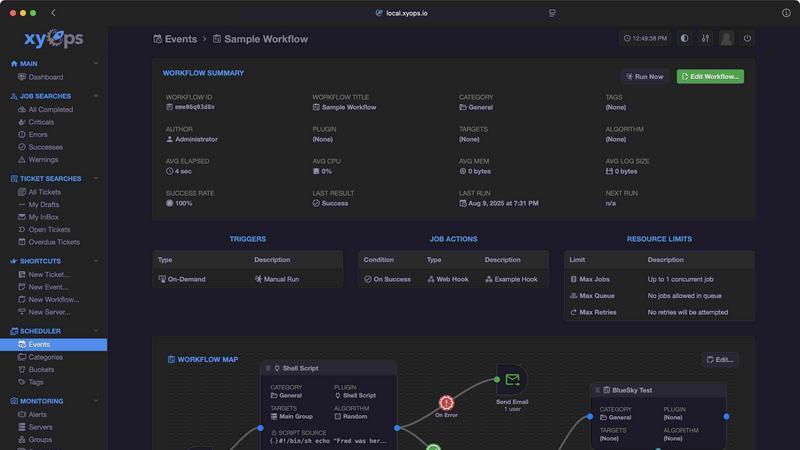
About xyOps
xyOps™ is a revolutionary system that transforms how developers and operations teams manage their workflow automation, job scheduling, server monitoring, alerting, and incident response. By bringing these essential functionalities into a single, cohesive platform, xyOps empowers teams to orchestrate their entire infrastructure with ease and efficiency. Designed for those who refuse to compromise on data privacy, freedom, and visibility, xyOps stands out by offering an open and extensible solution that can run in any environment. Unlike other platforms, xyOps does not hide features behind paywalls or push telemetry data back to third parties. It is built to simplify complex processes, enabling users to schedule jobs across their fleet, track performance metrics, set up custom alerts, and monitor activities in real-time. With xyOps, teams can achieve a new level of operational excellence and innovation.
Features
Job Scheduling Reimagined
xyOps elevates job scheduling beyond traditional tools like cron, offering a flexible and powerful solution that allows you to target individual servers or groups, create multiple schedules per event, and even support crontab imports. This feature ensures that your automation needs are met efficiently, regardless of the scale of your operations.
Visual Workflow Builder
With xyOps's graphical workflow editor, you can effortlessly build complex workflows by connecting events, triggers, actions, and monitors into meaningful pipelines. This visual approach simplifies the orchestration of tasks, enabling you to chain jobs with conditional logic and pass data seamlessly between workflow steps.
Smart Alerts
xyOps provides rich alerting capabilities that are fully customizable and capable of complex triggers. You can set up notifications via email, webhooks, and custom channels, ensuring that you are always informed of critical incidents. Alerts can even create tickets or trigger jobs, allowing for swift incident response.
Integrated Ticketing System
The built-in ticketing system in xyOps revolutionizes incident management by automatically creating tickets for alerts and failed jobs. This feature streamlines your response efforts, as tickets can attach files, run jobs for CI/CD systems, and be fully scripted via an API, ensuring that your team is always prepared to tackle issues head-on.
Use Cases
Streamlining Workflow Automation
xyOps is ideal for teams looking to streamline their workflow automation processes. By utilizing its job scheduling and visual workflow builder, teams can automate repetitive tasks, reducing manual intervention and enhancing productivity across their operations.
Centralized Monitoring and Alerting
For organizations with extensive server infrastructures, xyOps offers a centralized solution for monitoring and alerting. Users can track performance metrics in real-time, define custom monitors, and receive instant notifications, ensuring that any potential issues are addressed before they escalate.
Enhancing Incident Response
The integrated ticketing system within xyOps empowers teams to enhance their incident response capabilities. By automatically generating tickets for alerts and failed jobs, teams can prioritize and manage incidents more effectively, ensuring minimal downtime and maximum operational efficiency.
Scalable Infrastructure Management
Whether managing five servers or five thousand, xyOps adapts seamlessly to your needs. Its scalability features allow teams to run multiple hot backups, ensuring redundancy and uninterrupted job execution, while easily installing agents across diverse operating systems.
Frequently Asked Questions
What makes xyOps different from other automation tools?
xyOps stands out due to its open-source nature and lack of hidden fees. It combines multiple functionalities into a single platform while maintaining user control over data and visibility, unlike other tools that may impose restrictions.
Is xyOps suitable for large organizations?
Absolutely! xyOps is designed for scalability and can efficiently manage infrastructures of any size, from small teams to large enterprises with thousands of servers, ensuring that all user needs are met.
How does the visual workflow builder work?
The visual workflow builder allows users to create complex automation processes by visually connecting various components such as events, actions, and monitors. This intuitive interface makes it easy for teams to design, modify, and implement workflows without deep technical knowledge.
Can I customize alerts in xyOps?
Yes, xyOps offers rich customization options for alerts. You can set flexible rules and triggers, choose your preferred notification channels, and even link alerts to ticket creation and job execution, tailoring your alerting strategy to fit your team's specific needs.
Similar to xyOps

amaze.directory
Hand-checked AI tools with real pricing on the card and no paid ranks.

benchmark.directory
An AI tools directory that turns down money. 146 listings, 20 categories, no sponsored placement and no affiliate ordering.

saasgrow.ai
Screened, scored, categorised. saasgrow.ai lists SaaS growth tools on merit — never on who paid the most for the slot.

Tools Network
Tools Network is a curated directory of the best AI tools across 25+ categories. Compare ratings, pricing, and features to find the right one, fast.

Free Gemini Omni
Create, remix, and edit cinematic AI videos online with text, image, audio, and video prompts.

Photo to Text
Free online AI photo to text converter. Instantly extract text from screenshots, handwritten notes, and PDFs into editable Word or Excel files.

UseWok
Done-for-You SaaS Visibility for Search & AI | UseWok

Postqued
Schedule and publish social content across 10 platforms with one dashboard, API, and MCP built for teams and AI agents.