

QuickSigner
QuickSigner lets you send, sign, and track legally binding documents online in seconds with powerful security and a simple API.
AI tool Details
Explore More
Alternatives
About QuickSigner
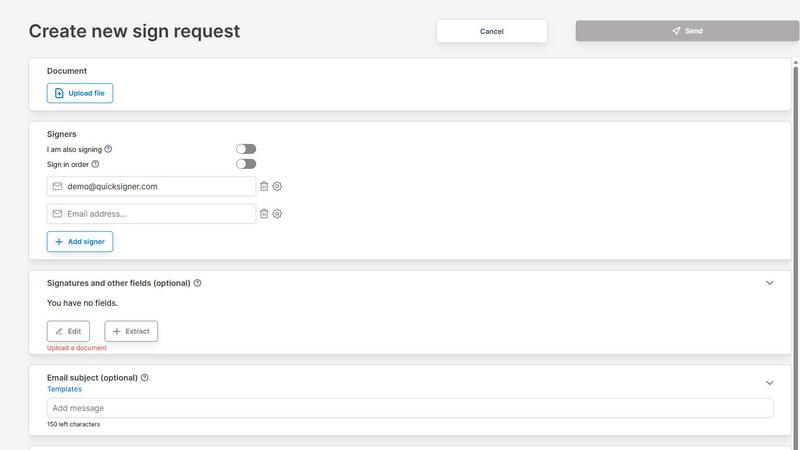
QuickSigner is a revolutionary end-to-end electronic signature platform designed to liberate you from the slow, cumbersome process of traditional document signing. It is a simple yet highly effective online application that transforms how you sign, send, and finalize agreements, turning what used to take days of frustrating back-and-forth into a matter of minutes. This powerful tool is built for everyone from solo entrepreneurs and small teams to growing businesses across all industries, including accounting, travel, and non-profits, who need a faster, more reliable, and legally binding way to close deals. The core value proposition is simple: unmatched speed, ironclad security, and exceptional ease of use. QuickSigner empowers you to upload any document, add recipients, and collect secure electronic signatures from any device, with no account or software installation required for the signer. It is built on a foundation of trust and compliance, featuring Adobe Approved Trust List (AATL) electronic signatures and ISO 27001 certification, ensuring every document you finalize is legally valid and your data is protected at the highest level. With an intuitive interface, powerful features like preset templates and real-time tracking, and an API for seamless integration, QuickSigner is not just a tool; it is your partner in accelerating business growth and operational efficiency. It is the simple, cost-effective, and powerful solution that replaces outdated platforms like DocuSign, giving you back your most valuable resource: time.
Features
Lightning-Fast, Secure Signing
This feature allows you to send a document for signature in seconds. You simply upload your document, drag and drop signature fields, and enter recipient emails. Recipients then sign from any device using a secure link, with no need to create an account or install any software. The entire process is powered by Adobe Approved Trust List (AATL) electronic signatures and is ISO 27001 certified, guaranteeing that every signature is legally binding and your data remains confidential. This transforms a multi-day process into a seamless, secure, and instant experience.
Intuitive Drag-and-Drop Document Builder
QuickSigner provides a highly intuitive interface where you can easily upload PDF and Word documents. You can then place signature, date, text, and even initial fields exactly where they need to be with a simple drag-and-drop action. This eliminates the complexity of document preparation, allowing you to create professional, error-free signing requests in minutes. It gives you complete control over the signing workflow, ensuring recipients know precisely where to sign, date, or fill in information, leading to faster completions and fewer errors.
Real-Time Tracking and Management Dashboard
Say goodbye to the guessing game of "Has my document been signed yet?" QuickSigner provides a powerful dashboard that lets you monitor the signing progress of every document you send in real time. You can see who has opened the document, who has signed, and who is still pending. This complete visibility empowers you to take proactive steps, such as sending a friendly reminder to a signer who has not yet acted. This feature turns document management from a passive waiting game into an active, controlled process, dramatically improving your team's efficiency.
Preset Templates and Team Collaboration Tools
For teams that send similar documents repeatedly, QuickSigner offers a powerful template feature. You can create preset templates with all the required fields, signers, and instructions already in place. This allows team members to send out standardized contracts, agreements, or forms with a single click, ensuring consistency and saving hours of repetitive work. Combined with user management and tracking features, it empowers small teams to collaborate effectively, maintain oversight, and replace more expensive, complex solutions like DocuSign with a more agile and cost-effective platform.
Use Cases
Streamlining Sales Contract Signing
For sales teams, every minute counts. QuickSigner transforms the final stage of the sales process from a potential bottleneck into a competitive advantage. Instead of waiting for a printed contract to be signed, scanned, and emailed back, a salesperson can upload the agreement, add the client's email, and place the signature field instantly. The client receives a secure link and can sign from their phone or computer, often within minutes. This speed closes deals faster, improves cash flow, and creates a superior experience for the buyer, directly driving business growth.
Accelerating HR Onboarding and Agreements
Human resources departments can use QuickSigner to revolutionize the onboarding of new employees. Instead of managing a stack of paper forms for offer letters, tax documents, and policy acknowledgements, HR can create a single, streamlined document packet. Using the template feature, they can send these packets to new hires with a few clicks. The new employee can then review and sign all necessary documents from home before their first day. This not only saves significant administrative time but also ensures a professional, paperless, and legally compliant start for every new team member.
Simplifying Client Intake for Professional Services
Accountants, lawyers, and consultants can dramatically improve their client intake process with QuickSigner. Instead of mailing or faxing engagement letters and disclosure forms, professionals can instantly send these documents for electronic signature. The ability to add multiple fields like date, initials, and text boxes ensures all required information is captured accurately. Clients appreciate the convenience of signing from anywhere, and the business benefits from faster project starts, reduced administrative overhead, and a fully digital, organized record of all client agreements.
Closing Deals Faster in the Travel Industry
Travel agencies and tour operators can use QuickSigner to secure bookings and finalize itineraries with unprecedented speed. When a client decides on a package, the agent can immediately send the booking confirmation, terms and conditions, and waiver forms for signature. The client can sign on the go, from their phone, before the deal gets cold. This has proven to cut agreement process time by up to 90%, allowing businesses to serve more clients, close more deals, and provide a seamless, modern experience that builds trust and loyalty.
Frequently Asked Questions
What types of documents can I send with QuickSigner?
QuickSigner supports the most common document formats for your convenience. You can easily upload and send PDF and Word documents (such as .doc and .docx files) for signature. This covers the vast majority of business contracts, agreements, forms, and letters, making it a versatile tool for nearly any document signing need.
Are signatures made with QuickSigner legally binding?
Yes, absolutely. QuickSigner uses Adobe Approved Trust List (AATL) electronic signatures, which are recognized as legally valid and enforceable in most countries around the world. Additionally, the platform is ISO 27001 certified, meaning it meets the highest international standards for information security management. This combination ensures that your signed documents are both legally binding and securely handled.
Do the people I send documents to need to create an account?
No, they do not. One of the most powerful and convenient features of QuickSigner is that recipients can sign documents from any device (computer, tablet, or smartphone) using a secure link sent to their email. They do not need to create an account, install any software, or download an app. This removes the biggest barrier to fast signing and ensures a frictionless experience for everyone.
Can I track the progress of documents I have sent out?
Yes, you can. QuickSigner provides a comprehensive real-time tracking dashboard. From this dashboard, you can see the exact status of every document you have sent. You will know who has viewed the document, who has signed it, and who still needs to take action. This visibility allows you to manage your workflow proactively, send follow-up reminders, and know exactly when a document is fully executed.
Similar to QuickSigner

@fuck.it - email with attitude
Private email. Pure. Secure. Exclusive. No ads, no tracking, no data selling. GDPR compliant, EU-hosted.
Novastart
Apps and files on an infinite canvas where people and AI agents work together.
My Tools Suite Pro
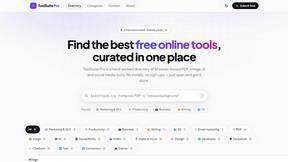
MyToolsSuitePro is a curated directory of free online tools for productivity, writing, marketing, SEO, 3D, email marketing, and everyday digital tas

Panzoe
Panzoe is an all-in-one AI platform for personal productivity, business automation, AI assistants, content creation, and custom AI solutions.

AUTOMATER.ai
A tray helper for every AI coding tool: sessions, alerts and usage in one place

StatementConverterAI
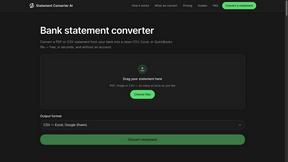
Convert a bank statement PDF or CSV into clean CSV, Excel, or QuickBooks — no account needed.

JevModel
Run Choice, Score and Noul decisions on text or JSON. Build visual flows, process batches and integrate results through an API.